What Is Employee Monitoring? The Complete Guide
Learn what employee monitoring is, the main types, how AI is reshaping it, and how to set it up with clear insights, compliance, and better team visibility.
Most teams already track work in different ways. You look at clock-in data, project timelines, and tool usage, yet it still feels difficult to understand how work actually happens during the day. Activity stays visible, but real progress remains unclear, which leads to hesitation in decisions and delays in improving how your team works.
Employee monitoring helps you close that gap. It shows how your team uses time, how tasks move forward, and where work starts to break down. Modern employee monitoring focuses more on work patterns, productivity insights, and clear visibility instead of intrusive tracking methods. This guide explains what employee monitoring means, the different types of monitoring, how it has evolved, and how you can use it to understand work more clearly while maintaining transparency across your team.
What Is Employee Monitoring?
Employee monitoring is the process of tracking and analyzing work activity to understand how tasks move, how your team uses time, and how work contributes to results.
You use employee monitoring to get a clear, data-backed view of daily work. It shows which tasks move forward, where delays happen, and how different tools and activities connect to actual output. Instead of relying on assumptions, you make decisions based on real work patterns that you can see and measure.
Modern employee monitoring focuses on visibility and clarity, not control. It tracks work activity with a defined purpose and keeps everything transparent. You look at patterns across tasks, time, and workflows to improve how work happens, without interfering in how individuals complete their tasks.
Why You Need Employee Monitoring
When you lack clear visibility, it becomes harder to spot delays, balance workloads, and fix issues early. Work may look active, but you still cannot clearly see how tasks progress or where your team spends time. Employee monitoring helps you understand how work moves, how your team uses time, and what affects output. Below are the key reasons why you need it.
- Clear Visibility into Daily Work: Get a detailed view of how tasks progress, which tools your team uses, and how time moves across the day. This clarity replaces guesswork with actual insights.
- Better Control Over Remote and Hybrid Work: Distributed work reduces direct visibility into daily activities. A Gallup report shows that only 54% of remote teams feel confident about productivity. Employee monitoring helps you understand work patterns, track progress clearly, and maintain visibility across remote teams without constant follow-ups.
- Stronger Data Security and Compliance: Employee monitoring helps you track access to files, systems, and sensitive company data. This reduces security risks and supports compliance requirements in regulated environments.
- Improves Workload Balance: Work distribution becomes easier to manage when capacity and overload are clearly visible. This helps prevent burnout while keeping productivity steady.
- More Accurate Performance Insights: Feedback becomes more reliable when it is based on actual work data instead of assumptions. This improves clarity in performance discussions.
- Faster Decision-making: Real-time data removes delays caused by manual tracking or late reports. You can identify issues quickly and respond before they affect workflows or deadlines.
- Early Identification of Productivity Gaps: Patterns where work slows down, or breaks become visible early. Fixing these gaps before they impact deadlines keeps work on track.
Need better visibility into daily work?
Use Time Champ to track activity, identify risks, and move decisions forward with confidence.
The 8 Types of Employee Monitoring
Different types of employee monitoring track different aspects of work. Each one serves a specific purpose, from understanding time usage to improving security and visibility. Here's a quick reference before we break each one down.
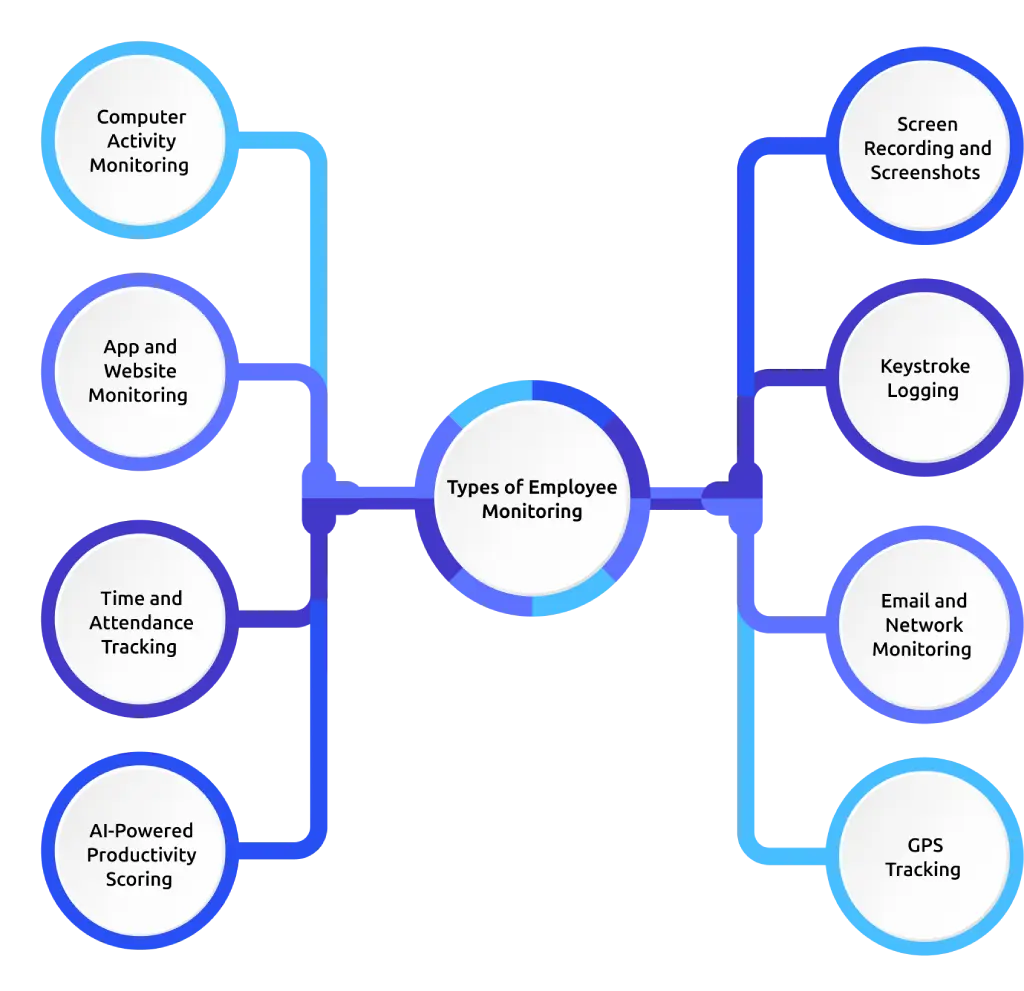
| Type | What Employee Monitoring Tracks | Best For |
|---|---|---|
| Computer Activity Monitoring | Apps, websites, and time on each | Most teams |
| App and Website Monitoring | Specific tools used, AI tool use | Remote and hybrid teams |
| Time and Attendance Tracking | Hours, start/end times, project time | All team sizes |
| AI-Powered Productivity Scoring | Focus quality, deep work, patterns | Modern distributed teams |
| Screen Recording and Screenshots | Screen visuals, session captures | High-risk or compliance roles |
| Keystroke Logging | Typing counts or keystroke patterns | Security-sensitive roles |
| Email and Network Monitoring | Email patterns, file transfers, traffic | Regulated industries |
| GPS Tracking | Location during work hours | Field workers, drivers |
1. Computer Activity Monitoring
Computer activity monitoring tracks how your team uses company devices during the workday. It records which apps your team opens, which websites they visit, and how long each activity lasts. This gives you a clear view of how time flows across tasks and tools, helping you understand actual work patterns instead of relying on assumptions.
Most systems focus on activity patterns rather than content. They show which tools your team uses and how long they stay active, without capturing what happens inside those tools. This keeps tracking non-invasive while still giving enough insight to identify distractions, improve workflows, and make better decisions based on real usage data.
2. App and Website Monitoring
App and website monitoring is a focused subset of computer activity monitoring. Instead of tracking everything on the device, it focuses on which tools your team uses and how often they use them. This gives you a clearer view of how work happens across different applications and platforms.
80% of digital workers use AI tools regularly, which makes AI usage an important part of productivity tracking. Monitoring how your team uses these tools helps you understand whether they support faster work, better output, or unnecessary rework. The gap between AI usage and measuring its actual impact is now widely known as the AI Measurement Gap.
3. Time and Attendance Tracking
Time and attendance tracking is one of the most common and widely adopted types of employee monitoring. It captures when your team logs in, logs out, how long they work, and how they spend time across tasks and projects. It also tracks break time and idle time, which helps you understand actual working hours more clearly.
This data directly supports payroll, project planning, and compliance records. It works well because the purpose stays clear, and it only focuses on work hours without going deeper into activity details. If you still rely on spreadsheets or manual timesheets, small errors can build over time and reduce accuracy.
4. AI-Powered Productivity Scoring
AI-powered productivity scoring goes beyond basic activity tracking and focuses on how work happens. Instead of only logging actions, it evaluates the quality of work by analyzing patterns such as app switching frequency, interruptions from notifications, and time spent on a single task. This helps you understand whether work happens in focused blocks or breaks into frequent distractions.
Two team members can log the same hours and get completely different focus scores, and that difference matters for coaching, capacity planning, and workload decisions. This is the core of what most platforms now call workforce intelligence, where the system moves beyond logging and helps you identify actionable work patterns.
5. Screen Recording and Screenshots
Screen recording and periodic screenshots capture what appears on a team member’s screen during work hours. This gives you the most detailed view among all types of employee monitoring, but it also comes with the highest level of privacy impact.
This type fits specific use cases such as client-facing compliance work, quality checks, or roles that require a clear audit trail for sensitive data. It does not work well as a default setting for your entire team. If you set up employee monitoring and enable screen recording for everyone from the start, that decision needs careful review before rollout.
6. Keystroke Logging
Keystroke logging tracks typing activity during work hours. Most modern tools focus on keystroke counts as an engagement signal instead of capturing the actual text. This distinction plays a key role in maintaining privacy and meeting legal requirements.
This type fits limited use cases such as security-sensitive roles, legal work, or environments where strict data regulations apply. For most regular work environments, the level of privacy impact becomes higher than the value of the insight it provides.
7. Email and Network Monitoring
Email and network monitoring tracks email patterns, network traffic, and file transfer activity. It usually does not read email content. It focuses on unusual behavior such as large file transfers, unexpected external contacts, or data moving through channels that your team should not use.
This type plays an important role in preventing data leaks and detecting insider threats. In industries like finance, healthcare, or government, some level of this monitoring is often required to meet compliance standards such as HIPAA, FINRA, or GDPR.
8. GPS Tracking
GPS tracking applies to field teams, drivers, and roles that operate across multiple locations. It tracks location during work hours using company-owned devices or vehicles, which helps you understand movement and task coverage in real time.
For logistics and field service teams, this is not optional. It helps you manage routes, confirm on-site arrivals, and resolve client disputes with clear data. The key rule is to track only during work hours and only on company equipment. Tracking personal devices or locations outside work hours can lead to legal and privacy issues under laws like GDPR and various state regulations.
From app tracking to GPS visibility, every insight helps you understand work better.
Time Champ brings all of them together, so you get one clear, connected view of your team.
How AI Is Changing Employee Monitoring?
AI has changed how employee monitoring works. Earlier, tools only showed what had already happened. Now, AI-powered systems show what is likely to happen next, which changes how you run your team day to day. This shift gives you a clearer view of progress, not just past activity.
Standard tools cannot keep up with this change. They only track hours, apps, and websites, but miss what happens inside an AI-driven workflow. You may see someone open ChatGPT for 40 minutes, but you cannot tell if that session helped complete a task faster or created extra rework. AI employee monitoring software solves this by tracking AI tool usage separately, which gives you a clearer understanding of how those tools affect productivity and work quality.
- Focus Scoring: The system scores the depth of work, not just the duration. It looks at app switching, breaks, and time spent on a single task. A four-hour block with 60 context switches looks very different from a four-hour stretch of focused output. Now you can clearly see the difference.
- Burnout Prediction: Work patterns like long hours, fewer breaks, and drops in output create early warning signs over time. The system flags risks 30 to 60 days early, helping with burnout prevention and attrition detection before problems become visible.
- Automated Activity Classification: The system learns how work actually flows. It categorizes activity based on real behavior instead of forcing it into generic labels. Over time, it becomes more accurate and aligns with how your team works.
- Natural Language Queries: You can ask direct questions instead of digging through reports. For example, “Why did output drop on Thursday?” The system gives a clear answer backed by data, not raw spreadsheets.
Using AI in employee monitoring also requires careful planning before rollout. You need to decide how to act on predictions, how transparent the system should be, and how to handle bias across different roles and teams. For the full breakdown, see our guide on AI in the workplace.
Is Employee Monitoring Legal?
Yes, in most places. At the federal level, the Electronic Communications Privacy Act (ECPA) allows you to monitor activity on company-owned devices for valid business reasons. This sets the baseline. State laws add more specific rules, and they vary. Connecticut, Delaware, New York, and Colorado require written notice before monitoring starts, while California requires a notice at the time of data collection under CCPA. If you operate across multiple states, you need to check which rules apply before rollout.
Outside the US, the rules are stricter. The EU’s GDPR requires a clear legal reason for collecting employee data along with full transparency on what you track and why. The EU AI Act adds extra requirements for AI-based monitoring tools, including bias checks and human oversight. Canada’s PIPEDA and Brazil’s LGPD follow similar principles. For a full breakdown of federal and state-level rules, check out this guide on employee monitoring privacy laws: federal and state.
How to Set Up and Choose Employee Monitoring?
Setting up employee monitoring without a clear plan creates confusion and low adoption. A structured approach helps you choose the right setup and avoid common mistakes. Here are the key things to focus on.
1. Define the Purpose First
Start with a clear goal before you choose any tool or feature. Decide whether you want better visibility into daily work, improved workload balance, or stronger compliance tracking. A clear purpose helps you avoid collecting unnecessary data and keeps your setup focused on outcomes that actually matter.
2. Choose the Right Type of Monitoring
Different roles require different levels of tracking. For example, time tracking works well for project-based work, while activity tracking gives better visibility to daily workflows. Select a type that fits how your team works instead of applying the same approach across everyone. This helps you maintain a balance between visibility and flexibility.
3. Set Clear Tracking Boundaries
Define what you will track and what you will not. Limit tracking to work-related activities and work hours. Avoid collecting data that does not help you improve visibility, productivity, or compliance. Clear boundaries help you keep the system simple and reduce confusion during rollout.
4. Communicate Before You Roll Out
Explain clearly what you track, why you need it, and how you plan to use the data. Open communication helps your team understand the purpose behind employee monitoring instead of seeing it as control. It is also important to get proper employee consent before you begin, especially in regions where it requires regulation. When expectations are clear from the start, adoption becomes smoother, and you avoid confusion or pushback later.
5. Run A Pilot Before Full Implementation
Start with a smaller group and test the setup in real conditions. Check whether the data is accurate, whether the system works smoothly, and how your team responds to it. Use this phase to fix issues and adjust your approach before scaling.
6. Select Monitoring Software That Fits Your Workflow
Choose an employee monitoring software that works well with your existing systems and provides clear, usable insights. The software should allow flexibility in tracking, support integrations, and make it easy to understand data without extra effort. A good choice helps you act on insights instead of just collecting them.
Why Time Champ Stands Out in Employee Monitoring
Time Champ is an employee monitoring software with built-in workforce intelligence. It goes beyond basic tracking and helps you understand how work actually happens across your team. You get clear visibility into time usage, task flow, and focus patterns without relying on guesswork. The platform gives access to real-time dashboards, so both you and your team can view the same data and stay aligned on work progress.
The system focuses on practical insights rather than just collecting activity. It tracks app usage, work hours, and productivity patterns while keeping the setup flexible based on your needs. AI-based insights help you identify focus levels, workload balance, and potential issues early. Along with this, features like screenshots, screen recordings, live screen views, keystroke tracking, and mouse-click detection give deeper visibility into daily work activity. With features like configurable tracking, role-based access, and built-in privacy controls, Time Champ helps you monitor work in a structured and transparent way while maintaining clarity and trust.
Conclusion
Employee monitoring helps you understand how work actually happens across your team, instead of relying on assumptions. When you use it with a clear purpose, the right setup, and transparent communication, it gives you better visibility into time, tasks, and performance without affecting trust. The key is to focus on meaningful insights, not just activity data, so you can improve workflows, balance workloads, and make decisions based on what is really happening in day-to-day work.
Tracking work without the right system often creates confusion instead of clarity.
Time Champ makes employee monitoring simple, transparent, and easy for your team to accept.

Thasleem Shaik

Table of Content
 What Is Employee Monitoring?
- Why You Need Employee Monitoring
- The 8 Types of Employee Monitoring
- How AI Is Changing Employee Monitoring?
- Is Employee Monitoring Legal?
- How to Set Up and Choose Employee Monitoring?
- Why Time Champ Stands Out in Employee Monitoring
- Conclusion

Related Blogs
Explore ethical employee monitoring techniques to track work transparently, protect privacy, and improve productivity while building trust across your team.
Anjali | Apr 27 2026
Discover how to create an effective employee monitoring policy with our comprehensive guide. Enhance productivity while respecting privacy. Learn best practices today!
Jahnavi Pulluri | Jul 31, 2024
Find the best employee monitoring tools for 2026. Compare features, pricing, pros & cons to manage workforce performance and improve productivity.
Thasleem Shaik | Apr 02, 2026
Explore features of employee monitoring tools, including tracking, security, and productivity insights, to choose the right solution.
Thasleem Shaik | Apr 21, 2026
Compare the best employee monitoring apps for BYOD devices, with privacy controls, security features, pricing, and use cases for remote and hybrid teams.
Shabana | Apr 28, 2026
Understand how employee monitoring affects workplace morale, trust, and productivity, with practical ways to implement monitoring without reducing engagement.
Anjali | Apr 28, 2026


 4.7/5 avg.
Ready to Manage Your Workforce Smarter?
Join our family of 1500+ companies using smart insights to redefine workforces!

Free Trial
No Credit Card Required