Remote vs In-Office Work: Which Is Better for Teams?
Remote vs in-office work comes with different benefits and challenges. Compare productivity, flexibility, costs, and work-life balance to choose wisely.

Leading a team today often means choosing between remote, in-office, or hybrid setups, and each comes with trade-offs in productivity, collaboration, and employee needs. Deciding which environment best supports both flexibility and structure isn’t always straightforward. Understanding remote vs in-office work helps you make a practical choice for your team by clarifying trade-offs between flexibility and structure and identifying what best supports productivity, collaboration, and long-term goals.
This guide compares remote and in-office work, including pros and cons. It also helps you decide which option is best for your team.
What is Remote Work?
Remote work is a work arrangement that allows employees to perform their job duties outside a traditional office. Employees can work from home, coworking spaces, or other locations, using digital tools to communicate, collaborate, manage tasks, and fulfill their responsibilities without being physically present at the workplace.
What is Office Work?
Office work is a traditional work arrangement where employees perform their job responsibilities from a designated workplace. Employees typically work at shared desks or workstations, communicate in person, attend meetings, and use workplace resources while following schedules and processes set by their organization.
Remote vs In-Office Work: A Side-by-Side Comparison
Remote vs in-office work offers different experiences for employees and teams. Comparing them across key factors can help you identify which setup better matches your team’s needs and goals.
| Factor | Remote Work | In-Office Work |
|---|---|---|
| Work Location | Employees work from home or another location. | Employees work from a shared office. |
| Flexibility | Offers greater control over work location and daily routines. | Follows a more structured workplace schedule. |
| Productivity | Can support focused work with fewer office interruptions. | Provides a structured environment with direct supervision and support. |
| Collaboration | Relies on video calls, chat, and digital collaboration tools. | Enables face-to-face discussions and quick team interactions. |
| Communication | Communication mainly happens through digital channels. | Employees can communicate directly in person. |
| Work-Life Balance | Reduces commuting and can provide more schedule flexibility. | Creates a clear separation between work and home for some employees. |
| Employee Costs | Can reduce commuting, meals, and other daily office expenses. | Employees may spend more on commuting and workplace-related costs. |
| Employer Costs | Can reduce some office space and facility expenses. | Requires spending on office space, utilities, and workplace facilities. |
| Team Connection | Requires intentional activities to maintain team relationships. | Makes regular face-to-face interaction easier. |
| Management | Requires you to track progress through outcomes and digital work signals. | Allows you to interact with employees directly in the workplace. |
Finding it hard to compare productivity across different work setups?
Time Champ helps you track work patterns and identify productivity gaps.
Remote Work Advantages and Disadvantages
Remote work can give your teams greater flexibility while reducing the need for daily office routines. However, it also creates challenges that can affect communication, engagement, and team coordination.
Advantages of Remote Work
- Greater Flexibility: Employees can manage their work around personal schedules and responsibilities.
- Wider Talent Access: You can hire skilled employees from different cities, regions, or countries.
- Fewer Workplace Distractions: Employees may create a work environment that supports deeper focus.
- Lower Commuting Burden: Employees spend less time and money traveling to and from the workplace.
Disadvantages of Remote Work
- Communication Gaps: Digital communication can make some discussions slower or less clear.
- Limited Team Interaction: Remote employees may have fewer opportunities for informal conversations and relationship-building.
- Technology Dependence: Internet problems or software issues can interrupt daily work.
- Harder Performance Visibility: You may need better tools to understand work patterns and progress.
In-Office Work Advantages and Disadvantages
In-office work provides a structured environment where employees can interact and collaborate in person. However, fixed workplace routines can also create challenges around flexibility, costs, and employee preferences.
Advantages of In-Office Work
- Faster Collaboration: Employees can discuss ideas, solve problems, and make decisions in person.
- Stronger Team Connection: Regular face-to-face interaction can help employees build closer working relationships.
- Immediate Support: Employees can quickly approach colleagues or managers when they need help.
- Clear Work Structure: A dedicated workplace can create consistent routines and clearer boundaries around working hours.
Disadvantages of In-Office Work
- Less Flexibility: Employees have fewer options to adjust their work location or daily routine.
- Commuting Demands: Regular travel can add time, costs, and stress to the workday.
- Higher Workplace Costs: You need to maintain office space, equipment, utilities, and other facilities.
- Potential Distractions: Frequent meetings, conversations, and workplace activity can interrupt focused work.

Did You Know?
A Stanford-led study of more than 150,000 U.S. firms found that most businesses viewed work-from-home and on-site productivity as similar. Only 7% considered on-site work more productive, compared with 2% favoring WFH.
How to Choose Between Remote and In-Office Work: A 6-Step Framework
Choosing a work model requires more than looking at employee preferences or office costs. Use these six steps to assess your team’s work, business needs, and ability to support each model effectively.
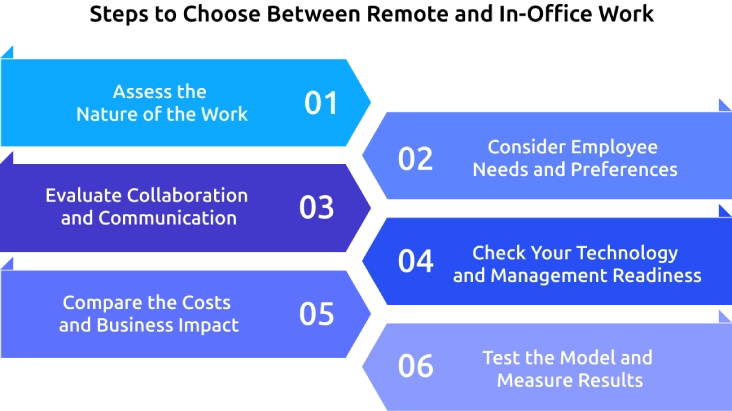
1. Assess the Nature of the Work
Start by identifying where each role performs best. Consider whether employees need physical equipment, face-to-face interaction, client access, or a shared workplace to complete their responsibilities effectively. Roles focused on independent digital tasks may work well remotely, while hands-on or highly collaborative roles may benefit from office work.
2. Consider Employee Needs and Preferences
Ask employees what work environment helps them stay focused, connected, and productive. Consider factors such as flexibility, commuting time, home workspace, team interaction, and career development. Gathering employee input can help you create a model that supports both individual needs and business goals.
3. Evaluate Collaboration and Communication
Look at how often teams need real-time discussions, brainstorming, mentoring, and quick decision-making. If frequent face-to-face interaction is essential, office work may be a stronger fit. If your teams can collaborate effectively through digital tools and documented workflows, remote work may work well.
4. Check Your Technology and Management Readiness
Review whether your team has reliable communication, project management, security, and productivity tools. Also assess whether you can set clear goals, track outcomes, and support employees without relying on physical presence. Strong technology and management practices make remote work easier to operate.
5. Compare the Costs and Business Impact
Calculate the costs associated with each model. For remote work, consider equipment, software, security, and employee support. For office work, review rent, utilities, facilities, equipment, and commuting-related factors. Then compare these costs with expected productivity, collaboration, hiring, and retention outcomes.
6. Test the Model and Measure Results
Proceed with a defined trial period before making the arrangement permanent. Set clear measures for productivity, attendance, collaboration, employee satisfaction, and business results. Review the results regularly and adjust the work model when the evidence shows that your team needs a different approach.
Did You Know?
Gallup found that only 23% of remote-capable Gen Z employees preferred fully remote work in 2025, compared with 35% among older generations. Employee preferences can vary significantly across workforce groups.
How Time Champ Improves Visibility Across Work Models
With teams split between remote and in-office setups, it’s often hard to clearly see how work hours are being used or where productivity is slipping. Time Champ is a workforce intelligence platform that helps you track work activity, productivity, attendance, and workforce trends across different work models. Real-time visibility and workforce analytics help you track productivity, balance workloads, improve accountability, and manage remote and in-office teams without constant check-ins.
Here are the Key Time Champ Features for Remote and In-Office Teams
- Real-Time Activity Monitoring: Tracks work activity across apps, websites, tasks, and workflows as it happens so you can stay updated on productivity in real time without constant check-ins.
- Automated Time Tracking: Records accurate work hours automatically so you can eliminate manual timesheets, reduce errors, and ensure reliable reporting.
- Productivity Tracking: Analyzes productivity trends and focused work hours so you can quickly identify performance gaps and improve overall efficiency.
- App and Website Usage: Shows how employees spend time across different applications and websites so you can understand work patterns and optimize tool usage.
- Attendance Management: Centralizes attendance, work hours, breaks, and shifts so you can simplify workforce scheduling and maintain accurate records from one place.
- Workforce Analytics: Compares team performance and highlights productivity gaps so you can make informed, data-driven management decisions.
- Screenshots and Screen Recording: Captures visual activity with configurable settings so you can maintain transparency, accountability, and additional oversight when required.
- Reports & Insights: Generates detailed productivity, time usage, and performance reports with export options so you can analyze workforce data, share insights, and support better decision-making.
Struggling to track productivity across remote and office teams?
Time Champ gives you clear visibility into time, activity, and performance.
Conclusion
Choosing between remote and in-office work depends on your team’s roles, collaboration needs, employee preferences, and business goals. There is no single model that works for every organization. Use the comparison and six-step framework to assess what fits your teams best. With the right approach, you can support productivity, flexibility, collaboration, and employee experience across your workforce. Remote vs in-office decisions also become easier when you have clear visibility into work patterns and outcomes. Start by assessing your current model, identify gaps, and measure results, then use the insights to create a work environment that supports both employees and business performance.

Anjali

Table of Content
 What is Remote Work?
- What is Office Work?
- Remote vs In-Office Work: A Side-by-Side Comparison
- Remote Work Advantages and Disadvantages
- In-Office Work Advantages and Disadvantages
- How to Choose Between Remote and In-Office Work: A 6-Step Framework
- How Time Champ Improves Visibility Across Work Models
- Conclusion
Instant Signup
Thank you for your request!
We have received your signup request and our team will get back to you soon. In the meantime, you can book a demo to see Time Champ in action.
Book a DemoFree trial. No credit card required. Prefer a walkthrough? Book a demo.
Related Blogs

Hybrid work combines office and remote time to fit how teams actually work. Learn hybrid work models, benefits, challenges, and how to measure success.
Thasleem Shaik | Jun 22, 2026
Turn hybrid teams into high performers with hybrid team productivity strategies that improve results, visibility, collaboration, trust, and accountability.
Anjali | Jun 19, 2026
Looking to build a better hybrid work schedule? Explore popular schedule types, weekly examples, and practical tips for a more productive team.
Guna Lakshmi | Jul 21, 2026
See what the data says about hybrid work productivity gains, including productivity, retention, engagement, cost savings, and long-term business impact.
Thasleem Shaik | Jun 08, 2026
Boost remote team productivity with practical management tips, proven best practices, key metrics, and tools that help your remote teams perform better.
Anjali | Jul 16, 2026
Learn how to track time for remote workers using simple methods and remote tracking tools and learn best practices that improve trust and productivity.
Guna Lakshmi | May 19, 2026


 4.7/5 avg.
Ready to Manage Your Workforce Smarter?
Join our family of 1500+ companies using smart insights to redefine workforces!

Free Trial
No Credit Card Required