Hybrid Work Schedule: A Guide to Create a Flexible Approach
Looking to build a better hybrid work schedule? Explore popular schedule types, weekly examples, and practical tips for a more productive team.
If your hybrid work schedule isn't clearly defined, employees may be unsure when to work from home, when to come into the office, and how to collaborate effectively with their teammates. This can lead to communication problems, inconsistent attendance, and reduced productivity.
A successful hybrid work schedule requires a clear, well-planned framework that promotes flexibility, strengthens collaboration, and maximizes ROI.
In this guide, you’ll learn what a hybrid work schedule is and how to create one that supports your team, avoids common challenges, and how to create one in just 6 simple steps.
What is a Hybrid Work Schedule?
A hybrid work schedule is a structured plan that determines when your employees work from the office and when they work remotely. Instead of allowing employees to choose their work location without guidelines, a hybrid schedule gives everyone clear expectations.
It helps you coordinate collaboration, improve workplace communication, and ensure work gets done efficiently, regardless of where employees are located.
A structured hybrid work schedule includes
- Which days do employees work from the office
- Which days do they work remotely
- Communication and meeting expectations
- How attendance and performance are measured
Without a clear schedule, you may find employees coming into the office on different days, missing opportunities to collaborate, or struggling to stay aligned. A well-designed hybrid work schedule helps you avoid these challenges and creates a more predictable work environment for everyone.

Did You Know?
52% of employees in remote-capable jobs work in a hybrid arrangement, making hybrid work the most common work model among remote-capable employees.
Why Is a Hybrid Work Schedule Important?
A well-planned hybrid work schedule helps you create a more organized and productive workplace. It gives your employees clear expectations while making it easier for you to coordinate work across office and remote locations.
- Help your team collaborate more effectively by scheduling shared office days.
- Set clear expectations for office and remote work.
- Reduce scheduling conflicts and communication gaps.
- Plan meetings, projects, and resources more efficiently.
- Support a healthier work-life balance while maintaining productivity.
- Create a more consistent and organized work experience for your employees.
Common Types of Hybrid Work Schedules
Not every hybrid workplace follows the same routine. The right schedule depends on your business goals, the type of work your employees do, and how much flexibility you want to provide.
Below are the seven common types of hybrid work schedules, each designed to support different business and employee needs.
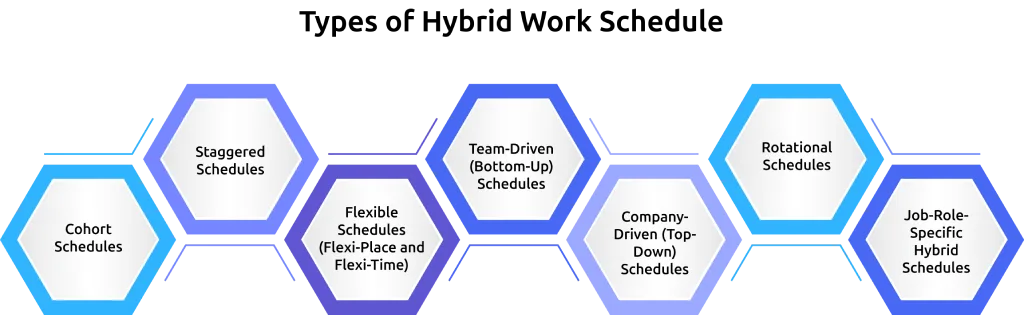
1. Cohort Schedules
A cohort schedule means everyone follows the same office schedule set by the company. Employees come to the office on the same days each week and work remotely on the remaining days.
The two most popular formats are 3/2 (three office days and two remote days) and 2/3 (two office days and three remote days). Since everyone is together on the same days, it's easier to schedule meetings, collaborate on projects, and strengthen team relationships.
Pros
- Easy to plan meetings and teamwork
- Creates a predictable weekly routine
- Encourages stronger team connections
Cons
- Limited employee flexibility
- Doesn't accommodate individual work preferences
- Can increase office crowding on common workdays
Best for: Mid-sized and large organizations that rely on frequent in-person collaboration.
2. Staggered Schedules
A staggered schedule assigns employees specific office days as well as fixed start and finish times. Instead of everyone arriving at once, employees work in different shifts or time slots, helping organizations spread out office occupancy throughout the day.
This approach is especially useful when businesses need continuous coverage or have limited office capacity. It is commonly used in customer support, healthcare, manufacturing, retail, and security operations.
Pros
- Reduces congestion during peak hours
- Makes staffing levels predictable
- Ensures consistent business coverage
Cons
- Very little employee flexibility
- Requires careful planning and supervision
- Difficult to adjust for personal schedules
Best for: Shift-based businesses and teams that require continuous coverage.
3. Flexible Schedules (Flexi-Place and Flexi-Time)
Flexible hybrid schedules give employees more control over how they work while still following company guidelines.
There are two common approaches:
Flexi-Place: Employees choose whether to work from home or the office on a given day, often using desk-booking systems.
Flexi-Time: Employees choose their start and finish times while remaining available during agreed core working hours.
This flexibility helps employees work when and where they are most productive, often improving job satisfaction and work-life balance. However, it also requires stronger communication and planning to keep teams connected.
Pros
- Greater employee satisfaction
- Supports different work styles and personal commitments
- Encourages autonomy and trust
Cons
- Team coordination requires more effort
- Office attendance becomes less predictable
- Company culture may weaken without regular in-person interaction
Best for: Knowledge-based teams, small organizations, and companies with strong asynchronous work practices.
4. Team-Driven (Bottom-Up) Schedules
In a team-driven schedule, each department creates its own hybrid work routine based on how it operates. For example, the engineering team may work from the office twice a week, while the sales team may prefer fixed client-facing office days.
This approach recognizes that different teams have different collaboration needs instead of forcing everyone to follow the same schedule.
While it improves flexibility within teams, coordinating meetings across departments can become more challenging.
Pros
- Matches schedules to each team's needs
- Gives teams greater ownership
- Reduces unnecessary office attendance
Cons
- Cross-team meetings can be harder to organize
- Office space planning becomes more complex
Best for: Large organizations with multiple departments performing different types of work.
5. Company-Driven (Top-Down) Schedules
Leadership decides the schedule and applies it across the entire organization. Everyone follows the same hybrid policy regardless of department or role.
This creates consistency and makes policies easier to communicate and enforce. It is common in organizations that prioritize a strong company culture or operate under strict compliance requirements.
The downside is that one schedule may not suit every team equally well.
Pros
- Simple to implement
- Easy for everyone to understand
- Creates a consistent employee experience
Cons
- Doesn't account for different team needs
- Can reduce flexibility
- Some departments may be less productive under a fixed schedule
Best for: Mid-sized and large companies that value consistency and standardized processes.
6. Rotational Schedules
With rotational schedules, employees or teams alternate between working remotely and in the office over longer periods, such as weekly, bi-weekly, or monthly.
For example, one team may work from the office this week while another works remotely, then they switch during the next rotation. This approach helps you maximize office space while still giving employees regular opportunities for face-to-face collaboration.
The challenge is ensuring different teams remain connected when they are not in the office at the same time.
Pros
- Makes efficient use of office space
- Balances collaboration and focused work
- Provides a predictable schedule
Cons
- Cross-team collaboration can become difficult
- Switching routines may disrupt some employees
- Requires careful planning
Best for: Organizations with limited office capacity or geographically distributed teams.
7. Job-Role-Specific Hybrid Schedules
Instead of assigning schedules by department, this approach sets office expectations based on job responsibilities.
For example, sales representatives, customer success managers, and executives may spend four or five days in the office, while software developers, designers, or content writers may only need one or two office days each week.
This allows organizations to match office attendance with the actual demands of each role. However, employees may view different levels of flexibility as unfair if expectations are not clearly explained.
Pros
- Aligns schedules with actual work requirements
- Improves productivity for different roles
- Makes better use of office resources
Cons
- May create perceptions of unequal treatment
- Workforce planning becomes more complex
- Recruiting expectations vary by role
Best for: Organizations with a wide variety of job roles and responsibilities.
Comparison of Hybrid Work Schedule Types
| Schedule Type | How It Works | Flexibility | Best For | Typical Office Days |
|---|---|---|---|---|
| Cohort | Everyone follows the same office days | Low | Mid-sized and large organizations | 2-3 |
| Staggered | Fixed office days and working hours | Very Low | Shift-based and coverage-critical teams | Varies |
| Flexible (Flexi-Place/Flexi-Time) | Employees choose when or where to work within company guidelines | High | Knowledge workers and high-trust teams | 0-3 |
| Team-Driven | Each team creates its own schedule | Medium | Large organizations with different departments | Varies |
| Company-Driven | One schedule for the entire company | Low | Organizations that value consistency | 2-3 |
| Rotational | Teams alternate between office and remote periods | Low-Medium | Companies with limited office space | Varies |
| Job-Role-Specific | Office attendance depends on job role | Low-Medium | Organizations with diverse job functions | Varies |
How to Create a Hybrid Work Schedule in 6 Steps
Creating an effective hybrid work schedule requires a structured approach. Following hybrid schedule best practices can help you create a model that supports both employee needs and business objectives.
Step 1: Understand What Your Employees Need
Before creating a schedule, understand how your employees work. Different teams have different needs, and what works for one department may not work for another.
Ask employees about their preferred work locations, collaboration needs, and any challenges they face.
Step 2: Choose a Schedule Type Based on Team Type
Once you understand how your team works, choose a hybrid schedule type that aligns with those needs.
For example, teams that collaborate often, such as sales, marketing, and product teams, may benefit from more office time. Employees who work independently may need fewer in-office days.
Step 3: Set Anchor Days for Communication
Anchor days are designated office days when employees come together for meetings, collaboration, and team activities. They help ensure everyone is available when in-person interaction matters most.
Once you've selected these days, clearly explain their purpose. Employees are more likely to support office attendance when they understand its value.
Did You Know?
Office attendance remains about 30% lower than pre-pandemic levels, showing that hybrid work has become a long-term workplace model rather than a temporary trend.
Step 4: Set Clear Rules for Coordination
Set clear expectations for communication, meetings, project updates, and information sharing. This ensures employees can collaborate effectively regardless of where they're working. Documenting your hybrid work schedule policy can help employees understand expectations around office attendance, communication, availability, and performance.
Having consistent guidelines reduces confusion and helps everyone stay aligned across office and remote environments.
Step 5: Run a 30-Day Trial Period
Instead of making your schedule permanent immediately, test it for 30 days. This allows you to gather feedback, identify challenges, and evaluate how well the schedule supports collaboration and productivity.
Use employee input and performance insights to make adjustments before finalizing the schedule.
Step 6: Track, Measure, and Refine
A successful hybrid schedule should evolve with your team's needs. Regularly review attendance patterns, employee feedback, and productivity trends to understand what's working.
Use this data to refine your schedule over time and ensure it continues to support both business goals and employee needs.
Want to know if your hybrid schedule is actually working?
Use Time Champ to track performance trends and make data-driven improvements.
Sample Hybrid Work Schedules (Weekly Calendar Examples)
The examples below show four of the most common hybrid work schedules used by companies today. You can use them as a starting point and adjust the office and remote days based on your team's requirements.
1. Cohort 3/2 Schedule (3 Office Days, 2 Remote Days)
In this schedule, everyone works from the office on Tuesday, Wednesday, and Thursday, while Monday and Friday are remote workdays. This is one of the most widely adopted hybrid schedules because it keeps the middle of the week focused on collaboration while leaving the beginning and end of the week for focused individual work.
| Day | Work Location | Typical Activities |
|---|---|---|
| Monday | Remote | Individual work, planning, and writing documentation. |
| Tuesday | Remote | Deep work, reviews, and independent project tasks. |
| Wednesday | Office | Team collaboration, project kickoffs, and planning meetings. |
| Thursday | Office | One-on-ones, strategy discussions, client meetings, and workshops. |
| Friday | Remote | Complete pending work, provide feedback, and wrap up the week. |
2. Cohort 2/3 Schedule (2 Office Days, 3 Remote Days)
This schedule keeps employees in the office on Wednesday and Thursday, with Monday, Tuesday, and Friday spent working remotely. It provides more uninterrupted focus time while still ensuring teams meet regularly for collaboration.
| Day | Work Location | Typical Activities |
|---|---|---|
| Monday | Remote | Individual work, planning, and writing documentation. |
| Tuesday | Remote | Deep work, reviews, and independent project tasks. |
| Wednesday | Office | Team collaboration, project kickoffs, and planning meetings. |
| Thursday | Office | One-on-ones, strategy discussions, client meetings, and workshops. |
| Friday | Remote | Complete pending work, provide feedback, and wrap up the week. |
3. Anchor Day Schedule
An anchor day schedule requires everyone to come to the office on one fixed day, usually Wednesday. Employees choose where to work on the remaining days based on their workload and personal preferences, while meeting any minimum office attendance policy.
| Day | Work Location | Typical Activities |
|---|---|---|
| Monday | Flexible | Plan your week, prioritize tasks, start project work, and choose to work remotely or from the office based on your workload and collaboration needs. |
| Tuesday | Flexible | Focus on project work, complete individual tasks, or collaborate with teammates in person when needed. |
| Wednesday | Office (Anchor Day) | Team meetings, company updates, workshops, cross-functional collaboration, and social activities. |
| Thursday | Flexible | Continue project work, client meetings, or team collaboration based on individual and project needs. |
| Friday | Flexible | Complete pending tasks, update documentation, plan for the following week, and wrap up ongoing projects. |
4. Role-Based Hybrid Schedule
Instead of assigning the same schedule to everyone, this approach adjusts office attendance based on each employee's role. Teams that need frequent face-to-face interaction spend more time in the office, while roles requiring focused individual work have greater flexibility.
| Role | Office Days | Remote Days | Typical Schedule | Why It Works |
|---|---|---|---|---|
| Sales & Client-Facing | Monday-Thursday | Friday | 4 Office / 1 Remote | Supports client meetings and team coordination. |
| Engineering & Development | Wednesday | Monday, Tuesday, Thursday, Friday | 1 Office / 4 Remote | Gives developers uninterrupted focus time with occasional collaboration. |
| Design & Creative | Tuesday, Thursday | Monday, Wednesday, Friday | 2 Office / 3 Remote | Balances creative collaboration with independent design work. |
| Operations & Administration | Monday, Wednesday, Friday | Tuesday, Thursday | 3 Office / 2 Remote | Supports office operations while allowing flexibility. |
Tools for Hybrid Work Schedule Management
Managing a hybrid workforce is much easier when you have the right tools. Instead of adding multiple platforms that create confusion, choose tools based on the specific problem you need to solve.
The four categories of tools below cover the essential features for planning schedules, managing office space, measuring productivity, and keeping distributed teams connected.
| Use Case | Recommended Tools | Why They're Useful |
|---|---|---|
| Schedule Communication | Google Calendar, Outlook Calendar, Slack Status | Let’s everyone know who's working remotely, who's in the office, and when team members are available. |
| Desk Booking & Office Space Management | Robin, Envoy, deskbird, Kadence, Skedda | Helps employees reserve desks or meeting spaces while preventing office overcrowding. |
| Workforce Analytics & Productivity | Time Champ, ActivTrak, Hubstaff | Provides visibility into work patterns, productivity trends, attendance, and team performance across hybrid schedules. |
| Collaboration & Communication | Slack, Microsoft Teams, Zoom, Notion, Loom | Enables seamless communication, meetings, file sharing, and collaboration, whether employees are working remotely or from the office. |
Key Challenges of Implementing a Hybrid Work Schedule
Here are the some key challenges you may face when implementing a hybrid work schedule in your organization:
Partial Treatment
A hybrid work schedule can make some managers pay more attention to workers who are often in the office. Employees can choose where to work, some managers may give more raises and promotions to those who come to the office more, even if remote workers do the same amount of work.
Risks of Cyber Attacks
As more people work from home or mix office and remote work, the risk of cyberattacks has gone up a lot. Many workers use their own devices and home internet that aren’t safe, making it easier for hackers to steal company information. They might also get tricked by phishing scams if they don’t know about security rules.
Working in public places with free Wi-Fi can put important information at even more risk. To help ensure remote work security, companies should implement security measures, give regular training to workers, and encourage everyone to use safe devices and networks.
Not Suitable for all Industries
Hybrid work schedules don’t fit every industry because some jobs need workers to be there in person. For example, in hospitals, workers must be present to help patients and respond to emergencies.
In factories, workers need to be there to use machines and check items. Since these jobs need hands-on work and teamwork, a hybrid model might not work well. Companies should think about what they need to find the best setup for their workers.
Coordination Issues
Coordination problems occur when team members don’t work well together, especially when some are in the office and others are at home. It can be hard to keep everyone on track, and tasks may get delayed if people don’t share updates or don’t know what others are doing.
Without good planning and clear communication, work can feel messy, and important things may be missed. Teams need easy tools, frequent check-ins, and clear schedules to help everyone stay on the same page and collaborate effectively in order to address this.
Culture Building Issues
When people aren’t working at the same time they can start to feel left out and end up working alone. This makes it harder for managers to bring everyone’s work together because team members might not know what others are doing.
Casual chats that usually help build teamwork don’t happen as often, leading to communication problems, feelings of unfair treatment, and trouble welcoming new workers.
To keep a strong company culture that connects all employees, no matter where they work, businesses need to treat everyone fairly, talk openly, and have leaders who are involved.
Maintaining Consistent Communication
Keeping communication steady is a big challenge in a hybrid work schedule. With some workers in the office and others at home, it’s hard to keep everyone updated, leading to confusion.
In-person talks that usually happen in the office are less common, which makes it tougher to build trust. Employees who work remotely may experience feelings of isolation and alienation, which can hinder their productivity and motivation.
The hybrid work challenges mentioned above are quite common. It is important to consider these problems before implementing a hybrid work schedule.
Manage Your Hybrid Work Schedule Effectively with Time Champ
Creating a hybrid work schedule is only the first step. To make it successful in the long run, you need visibility into how your employees work, collaborate, and follow the schedule. That’s exactly what Time Champ does.
Time Champ is an employee monitoring and hybrid workforce management software designed to help you improve productivity, accountability, and operational efficiency. It also provides actionable workforce insights that help you make informed decisions, optimize resource allocation, and support a more effective hybrid work environment.
- Hybrid Work Dashboard: Get a centralized view of your hybrid workforce for attendance, schedules, approvals, and overall workforce performance.
- Live View: Monitor who's working remotely, in the office, or offline with real-time visibility into employee status and work activity.
- Attendance Management: Track office and remote attendance accurately to make sure employees follow their assigned hybrid work schedules.
- Compliance Management: Enforce hybrid work policies by monitoring attendance patterns, work hours, and schedule adherence to help maintain organizational compliance.
- Approvals: Simplify approval workflows for remote work requests, schedule changes, and attendance corrections from one place.
- Hybrid Work Schedules: Create, assign, and manage flexible hybrid work schedules based on team requirements while ensuring balanced office and remote coverage.
- Summary Reports: Get detailed reports on attendance, schedule compliance, workforce trends, and hybrid work performance to support decision-making.
Ready to optimize your hybrid work schedule?
Use Time Champ to track attendance, monitor productivity, and build a high-performing hybrid workplace.
Conclusion
An effective hybrid work schedule requires clear planning, consistent communication, and regular improvements based on employee feedback and performance data. Understanding your team's needs and addressing common challenges can help you create a hybrid work environment that supports both flexibility and productivity.
With tools like Time Champ, you can track attendance, monitor productivity, and gain the insights needed to continuously refine your hybrid work strategy.

Guna Lakshmi

Table of Content
 What is a Hybrid Work Schedule?
- Why Is a Hybrid Work Schedule Important?
- Common Types of Hybrid Work Schedules
- Comparison of Hybrid Work Schedule Types
- How to Create a Hybrid Work Schedule in 6 Steps
- Sample Hybrid Work Schedules (Weekly Calendar Examples)
- Tools for Hybrid Work Schedule Management
- Key Challenges of Implementing a Hybrid Work Schedule
- Manage Your Hybrid Work Schedule Effectively with Time Champ
- Conclusion
Instant Signup
Thank you for your request!
We have received your signup request and our team will get back to you soon. In the meantime, you can book a demo to see Time Champ in action.
Book a DemoFree trial. No credit card required. Prefer a walkthrough? Book a demo.
Related Blogs

Struggling with managing hybrid teams? Explore practical tips to boost collaboration, prevent communication gaps, and improve team performance.
Guna Lakshmi | Jun 19, 2026
Struggling with hybrid work communication? Discover 8 practical strategies to improve collaboration and keep remote and hybrid teams connected.
Guna Lakshmi | Jun 17, 2026
Explore the productivity effects of hybrid work and discover how it can improve focus, employee engagement, retention, and overall team performance.
Guna Lakshmi | Jul 01, 2026
Hybrid work offers savings, but hidden costs can erode ROI. Explore 9 expenses and practical ways to identify them before they grow.
Guna Lakshmi | Jun 06, 2026
Protect sensitive business data in hybrid work environments with strong security controls and practical strategies to prevent data breaches.
Guna Lakshmi | Jun 10, 2026
Learn what a work schedule is, its types, benefits, challenges, legal factors, and how to create effective employee schedules with practical tips.
Guna Lakshmi | Apr 13, 2026


 4.7/5 avg.
Ready to Manage Your Workforce Smarter?
Join our family of 1500+ companies using smart insights to redefine workforces!

Free Trial
No Credit Card Required