Remote Work Security: Best Practices to Stay Secure
Strengthen remote work security with proven best practices, reduce security risks, protect your remote teams, and keep business data secure from threats.

Managing a remote team feels like freedom until one weak password or unsecured Wi-Fi connection puts your entire business at risk. When employees work from different locations using various devices, even a small security gap can expose sensitive data in seconds. Remote work security helps you reduce these risks by protecting your employees, devices, and information without slowing productivity.
Here you’ll understand the biggest security risks in remote work, practical best practices, and the key elements for building a strong security policy. Also, you’ll understand how to maintain a secure and productive remote workforce.
What is Remote Work Security?
Remote work security is the practice of protecting business systems, devices, and sensitive information when employees work from locations outside the office. It combines security policies, secure technologies, and employee awareness to reduce cyber threats, prevent unauthorized access, and keep remote work environments safe.
What Are the Biggest Remote Work Security Risks?
Remote teams rely on different devices, networks, and locations to get work done, creating more opportunities for cyber threats. Without strong security in remote work, a single vulnerability can put sensitive business data, employee accounts, and critical systems at risk.

Unsecured Home and Public Wi-Fi Networks
Employees often connect to company resources using home or public Wi-Fi that may not have strong security settings. Hackers can intercept data or create fake Wi-Fi hotspots to steal login credentials and gain unauthorized access to business systems.
Phishing and Social Engineering Attacks
Cybercriminals frequently target remote employees through fraudulent emails, messages, or phone calls that appear legitimate. Clicking a malicious link or sharing login credentials can quickly compromise business accounts and expose confidential information.
Personal and Unmanaged Devices
Using personal laptops, smartphones, or tablets for work increases the risk of security gaps when devices lack regular updates, antivirus protection, or encryption. If these devices are lost, stolen, or infected with malware, sensitive company data can be exposed.
Weak Passwords and Poor Access Controls
Reused passwords and weak authentication make it easier for attackers to access business applications. Without security measures such as multi-factor authentication (MFA) and role-based access control, a compromised account can affect multiple systems.
Unauthorized Applications and File Sharing
Employees sometimes use personal cloud storage, messaging apps, or unapproved software to complete tasks faster. These applications operate outside IT control, making it difficult to protect sensitive data and monitor where information is shared.
Outdated Software and Devices
Applications and devices that miss security updates remain vulnerable to known cyber threats. Regular patching helps close these vulnerabilities before attackers can exploit them to install malware or steal business data.

Did You Know?
Verizon’s Data Breach Investigations Report found that credential abuse (22%) and vulnerability exploitation (20%) were the two leading initial attack vectors behind confirmed data breaches, highlighting the importance of strong authentication and timely software updates.
How to Eliminate Remote Work Security Risks?
Reducing security risks starts with a proactive approach. Combining the right technologies, clear security policies, and employee awareness can help you protect sensitive data and create a safer remote work environment.
1. Secure Internet Connections
Require employees to connect through a trusted VPN when accessing company systems from home or public networks. Encourage the use of password-protected Wi-Fi with updated router firmware to prevent unauthorized access.
2. Strengthen Authentication
Enforce strong password policies and enable multi-factor authentication (MFA) across all business applications. This adds an extra layer of protection even if login credentials are compromised.
3. Use Company-Managed Devices
Provide employees with company-managed laptops and mobile devices whenever possible. If personal devices are allowed, enforce security standards such as encryption, antivirus software, and automatic updates.
4. Keep Software and Devices Updated
Enable automatic updates for operating systems, applications, and security tools to close known vulnerabilities. Regular patch management reduces the chances of attackers exploiting outdated software.
5. Train Employees to Identify Cyber Threats
Conduct regular cybersecurity awareness training to help employees recognize phishing emails, suspicious links, and social engineering attacks. Well-informed employees are less likely to make mistakes that lead to security incidents.
6. Control Access to Business Resources
Grant employees access only to the systems and data required for their roles. Reviewing user permissions regularly helps prevent unauthorized access and limits the impact of compromised accounts.
7. Monitor Devices and User Activity
Track device health, application usage, and unusual account activity to identify potential security issues early. Continuous monitoring helps your IT teams respond quickly before small incidents become major security breaches.
What Are the Best Practices to Secure a Remote Team?
Strong security isn’t built by relying on a single tool or policy. It comes from creating consistent habits, clear processes, and a culture where every employee contributes to protecting business information. Following these remote work security best practices helps you stay resilient as remote teams grow.
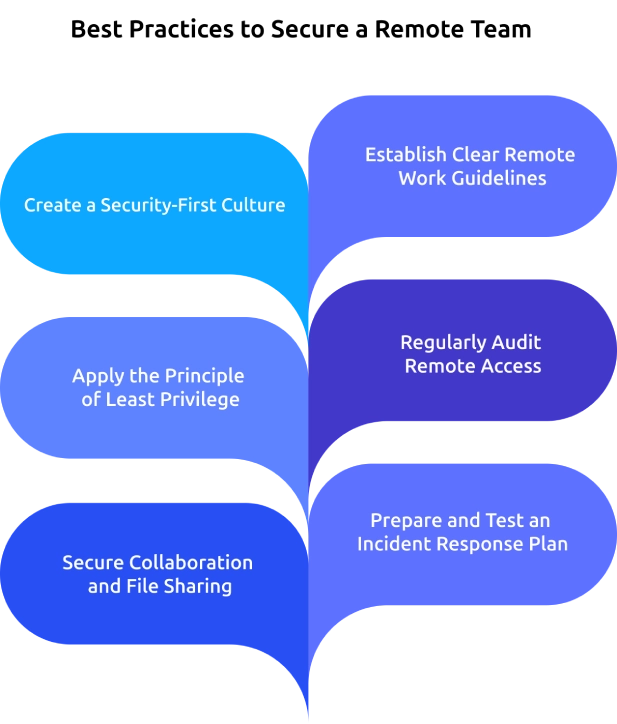
Create a Security-First Culture
Security works best when every employee understands their role in protecting company data. Regular awareness sessions, clear communication, and ongoing reminders help your employees make safer decisions in their daily work.
Establish Clear Remote Work Guidelines
Create documented guidelines that define how your employees should access business systems, handle sensitive information, use personal devices, and report security incidents. Clear expectations reduce confusion and encourage consistent security practices across the organization.
Apply the Principle of Least Privilege
Give employees access only to the applications, files, and systems they need for their responsibilities. Limiting permissions reduces the chances of accidental data exposure and minimizes the impact of compromised accounts.
Regularly Audit Remote Access
Review user accounts, connected devices, and application permissions regularly to ensure they remain appropriate. Removing inactive accounts and outdated access rights helps you eliminate unnecessary security gaps before they become a problem.
Secure Collaboration and File Sharing
Use approved collaboration platforms that offer encryption, access controls, and version management for sharing business information. Centralizing file sharing also prevents your employees from using personal apps that may not meet company security standards.
Prepare and Test an Incident Response Plan
Even with strong security measures, incidents can still happen. A documented response plan with defined roles, reporting procedures, and recovery steps enables your teams to respond quickly, minimize downtime, and reduce business impact.
Finding it hard to secure your remote workforce?
Use Time Champ to monitor activities, spot risks early, and stay in control.
How to Build a Remote Work Security Policy?
A remote work security policy gives your employees clear instructions on how to work securely outside the office. Follow these steps to create a practical policy that protects business data while keeping expectations consistent across your organization.
- Define Who the Policy Applies To: Clearly state which teams must follow the policy, such as remote employees, hybrid workers, contractors, and vendors. This helps ensure that everyone accessing company systems understands and follows the same security rules.
- Set Rules for Device Usage: Explain which devices your employees are allowed to use for work and what security measures those devices must have. This ensures that all devices meet basic protection standards like antivirus software, encryption, and regular updates.
- Establish Secure Access Requirements: Describe how employees should securely connect to company systems and applications. This includes using tools like VPNs and multi-factor authentication to prevent unauthorized access.
- Create Data Handling and Classification Guidelines: Provide clear instructions on how employees should store, share, and manage company data. This helps protect sensitive information by ensuring it is handled using approved tools and methods.
- Define Password and Account Management Standards: Set rules for creating strong passwords and managing user accounts securely. This reduces the risk of unauthorized access by ensuring accounts are properly protected.
- Specify Approved Applications and Collaboration Tools: List the tools your employees are allowed to use for communication, file sharing, and collaboration. This prevents the use of unsafe or unapproved apps that could expose company data.
- Document Security Incident Reporting Procedures: Explain how your employees should report any security issues or suspicious activity. This ensures quick action can be taken to reduce potential damage.
- Define Roles, Responsibilities, and Policy Reviews: Assign clear responsibilities for maintaining and enforcing the policy across teams. Regular reviews help you keep the policy updated as new risks and technologies emerge.
Did You Know?
According to the FBI’s Internet Crime Report, cybercriminals caused more than $16 billion in reported losses across 859,532 complaints in 2024. Phishing remained one of the most commonly reported cybercrimes, making strong security practices essential for businesses with remote teams.
How Time Champ Helps Businesses Secure Remote Teams
Managing remote teams without clear visibility can leave security gaps unnoticed until they become serious problems. Time Champ is an employee monitoring software with remote work management and security features that help you improve remote work security with real-time visibility, activity monitoring, and actionable workforce insights.
Here are the key features of Time Champ that help you manage remote teams effectively.
- Real-Time Activity Monitoring: Tracks employee actions across devices in real time, allowing you to quickly detect unusual behavior and ensure employees follow secure work practices consistently.
- Application & Website Tracking: Monitors the tools and websites your employees use during work hours, which helps to prevent unauthorized access while encouraging employees to use only approved and safe applications.
- Automated Screenshot Capture: Captures periodic screenshots of employee work activity, allowing you to verify tasks and maintain accountability without the need for constant supervision.
- Productivity Insights: Analyzes active, productive, and idle time across your teams. This helps you identify inefficiencies and make informed decisions to improve overall team performance.
- Centralized Dashboard: Provides a single platform to manage all remote, hybrid, and in-office employees, helping you maintain better control and simplify workforce monitoring across different teams.
- Instant Alerts & Reports: Generates real-time alerts and detailed activity reports, which help you respond quickly to potential risks and maintain compliance with minimal effort.
Want a safer and more productive remote team?
Time Champ gives you the visibility to protect your workforce with confidence.
Conclusion
Protecting your remote workforce requires more than basic security tools. It takes clear policies, proactive monitoring, employee awareness, and consistent security practices to reduce risks and protect your sensitive business data. Identifying potential threats early and following proven remote work security strategies can help you create a safer and more productive work environment. The right combination of technology and security practices helps your teams work confidently from anywhere while keeping critical information protected. Start strengthening your remote security strategy today to build a resilient workforce that’s prepared for evolving cyber threats.
Table of Content
 What is Remote Work Security?
- What Are the Biggest Remote Work Security Risks?
- How to Eliminate Remote Work Security Risks?
- What Are the Best Practices to Secure a Remote Team?
- How to Build a Remote Work Security Policy?
- How Time Champ Helps Businesses Secure Remote Teams
- Conclusion

Related Blogs

Learn how remote employee tracking and DLP work together to prevent data leaks, secure remote teams, and support privacy, compliance, and safer workflows.
Anjali | May 09, 2026
Ensure remote work compliance with our guide on key areas, common challenges, and best practices for your team.
Shabana Shaik | Jan 10, 2025
Avoid common remote work mistakes that hurt productivity and teamwork. Learn how to overcome challenges and create a more efficient remote work setup.
Thasleem Shaik | Mar 13, 2025
Learn effective remote team alignment strategies to enhance communication, boost productivity, and keep your team connected.
Thasleem Shaik | Mar 13, 2025
Want a happier team and lower costs? See how a remote work culture can boost productivity and make your company thrive!
Jahnavi Pulluri | Mar 12, 2025
Struggling with remote work productivity challenges? Learn what’s slowing your team down and how to improve focus, communication, and performance.
Guna Lakshmi | Apr 15, 2026


 4.7/5 avg.
Ready to Manage Your Workforce Smarter?
Join our family of 1500+ companies using smart insights to redefine workforces!

Free Trial
No Credit Card Required