How to Monitor Employee Idle Time: A 2026 Manager's Guide
Learn how to monitor employee idle time the right way with fair thresholds, transparent policies, and idle time monitoring software that builds trust.

Keeping track of how your team spends their work time isn’t always easy, especially when idle periods go unnoticed until productivity starts slipping. When work slows down without clear reasons, it becomes difficult to tell whether it’s due to workload gaps, distractions, or process inefficiencies. At the same time, monitoring too closely can make employees feel uncomfortable and reduce trust. This is where employee idle time monitoring becomes essential, helping you gain clarity on work patterns while still maintaining a respectful and transparent work environment.
In this blog, you’ll learn how to approach employee idle time monitoring the right way, from understanding idle time to setting fair thresholds and choosing the right tools. It also covers practical steps for idle time monitoring, including how to track, calculate, and use insights effectively without harming employee trust.
What Is Employee Idle Time, and Why Does It Matter?
Employee idle time refers to the period during work hours when there is no active input or task engagement, often caused by workflow gaps, delays, or task transitions. It’s a normal part of work, but consistent patterns can signal inefficiencies that need attention.
It is important because unmanaged idle time can quietly reduce overall productivity, delay project timelines, and increase operational costs without clear visibility. With the right approach to employee idle time monitoring, you can identify patterns, address bottlenecks, and improve workflow efficiency while still maintaining a fair and transparent work environment that employees trust.

Did You Know?
According to Gallup , only 31% of U.S. employees are actively engaged at work, showing how difficult it is to understand how time is actually spent without proper visibility.
How to Monitor Employee Idle Time in 5 Steps
Monitoring idle time becomes much easier when you follow a clear and practical approach. With the right steps, you can understand work patterns, identify gaps, and improve productivity without creating unnecessary pressure. Here’s how you can do it effectively.
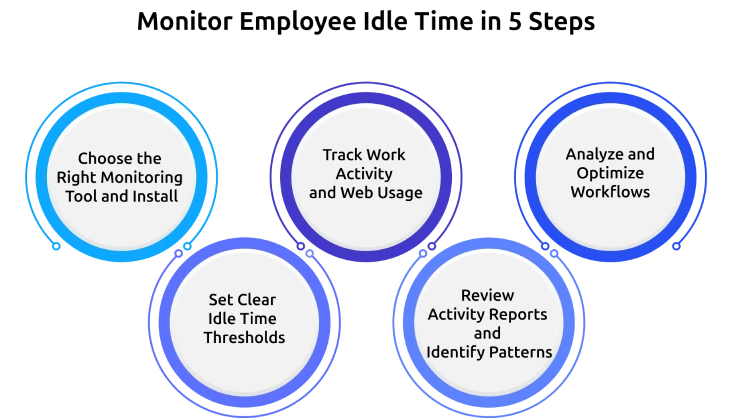
1. Choose the Right Monitoring Tool and Install
Start by selecting reliable software that gives you clear visibility into active and inactive work periods. The right tool should help you track activity patterns clearly and responsibly, making your employee idle time monitoring both accurate and transparent.
2. Set Clear Idle Time Thresholds
Define what counts as idle time based on your team’s workflow. Set clear and specific limits (for example, a few minutes of inactivity), so your tracking stays fair, consistent, and easy for everyone to understand.
3. Track Work Activity and Web Usage
Monitor how time is spent across applications, websites, and tasks. This helps you understand whether idle time is caused by distractions, waiting periods, or natural workflow gaps, making your employee monitoring more meaningful.
4. Review Activity Reports and Identify Patterns
Analyze activity reports regularly to spot trends in idle time. Look for repeated gaps, delays, or inconsistencies so you can clearly distinguish between normal downtime and areas that need improvement.
5. Analyze and Optimize Workflows
Use the insights you gather to improve processes, balance workloads, and remove bottlenecks. When you share findings openly with your team, you not only reduce unnecessary idle time but also build trust and improve overall productivity.
Struggling to clearly track idle time without confusion or guesswork?
Time Champ helps you monitor employee activity with clear insights and simple tracking.
What Should Idle Time Monitoring Software Track?
Choosing the right metrics is essential to make your idle time monitoring accurate and meaningful. When you track the right data, you can gain clear insights into work patterns without relying on assumptions. This helps you understand not just when idle time happens, but also why it occurs.
Here are the key things your employee idle time monitoring software should be able to track:
Application and Website Usage
Monitor the tools, websites, and application usage before and after idle periods. This provides context and helps you understand what leads to inactivity.
Keyboard and Mouse Activity
Track real-time input activity to understand whether an employee is actively working or inactive during work hours.
Inactivity Duration Tracking
Measure how long a system remains unused. This helps you identify short breaks and extended idle periods that may need attention.
Custom Idle Timeouts
Allow flexible configuration of what counts as idle time (for example, 5, 10, or 20 minutes). This ensures your tracking aligns with different roles and workflows.
Idle Time Classification
Enable employees to label idle time, such as breaks, meetings, or technical issues. This adds clarity and prevents misinterpretation of data.
Productivity Reports and Insights
Generate detailed reports that compare active and idle time, helping you identify patterns, spot inefficiencies, and make better decisions.
How to Calculate Idle Time?
Understanding how to calculate idle time gives you a clear, measurable view of how work hours are spent. It helps you clearly see where time is being lost or not used effectively.
Formula for Calculating Idle Time:
Idle Time = Scheduled Production Time - Actual Production Time
Here,
Scheduled Production Time- total planned time allocated for employee work or tasks.
Actual Production Time- Actual production time is the time spent actively completing the tasks.
Example:
If an employee logs 8 hours (480 minutes) in a day and actively works for 6.5 hours (390 minutes), then:
Idle Time = 480 - 390 = 90 minutes
This helps you quantify idle time accurately and makes it easier to track patterns, compare performance, and improve overall productivity.
Idle Time Benchmarks by Role and Industry
Idle time is not the same across every role, and comparing teams without context can lead to wrong conclusions. Different jobs include varying levels of inactive time based on how work gets done.
Use these benchmarks as a reference and adjust them based on your team’s actual work patterns.
| Role | Typical Idle Time % | What to Watch For |
|---|---|---|
| Customer Support / BPO Agent | 5% – 10% | Sudden spikes may indicate system issues or low ticket volume, not necessarily performance concerns |
| Knowledge Worker / Analyst | 10% – 20% | Research, analysis, and meetings may appear as idle time, consistently zero idle time can be unrealistic |
| Sales Representative / Account Manager | 20% – 35% | Calls, follow-ups, and offline interactions often increase idle time, check activity logs for clarity |
| Creative / Designer | 15% – 30% | Brainstorming, sketching, and review work may not reflect active system usage |
| Software Engineer | 10% – 25% | Code compilation, debugging, and discussions can create natural idle periods |
| HR / People Operations | 15% – 25% | Interviews, meetings, and employee interactions contribute to higher idle time |
| Field Service / On-Site Roles | 30%+ (on-site) | Travel and offline tasks are common, rely on check-ins without the system activity alone |
| Manager / Team Lead | 20% – 35% | Meetings, planning, and team coordination dominate time, avoid comparing with individual contributors |
Common Mistakes Managers Make When Monitoring Idle Time
Even with the right tools, the way you approach tracking can shape how your team responds to it. Small missteps in employee idle time monitoring can lead to confusion, resistance, or reduced trust if not handled carefully.
Understanding these common mistakes helps you create a more balanced and effective monitoring approach.
1. Assuming Idle Time as Low Productivity
Idle time does not always mean that the work is not getting done. Employees may be thinking, planning, or waiting on inputs, so judging performance purely on inactivity can lead to unfair conclusions.
2. Tracking Activity Without Context
Looking only at idle metrics without understanding the reason behind them, such as system delays, meetings, or approvals, can result in misleading insights.
3. Applying the Same Standards Across All Roles
Different roles have different work patterns. Using identical thresholds for everyone ignores the nature of each job and makes your employee idle time monitoring less accurate.
4. Over-focusing on Constant Activity
Equating continuous activity with productivity can push employees to stay active unnecessarily, which often reduces efficiency and increases fatigue over time.
5. Failing to Communicate Monitoring Clearly
When employees are not informed about what is being tracked or why, it creates uncertainty and reduces trust. Clear communication is essential for a fair monitoring process.
How to Use Idle Time Data Without Hurting Trust
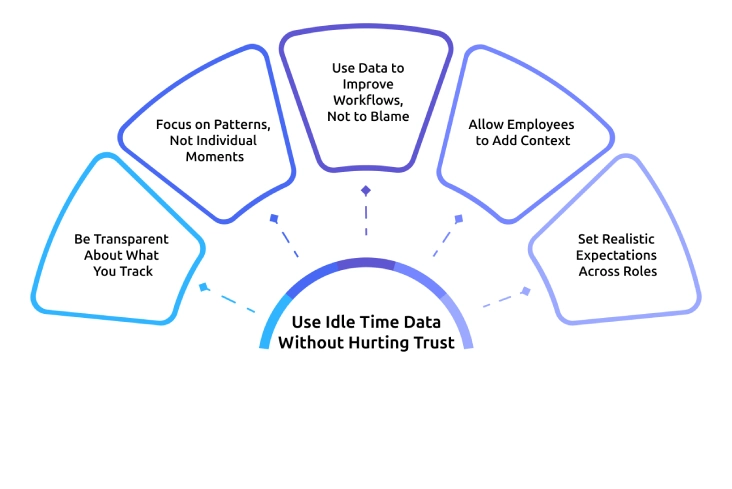
Idle time data is useful only when it is applied effectively. The way you use it can either improve performance or create unnecessary pressure. A balanced approach to employee idle time monitoring helps you gain insights while maintaining transparency and trust within your team.
Be Transparent About What You Track
Clearly explain what data is being collected, how it is used, and why it matters. When your employees understand the purpose, they are more likely to see monitoring as supportive.
Focus on Patterns, Not Individual Moments
Look at trends over time and avoid reacting to short idle periods. This helps you make fair decisions based on consistent data
Use Data to Improve Workflows, Not to Blame
Identify bottlenecks, delays, or workload gaps using idle time insights. Use this information to improve processes while avoiding unnecessary focus on individual shortcomings.
Allow Employees to Add Context
Give employees the option to explain idle time, such as meetings, thinking time, or technical issues. This ensures your employee’s idle time monitoring reflects the full picture.
Set Realistic Expectations Across Roles
Align idle time expectations with the nature of each role. When expectations are fair and clearly defined, employees feel more confident and less pressured.
How Time Champ Helps You Monitor Employee Idle Time
Keeping track of idle time often becomes difficult when you lack clear visibility or rely on scattered data. You may notice productivity gaps, but without proper context, it’s hard to understand whether they are caused by workflow delays, system issues, or normal work patterns. This is where employee idle time monitoring needs a more structured and transparent approach to deliver meaningful insights.
Time Champ is an employee monitoring software with a workforce intelligence layer designed to make this process simple, fair, and clear. It automatically detects inactivity using keyboard and mouse signals and allows you to set role-based thresholds that match how different team’s work. Employees receive real-time alerts and can quickly mark and explain idle time, while you can get access to clear trends across days, weeks, and months. With features like app and website usage context, customizable settings, privacy-focused tracking, and seamless integrations with attendance and project tools, Time Champ helps you monitor idle time effectively, supporting both productivity and trust.
Finding it difficult to track idle time clearly without affecting team trust?
Time Champ makes idle time tracking simple, transparent, and easy to manage.
Wrapping Up
Monitoring idle time is about gaining clear visibility into how workflows across your team, so you can make better decisions and improve overall efficiency. When done thoughtfully, it helps you identify gaps, improve processes, and support better productivity without creating pressure. A balanced approach to employee idle time monitoring focuses on patterns, context, and clear communication, ensuring that data is used to guide decisions. As you apply these practices, you can create a work environment where expectations are clear, performance is measurable, and trust remains strong.

Table of Content
-
 What Is Employee Idle Time, and Why Does It Matter?
-
How to Monitor Employee Idle Time in 5 Steps
-
What Should Idle Time Monitoring Software Track?
-
How to Calculate Idle Time?
-
Idle Time Benchmarks by Role and Industry
-
Common Mistakes Managers Make When Monitoring Idle Time
-
How to Use Idle Time Data Without Hurting Trust
-
How Time Champ Helps You Monitor Employee Idle Time
-
Wrapping Up
Related Blogs

Discover how to monitor remote employees effectively, boost productivity, and address challenges while respecting privacy.
Tarun Kumar | August 9, 2024
Discover the best ways to introduce productivity monitoring in your organization smoothly and effectively.
Thasleem Shaik | March 18, 2025
Choose the right employee monitoring tool for your team with this 2026 guide. Explore types, key features, a 5-step framework, and top software options.
Jahnavi Pulluri | June 7, 2023
Understand employee monitoring legal compliance, key laws, and best practices to track work activity while protecting privacy and avoiding legal risks.
Thasleem Shaik | April 14, 2026
Understand how employee monitoring privacy laws in the U.S. affect your business, what you can track, the rules to follow, and how to stay compliant.
Thasleem Shaik | April 15, 2026
Explore how to implement employee monitoring software effectively with clear steps, legal tips, best practices, ROI metrics, and key pitfalls to avoid.
Anjali | April 15, 2023


 4.7/5 avg.
Ready to Manage Your Workforce Smarter?
Join our family of 1500+ companies using smart insights to redefine workforces!

Free Trial
No Credit Card Required