How to Monitor Remote Employees: A Step-by-Step Guide
Learn how to monitor remote employees the right way, what to track, how to roll it out, and how to keep your team's trust through the whole process.
Keeping remote teams productive becomes challenging when you cannot clearly track daily work and progress. Lack of visibility often leads to missed deadlines, uneven workloads, communication gaps, and constant status updates. Over time, these problems make remote work harder to manage and reduce overall productivity.
That is why many teams now use employee monitoring software for remote teams to gain better visibility into work patterns and project progress. The right remote employee monitoring strategy helps you track remote employees more effectively while still maintaining trust and flexibility. In this guide, you will learn how to monitor work-from-home employees, what activities you should track, and the best practices for monitoring remote employees in a productive and transparent way.
What Does Remote Employee Monitoring Actually Mean?
Remote employee monitoring is the process of tracking work activity, productivity, attendance, task progress, and work patterns across remote teams. It helps you understand how work moves throughout the day, identify productivity gaps, manage workloads more effectively, and keep projects on schedule even when your team works from different locations.
Most teams now use remote employee monitoring software to gain better visibility into daily work without relying on constant follow-ups or manual updates. Depending on your workflow, remote employee monitoring tools can track work hours, application usage, project activity, idle time, task completion, and overall remote workforce productivity. The goal of remote work monitoring is not to control every minute of work, but to improve accountability, transparency, and team performance in a more organized way.
Why Do You Monitor Remote Employees?
When your team works remotely, it becomes harder to understand how work progresses throughout the day. You cannot quickly notice delays, workload imbalances, communication gaps, or productivity issues the way you can in an office environment. That is why many teams now monitor remote employees to improve visibility, manage work more effectively, and keep projects moving without relying on constant follow-ups.
Here are the main reasons why you need to monitor remote employees:
- Improve Visibility into Daily Work: Remote work often limits direct visibility into tasks and progress. Remote work monitoring helps you understand what work gets completed, what tasks are delayed, and where additional support may be needed.
- Track Productivity More Clearly: Many teams use remote employee productivity monitoring to understand work patterns, active hours, and task completion without interrupting daily work.
- Manage Workloads Better: Uneven workloads can quickly lead to missed deadlines and burnout. When you monitor remote employee productivity, you can identify overloaded team members and distribute work more effectively.
- Reduce Communication Gaps: Delayed responses and unclear updates can slow down projects. Monitoring remote employees helps you identify workflow bottlenecks earlier and improve collaboration across remote teams.
- Keep Projects on Schedule: Tracking progress regularly makes it easier to spot delays before they affect delivery timelines. This helps you manage remote projects more smoothly and avoid last-minute issues.
- Improve Accountability Across Teams: Clear visibility into work activity and responsibilities helps create stronger accountability without relying on repeated status meetings or manual check-ins.
Lack of visibility makes remote team management harder than it should be.
Use Time Champ to track productivity, work patterns, and team performance with complete transparency.
How Do You Monitor Remote Employees Step by Step?
Monitoring remote employees becomes easier when you follow a clear process instead of relying on constant check-ins and manual follow-ups. The right approach helps you improve visibility, track productivity, and manage work more effectively without creating unnecessary pressure on your team.
Here is a step-by-step process to track remote employees more efficiently:
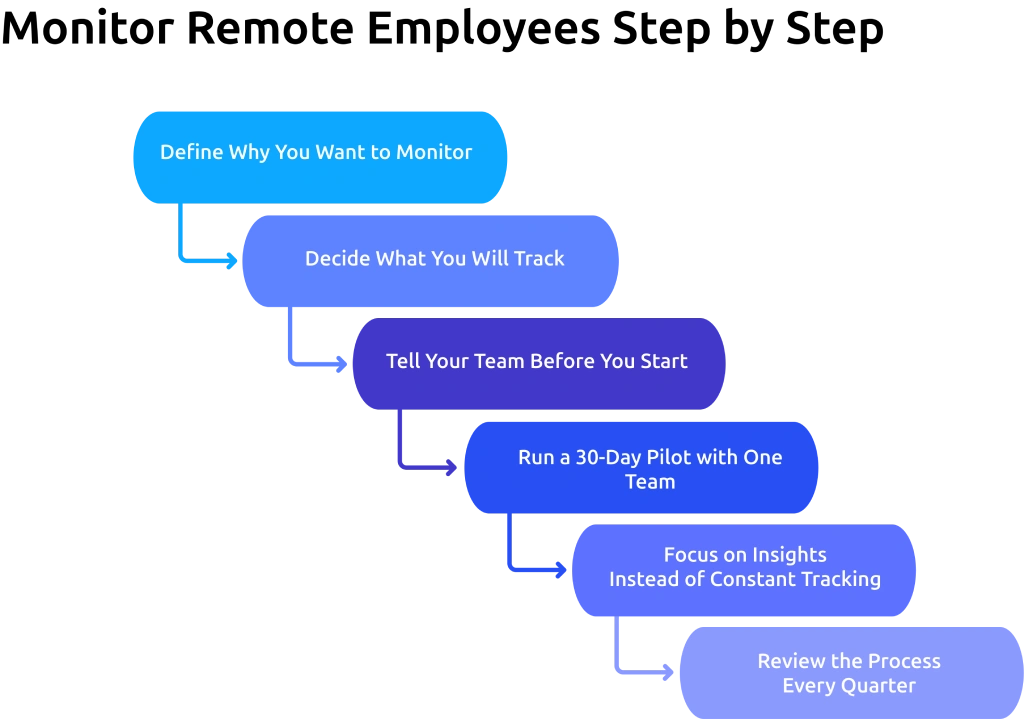
Step 1: Define Why You Want to Monitor
Before you look at any remote employee monitoring software, write down a clear reason why you need it.
Are you trying to close a visibility gap in productivity? Catch compliance risks before they become larger issues? Spot burnout early? Improve team support and performance?
Your reason shapes the entire monitoring process, including what you track, who can access the data, and how you communicate monitoring practices to your team. Without a clear purpose, monitoring remote employees can quickly become inconsistent, time-consuming, and harmful to trust.
Create a simple monitoring goal, communicate it clearly, and review it regularly to make sure it still aligns with your team’s needs and workflow.
Step 2: Decide What You Will Track
Once you know why you're monitoring, decide which work activities and productivity metrics actually help you answer that question.
If your goal is output visibility, track task completion rates and active work hours. If it's security, focus on app usage patterns and unusual file activity. If it's coaching, review productivity trends over two to three weeks.
How to monitor remote employees effectively depends on tracking the right activities, not every available data point. Collecting excessive data does not improve decisions. Instead, it makes work patterns harder to understand and reduces visibility into actual productivity trends.
Step 3: Tell Your Team Before You Start
Create a clear remote work policy that explains how you plan to monitor remote work activity and share it with your team before you begin. Your policy should clearly explain:
- What you track
- What you do not track
- Who can access the data
- How you will use the information
This step is essential for building trust and avoiding confusion. According to a survey by ExpressVPN, 59% of employees said workplace monitoring increases stress and anxiety levels. When you communicate your remote work monitoring process clearly from the beginning, your team understands the purpose behind it and responds more naturally.
Step 4: Run a 30-Day Pilot with One Team
Do not roll remote employee monitoring software out across the entire organization on day one. Start with one team of 15 to 25 employees. During the pilot, track only three things:
- Tool Stability: Does the software run without disrupting daily work?
- Data Accuracy: Does the data match what you already know about team productivity and work patterns?
- Team Feedback: Collect feedback at the end of week two and week four.
If all three areas perform well, you can confidently expand the monitoring process across other teams. If one area creates issues, fix the problem before introducing the program to a larger group. Launching a poorly received or unreliable monitoring process across the entire organization can create bigger operational and trust issues later.
Step 5: Focus on Insights Instead of Constant Tracking
Once your monitoring process is active, use the data to understand productivity trends, workload patterns, and workflow issues instead of watching every activity in real time. Look for patterns that affect performance, such as repeated delays, uneven workloads, low focus time, or communication gaps.
Use these insights to improve workflows, support your team better, and solve productivity problems earlier. Remote employee monitoring works best when it helps you make better decisions, not when it creates unnecessary pressure through constant observation.
Step 6: Review the Process Every Quarter
Schedule a 30-minute quarterly review from the beginning. During that review, check three things:
- Are you still tracking only the activities connected to your original purpose?
- Has the monitoring scope expanded beyond what you planned at the start?
- Does the process still match the transparency note and remote work policy shared with your team?
Monitoring work from home employees can gradually expand over time as you add new features and dashboards. Quarterly reviews help you keep the process focused, transparent, and aligned with your original goals while avoiding unnecessary tracking.
What Should You Track When Monitoring a Remote Team?
The table below shows which activities help you manage remote work more effectively, and which monitoring practices can create unnecessary friction and trust concerns.
| What to Track | What Not to Track |
|---|---|
| Task Progress and Project Status: Track completed tasks, pending work, deadlines, and project updates to understand how work progresses across your team. | Personal Conversations: Avoid monitoring private chats or personal discussions that are not connected to work. |
| Work Hours and Attendance: Monitor login times, active work hours, breaks, and attendance patterns to manage schedules and availability. | Webcam Surveillance: Constant camera monitoring creates discomfort and damages trust quickly. |
| Productivity Trends: Review focus time, work patterns, and productivity changes over time instead of judging one low-productivity day. | Constant Mouse and Keystroke Tracking: Tracking every mouse movement, keystroke, or inactivity period can make remote work feel overly restrictive. |
| Workload Distribution: Identify overloaded team members early and balance tasks more effectively across projects. | Personal Device Activity: Do not monitor apps, files, or browsing activity outside work-related systems. |
| Application and Tool Usage: Track work-related applications and tools to understand workflow patterns and productivity gaps. | Non-Work Online Behavior: Avoid tracking unrelated browsing activity that does not affect work responsibilities. |
| Communication and Response Patterns: Review collaboration delays, missed updates, or communication gaps that affect project delivery. | Continuous Screen Recording: Excessive screen monitoring often feels invasive and reduces employee confidence. |
Manual follow-ups and disconnected reports slow down remote team management.
Use Time Champ to get real-time insights into employee activity, work schedules, and productivity trends.
What Challenges Come with Monitoring Remote Employees?
Remote employee monitoring can improve visibility and productivity, but it also creates challenges when you track too much, communicate poorly, or rely heavily on monitoring data without proper context. If you do not manage the process carefully, monitoring can affect trust, morale, and overall team performance. Here are the challenges you need to know before you start.
1. Lack of Trust and Employee Resistance
Remote employees may feel uncomfortable when monitoring practices are unclear or overly aggressive. If you track too many activities without proper communication, your team may view monitoring as surveillance instead of productivity support. Clear communication and transparent remote work policies help reduce resistance and build trust.
2. Time Zone Differences Can Mislead Monitoring Data
If your remote workforce monitoring setup runs on a single time zone, you may misread employee activity and work hours. For example, a developer in Berlin who starts work at 8 AM CET may appear to start at 2 AM on a US-based dashboard. Their normal work schedule can easily look unusual when the system does not adjust to local time zones.
This creates confusion and can make productive employees appear inactive or inconsistent, even when they follow their regular schedules properly. To avoid inaccurate productivity tracking, always review work activity based on the employee’s local time zone instead of your company’s default time zone.
3. Excessive Monitoring Creates Pressure
Tracking every action can make remote work feel restrictive and uncomfortable. Constant monitoring often pushes employees to focus on appearing active instead of doing meaningful work. Over time, this can reduce engagement and affect overall performance. To avoid this, focus on productivity trends, task progress, and work outcomes instead of monitoring every minute of activity.
4. Legal Rules Change Based on Employee Location
Monitoring work from home employees across different states or countries means you must follow different employee monitoring and privacy laws. For example, California requires written consent before monitoring, while GDPR applies to employee monitoring data in European countries. Before using employee monitoring software for remote teams, review the legal and notification requirements for every location where your team works. This helps you avoid compliance and privacy issues later.
5. Inaccurate Productivity Assumptions
Monitoring data without context can lead to incorrect conclusions. A drop in active hours may happen because of blocked tasks, unclear priorities, meeting-heavy schedules, or technical issues. Data helps you identify patterns, but direct communication helps you understand the actual reason behind them.
What Are the Best Practices for Remote Employee Monitoring?
Knowing how to monitor remote employees is one thing. Managing the process effectively without affecting trust, productivity, or team morale is another challenge. These best practices help you collect daily focus-time reports and task completion rates, improve visibility, and create a more transparent remote work environment.

1. Create A Clear Remote Work Policy
Before you start monitoring remote employees, clearly explain what you track, why you track it, and how you use the data. A transparent remote work policy helps reduce confusion and builds trust across remote teams.
2. Focus on Productivity Instead of Activity
Do not judge productivity based only on screenshots, mouse movement, or online status. Effective remote employee productivity monitoring focuses more on task progress, deadlines, work quality, and overall output.
3. Use Monitoring Data to Support Your Team
The purpose of remote employee monitoring should be to improve workflows and identify productivity challenges, not to create pressure. Use monitoring insights to provide support, balance workloads, and resolve workflow issues earlier.
4. Monitor Only Work-Related Activities
Track only the activities connected to productivity, attendance, project progress, and collaboration. Avoid monitoring personal devices, private conversations, or unrelated online activity during remote work monitoring.
5. Review Monitoring Data with Context
A temporary drop in productivity does not always indicate poor performance. When you monitor remote employee productivity, review workloads, project complexity, meeting schedules, and communication delays before making decisions.
How to Choose the Remote Employee Monitoring Software?
Choosing the right remote employee monitoring software depends on what you want to track, how your team works, and how much visibility you actually need. The best tool should help you improve productivity and workflow management without creating unnecessary complexity or excessive monitoring.
1. Look for Productivity-Focused Features
Choose remote employee monitoring tools that help you track work hours, task progress, productivity trends, attendance, and workload distribution. Focus on tools that support better workflow visibility instead of excessive employee surveillance.
2. Check Reporting and Analytics Capabilities
Good employee remote monitoring software should provide clear productivity reports, activity summaries, and work insights. These reports should help you identify delays, workload gaps, productivity patterns, and performance trends more easily.
3. Prioritize Ease of Use
Complicated tools often create adoption issues across remote teams. The best software to monitor remote employees should offer a simple dashboard, clear navigation, and easy setup for both administrators and employees.
4. Review Privacy and Security Controls
Before selecting monitoring software for remote employees, check how the software handles employee data, access permissions, activity tracking, and privacy settings. Strong security controls help you manage remote work more responsibly.
5. Choose Software That Supports Scalability
Your monitoring needs may change as your remote team grows. Select employee monitoring software for remote teams that can support larger teams, multiple departments, different work schedules, and changing workflow requirements.
How Does Time Champ Help You Monitor Remote Employees?
Time Champ is an employee monitoring software with built-in workforce intelligence. It helps you track remote employee activity, work schedules, attendance, work-from-home compliance, and productivity trends from a centralized dashboard. You can clearly understand daily work patterns, monitor active work hours, review attendance accuracy, and identify productivity gaps across remote teams more easily.
With detailed reports, compliance tracking, remote work schedules, and workforce insights, Time Champ helps you improve visibility into remote work without relying on repeated follow-ups or manual tracking. It lets you spot attendance gaps before payroll runs, helps you redistribute tasks before a deadline slips, and supports more organized remote workforce management.
Different time zones can make remote teams harder to manage.
Use Time Champ to track work schedules, employee activity, and productivity across every location.
Conclusion
Monitoring remote employees becomes more effective when you focus on visibility, productivity, and clear communication instead of excessive tracking. The right approach helps you understand work patterns, manage workloads better, identify delays earlier, and keep remote teams aligned without affecting trust. By using transparent monitoring practices and the right remote employee monitoring software, you can build a more organized, productive, and accountable remote work environment.

Thasleem Shaik

Table of Content
 What Does Remote Employee Monitoring Actually Mean?
- Why Do You Monitor Remote Employees?
- How Do You Monitor Remote Employees Step by Step?
- What Should You Track When Monitoring a Remote Team?
- What Challenges Come with Monitoring Remote Employees?
- What Are the Best Practices for Remote Employee Monitoring?
- How to Choose the Remote Employee Monitoring Software?
- How Does Time Champ Help You Monitor Remote Employees?
- Conclusion

Related Blogs

Learn how to monitor employee idle time the right way with fair thresholds, transparent policies, and idle time monitoring software that builds trust.
Anjali | Apr 30, 2026
Data loss costs more than you think. Learn what causes it, how employee monitoring reduces data exfiltration risk, and how to protect your business.
Thasleem Shaik | Apr 17, 2026
Learn how to legally implement employee monitoring software. Covers legal requirements, policy steps, best practices, and what to tell your employees.
Thasleem Shaik | Apr 16, 2026
Track the right remote worker productivity metrics to understand performance, improve output, and avoid micromanagement with clear insights.
Thasleem Shaik | Apr 24, 2026
Understand the role of productivity tracking in remote work and how it improves team clarity, workload balance, and performance with real insights.
Thasleem Shaik | May 01, 2026
Learn why remote employee monitoring matters, its key pros and cons, and how to overcome challenges with the right approach for better productivity and trust.
Anjali | Apr 28, 2026


 4.7/5 avg.
Ready to Manage Your Workforce Smarter?
Join our family of 1500+ companies using smart insights to redefine workforces!

Free Trial
No Credit Card Required