Remote Work Policy: Complete Guide + Free Template
Create an effective and simple remote work policy with practical steps, proven best practices, helpful examples, and a free downloadable template.

Remote work can feel simple at first, but without clear rules, your team may face confusion around availability, communication, productivity, and responsibilities. When expectations are not clear, daily work becomes harder for both you and your employees.
A remote work policy helps you set up simple, practical guidelines, so everyone knows how to work, communicate, stay accountable, and follow the same process. In this guide, you will learn how to create a clear remote work policy and use a free template to make the process easier.
What is a Remote Work Policy?
A remote work policy is a formal document that explains how your team can work outside the office while meeting your company's expectations. It defines who is eligible to work remotely, expected work hours, communication guidelines, performance expectations, equipment usage, data security requirements, and other workplace rules. A clear policy helps everyone follow the same standards regardless of where they work.

Did You Know
71% of remote workers say working remotely helps them maintain a better work-life balance. This highlights the importance of creating clear remote work policies that support flexibility while setting consistent expectations.
Why Is a Remote Work Policy Important?
A work-from-home policy gives your team clear direction on how to work outside the office. Without clear guidelines, different work styles and expectations can create confusion over time. Here are some key reasons why having a clear policy matters.
- Creates a Consistent Work Experience: When everyone follows the same guidelines, work becomes more organized. It also reduces confusion caused by different approaches across teams.
- Improves Communication: Clear communication rules help your team stay connected while working from different locations. Everyone knows which tools to use, when to respond, and how to share updates.
- Supports Better Data Security: A policy clearly explains how your team should use company data, devices, and accounts. It helps your team reduce security risks and follow safe work practices.
- Helps Maintain Compliance: A documented policy makes it easier to follow workplace laws, company requirements, and internal procedures. It also provides clear guidance whenever questions or issues arise.
Struggling to manage remote work across your teams?
Try Time Champ for better visibility and control.
How to Create an Effective Remote Work Policy?
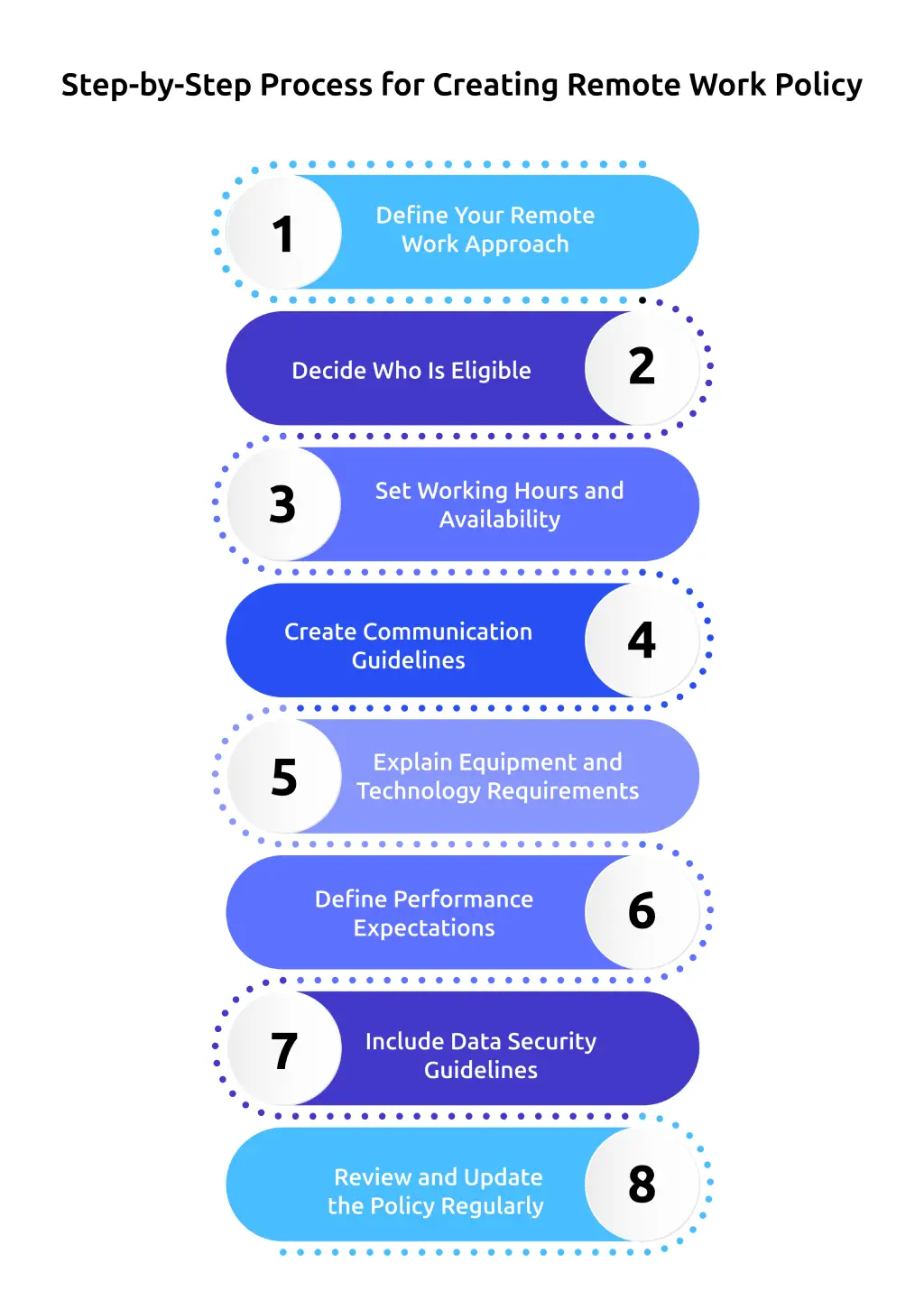
Creating a remote work policy is more than writing a list of rules. It should provide clear direction for remote work while helping you maintain security, consistency, and compliance. Follow these steps to build a policy that is practical and easy to implement. You can also use the template below to create one faster.
1. Define Your Remote Work Approach
Start by deciding how remote work will fit into your workplace. Will your team work fully remote, follow a hybrid schedule, or work from home only when needed? Defining your approach first helps you build the rest of the policy with clear direction.
2. Decide Who Is Eligible
Not every role has the same work requirements. Clearly explain which roles can work remotely and whether eligibility depends on job responsibilities, performance, location, or other business requirements. This helps your team understand how remote work decisions are made.
3. Set Working Hours and Availability
Explain the expected work schedule, core working hours, break times, and availability. If your team follows flexible schedules, mention when everyone should be available for meetings and collaboration. Clear expectations help avoid misunderstandings.
4. Create Communication Guidelines
Define how your team should communicate while working remotely. Specify the tools for meetings, messages, project updates, and urgent discussions. You should also set reasonable response times, so communication stays consistent.
5. Explain Equipment and Technology Requirements
List the equipment your company provides and clearly state what your team needs to arrange on their own. Specify approved devices, software, internet requirements, and any technical support you offer. This ensures everyone has the right tools to start working effectively from day one.
6. Define Performance Expectations
Explain how you will evaluate work. Focus on goals, deliverables, deadlines, and work quality instead of just tracking hours online. Clear performance expectations help your team stay accountable and give everyone a fair way to measure their work.
7. Include Data Security Guidelines
Your remote work policy should explain how employees protect company information. Include requirements for using secure passwords, working only on approved devices, using a VPN when needed, sharing files through approved platforms, and handling confidential information carefully to keep data safe.
8. Review and Update the Policy Regularly
Business needs, technology, and workplace regulations change over time. Review your remote work policy regularly to keep it accurate and relevant. Ask your team for feedback and update the policy when new requirements or work practices arise.
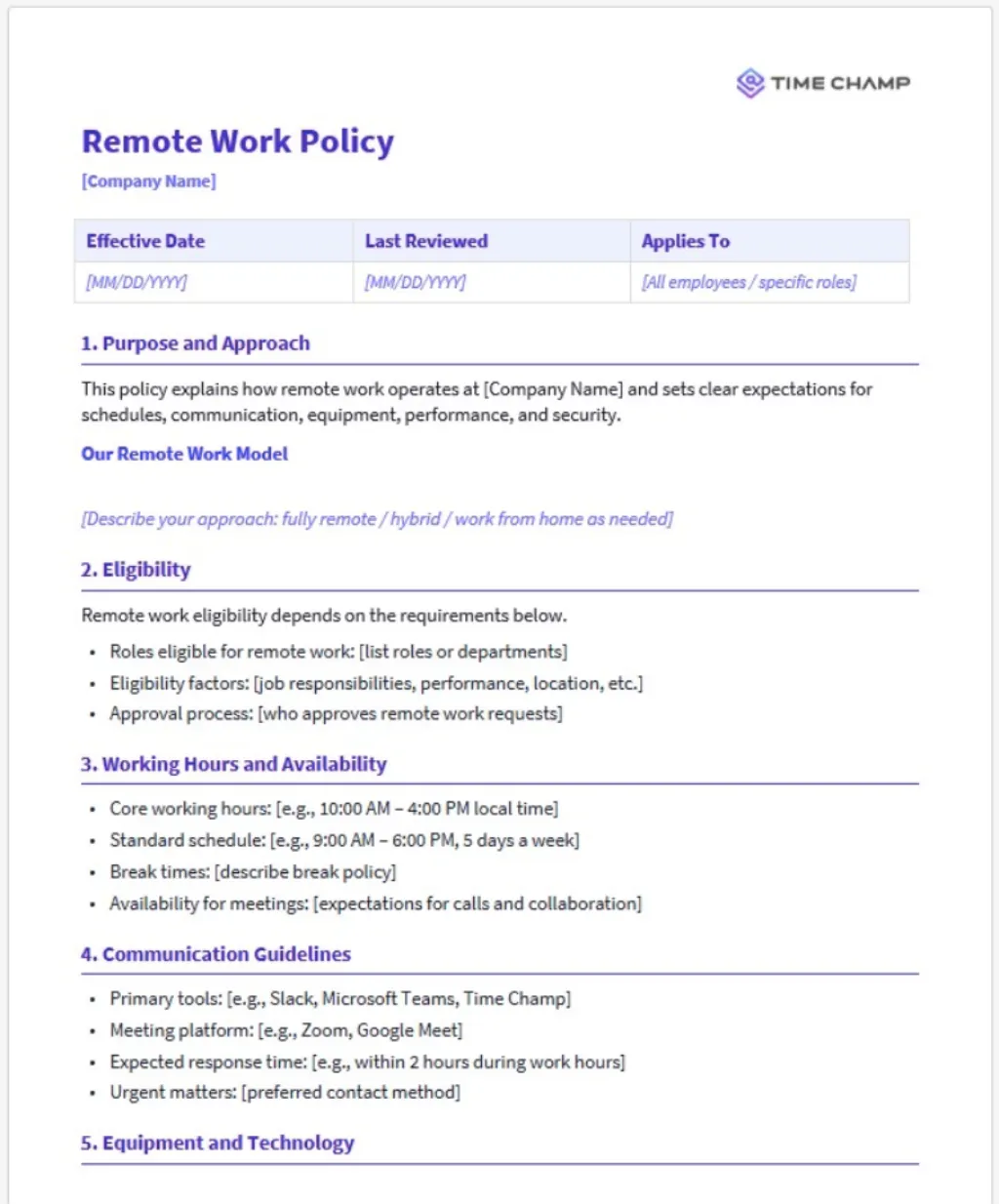
Remote Work Policy Template
Once you've completed these steps, use our remote work policy template to organize everything into a clear document. A well-structured template helps you include every essential section while making future updates easier as your workplace evolves.
Best Practices for Implementing a Remote Work Policy
Creating a policy is the first step. To make it successful, your team needs to understand it, follow it consistently, and have the right support. Here are some remote work guidelines that can help you put your policy into practice.
1. Communicate the Policy Clearly
Share the policy with your team before it takes effect and explain the purpose behind each guideline. Give everyone enough time to ask questions so there is no confusion from the beginning.
2. Include the Policy in Your Employee Handbook
Keep your work-from-home policy together with your employee handbook so everyone can access the latest version whenever they need it. This also makes future updates easier to communicate.
3. Provide Training Before Implementation
Understand how to apply the policy correctly. When you follow the same process across departments, you provide consistent guidance to your employees. Handle exceptions fairly and consistently, so employees feel supported and treated equally.
4. Measure Results Instead of Activity
Focus on performance measurement based on goals, quality of work, and deadlines instead of simply tracking online hours. This creates a fair approach while supporting long-term employee productivity.
5. Give Your Team the Right Tools
Provide reliable communication, collaboration, and work management tools before introducing your telecommuting policy. The right technology helps your distributed teams stay connected and complete work without unnecessary delays.
How Time Champ Simplifies Remote Work Management
Managing a remote team becomes much easier when you have clear visibility into daily work. Instead of relying on manual updates or constant follow-ups, you can make informed decisions with accurate work insights. Here's how Time Champ helps you manage remote work more effectively.
- Track Work Hours Automatically: Capture employees' work hours without manual timesheets. Automated time tracking gives you accurate records for attendance, payroll, and project reporting.
- Monitor Productivity with Real-Time Insights: See how work is progressing through productivity reports, application usage, and focus time. These insights help you identify work patterns and support better performance.
- Measure Performance with Meaningful Data: Evaluate work using completed tasks, active work time, and project progress instead of assumptions. This helps you conduct fair and consistent performance reviews.
- Protect Company Data: Strengthen data security with data loss prevention features such as website restrictions, USB device control, suspicious activity alerts, and detailed activity records to reduce security risks.
- Improve Visibility Across Remote Teams: View attendance, work activity, productivity, and project progress from a single dashboard. This makes it easier to stay connected with distributed teams without interrupting their work.
With the right insights and automation, managing remote work becomes more organized and consistent. Time Champ helps you support your team, maintain accountability, and keep work moving smoothly regardless of where your employees work.
Lack of visibility creates confusion across remote teams.
Try Time Champ for complete remote workforce visibility.
Conclusion
A well-structured remote work policy helps you set clear expectations, improve collaboration, maintain compliance, and create a consistent work experience for your team. Following the right steps and regularly updating your policy as your business grows helps you build a workplace that supports long-term success. If you want better visibility into remote work, Time Champ helps you track work hours, monitor productivity, and manage your remote team with accurate insights, making it easier to put your policy into practice.

Thasleem Shaik

Table of Content
 What is a Remote Work Policy?
- Why Is a Remote Work Policy Important?
- How to Create an Effective Remote Work Policy?
- Remote Work Policy Template
- Best Practices for Implementing a Remote Work Policy
- How Time Champ Simplifies Remote Work Management
- Conclusion

Related Blogs

Understand the role of productivity tracking in remote work and how it improves team clarity, workload balance, and performance with real insights.
Thasleem Shaik | May 01, 2026
Track the right remote worker productivity metrics to understand performance, improve output, and avoid micromanagement with clear insights.
Thasleem Shaik | Apr 24, 2026
Performance evaluation in remote workforces: 7 metrics that matter, common biases to avoid, and how to run reviews your team trusts.
Guna Lakshmi | Apr 14, 2026
"Dive into the benefits and challenges of fully remote work! Uncover valuable tips, tools, and insights for success in this dynamic work model. RemoteWorkPros
Mounika Sai | Nov 28, 2023
Explore the essentials of remote work culture, including best practices, and strategies to enhance your productivity in a virtual environment!
Sai Keerthi Uppala | Oct 17, 2024
Debunk the top 5 popular remote work myths and discover the truth behind productivity, engagement, and flexibility in remote work environments.
Mounika Sai | May 30, 2023


 4.7/5 avg.
Ready to Manage Your Workforce Smarter?
Join our family of 1500+ companies using smart insights to redefine workforces!

Free Trial
No Credit Card Required