Apps and Websites Usage Tracking Software That Reveals Productivity Patterns

Gain full visibility into your team's digital activity with our accurate apps and website usage software that reveals productivity patterns and tracks where every work hour goes.

apps and websites usage tracking software
Trusted by 1200+ Companies Worldwide
127+
Countries
1200+
Companies
100K+
Users
2.5M+
Insights Generated
envision imagemarkets customeragilisium imagedecade customerknackgobal imageuintnese customerphysics wallah imagehealthquist customerintegra customersutherland imagemoney view image

Apps and Websites Usage Tracking Built for Teams That Need Clear Visibility

track every app your team uses
track every app your team uses icon

Track Every App Your Team Uses Daily

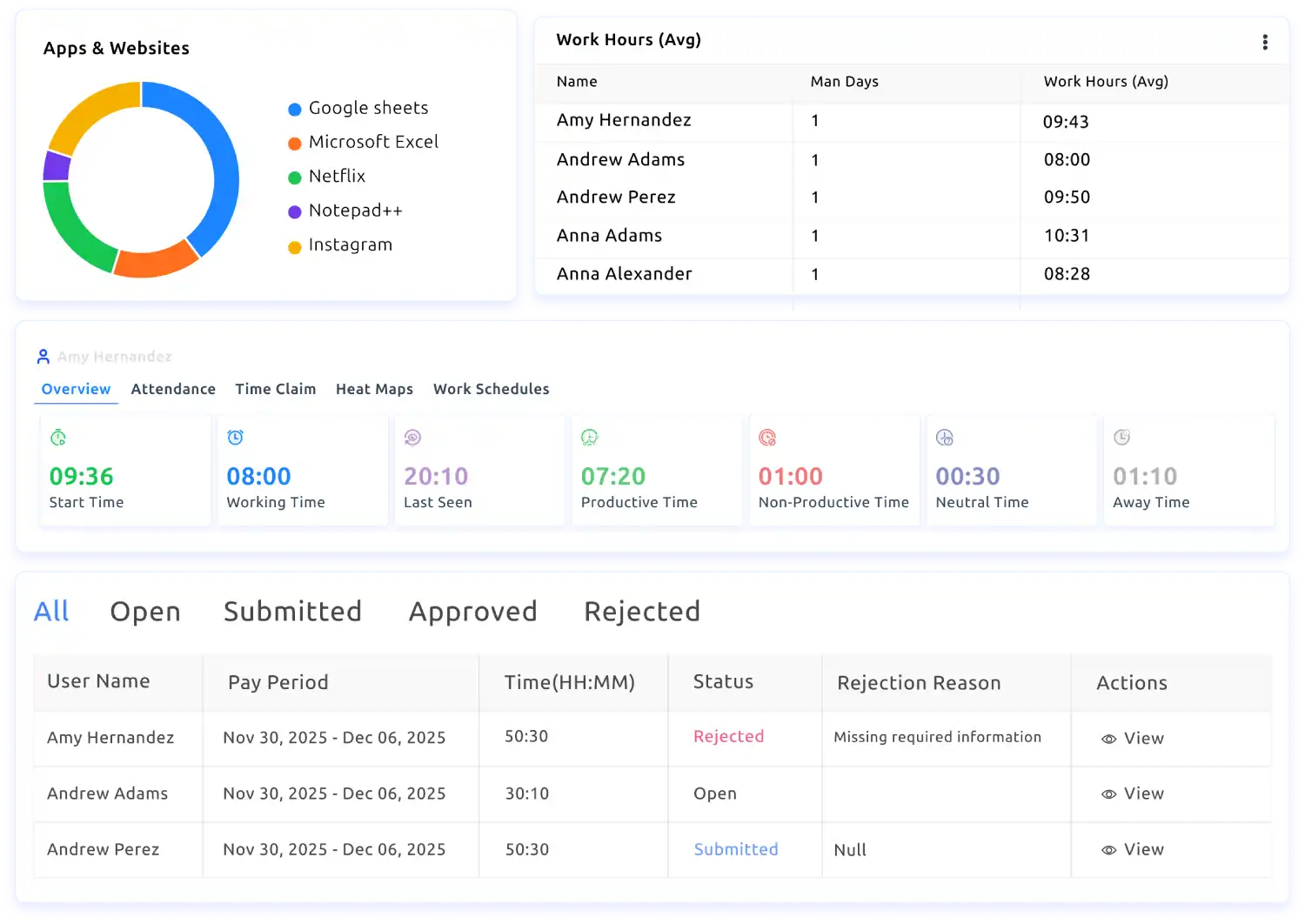
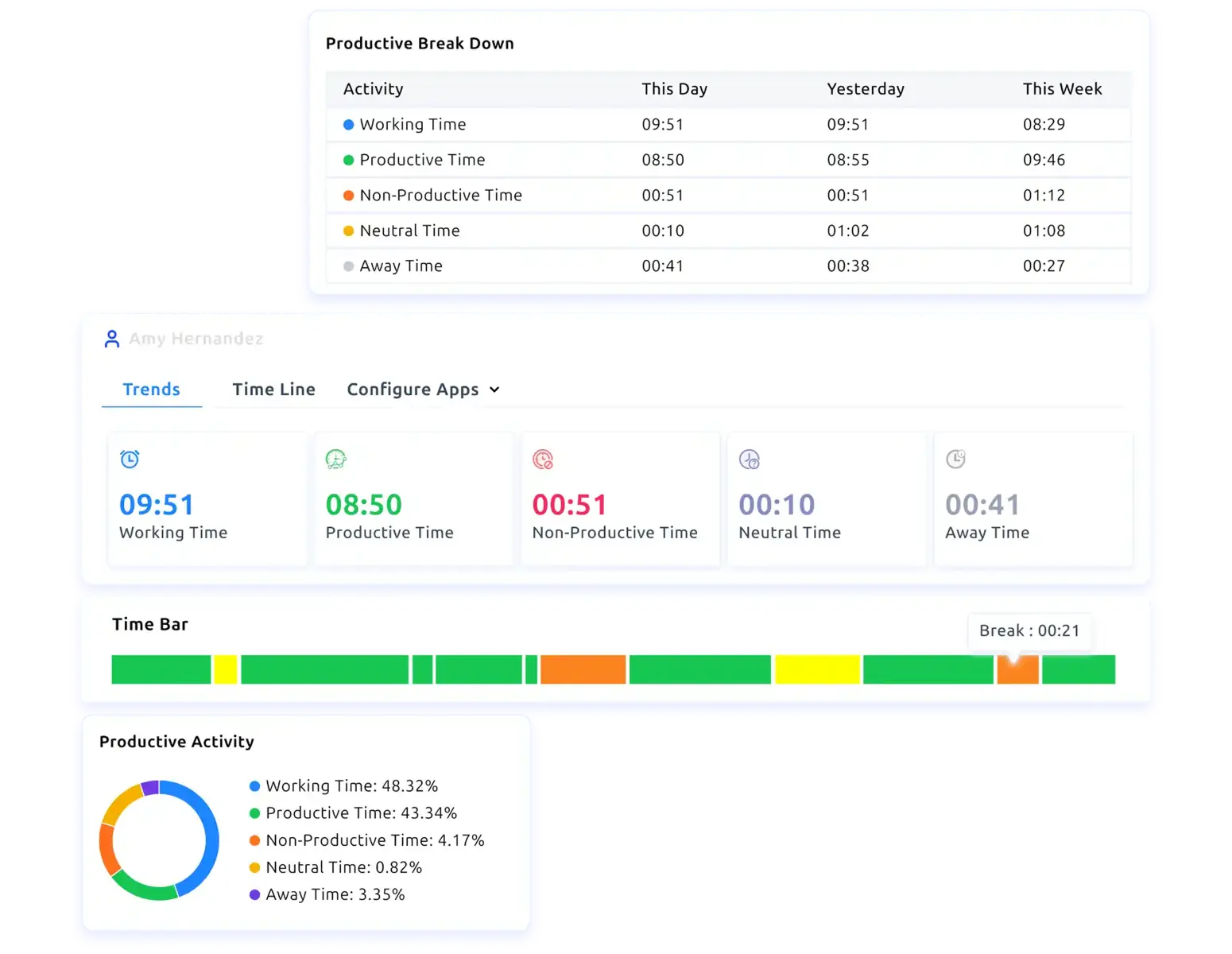
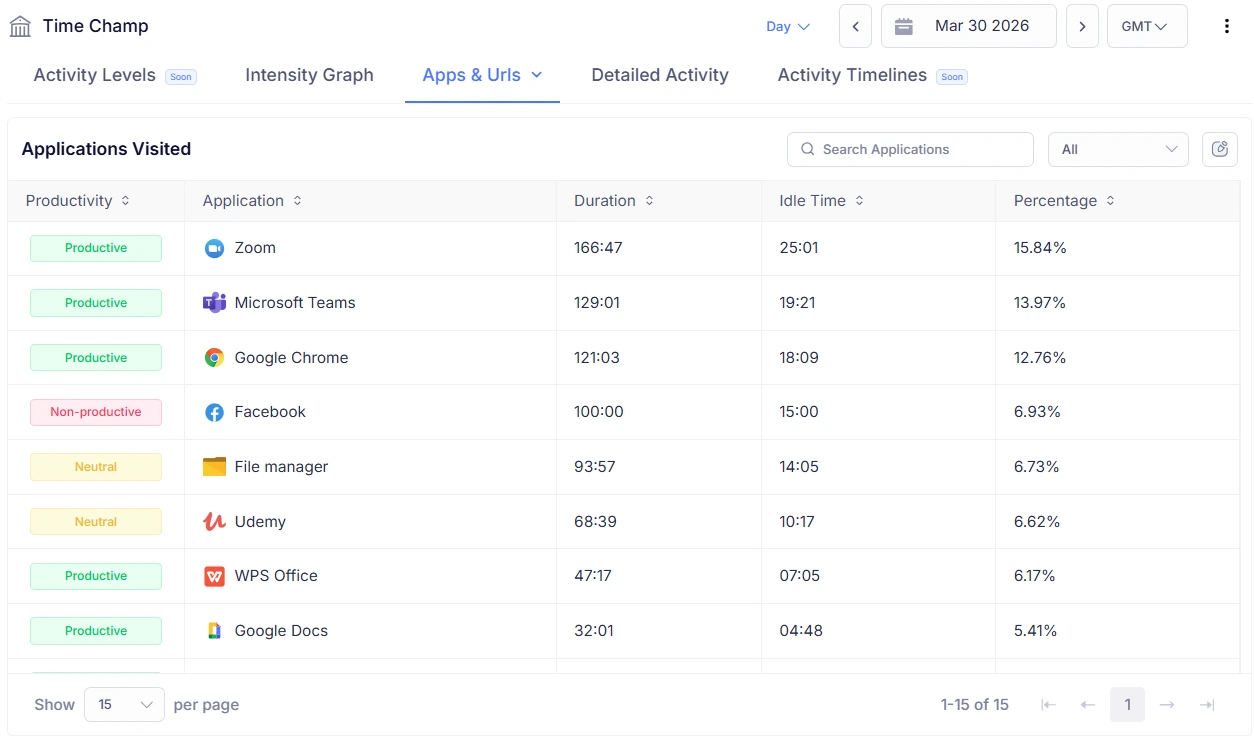
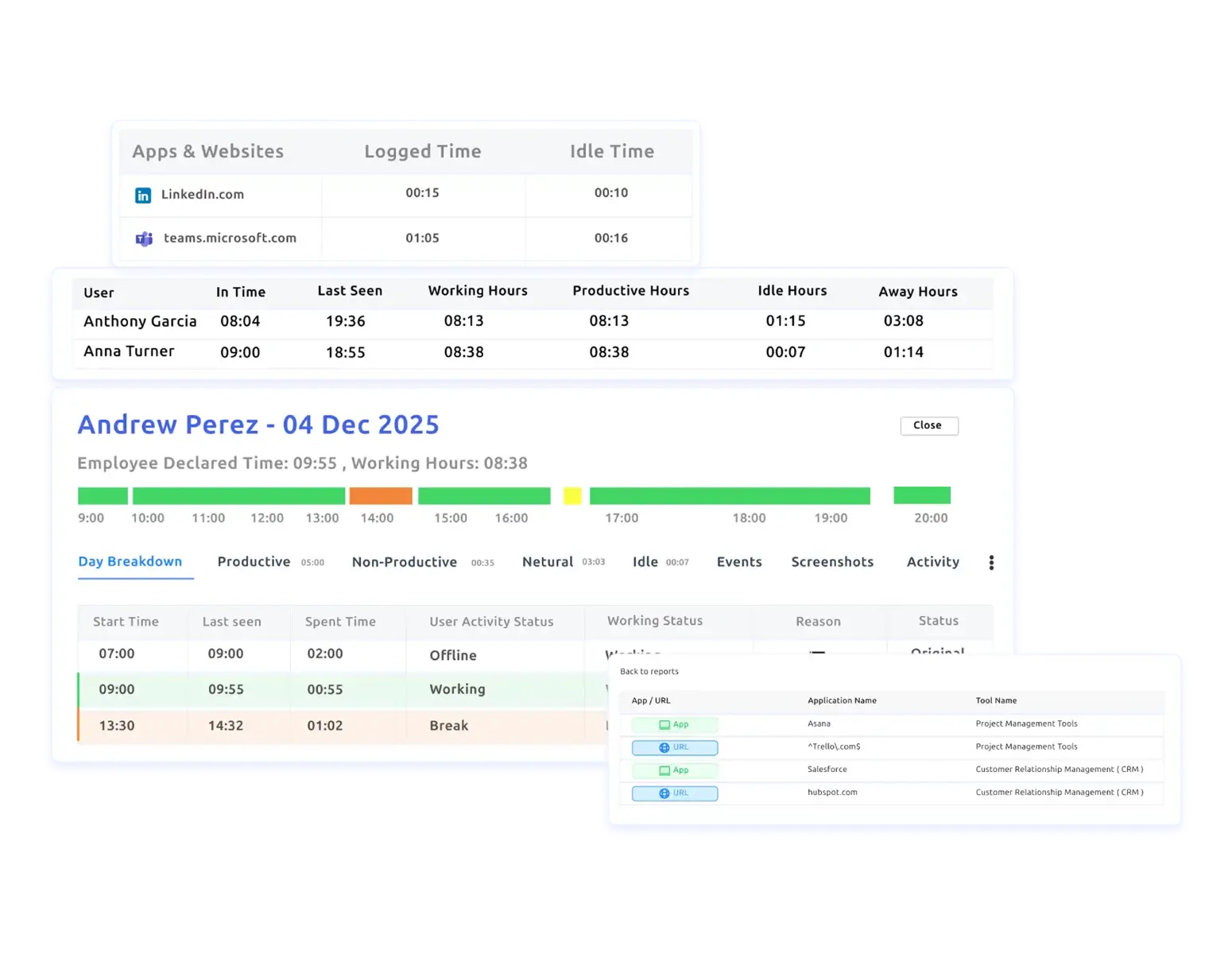
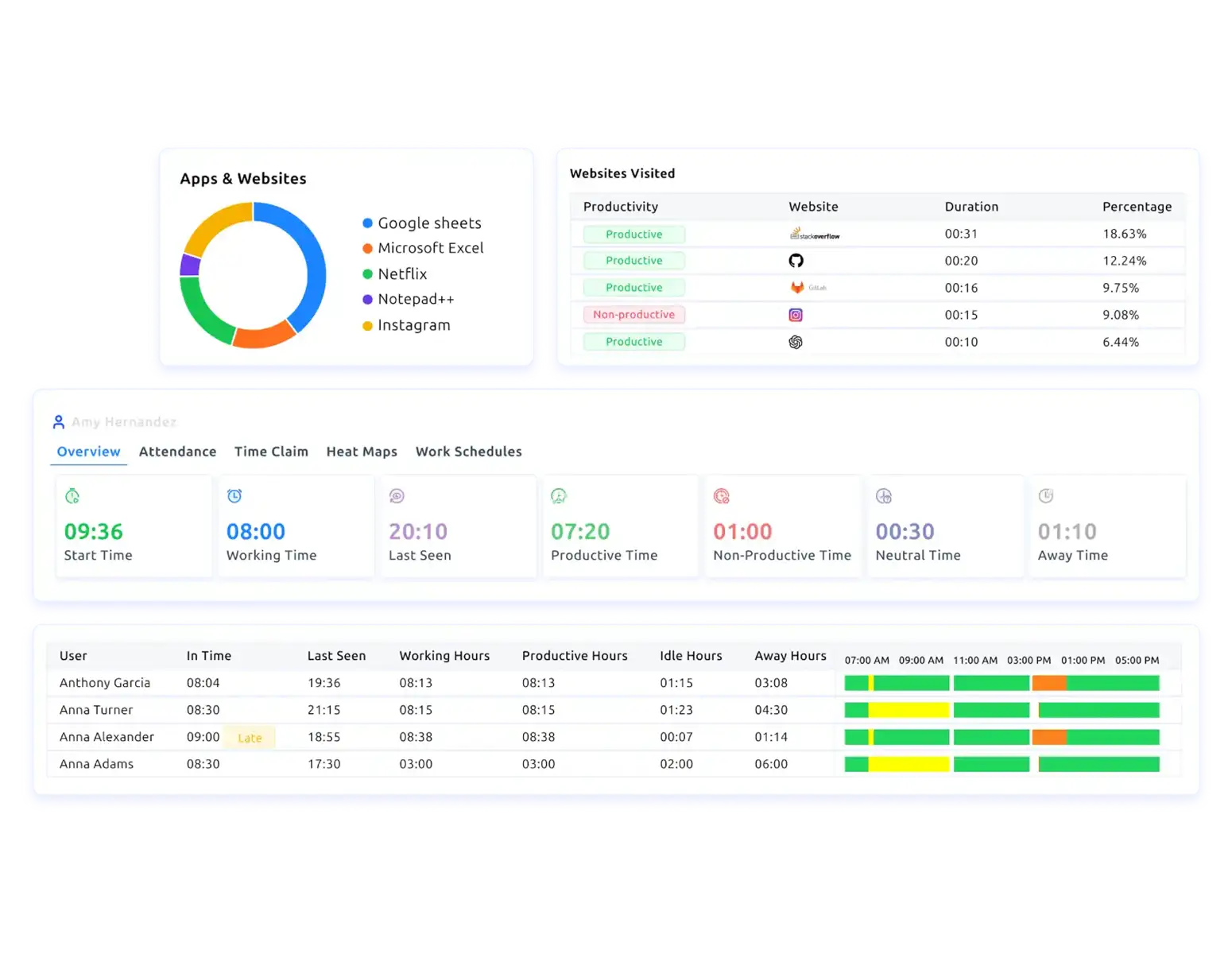
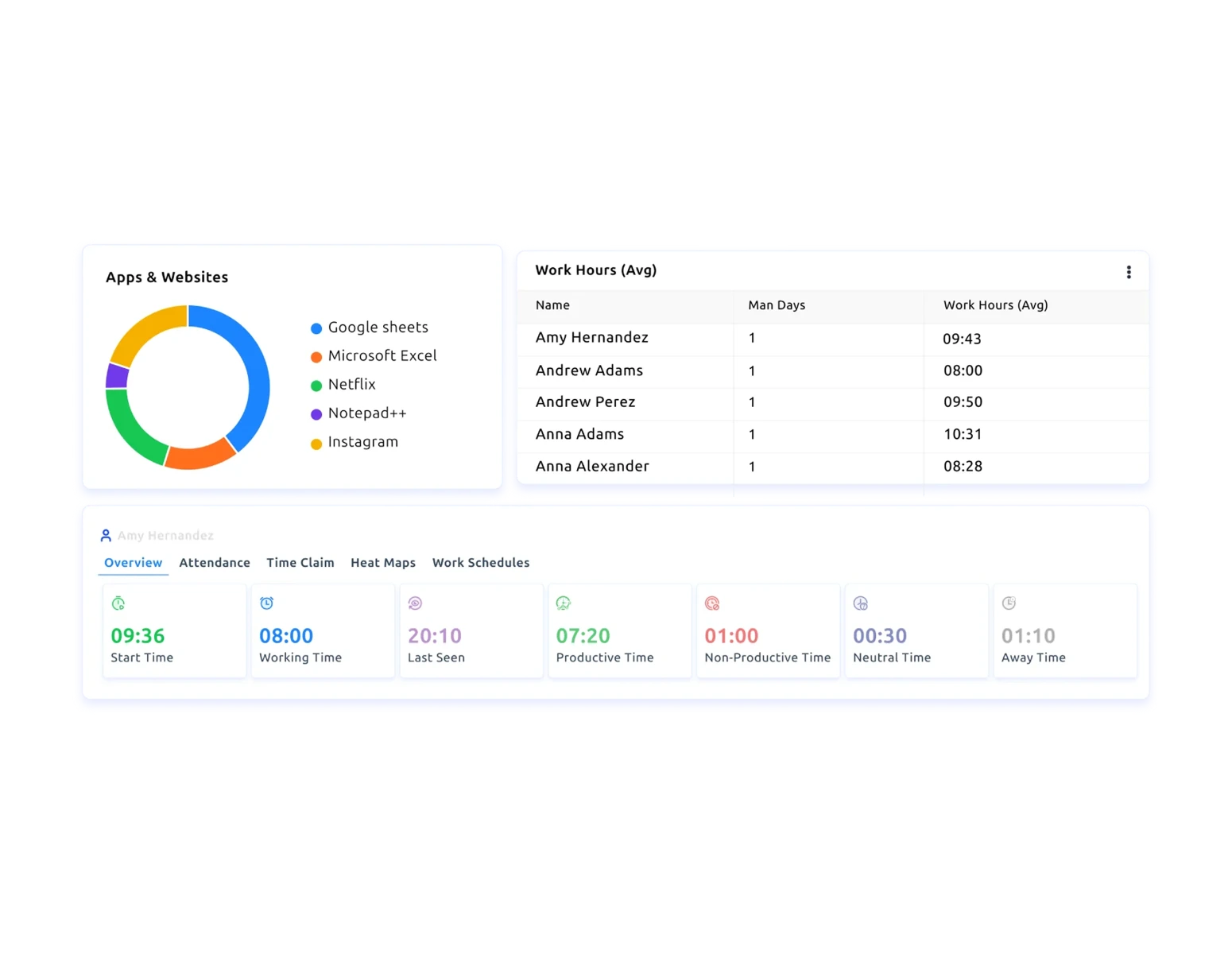
See which apps your team uses most, how long they stay active, and whether that time is productive, neutral, or non-productive every day.

 websites your employees visit icon

Monitor Every Website Your Employees Visit

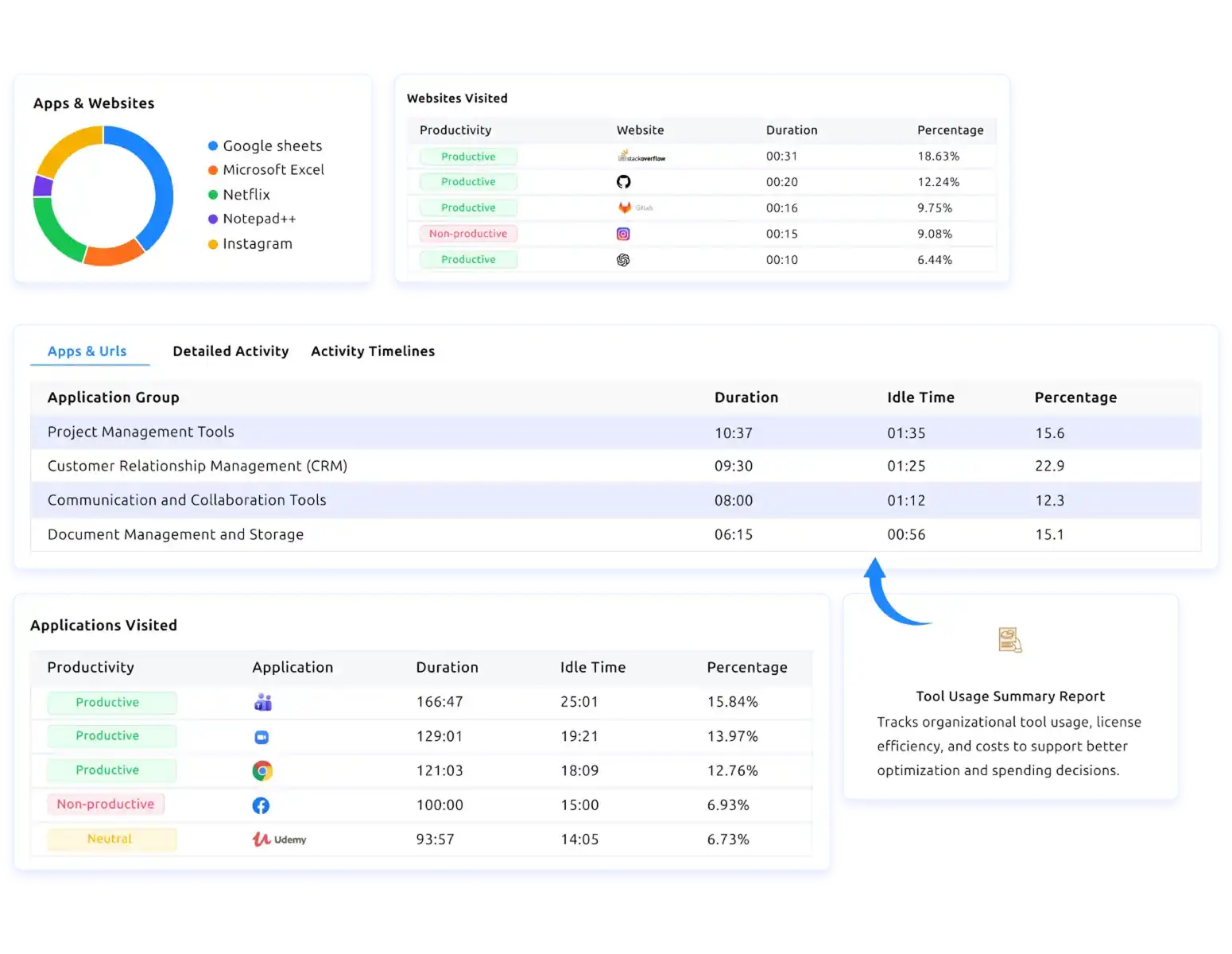
Track every website visited during work hours with duration, idle time, productivity status, and usage percentage for each URL.

applications into categories icon

Group Applications into Meaningful Categories

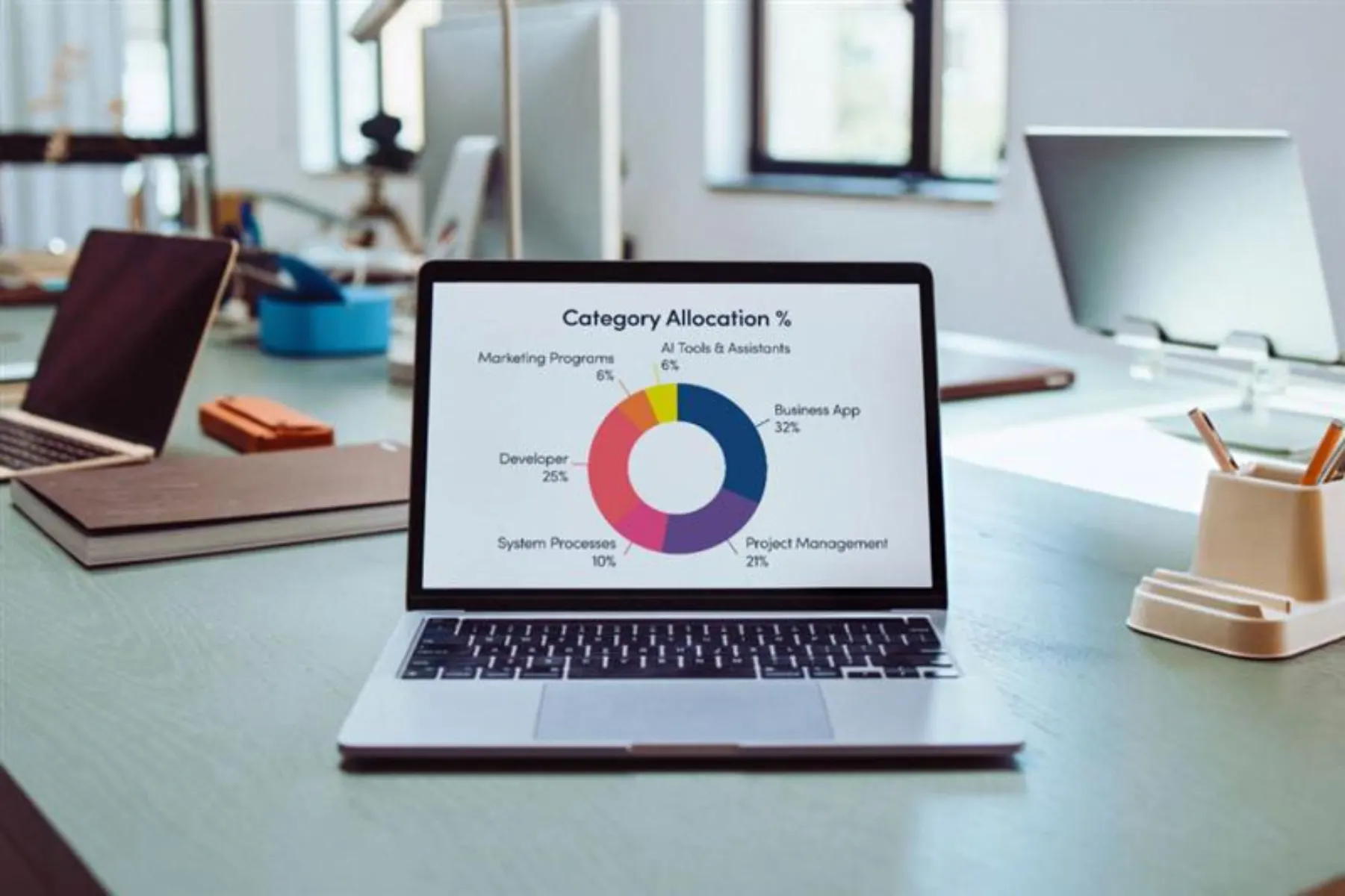
Group your team's applications into categories and instantly see which tool groups consume the most work hours throughout the workday.

app and web usage icon

Classify APP & Web Usage Clearly

Classify every app and website as productive, non-productive, or neutral to get a clear picture of your team's digital habits.

teams activity
teams activity icon

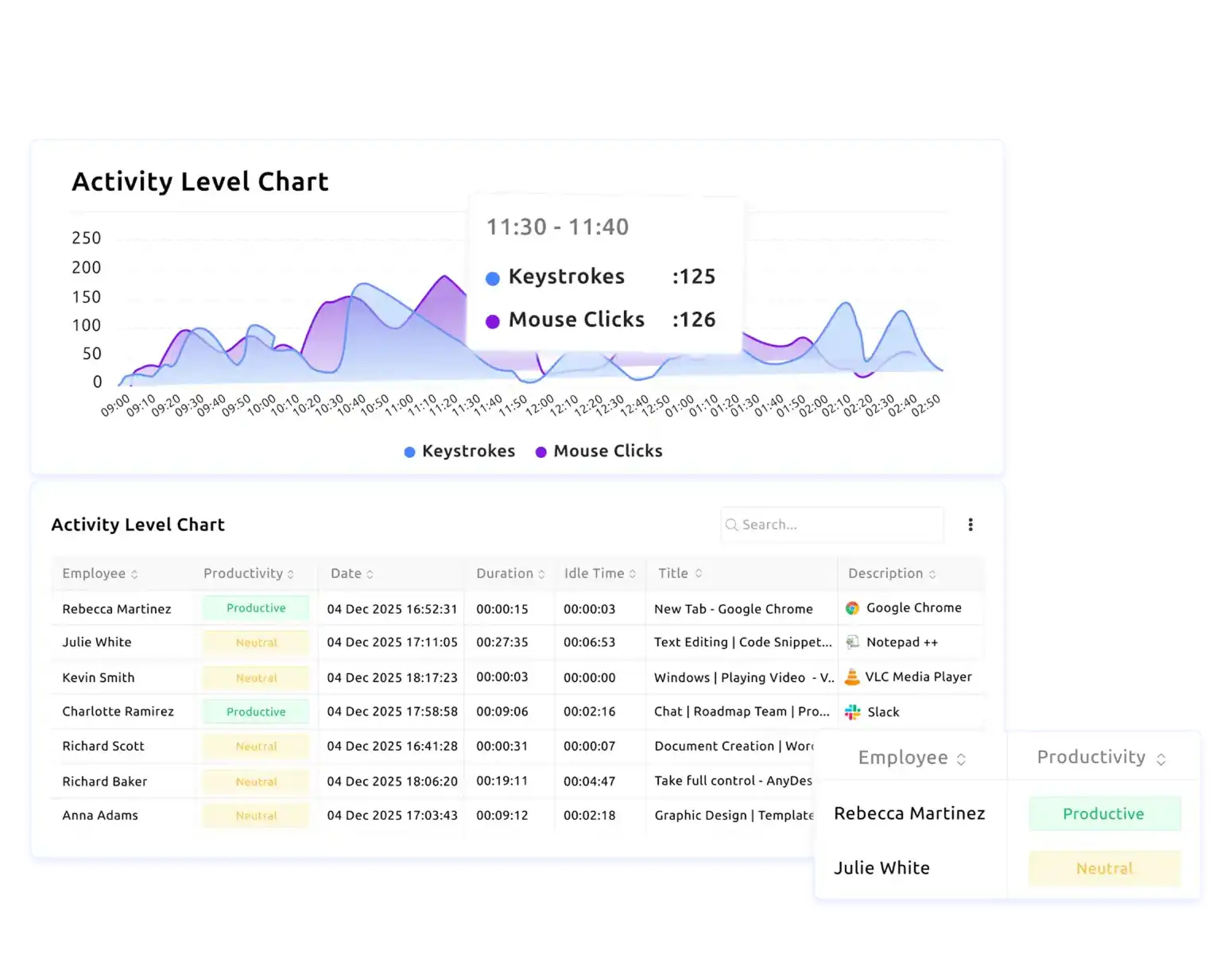
Visualize Your Team's Activity Instantly

View keystroke and mouse click patterns across the workday on an activity intensity graph to identify peak hours and productivity dips.

digital activity icon

Drill Into Every Digital Activity with Full Detail

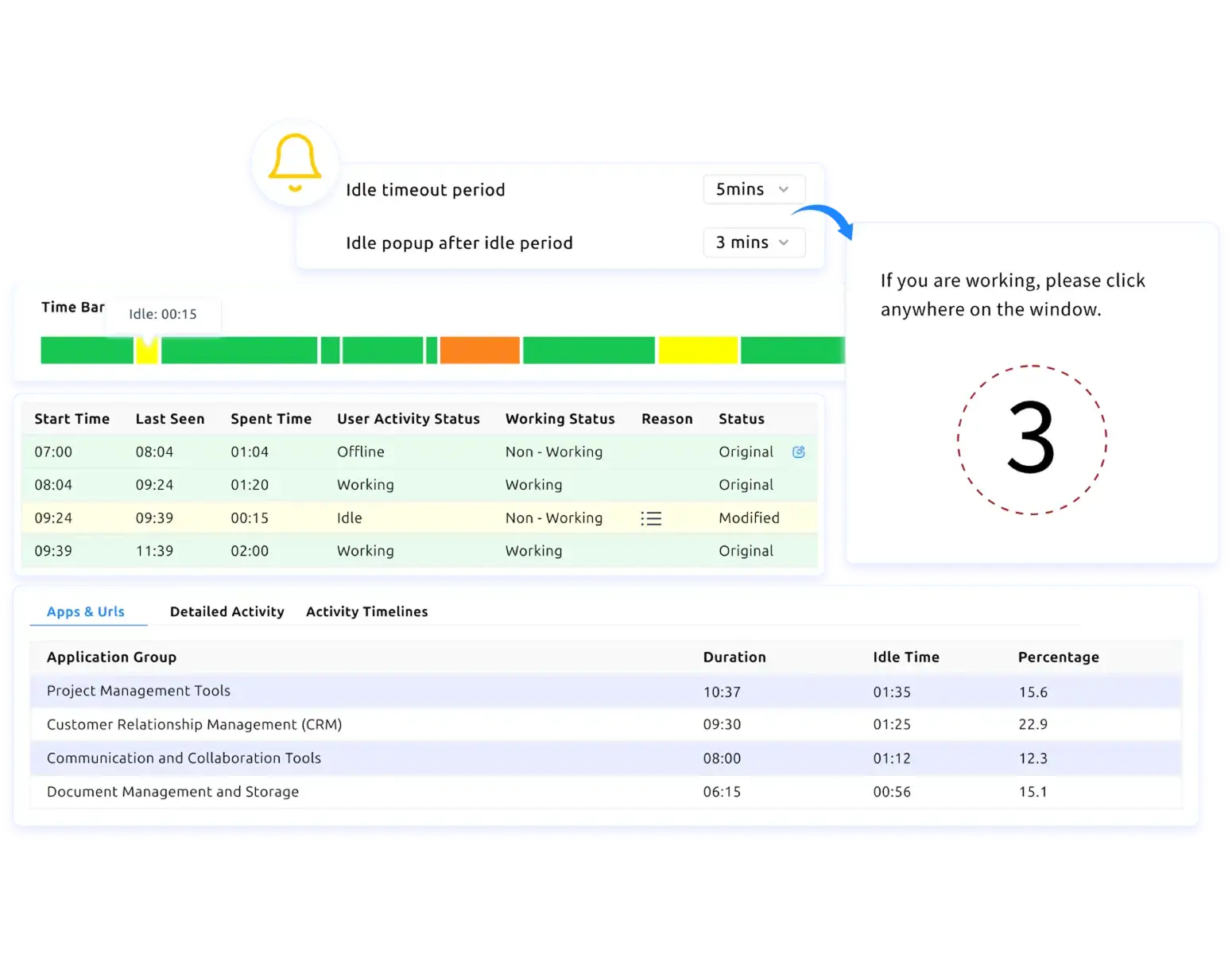
Dig deeper into your team's digital activity with full context on every action, including who performed it, when, how long, and on which app or website.

see employees doing in real time icon

See What Employee Is Doing in Real-Time

Get a live dashboard that refreshes every minute, showing who is active, idle, offline, or away, along with what app or website they are using currently.

export reports in multiple formats icon

Export Reports in Multiple Formats Easily

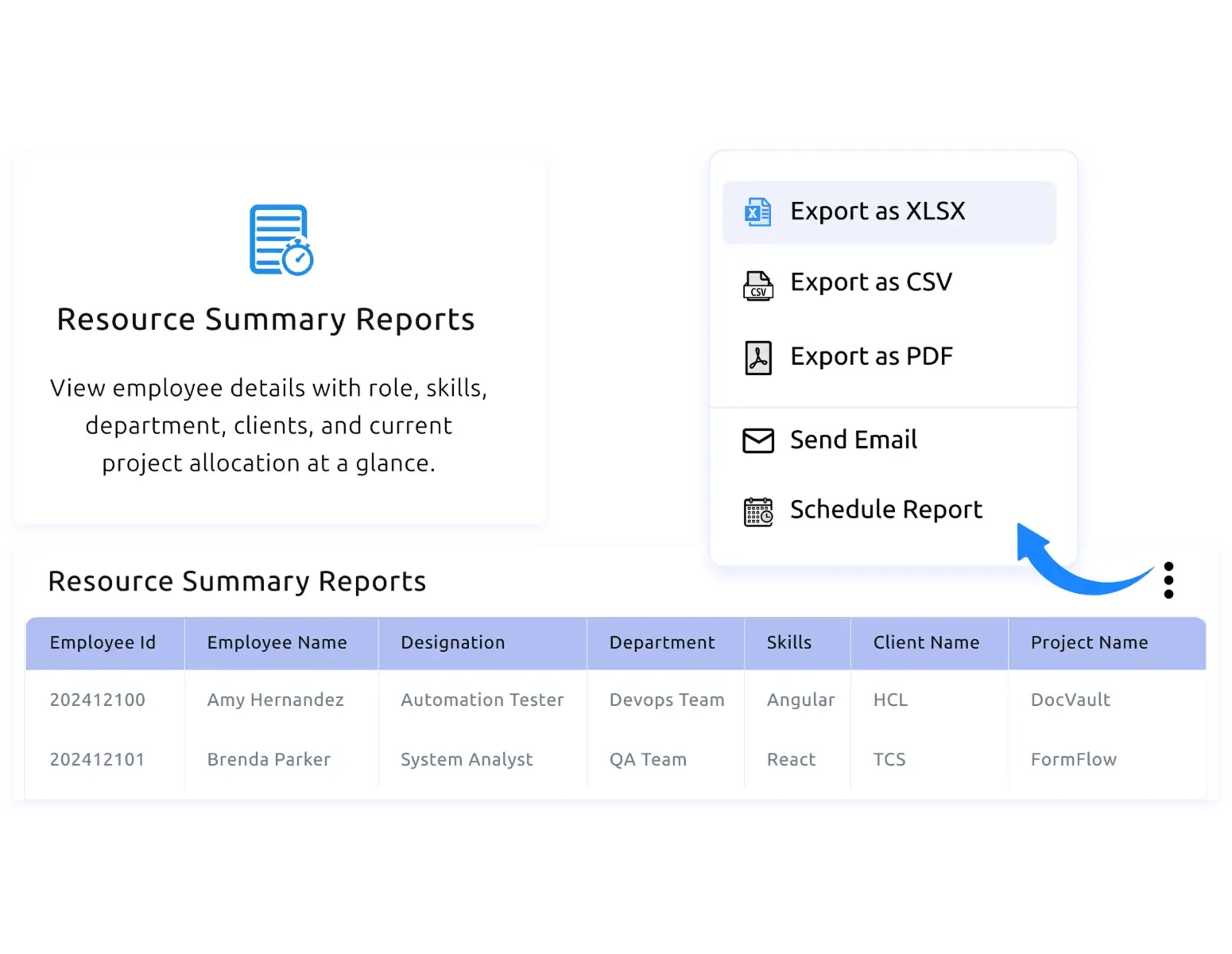
Download your usage reports as XLSX, CSV, or PDF, send them via email, or schedule automated delivery to keep your stakeholders informed.

Traditional App Tracking vs Time Champ's Apps & Website Usage Tracking

A clear comparison of what traditional app tracking misses and how Time Champ's apps and website usage tracking stand apart from that old approach.

Traditional App Tracking

  • icon
    Manual activity tracking is often inaccurate
  • icon
    No visibility into which apps are productive
  • icon
    Hard to know where work hours actually go
  • icon
    No way to group or categorize tool usage
  • icon
    Scattered data, no centralized view
  • icon
    Time-consuming manual reports
  • icon
    No real-time visibility into current activity

Time Champ's Apps & Website Usage Tracking

  • icon
    Automated tracking of every app and website in real time
  • icon
    Classify every app as productive, non-productive, or neutral
  • icon
    Shows the exact duration and percentage for every app and website used
  • icon
    Group apps into meaningful categories for deeper usage insights
  • icon
    Centralized dashboard with detailed activity logs for every employee
  • icon
    Export reports instantly as XLSX, CSV, or PDF with one click
  • icon
    Live dashboard refreshes every minute, showing what each employee is doing right now

Is Time Champ the Perfect Apps & Website Usage Tracking Software for Your Organization?

Absolutely. With Time Champ, many teams gained complete visibility into every app and website their employees used during work hours, without disrupting daily workflows. This helped organizations identify productivity gaps, reduce digital distractions, and make smarter decisions about how work time was being spent.

With Time Champ, organizations:

apps usage tracking
app website activity

Gained Full Visibility into App & Website Activity

Understood exactly which apps and websites employees used most, how long they stayed active, and whether that time contributed to productive work outcomes.

 non productive usage

Identified and Reduced Non-Productive Usage

Spotted non-productive app and website activity early, which helped managers take timely action, set clear usage boundaries, and redirect focus toward meaningful work.

workforce decisions

Made Smarter Workforce Decisions with Usage Data

Used detailed usage reports and productivity classifications to reallocate resources, optimize tool investments, and improve overall team efficiency over time.

How Time Champ’s Apps and Websites Usage Tracking Software Works
  • 1
    Create an Account
  • 2
    Add Your Team
  • 3
    View App & Web Usage Data in Real Time
  • 4 Analyze Activity Reports and Take Action
Create an Account

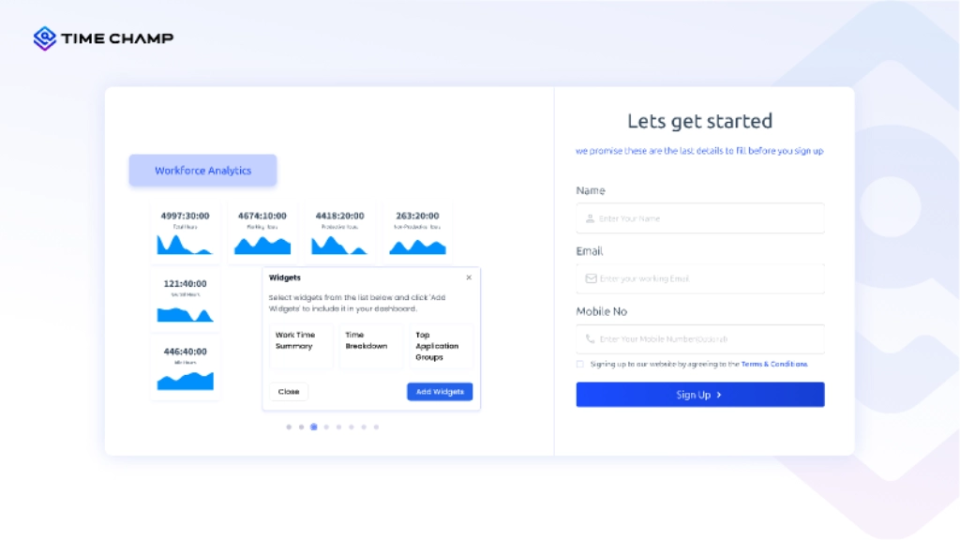
Sign up for Time Champ for free in seconds and set up your account instantly.

get started dashboard
Add Your Team

Invite your employees, assign roles, and configure access levels with ease.
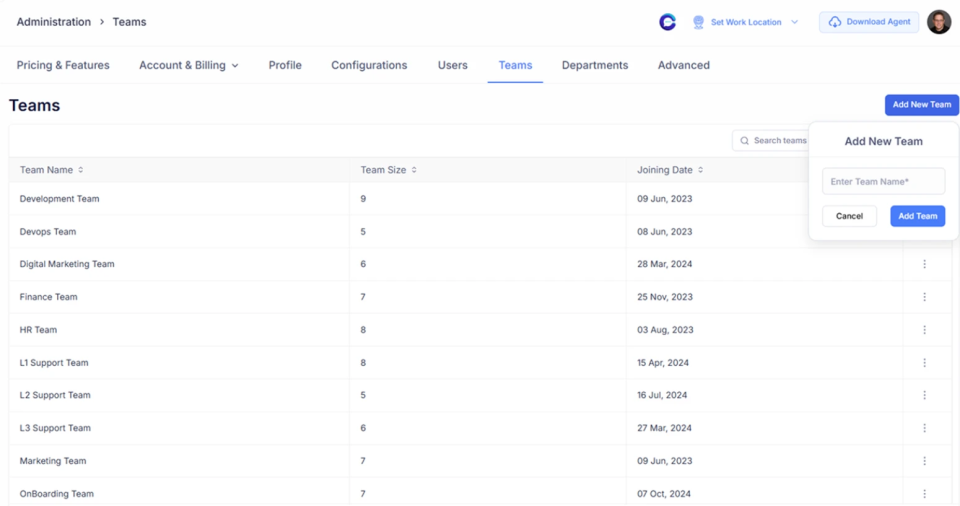
add your teams dashboard
View App & Web Usage Data in Real Time

See how apps and websites are used across teams, with clear visibility into focus levels, activity patterns, and workflow distribution.
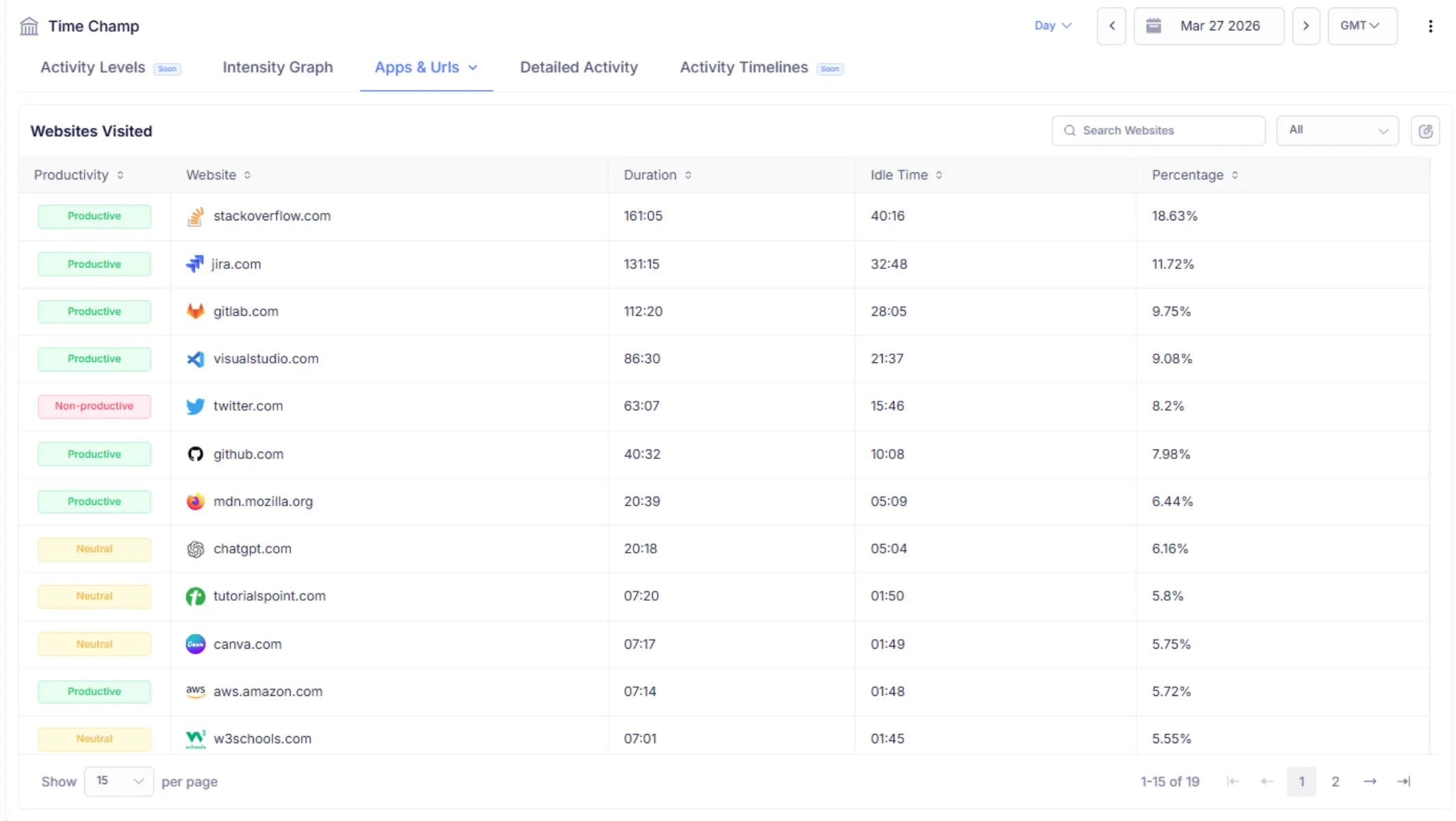
apps web usage data
Analyze Activity Reports and Take Action

Use activity reports to analyze the app & web usage, optimize workflows, improve productivity, and make confident, data-driven decisions.
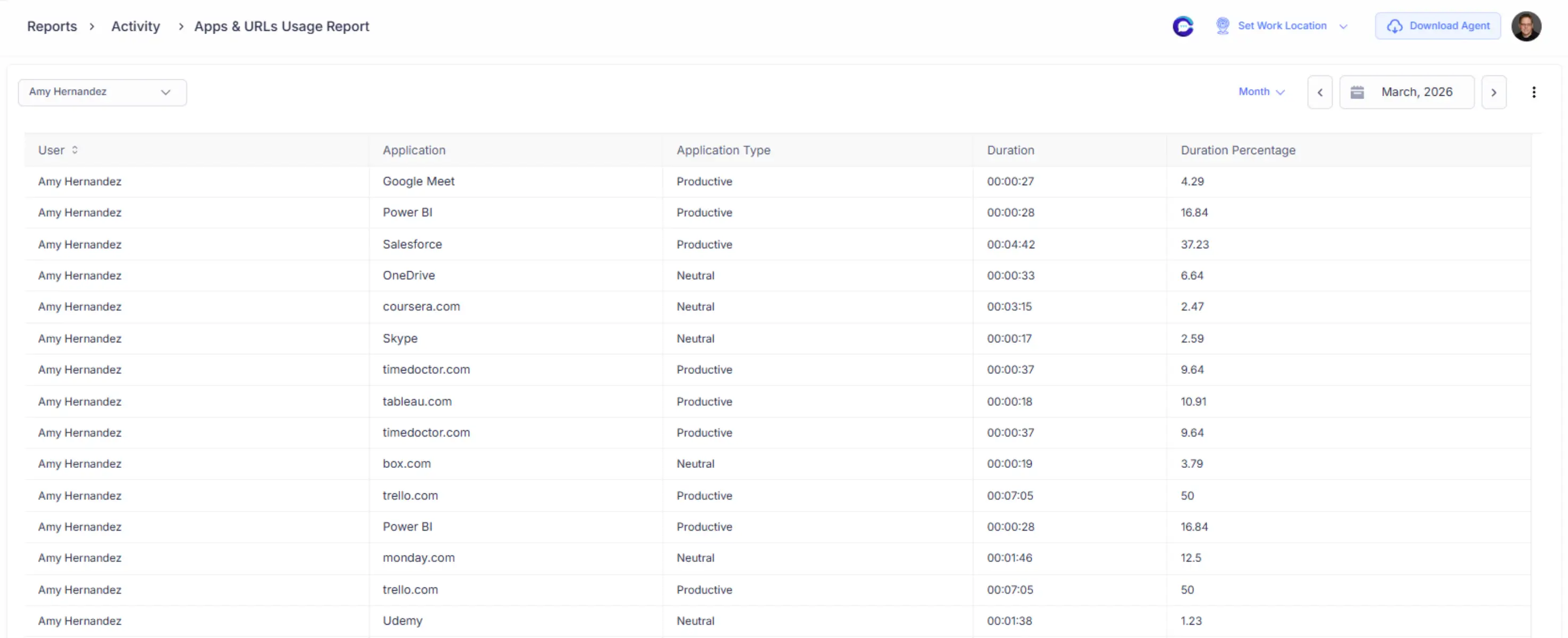
usage-report

Apps and Websites Usage Tracking Software Use Cases

application tracking icon

Real-Time App Usage Tracking

website monitoring icon

Detailed Website Visit Monitoring

application grouping icon

Application Category Grouping

activity tracking icon

Activity Intensity Visualization

digital activity tracking icon

Granular Digital Activity Drill-Down

live employee dashboard icon

Live Employee Status Dashboard

idle time detection icon

Idle & Away Time Detection

productivity-based usage icon

Productivity-Based Usage Classification

activity reports icon

Automated Report Export & Delivery

Real Results From Clear Visibility Into App and Website Usage

See How Organizations Improved Productivity With Time Champ

healthquist logo
90% boost in team productivity
Achieved faster and more accurate payroll
Improved visibility into performance and time usage
healthquist logo

Untracked work hours were hurting team productivity, but Time Champ gave us the visibility we needed. Since then, our employees’ focus has improved, and work delays have reduced.

Santhosh V
HR assistant
vserve icon
56% productivity increase 
32% boost in accountability 
Improved time management across the organization
vserve icon

Time Champ has significantly improved how we manage productivity, attendance, and time tracking. It’s affordable, effective, and we’ve already recommended it to others as a reliable all-in-one workforce solution.
Arun Raj
ages learning logo
Achieved up to 75% improvement in daily productivity 
Strengthened accountability with clear attendance logs
Smoother and faster scheduling
ages learning logo

Managing teams across locations has become so much easier for us. Clear reports and activity insights helped us focus on performance instead of chasing updates.

Arun
Operations Manager
centaur billing logo
29% increase in productivity
Improved work-life balance and time utilization
Strengthened data security and compliance
centaur billing logo

Time Champ gave us the customization we needed. Its reports and features are easy to use and have genuinely improved our team’s productivity.

Arwindham Aravazhi
Deputy Manager
milestone technologies logo
Up to 1,270 work hours saved with Time Champ
Better accuracy and efficiency in client billing
Improved overall productivity with easy scheduling
milestone technologies logo

Time Champ has been our trusted partner for 3 years. It simplified our operations, improved invoice accuracy, and strengthened client satisfaction. We love it.

Premish Paul
Executive Leader
billed right logo
20% Reduction in Time Wastage 
Saw a 15% increase in on-time task completion 
Saved 1–2 hours daily by reducing distractions. 
billed right logo

Time Champ helped us cut time wastage, improve focus, and support individual growth. Now our teams work better without constant oversight, and the results speak for themselves.

Kalyan
See Why Teams love Time Champ

The Ultimate Guide to Apps and Websites Usage Tracking Software

Guide Topics

    What is Apps and Websites Usage Tracking Software?
    App and website usage tracking software is a productivity intelligence solution that captures and analyzes how employees use applications and web platforms during work hours. It records usage duration, frequency, and active versus idle time to provide a clear, data-backed view of digital work behavior across teams.
    Rather than generating raw activity logs, this software structures usage data into meaningful insights. An effective app and website usage tracking system shows which tools support focused work, which interrupt workflows, and how time is distributed across applications and websites at individual, team, and organizational levels.
    Why Do Businesses Need App and Website Usage Tracking Software?
    Businesses need clear visibility into how apps and websites are used to improve productivity and efficiency. Here’s why:
    Visibility into Real Work Patterns: Understand how time is actually spent across apps and websites to replace assumptions with factual usage insights.
    Productivity Improvement Opportunities: Identify focus gaps, digital distractions, and inefficient usage patterns that impact daily productivity.
    Smarter Tool Utilization: Analyze app and website usage to optimize tool adoption, consolidation, and software spend.
    Support for Hybrid and Remote Teams: Maintain consistent visibility into digital work behavior across remote, hybrid, and distributed teams.
    Data-Driven Coaching and Planning: Enable objective coaching, workload balancing, and performance planning based on real usage data.
    Early Detection of Inefficiencies: Spot usage imbalances and workflow interruptions early to prevent productivity decline.
    What Features Are Included in Apps and Websites Usage Tracking Software?
    Application Configuration & Grouping Group applications by function to clearly expose where work time is being spent. This eliminates confusion caused by scattered tool usage, reduces unnecessary tool switching, and helps teams focus on applications that directly contribute to output.
    Category-Based Usage Intelligence Analyze app and website usage by categories to understand which types of work consume the most time. This insight enables teams to rebalance workloads, correct over-allocation, and ensure daily effort aligns with productivity priorities.
    Application & Website Usage Visibility Get a detailed list of applications used and websites visited, including time spent and idle periods. This visibility helps teams identify low-value digital activity, reduce distractions, and reinforce disciplined, focused use of work tools.
    Detailed Activity & Time Insights Use active and idle time data to uncover attention gaps, frequent interruptions, and multitasking overload. Addressing these issues improves task continuity, reduces workflow friction, and increases the quality of output.
    Usage Reports & Trend Analysis Generate daily and monthly app and URL usage reports to track trends, adoption, and behavioral changes over time. Historical insights allow teams to measure productivity improvements, assess the impact of workflow changes, and make informed planning decisions.
    Suspicious Activity Detection Identify abnormal patterns such as prolonged inactivity or irregular behavior early. This ensures data accuracy, maintains operational discipline, and protects productivity without relying on constant supervision or manual checks.
    What Are the Benefits of Using Apps and Websites Usage Tracking Software?
    App and website usage tracking software helps you turn digital usage visibility into measurable productivity improvements.
    Clear Visibility into Digital Work Apps and websites usage tracking software shows exactly how teams use applications and websites during work hours. It replaces assumptions with factual usage insights and reveals real work patterns across individuals and teams. This clarity gives organizations a reliable basis for improving productivity.
    Improved Productivity and Focus Teams use usage insights to identify distractions, idle time, and low-value digital activity. They reduce unnecessary context switching and workflow interruptions. This enables employees to stay focused on tasks that directly contribute to output.
    Optimized Tool Usage and Reduced Overload The software highlights which applications teams rely on and which remain underutilized. Organizations identify redundant tools and simplify their technology stack. This reduces tool overload and ensures digital tools actively support productive work.
    Better Workflow and Time Management Active and idle time insights expose workflow gaps and multitasking overload. Teams identify frequent interruptions that slow execution. Addressing these issues improves task continuity and overall efficiency.
    Objective, Data-Driven Decision-Making Managers use factual usage insights to support coaching and performance planning. Teams balance workloads more accurately and fairly. Leaders make decisions based on evidence rather than perception.
    Early Identification of Productivity Gaps Usage trends help teams spot inefficiencies early. Managers address productivity issues before they escalate. This proactive approach maintains consistent performance standards.
    Support for Hybrid and Remote Teams The software delivers consistent visibility into digital work regardless of location. Teams apply the same usage insights across remote, hybrid, and distributed setups. This supports accountability without physical supervision.
    Reliable Reporting for Reviews and Audits The platform generates structured reports on application and website usage for review and discussion. Teams share accurate data for operational analysis and leadership decisions. This ensures transparency and audit readiness.
    Can app and website usage tracking software generate detailed reports?
    Application and website usage reports give clear insights into how time is distributed across apps, websites, and work categories. You can see which tools drive productive work, which are time-consuming, and how usage patterns change over days or months. These insights help you identify dominant work patterns, focus gaps, tool usage levels, and inefficiencies affecting productivity.
    You can access application and website usage data through structured dashboards and downloadable reports that show app-wise and website-wise details. The data is available for daily and monthly analysis and can be exported for productivity reviews, leadership discussions, audits, and planning. This ensures you always have reliable, shareable insights to make informed decisions.
    What Industries Use App and Website Usage Tracking Software?
    Many industries use app and website usage tracking software to gain visibility into digital work patterns.
    IT Services and Software Development IT and development teams use app and website usage insights to analyze how time is distributed across coding tools, collaboration platforms, and research websites. This helps balance focused development work with meetings and support tasks, improving delivery efficiency.
    Marketing and Creative Teams Marketing and design teams rely on multiple tools for content creation, analytics, and collaboration. Usage insights help identify how effort is spread across creative work, planning, and analysis, enabling better workflow optimization and focus management.
    Finance and Accounting Finance teams use apps and websites usage tracking software to maintain focus during reporting, reconciliation, and compliance-related work. Clear visibility into tool usage supports accuracy, consistency, and efficient time management during critical periods.
    Customer Support and Operations Operations and support teams use usage insights to optimize tool usage across ticketing systems, communication platforms, and internal applications. This improves response efficiency, workload distribution, and overall service performance.
    Healthcare Administration Healthcare administrative teams use application and website usage data to understand how digital systems support scheduling, documentation, and coordination tasks. This helps improve operational efficiency while maintaining consistency and accuracy.
    Enterprises with Hybrid and Remote Workforces Organizations with distributed teams rely on apps and websites usage tracking software to maintain consistent visibility into digital work behavior. This supports productivity management and accountability across locations without physical supervision.
    What Is the Difference Between App Usage Tracking and Website Usage Tracking?
    App usage tracking and website usage tracking focus on different purposes in measuring digital productivity. Knowing the difference ensures more accurate usage insights.
    App Usage TrackingWebsite Usage Tracking
    Tracks time spent on desktop and system applications installedRecords time spent on browser-based websites and web applications
    Displays the active and idle time of each applicationShows visit duration and browsing behavior on websites
    Helps you understand how work tools support daily tasksHelps you understand how online activity supports or distracts from work
    Allows application and tool stack optimizationAllows minimizing digital distractions and unfocused browsing behavior
    Focuses on productivity within work applicationsFocuses on productivity within browser-based activity
    Do Apps and Websites Usage Tracking Software Tools Integrate with HR Systems?
    Apps and websites usage tracking software integrates with HR, payroll, attendance, and workforce management systems to provide a unified view of digital work. By connecting application and website usage insights with HR data, you align usage patterns with attendance, schedules, and workforce planning. This integration allows you to simplify reporting, reduce the need to manually match data, and facilitate informed decision-making. You gain a more complete understanding of how digital work activity fits into larger workforce processes without the need to replicate information across systems.
    Is Time Champ Apps and Websites Usage Tracking Software Secure?
    Time Champ’s apps and websites usage tracking software is designed with security and responsible data handling as its core. It ensures that application and website usage data is collected, stored, and accessed in a controlled and transparent way, supporting organizational policies without interfering with the everyday work.
    The platform restricts usage insight access to authorized users through role-based controls. Structured reporting, rule-based alerts, and suspicious activity indicators maintain data integrity and prevent misuse or misinterpretation of information. This gives you the productivity insights you need while keeping data secure and access controlled.
    As part of the Time Champ workforce intelligence platform, apps and websites usage tracking software balances visibility with trust. You gain the insights required to improve productivity while maintaining a secure, enterprise-ready environment that encourages ethical and compliant use of digital work data.

    Recognised for Excellence, Trusted by Teams Worldwide

    Time Champ's workforce intelligence software earns top ratings for helping teams work smarter with clarity, focus, and measurable growth.

    gridleader award timechamphigh perfomer timechampspring momentum awards timechampeasier todo awardasia high perfomer springmid market high perfomerhigh perfoemr smallhigh user adoption awardstimechamp awardsregional leader timechampasia pasific leadereasiestsetup timechamphigh perfoemr smallhigh perfomer timechampmidmarket leadermid market high perfomerhigh perfomer timechampmid market high perfomergridleader award timechamphigh perfomer timechampspring momentum awards timechampeasier todo awardasia high perfomer springmid market high perfomerhigh perfoemr smallhigh user adoption awardstimechamp awardsregional leader timechampasia pasific leadereasiestsetup timechamphigh perfoemr smallhigh perfomer timechampmidmarket leadermid market high perfomerhigh perfomer timechampmid market high perfomer
    stars
    g2 Logo stars

    4.8

    capterra logo stars

    5.0

    crozdesk logo stars

    5.0

    softwaresuggest logo stars

    5.0

    capterra logo google review logo g2crowd logo crozdesk logo company review logo
    star image 4.7/5 avg.

    Ready to Manage Your Workforce Smarter?

    Join our family of 1100+ companies using smart insights to redefine workforces!

    free trial available

    Free Trial

    no credit card required

    No Credit Card Required