The Role of Productivity Tracking in Remote Work Success
Understand the role of productivity tracking in remote work and how it improves team clarity, workload balance, and performance with real insights.

When your team works remotely, you lose the natural visibility that an office environment provides. You cannot easily see who stays focused, who handles too much work, or where work starts slowing down. Teams often rely on status updates, frequent check-ins, and assumptions. These approaches do not scale and do not give you the clarity needed to make fair, confident decisions.
This is where remote employee productivity tracking changes how you lead. Instead of constantly asking for updates, you see how work moves across your team, which tasks move forward, where your team spends time, and which patterns indicate potential issues early. This guide explains how tracking remote worker productivity helps you replace assumptions with visibility into how work moves, improve team visibility, and build a remote work system that supports consistent and measurable outcomes.
What Does Remote Work Success Actually Look Like in 2026?
Most teams still measure remote work success by output. Did your team complete the work? Did the numbers improve? These questions matter, but they only show part of the picture. A team can meet targets and still face burnout, lose alignment, or struggle to maintain consistency over time.
Remote work success in 2026 depends on multiple factors working together:
- Visibility: Work progress stays clear across the team without constant meetings or repeated follow-ups. This level of clarity makes it easier to identify issues early and respond quickly.
- Trust: Shared expectations and reliable data create a sense of accountability. Decisions rely on actual work patterns instead of assumptions.
- Alignment: Daily tasks connect directly to team goals and business outcomes. Priorities stay clear, and work moves in the right direction.
- Engagement: The team remains connected to the work and feels recognized for contributions. This helps maintain steady motivation over time.
- Well-being: Workloads stay balanced, and focus time remains protected. This reduces burnout and supports consistent performance.
- Output: Results remain measurable and consistent. Work quality and timelines stay predictable, which supports long-term growth.
When these elements work together, remote work becomes more stable, transparent, and easier to manage.
Why Does Remote Work Fail Without Productivity Tracking?
Remote work does not fail because of distance. It fails when there is no clear way to see how work moves, where time goes, and what needs attention. Without that clarity, decisions rely on assumptions, follow-ups increase, and small issues grow before anyone notices. Here’s where things start to break down:
1. Lack of Clear Visibility
Updates and messages fragment work progress across channels. It becomes difficult to track which tasks move forward and which ones slow down. This lack of clarity delays decisions and creates confusion around priorities. Over time, work loses direction and becomes harder to manage.
2. Overload Goes Unnoticed
You may assume tasks are evenly distributed, but actual effort shows a different picture. Without clear tracking, heavy workloads stay hidden until they affect performance. At the same time, gaps in capacity planning leave some team members with excess work while others have unused bandwidth. This imbalance increases pressure and affects consistency.
3. Too Many Check-Ins and Meetings
Frequent calls and status updates take over when there is no reliable data to refer to. Teams spend more time explaining work instead of progressing it. These interruptions break focus and reduce overall productivity.
4. Early Signs of Problems Get Missed
Small delays and drops in engagement often go unnoticed without visibility. These issues remain undetected until they affect delivery. By then, resolving them takes more time and effort than early action would require.
5. Trust Becomes Harder to Maintain
Unclear work patterns make it difficult to connect effort with outcomes. This creates gaps between expectations and actual work, leading to misunderstandings. Over time, this reduces confidence in how teams assess work and acknowledge contributions.
Lack of visibility makes remote work harder to manage and slows down decisions.
Try Time Champ to get clear insights into work, time, and team performance in one place.
How Does Remote Productivity Tracking Support Each Pillar of Remote Work Success?
Remote work does not break down because teams lack effort. It breaks when there is no clear system to connect daily work with outcomes. Productivity tracking fills that gap by giving you a consistent view of how work happens, where time goes, and what needs attention. When used correctly, it strengthens every pillar that defines remote work success. Here is how it supports each one:
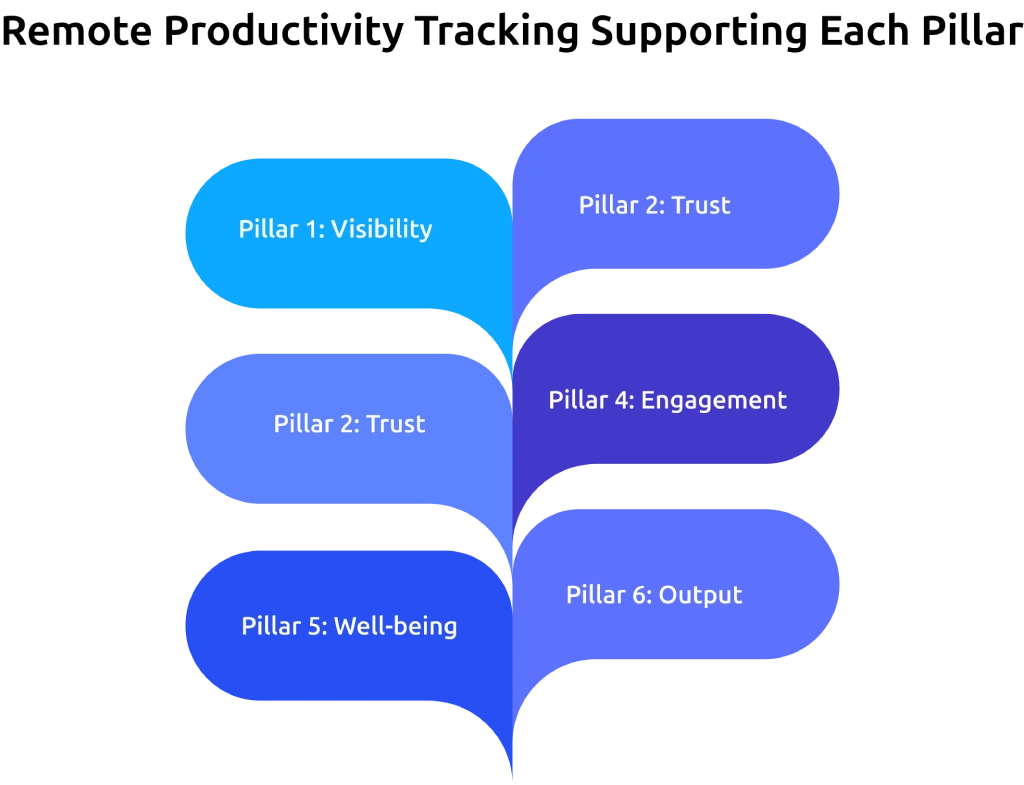
Pillar 1: Visibility - Replace the Office Walk-Around with a Dashboard
In an office setup, it was easier to understand how work was progressing by observing daily activity, ongoing tasks, and team interactions. Once work shifts to a remote environment, that direct line of visibility disappears. It becomes harder to know who is making progress, where work is slowing down, and where support is needed without relying on frequent updates.
Remote productivity tracking brings that visibility back in a structured way. It shows activity patterns, focus time, application usage, and task progress in one place. Instead of depending on constant check-ins to understand what is happening, you can quickly identify gaps and take action where it matters. This level of clarity helps you guide work effectively without relying on assumptions.
Pillar 2: Trust - Build It Through Two-Way Transparency
Trust in a remote team does not come from instinct. It develops when work stays visible through clear, shared data. When only you have access to productivity insights, the setup starts to feel unbalanced. You review the data, while your team completes the work without the same level of visibility. This gap creates confusion and weakens trust over time.
The shift happens when you give your team access to the same dashboard. Focus time, active hours, and output trends stay visible to everyone involved. This shared view turns productivity tracking into a system of mutual accountability. When both sides look at the same data, the conversation changes from "I need to know what you did today" to "Here is what the data shows, what do you need from me?"
Pillar 3: Alignment - Connect Daily Work to Bigger Goals
One of the most common problems in remote work is a gradual loss of direction. Work continues, your team completes tasks, but the overall effort does not lead to the outcomes your business actually needs. This kind of misalignment becomes harder to identify when there is no clear view of what your team works on each day.
An employee productivity tracker that links daily activity to team goals closes that gap. When your team sees how current tasks contribute to quarterly targets, it becomes easier to focus on the right priorities. This reduces the need for last-minute corrections and keeps work aligned with goals in real time rather than after misalignment has already cost the team time.
Pillar 4: Engagement - Catch Disconnection Before It Leads to Attrition
Remote work and employee engagement are closely linked. According to Gallup, about 31% of fully remote employees report being engaged, compared to 20% of fully on-site employees. This advantage holds only when work stays clear, structured, and visible.
Changes in engagement often appear in productivity data before they become obvious in daily work. A drop in active hours, reduced participation in communication, lower meeting involvement, or less activity in collaborative tools can signal early disengagement. With consistent tracking, these patterns become visible in time to take action. Early conversations help address issues before they grow and affect overall performance.
Pillar 5: Well-being - Use Workload Data to Prevent Burnout
Productivity tracking is not just a tool for measuring output. It also helps identify when the workload starts to exceed healthy limits. Around 47% of remote workers report blurred work-life boundaries, and burnout does not appear suddenly. It builds over time through late-night work patterns, missed breaks, excessive meetings, and long periods without focused work.
In many cases, these signs stay visible in work patterns for weeks before teams take action. Tracking workload distribution, after-hours activity, and meeting load gives a clear view of how sustainable the workload is. This makes it easier to rebalance tasks, protect focused work time, and provide support before pressure turns into burnout.
Pillar 6: Output - Measure What Your Business Actually Pays For
The biggest shift in remote work performance management is the move from measuring hours to measuring outcomes. Tracking time only shows how long work continues, but it does not explain what that time produces or whether it leads to meaningful business results.
A strong productivity tracking system captures task completion rates, goal progress, and output based on actual deliverables. This gives a clear view of what your remote team produces instead of how long they stay active during the day.
When you track outcomes instead of hours, evaluating performance becomes objective and consistent. Reviews rely on clear data, and expectations stay well-defined. This helps maintain consistent results and gives your team a better understanding of what strong performance looks like.
How Does Time Champ Support Remote Work Success?
Time Champ is employee monitoring software built for distributed teams that need clear visibility into how work happens. When you manage remote or hybrid teams, you get a unified dashboard that shows work patterns, app usage, focus time, and project progress across locations and time zones. It also captures data in offline mode, so async schedules and low-connectivity work sessions do not create gaps in reporting.
Time Champ goes beyond basic tracking by turning raw data into meaningful insights you can act on. Your team gets access to the same dashboard, which keeps visibility shared and improves accountability. Built-in workload signals highlight late-hour activity, workload pressure, and idle-to-focus patterns so you can identify risks early. Time Champ also integrates with Slack, Microsoft Teams, Jira, Trello, and Google Workspace, so tracking fits naturally into the tools your team already uses.
Conclusion
Productivity tracking plays a key role in making remote work structured, clear, and manageable. It helps you move beyond assumptions by showing how work progresses, where time goes, and what needs attention. With the right visibility, you can balance workloads, stay aligned with goals, and address issues before they affect results. When used correctly, productivity tracking supports a stable remote setup where work stays consistent, expectations remain clear, and outcomes improve over time.
Scattered data makes it hard to manage remote teams effectively.
Use Time Champ to see real work patterns and make confident decisions.

Thasleem Shaik


Table of Content
-
 What Does Remote Work Success Actually Look Like in 2026?
-
Why Does Remote Work Fail Without Productivity Tracking?
-
How Does Remote Productivity Tracking Support Each Pillar of Remote Work Success?
-
How Does Time Champ Support Remote Work Success?
-
Conclusion
Related Blogs

Struggling with remote work productivity challenges? Learn what’s slowing your team down and how to improve focus, communication, and performance.
Guna Lakshmi | Apr 15, 2026
Discover the top 20 productivity hacks to get more done, boost efficiency, and stay focused. Learn expert tips to maximize your workflow and results!
Thasleem Shaik | November 14, 2024
Elevate remote team productivity with streamlined tools like Slack and Trello, backed by regular virtual check-ins for seamless collaboration.
Mounika Sai | December 21, 2023
As an HR manager, you’ve likely seen how remote work is transforming the workplace. But the big question remains: How does working from home impact employee
Mounika Sai | May 30, 2023
New business and management techniques The modern workforce has quickly adjusted to remote working. Managing remote teams requires a different set of
Mounika Sai | January 11, 2024
Productivity Tracking Software helps remote teams stay on top, track progress, streamline workflows & boost efficiency effortlessly. Learn more!
Shabana Shaik | March 15, 2025


 4.7/5 avg.
Ready to Manage Your Workforce Smarter?
Join our family of 1500+ companies using smart insights to redefine workforces!

Free Trial
No Credit Card Required