Benefits of Productivity Tracking Software for Remote Teams
Boost remote team efficiency with productivity tracking software that tracks work hours, monitors tasks, and improves accountability for distributed teams.
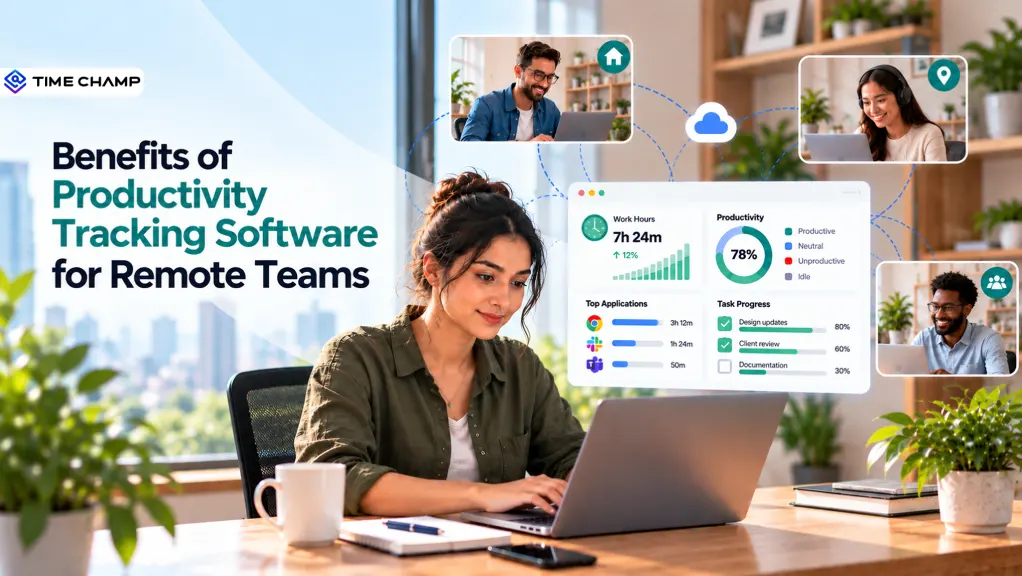
Remote work often feels like a black box, tasks get completed, but it’s not always clear how time is being spent or where bottlenecks are forming. You need clear visibility into daily work without creating a culture of constant monitoring. Productivity tracking software gives you a practical way to track work patterns, improve accountability, and support better team performance. It helps you focus on meaningful productivity insights while giving your remote employees the flexibility they need.
Here, you'll understand how productivity tracking can improve your remote team's performance. You'll also see the key benefits and features to consider when choosing the right software.
What Is Productivity Tracking Software?
Productivity tracking software is a digital solution that records work activity, time usage, task progress, and application behavior to provide visibility into how teams work. It helps you identify productivity patterns, manage workloads, improve efficiency, and support better performance across remote and distributed teams.
8 Benefits of Productivity Tracking Software for Remote Teams
Managing a remote team is more than tracking deadlines. You need clear visibility into work progress, time usage, and workload balance. Productivity tracking software helps you understand these patterns and improve planning and performance without micromanaging.
Here are the key benefits that give you visibility into progress, time usage, and workload balance.
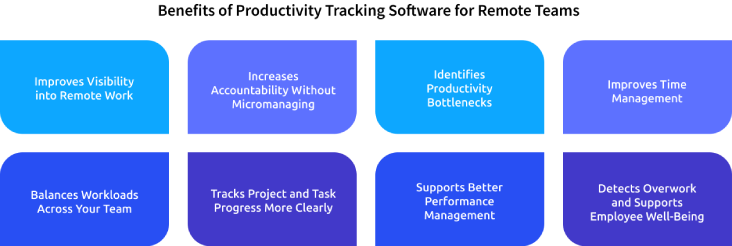
1. Improves Visibility into Remote Work
When your team works across different locations, it becomes hard to track progress without frequent check-ins. Productivity tracking provides a clear, centralized view of work hours, activity levels, task progress, and overall productivity trends, helping you stay informed in real time.
This visibility lets you quickly spot what is moving forward and where delays occur. You can then address issues based on actual work patterns without relying only on meetings, updates, or assumptions.

Did You Know?
Microsoft’s Work Trend Index found that 54% of hybrid managers said they had less visibility into employees’ work, compared with 38% of managers working in person. This visibility gap makes it harder to understand productivity across distributed teams.
2. Increases Accountability Without Micromanaging
Remote employees require autonomy, but you still need accountability. Productivity insights create a shared view of expectations, working patterns, task progress, and overall performance, helping teams stay aligned without constant supervision.
These insights help you address missed deadlines, workload issues, or productivity shifts with context, making conversations more constructive and reducing constant check-ins while effectively focusing on outcomes without constant oversight.
3. Identifies Productivity Bottlenecks
A productivity issue is not always caused by an employee. Slow processes, too many meetings, unclear priorities, frequent app switching, or task dependencies can all reduce output and create hidden inefficiencies in remote teams.
Tracking work patterns helps you identify bottlenecks. Repetitive tasks or frequent app switching highlight workflow issues, enabling you to streamline processes and address root causes without just pushing employees to work faster.
4. Improves Time Management
Remote teams often manage multiple projects, meetings, and deadlines at the same time. Without accurate time visibility, it becomes harder to know which activities consume the most working hours.
Time tracking compares planned work with actual time spent, helping you identify tasks that take longer than expected, remove inefficiencies, and improve future estimates. It also helps employees understand their work patterns and develop stronger time management habits for better productivity and overall efficiency gains.
5. Balances Workloads Across Your Team
Uneven workloads often go unnoticed in remote teams. One employee may be overloaded while another has spare capacity, yet both can appear equally busy during routine check-ins or status updates.
Productivity and workload insights help you spot these imbalances early. Reviewing work patterns, task progress, and working hours can help you redistribute responsibilities effectively, reduce repeated overtime, and ensure high performers are not overburdened.
6. Tracks Project and Task Progress More Clearly
Employee activity alone doesn’t show progress on key work. Linking productivity data with tasks and projects provides clearer visibility into real progress. This helps you understand what is truly being delivered.
You can track time spent on projects, spot delays, and identify where support is needed. This keeps work on schedule, clarifies priorities, and makes reviews more focused on actual outcomes.
7. Supports Better Performance Management
Performance reviews become more effective when supported by consistent data from daily work. Productivity tracking helps you understand performance patterns over time without judging employees based on a single deadline or isolated incident.
You can use these insights to recognize strong performance, guide coaching, and set realistic goals. You can compare productivity trends with workload and project demands for fair performance discussions.
8. Detects Overwork and Supports Employee Well-Being
Remote employees may work beyond their normal hours because the boundaries between work and personal time can become less clear. Without visibility, repeated overtime or unusual working patterns can be difficult to spot.
Tracking work hours and activity trends helps identify overwork early so you can review workloads, adjust deadlines, and offer support before it escalates. This helps to ensure a sustainable remote work environment and improves employee well-being and productivity.
Find it difficult to spot productivity gaps in your remote teams?
Track work patterns to improve focus, accountability, and output.
Key Features to Look for in Productivity Tracking Software
Choosing the right productivity tracking software can make managing your remote workforce much easier. You need tools that clearly show how work is progressing, where time is being spent, and where your employees may need support. The goal is to give you better visibility while keeping tracking simple and transparent.

Automated Time and Activity Tracking
Work hours, active time, idle time, and user activity are typically recorded without manual input. This reduces reliance on timesheets and provides a more consistent view of daily work patterns, which can support more informed planning and team management.
Task and Project Tracking
Tracked time is linked to specific tasks and projects, making it easier to see how work is distributed across the team. This connection helps you see work progress, surface delays earlier, and how much effort different projects require, which can support decisions around performance and resource allocation.
App and Website Usage Tracking
Workplace tool usage during working hours is often visible, offering insight into which applications support productivity and which may contribute to distractions. Over time, this can reveal workflow inefficiencies and patterns of unnecessary switching between tools.
Productivity Dashboards and Reports
Raw activity data is usually presented through dashboards and reports that highlight trends in an understandable format. These summaries make it easier to understand team performance, workload distribution, and overall progress. They are especially useful when reviewing performance, identifying resource gaps, and sharing data-driven updates with stakeholders.
Workload and Productivity Insights
Shifts in workload and productivity become more visible, including signs of overwork or unused capacity within the team. This type of insight is often used to balance responsibilities more evenly and reduce the risk of burnout or performance decline.
Integrations With Existing Tools
Connections with project management, HR, and communication platforms are commonly included. These integrations help you keep data aligned across systems and reduce the need for manual updates, while also linking tracked time to broader business processes such as payroll and project management.
Privacy, Security, and Employee Transparency
Data protection is typically supported through security measures and access controls, along with clear communication about what is being tracked. This transparency helps your employees understand how the system operates, which can support trust while still maintaining operational visibility.
How Time Champ Helps Remote Teams Track Productivity
Managing remote teams across locations makes it hard to gain real-time visibility into work patterns, productivity gaps, and workload balance without relying on manual tracking or constant check-ins. Time Champ is a workforce intelligence platform with built-in remote work monitoring features that brings time, productivity, attendance, activity, and workforce insights into one platform. It helps you understand how your remote team works, identify inefficiencies, and make better workforce decisions with real-time insights.
Here are the key features of Time Champ that help you track productivity, manage remote teams, and improve efficiency.
- Real-Time Activity Visibility: Shows how your remote team spends their workday across apps, websites, and tasks, helping you improve focus and fix productivity gaps quickly.
- Productivity and Work Pattern Insights: Breaks down productive, unproductive, and idle time so you can understand real work patterns and improve efficiency without guesswork.
- Automated Attendance and Work-Hour Tracking: Automatically tracks logins, breaks, and work hours, saving manual effort and ensuring accurate attendance records.
- Project and Task Time Tracking: Tracks time spent on each task and project, helping you manage resources better and meet deadlines easily.
- Workload and Idle-Time Visibility: Highlights idle time and workload imbalances so you can balance work better and remove bottlenecks early.
- Advanced Workforce Analytics: Turns productivity data into simple dashboards, helping you track performance and make smarter workforce decisions.
Struggling to track remote team productivity without micromanaging?
Use Time Champ to gain clear productivity insights to manage work better.
Conclusion
Managing remote teams effectively requires visibility into work patterns, productivity, workloads, and performance. The right productivity tracking software can help you gain these insights while reducing manual tracking and unnecessary check-ins. Choosing a solution with accurate time tracking, productivity reports, workload insights, task tracking, and strong privacy controls can support both business goals and employee trust. Now, assess your team’s current challenges and choose a solution that fits your workflow. Use the right productivity insights to improve accountability, balance workloads, remove bottlenecks, and build a more productive remote team.

Anjali

Table of Content
 What Is Productivity Tracking Software?
- 8 Benefits of Productivity Tracking Software for Remote Teams
- Key Features to Look for in Productivity Tracking Software
- How Time Champ Helps Remote Teams Track Productivity
- Conclusion

Related Blogs

Understand the role of productivity tracking in remote work and how it improves team clarity, workload balance, and performance with real insights.
Thasleem Shaik | May 01, 2026
Learn how time tracking improves remote team productivity through better visibility, accountability, performance tracking, and smarter team management.
Anjali | May 16, 2026
Learn how to monitor remote employees the right way, what to track, how to roll it out, and how to keep your team's trust through the whole process.
Thasleem Shaik | May 06, 2026
A practical guide to choosing productivity tracking software for your team, with comparisons of features, pricing, privacy, security, and rollout risks.
Jahnavi Pulluri | May 01, 2026
Boost remote team productivity with practical management tips, proven best practices, key metrics, and tools that help your remote teams perform better.
Anjali | Jul 16, 2026
Choose the right employee productivity monitoring software. A 2026 guide covering features, evaluation criteria, remote work needs, and rollout tips.
Jahnavi Pulluri | May 06, 2026


 4.7/5 avg.
Ready to Manage Your Workforce Smarter?
Join our family of 1500+ companies using smart insights to redefine workforces!

Free Trial
No Credit Card Required