How Time Tracking Improves Remote Team Productivity
Learn how time tracking improves remote team productivity through better visibility, accountability, performance tracking, and smarter team management.
Managing a remote team sounds simple until you realize how difficult it is to clearly understand what is happening throughout the workday. Some employees stay constantly active but struggle to deliver meaningful output, while others silently work overtime just to manage growing workloads and deadlines. Without clear insights, it becomes difficult to understand who needs support, where productivity is dropping, and whether your team is truly working efficiently or simply appearing busy online. That is why more companies are turning to remote team productivity tracking to improve visibility, accountability, and overall team performance without creating unnecessary pressure.
This guide explains how time tracking helps improve productivity in remote teams, what productivity tracking should actually measure, and the common mistakes businesses should avoid. You’ll also learn how to implement tracking in a way that supports employees, builds trust, and creates healthier remote work habits.
Why Is Remote Team Productivity Difficult to Measure?
Measuring productivity in remote teams becomes difficult once the everyday visibility of a physical office is no longer available to you. You cannot easily notice who is overloaded, who is distracted, or who is struggling with deadlines and burnout. In remote work environments, everyone can appear equally productive through messages, meetings, and online status updates, even when the actual workload and performance behind the scenes look completely different.
Remote work also removes many of the natural signals that you rely on to understand team performance. In an office, you can quickly recognize who is focused, who needs support, or who is constantly interrupted throughout the day. Remotely, most of those signals disappear, making it harder to identify productivity gaps, workload imbalance, disengagement, or burnout early enough to take action.

Did You Know?
A recent workplace study found that 58% of employees say leaders are only somewhat effective at managing distributed teams, highlighting how difficult it has become for managers to accurately understand productivity, workload, and employee well-being in remote environments.
What Does Time Tracking Measure in Remote Teams?
Time tracking is not about watching employees every minute of the day. Its real purpose is to help you understand how work time is spent, where productivity slows down, and what patterns affect team performance. Without focusing on constant monitoring, effective tracking helps you identify work habits, workload distribution, and productivity trends that are difficult to notice in remote environments.
Here are some of the key things time tracking helps measure:
- Productive and idle hours to understand how much time is actively spent on work.
- Focus time to identify uninterrupted work periods that support deep concentration and better output.
- Time spent on tasks and projects to understand which activities consume the most working hours.
- App and website usage to identify productive tools and unnecessary distractions during work hours.
- Workload distribution to identify employees handling excessive workloads and team members with available capacity.
- Attendance and work consistency to understand daily work patterns, shift adherence, and productivity trends over time.
The goal is not to judge employees based on isolated moments. Time tracking becomes useful when it helps you identify long-term patterns that improve planning, reduce burnout risks, and support better remote team performance.
Struggling to understand where remote work hours actually go?
Time Champ helps you track productivity, focus time, and workloads in real-time.
How Does Time Tracking Improve Remote Team Productivity?
Time tracking helps remote teams improve productivity by creating better visibility into how work hours are spent and where efficiency can be improved. This section explains how time tracking supports accountability, workload management, project planning, and overall team performance.

Creates Better Ownership of Work
Time tracking helps employees become more aware of how they manage their workday and prioritize tasks. This improves focus, reduces time wasted on distractions, and encourages greater responsibility toward deadlines and deliverables.
Helps Identify Productivity Gaps Early
Makes it easier for you to identify delays, workflow inefficiencies, and tasks that consume excessive time. This allows teams to resolve productivity issues before they start affecting project timelines and overall performance.
Improves Visibility Without Constant Monitoring
Offers better visibility into daily work patterns without relying on continuous follow-ups or micromanagement. You can understand team progress more clearly while employees continue working independently and flexibly.
Supports More Balanced Workloads
Helps you to identify the employees who handle excessive workloads and team members with available capacity. This supports fair work distribution, reduces burnout risks, and improves overall team efficiency.
Makes Project Planning More Accurate
Provides real-time insights into how long tasks and projects actually take to complete. This helps teams plan timelines more accurately, allocate resources effectively, and improve future productivity forecasting.
How to Implement Time Tracking in Remote Teams Without Losing Employee Trust
Implementing time tracking successfully depends on how openly and responsibly it is introduced to employees. When handled with transparency and clear communication, remote team productivity can improve without creating unnecessary pressure or trust issues within the team.
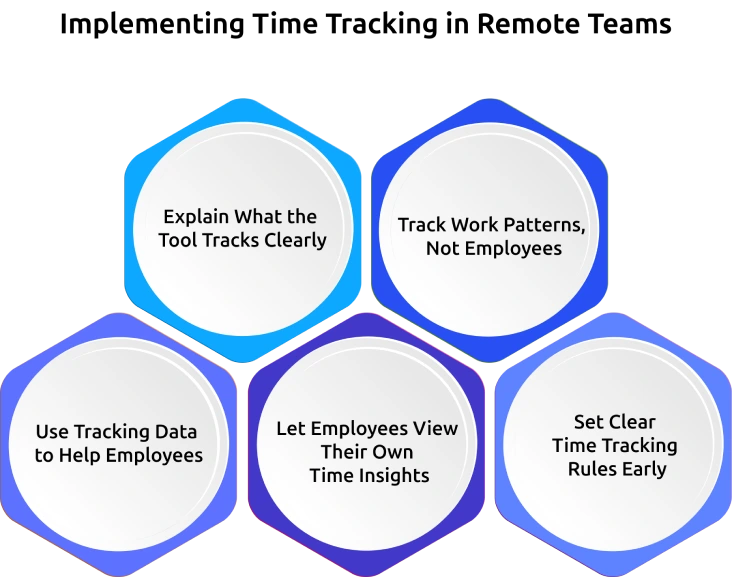
1. Explain What the Tool Tracks Clearly
Communicate clearly about what the tool tracks, what it does not monitor, and why the company is using it. Employees are more comfortable with time tracking when they understand it is meant to improve productivity, workload management, and team support.
2. Track Work Patterns, Not Employees
Use time tracking data to understand overall productivity trends, workflow efficiency, and workload balance across the team. Focusing on broader work patterns creates a healthier work environment than monitoring every individual action throughout the day.
3. Use Tracking Data to Help Employees
Use productivity insights to identify employees who may be overloaded, struggling with deadlines, or needing additional support. When employees see tracking data being used to improve workloads and work conditions, trust in the process increases naturally.
4. Let Employees View Their Own Time Insights
Give employees visibility into their own work hours, focus time, and productivity patterns. This encourages better self-management, improves time awareness, and helps employees optimize their daily work habits more effectively.
5. Set Clear Time Tracking Rules Early
Establish clear policies around how time tracking data will be used within the organization. Setting expectations early improves transparency, prevents misunderstandings, and helps employees feel more confident about the tracking process.
Common Time Tracking Mistakes That Hurt Remote Team Productivity
Time tracking improves productivity only when it is implemented with the right approach and clear communication. When companies use tracking incorrectly, it can create employee resistance, reduce trust, and make remote work management even more difficult.
1. Using Time Tracking as Surveillance
Constant monitoring, excessive screenshots, and activity-based pressure can make employees feel distrusted and stressed. Use time tracking to understand work patterns, improve productivity, and support employees without monitoring every minute of their day.
2. Not Explaining the Purpose Clearly
Introducing time tracking without explaining why it is being used often creates confusion and resistance within teams. Clearly communicate how tracking helps with workload management, productivity improvement, and better project planning to build employee trust from the beginning.
3. Tracking Data Without Taking Action
Collecting productivity data without using it to improve workflows or support employees reduces the value of time tracking. Use insights to identify delays, improve processes, balance workloads, and help employees work more efficiently.
4. Ignoring Employee Burnout Signs
Time tracking data can reveal employees consistently working overtime or struggling with excessive workloads. Ignoring these burnout warning signs can increase risk, so you should use tracking insights to redistribute work and encourage healthier work habits.
5. Relying on Manual Time Tracking
Manual time entries often lead to inaccurate reports, missed hours, and inconsistent productivity data. Using automated time tracking tools improves accuracy, reduces administrative effort, and provides more reliable productivity insights.
6. Using the Same Approach for Every Team
Different teams work differently, and a single tracking method may not fit every role or department. Customize time tracking settings based on workflows, responsibilities, and team requirements to create a more effective tracking process.
7. Implementing Tools Without Proper Planning
Rolling out a time tracking tool suddenly, without training or clear policies, can create frustration and poor adoption among employees. Introduce tools gradually, explain expectations clearly, and provide proper onboarding to make the transition smoother for remote teams.
How Time Champ Helps Improve Remote Team Productivity Through Time Tracking
Remote teams often struggle with limited visibility into work hours, productivity patterns, and workload balance, making it difficult to improve performance without constant follow-ups or manual tracking efforts. Time Champ is an employee monitoring software with a workforce intelligence layer that helps you manage remote work more effectively through smart time tracking, productivity insights, and real-time workforce visibility.
Time Champ helps remote teams automatically track productive and idle time, monitor app and website usage, analyze focus hours, manage attendance, and measure project and task time in real time. Features like automatic time tracking, idle time detection, productivity analytics, automated timesheets, workload insights, and detailed productivity reports help you clearly understand how work hours are being utilized across teams. The platform also helps identify productivity gaps, overloaded employees, workflow inefficiencies, and burnout risks before they start affecting overall performance. With real-time dashboards, activity insights, project-based tracking, location tracking, and geofencing features, teams can improve accountability, monitor field employee activities, distribute workloads more fairly, optimize work schedules, and make better productivity decisions without relying on manual reporting or constant supervision.
Want better visibility into remote team productivity without micromanaging employees?
Time Champ helps you track work transparently while improving accountability and workload balance.
Conclusion
Managing productivity in remote teams becomes difficult when you lack clear visibility into work patterns, workloads, and daily performance. Time tracking helps solve this challenge by providing accurate insights into how work hours are spent, where productivity gaps exist, and how teams can work more efficiently without constant supervision. When implemented with transparency and the right approach, remote team productivity improves through better accountability, balanced workloads, improved focus, and smarter project planning. More importantly, effective time tracking supports employees without creating pressure, helping you build healthier, more productive, and better-connected remote work environments over the long term.

Anjali

Table of Content
 Why Is Remote Team Productivity Difficult to Measure?
- What Does Time Tracking Measure in Remote Teams?
- How Does Time Tracking Improve Remote Team Productivity?
- How to Implement Time Tracking in Remote Teams Without Losing Employee Trust
- Common Time Tracking Mistakes That Hurt Remote Team Productivity
- How Time Champ Helps Improve Remote Team Productivity Through Time Tracking
- Conclusion



 4.7/5 avg.
Ready to Manage Your Workforce Smarter?
Join our family of 1500+ companies using smart insights to redefine workforces!

Free Trial
No Credit Card Required