What is Project Planning? Examples, Steps & Tools (2026)
Learn what is project planning: key components, examples, templates, strategies, benefits, challenges & tools to ensure project success and efficiency.

Every successful project begins with a clear plan. Whether you build software, manage construction work, launch a marketing campaign, or organize a business initiative, you need a structured way to define goals, assign tasks, and track progress. That process is called project planning. Most decisions about enterprise project management software hinge on integration depth more than feature count. For the broader picture across this topic, our best project management software guide brings the moving parts together.
When you plan your project properly, you reduce uncertainty and improve decision-making. Research from McKinsey and the University of Oxford shows that large IT projects run 45% over budget and deliver 56% less value than expected when planning and execution are weak. This statistic highlights why structured project planning is essential before starting any major initiative. Project planning helps you define goals, assign responsibilities, estimate costs, and create timelines that guide the entire project lifecycle.
In this blog you will learn what a project planning is, what are its key components, examples, templates, strategies, benefits, challenges & tools that help you complete projects successfully and efficiently.
What is Project Planning?
Project planning is the process of defining project goals, scope, tasks, timelines, resources, and risks before execution begins. It creates a structured project plan that guides your team through the entire project lifecycle, ensuring every activity aligns with the intended objectives and deadlines.
When you create a detailed project plan, you establish a clear roadmap for your team. This roadmap outlines what needs to be done, who will complete each task, and how long every stage will take. It also helps you anticipate risks, allocate resources effectively, and monitor project progress.
A study from the project management institute (PMI) found that organizations waste $122 million for every $1 billion invested in projects due to poor project performance and weak planning practices. This makes project planning as one of the most important factors in project success. Project planning also improves communication across your teams. When everyone understands their responsibilities, project objectives, and deadlines, your teams can collaborate more effectively and reduce misunderstandings.
Also read: 7 Free Project Planning Templates (Excel, Word & PDF)
Looking for a smarter way to plan and manage your projects?
Discover how Time Champ helps you improve project visibility, allocate resources effectively, and keep your team aligned.
Importance of Project Planning
Project planning plays a critical role in ensuring successful project execution. A clear project plan allows you to organize work efficiently, manage resources wisely, and keep your team focused on the project goals.
Ensures Clear Project Goals
A well-structured project plan helps you define clear goals and expected outcomes. When your team understands the project objectives from the beginning, everyone works toward the same direction and avoids confusion.
Improves Resource Management
Project planning allows you to allocate resources such as team members, tools, and budget more effectively. When you identify resource requirements clearly, you can prevent shortages, avoid overloading team members, and ensure every task has the necessary support.
Budget Overruns
Many projects exceed their budgets because teams fail to estimate costs properly during planning. Research from McKinsey found that projects can exceed budgets and schedules by 30% to 45% on average without strong planning and monitoring processes. Understanding project cost management helps you put the right controls in place from the start.
Strengthens Team Collaboration
A clear project plan helps you define roles, responsibilities, and deliverables for each team member. This clarity improves communication and helps teams collaborate more effectively, ensuring everyone understands their responsibilities. Learn more about how to define roles and responsibilities to keep your team aligned.
Improves Risk Management
Project planning allows you to identify potential risks early in the project lifecycle. When you prepare mitigation strategies in advance, you can address problems quickly and reduce the chances of major disruptions.
Keeps Project Timelines on Track
A structured project plan includes timelines, milestones, and deadlines that help you monitor progress. This structure allows you to track task completion and ensure that the project stays aligned with its schedule. A solid understanding of project timeline management helps you maintain visibility at every stage.
Want to keep every project organized and on schedule?
Use Time Champ to plan tasks, track progress, and deliver projects on time and successfully.
What Are the Key Components of Project Planning?
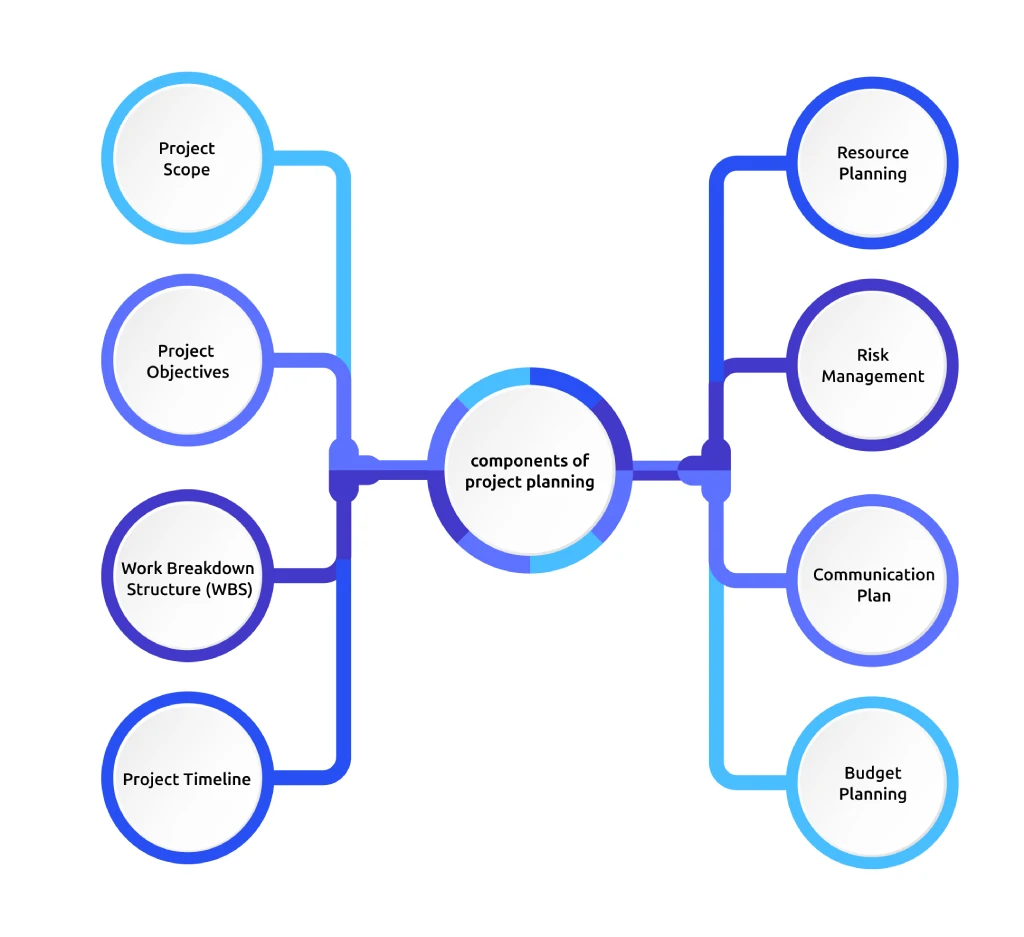
To execute a project successfully, you need a structured project plan that clearly defines goals, resources, timelines, and responsibilities. Each component of project planning helps you organize work, reduce uncertainty, and guide your team toward successful delivery. Below are the essential components you should include when building a strong project plan.
Project Scope
Project scope defines what your project will accomplish and what it will exclude. When you clearly define the scope in your project plan, you prevent unnecessary changes and keep the project aligned with its original objectives. A well-defined scope includes includes project deliverables, boundaries, and success criteria. Without a clear scope, teams often face scope changes, which can delay timelines and increase costs. You can use ready-made project scope templates to structure this effectively.
Project Objectives
Project objectives explain what you want to achieve through the project. Clear objectives help your team understand the purpose of the project plan and focus their efforts on achieving measurable results. To make objectives effective, you have to define them using the SMART framework (specific, measurable, achievable, relevant, and time-bound). This approach ensures that your project goals remain realistic and trackable.
Work Breakdown Structure (WBS)
A Work Breakdown Structure divides the project into smaller tasks and manageable activities. When you break large work into smaller parts, your project plan becomes easier to manage and track. This structure helps you assign responsibilities clearly and monitor task completion more efficiently. It also improves project visibility by showing how individual tasks contribute to the overall project outcome.
Project Timeline
A project timeline outlines when tasks should start and finish. Including a timeline in your plan helps you organize work phases, track progress, and maintain control over deadlines. A timeline includes milestones, task dependencies, and project phases. With a structured timeline, your team can monitor progress and quickly identify delays. Use project timeline templates to build yours faster and accurate.
Resource Planning
Resource planning identifies the people, tools, budget, and equipment needed to complete the project successfully. Once you define project resources clearly, every task receives the support it needs to move forward. Proper resource planning also helps prevent workload imbalance and ensures that your team can complete tasks efficiently.
Risk Management
Risk management prepares your project for potential challenges. When you include risk analysis in your plan, you identify possible issues early and develop strategies to minimize their impact. Projects often face risks such as delays, budget issues, or technical challenges, and managing them early helps keep your project on track.
Communication Plan
A communication plan defines how your team and stakeholders will share information throughout the project. Including a communication structure in your plan improves transparency and collaboration. This plan usually outlines reporting schedules, meeting frequency, and communication channels to ensure everyone in your team stays aligned with project goals.
Budget Planning
A clear budget within your plan helps you control expenses and prevent financial overruns. It allows you to estimate costs for resources, tools, and operations before the project begins. With proper budget planning, you can track spending throughout the project and make timely adjustments to keep the project financially on track.
What Are the Examples of Project Planning?
Real-world examples help you understand how organizations apply project planning across different industries. A structured plan helps you improve coordination, reduce delays, and achieve measurable outcomes. Here are some practical examples of project planning in action.
Software Development Project
A software company plans to launch a new mobile application within six months. The project team creates a detailed project work plan that includes:
- Product design phase (4 weeks)
- Development phase (12 weeks)
- Testing phase (6 weeks)
- Final release preparation (2 weeks)
Check out the best software development tools to support your software project planning effectively.
Construction Project Planning
A construction company plans to build a commercial office building over 18 months. The project planning process includes:
- Site preparation and permits
- Structural construction
- Electrical and plumbing installation
- Interior finishing
Large infrastructure projects often face delays if planning is weak.
Marketing Campaign Planning
A marketing team plans a 3-month product launch campaign that includes digital ads, social media promotions, and email marketing.
The project plan defines:
- Campaign budget ($50,000)
- Content production schedul
- Advertising platforms
- Performance metrics
Event Management Project
An event management company organizes a business conference for 1,000 attendees.
The project plan includes:
- Venue booking
- Speaker coordination
- Marketing promotion
- Registration management
- Event day logistics
Proper planning ensures the event runs smoothly and meets attendee expectations.
Ready to turn your project plans into successful results?
Time Champ helps you track tasks, monitor productivity, and keep every project moving forward.
How to Create a Project Plan?
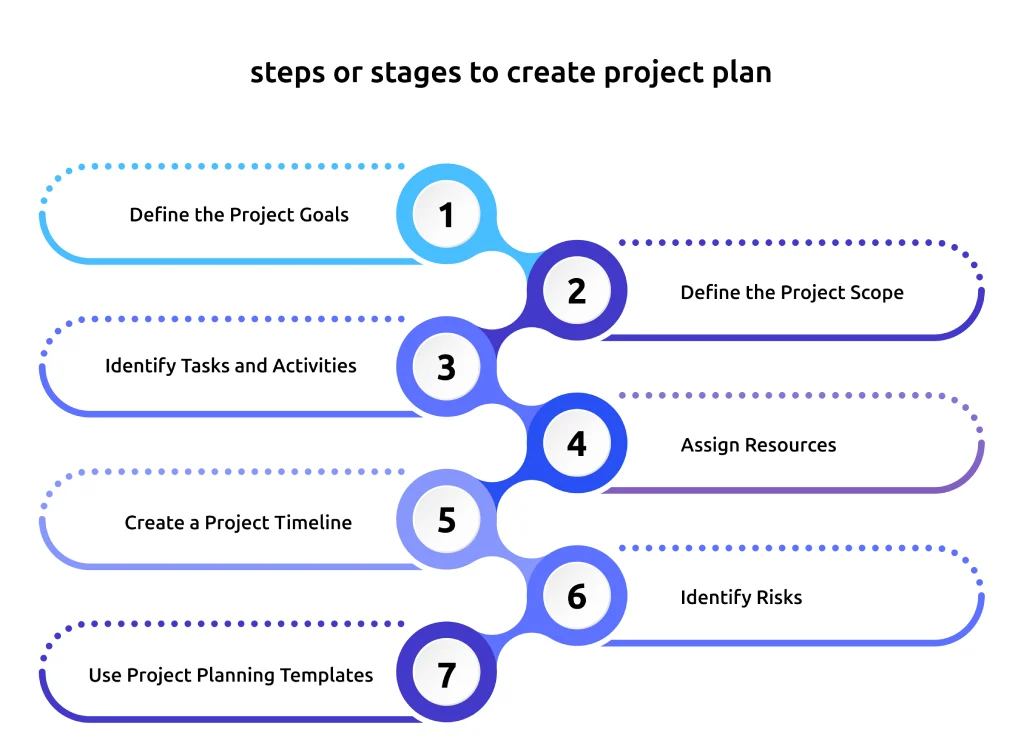
Creating a structured project plan helps you organize work, define responsibilities, and guide your team toward successful project completion. When you follow a systematic planning process, you can reduce risks and improve project efficiency. A well-prepared plan also helps you manage risks, control budgets, and monitor progress more effectively. Below are the essential project planning process steps you can follow.
Step 1: Define the Project Goals
Start by clearly defining what the project aims to achieve. Identify the problem you want to solve and the outcomes you expect.
Your goals should follow the SMART framework:
- Specific
- Measurable
- Achievable
- Relevant
- Time-bound
Clear goals help your team stay aligned throughout the project. When you understand the expected results, then you can prioritize tasks and make better decisions.
For example:
Don’t say like “Improve website performance”, a SMART goal would be: “Increase website traffic by 25% within six months.” This level of clarity makes it easier to measure project success.
Step 2: Define the Project Scope
Next, define the project scope to determine what work you will include in the project. This step helps prevent scope changes and keeps your project focused.
Your scope statement should include:
- Deliverables
- Project boundaries
- Key objectives
- Success criteria
When you define project scope early, it means you are creating a strong foundation for the rest of your project plan.
Step 3: Identify Tasks and Activities
Once you define the scope, break the project into smaller tasks using a work breakdown structure (WBS). This method divides complex work into manageable activities that your team can complete step by step.
For example, a product launch project might include tasks such as:
- Market research
- Product design
- Development
- Testing
- Marketing campaign preparation
Breaking tasks into smaller units improves clarity and makes it easier to track progress. It also helps you estimate timelines and resources more accurately.
Step 4: Assign Resources
Next, identify the people, tools, and budget required for each task. Assign responsibilities to team members based on their expertise, availability, and role within the project. Effective workload management helps reduce bottlenecks and improves workflow efficiency. When team members clearly understand their responsibilities, projects move forward more smoothly.
Step 5: Create a Project Timeline
Define the timeline for completing each task. Use milestones to track your project progress and ensure that they moves forward according to schedule. Many teams use Gantt charts, Kanban boards, or project calendars to visualize timelines and task dependencies. These tools help you see how tasks connect and identify potential delays before they occur.
Step 6: Identify Risks
Every project involves some level of uncertainty. During the planning stage, analyze potential risks that could impact your project.
Common project risks include:
- Resource shortages
- Budget constraints
- Technical issues
- Unexpected delays
- Communication gaps
Risk management is a critical part of project planning because it helps you prepare for challenges before they disrupt your project.
Step 7: Use Project Planning Templates
Using project planning templates simplifies the planning process and ensures consistency across projects.
A typical project planning template includes:
- Project overview
- Goals and objectives
- Task breakdown
- Timeline
- Resource allocation
- Budget estimation
- Risk management plan
These templates help you standardize planning and save time when managing multiple projects. They also make it easier for stakeholders to understand the project structure and track progress.
Which Common Strategies Improve Project Planning?
Strong project planning strategies help you manage complex work, align teams, and improve project outcomes. When you apply proven planning methods, you increase visibility into tasks, timelines, and resources. This clarity allows you to guide your team efficiently and keep projects moving in the right direction. Below are some effective project planning strategies you can apply.
Define Clear Project Objectives
Start every project plan with clearly defined objectives. When you establish specific goals at the beginning, your team understands what the project aims to achieve and how success will be measured. Clear objectives guide decision-making throughout the project lifecycle. They help you determine which tasks deserve priority and which activities contribute directly to the final outcome.
Break Work into Manageable Tasks
Large projects often become overwhelming when you try to manage everything at once. Breaking the project into smaller tasks makes the work easier to organize and execute. You can achieve this using a (WBS), which divides the project into smaller deliverables and activities. This method helps you identify all the work required to complete the project and ensures that no important tasks are overlooked.
Use Agile Project Planning
Agile project planning focuses on flexibility and adaptability. You can divide the project into smaller phases or iterations called sprints. Each sprint focuses on completing a specific set of tasks within a short period. Agile planning works particularly well for projects that involve changing requirements, such as software development, product design, or digital marketing campaigns. This allows your team to review progress frequently, gather feedback, and adjust priorities when necessary.
Prioritize Tasks Strategically
Not all tasks contribute equally to project success. Some activities directly impact project delivery, while others provide supporting value. Strategic task prioritization helps your team focus on high-impact work first. When you clearly identify which tasks require immediate attention, you prevent unnecessary delays and ensure important milestones are achieved on time.
Plan Resource Allocation Carefully
Effective resource planning ensures that the right people, tools, and budgets are available at the right time. When resources are poorly allocated, projects may experience delays, bottlenecks, or reduced productivity. During planning you should identify the skills required for each task and assign responsibilities accordingly. Matching tasks with the right expertise helps team’s complete work more efficiently and maintain quality standards.
Monitor Progress Continuously
Continuous monitoring helps you evaluate progress and ensure the project remains aligned with its goals. Tracking milestones, deadlines, and task completion allows you to identify potential issues early. When you detect delays or resource constraints quickly, you can adjust the plan before the problem escalates.
Use Project Planning Tools
Modern project planning tools make it easier to organize tasks, track timelines, and manage collaboration across teams. These tools provide visual dashboards that help you monitor project progress in real time. With digital planning platforms, you can assign tasks, update timelines, share documents, and communicate with team members from a single system.
Want a smarter way to apply these strategies in your daily workflow?
Time Champ helps you turn plans into action by tracking tasks and keeping your team aligned.
What Are the Benefits of a Project Planning?
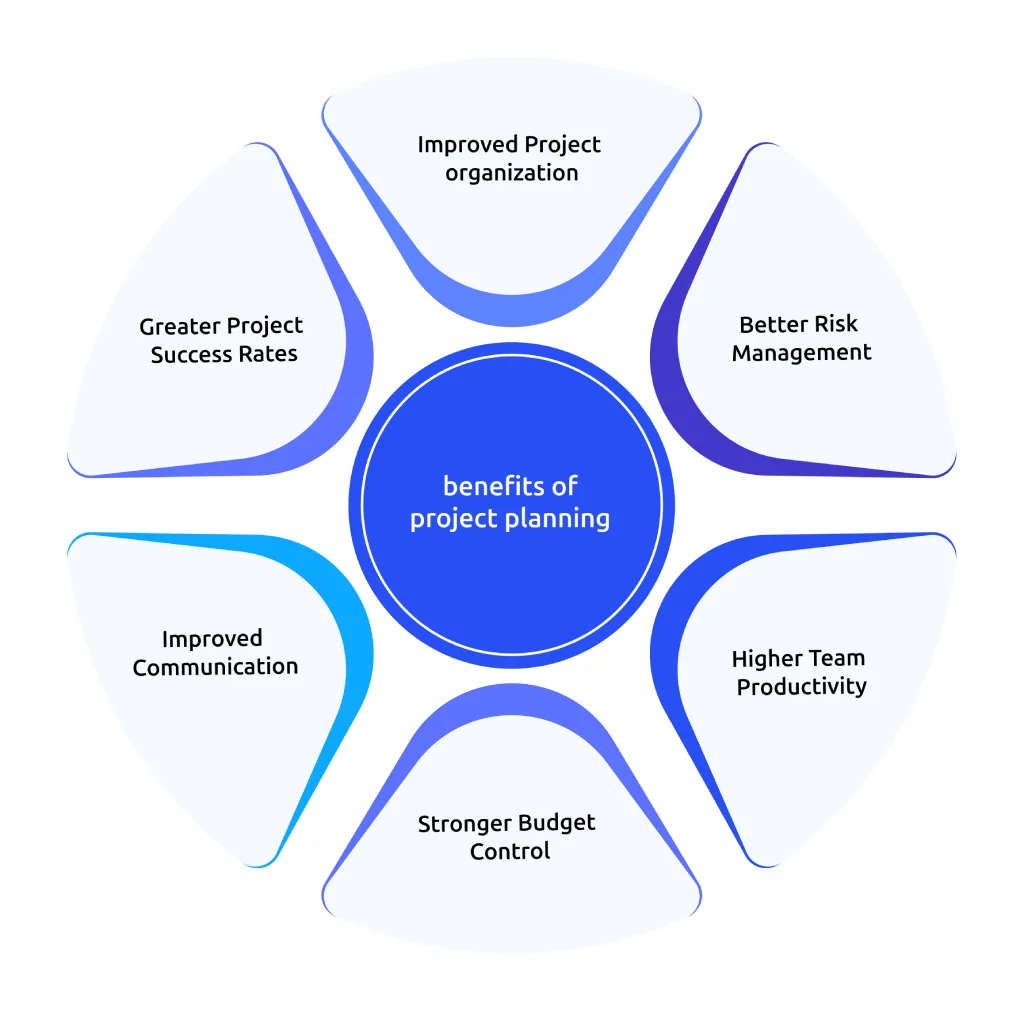
Effective project work planning provides several benefits that improve your project outcomes, team productivity, and overall organizational efficiency.
Improved Project organization
A well-structured project plan helps you organize tasks, timelines, and resources effectively. This clarity allows your team to understand what needs to be done and when. As a result, you can reduce confusion, avoid duplicate work, and keep the entire project workflow structured from start to finish.
Better Risk Management
Project planning allows you to identify potential risks before they become major problems. When you plan for risks early, you can create contingency strategies that minimize disruptions. This proactive approach helps you handle unexpected challenges without affecting project timelines or outcomes.
Higher Team Productivity
Clear planning reduces confusion and improves coordination among team members. When everyone understands their responsibilities, teams work more efficiently. This clarity helps you reduce delays and ensures your team focuses on completing tasks without unnecessary interruptions. Discover more strategies to improve employee productivity across your organization.
Stronger Budget Control
Project planning helps you estimate costs and monitor expenses throughout the project lifecycle. This financial visibility reduces the risk of cost overruns. With a well-defined project work plan, you can track spending regularly and ensure the project stays within the approved budget.
Improved Communication
A clear plan provides transparency across your teams and stakeholders. Everyone understands project goals, timelines, and responsibilities, which improves communication and collaboration. This shared understanding helps your teams resolve issues quickly and maintain alignment throughout the project.
Greater Project Success Rates
When you invest time in proper planning, you increase your chances of achieving better project outcomes. A structured project plan helps you deliver work on time and within budget while giving stakeholders clear visibility into project progress and direction.
What Are Common Challenges in Project Planning?
Even when you invest time in preparing a detailed project work plan, you may still encounter several challenges during the planning phase. Projects often involve multiple stakeholders, limited resources, and changing requirements, which can complicate the planning process. If you identify these challenges early, you can take proactive steps to manage them and keep your project on track. Here are some of the most common project planning challenges and ways you can address them effectively.
Unclear Project Requirements
One of the most common problems in project planning is unclear or incomplete project requirements. When stakeholders fail to define goals, deliverables, or expectations properly, your team may struggle to understand what the project actually needs to achieve.
Using workforce intelligence tools helps you track task progress, analyze team activity, and monitor work patterns, allowing you to identify gaps early and ensure your project plan stays aligned with project objectives.
Poor Resource Allocation
Poor resource allocation can slow down project progress and reduce productivity. When you assign too many tasks to some team members while others remain underutilised, it creates workflow bottlenecks and delays.
Workforce intelligence platforms provide insights into employee capacity, workload distribution, and productivity levels, helping you allocate resources more effectively and maintain a balanced workload across your team.
Scope Changes
Scope creep occurs when additional tasks or requirements are added to a project without adjusting timelines, budgets, or resources. Over time, these unexpected changes increase project complexity and may lead to missed deadlines.
Workforce intelligence solutions help you monitor project activities and track changes in workload, enabling you to detect scope changes early and adjust your project plan accordingly.
Ineffective Communication
Poor communication between stakeholders and team members can disrupt project planning and execution. Misunderstandings about priorities, responsibilities, or deadlines often result in errors and project delays.
Workforce intelligence platforms provide centralized visibility into tasks, progress updates, and team activity, ensuring everyone stays informed and aligned throughout the project lifecycle. Learn about the differences between formal and informal communication to build a stronger communication structure within your team.
Poor Risk Visibility
Projects can face unexpected risks such as resource shortages, technical issues, or external disruptions. Without proper visibility, these risks may affect project timelines and budgets.
Workforce intelligence platforms help you monitor team activity, identify potential delays early, and adjust your project plan proactively to reduce risks and keep the project moving forward.
How Does Project Plan Differ from Project Charter
Although both documents play an important role in project planning and implementation, they serve different purposes in the project lifecycle. A project charter gives formal approval to begin a project and defines its main purpose, while a project plan provides the detailed roadmap that guides how the project will be executed, monitored, and completed.
Understanding the difference between these two documents helps you organize project activities more effectively and ensures that both strategic direction and operational planning remain clear.
| Project Plan | Project Charter |
|---|---|
| Provides a detailed roadmap for executing and managing the project. | Formally authorizes the project and defines its overall purpose. |
| Includes detailed elements such as tasks, schedules, milestones, resources, budgets, and risks. | Provides a high-level overview of the project without operational details. |
| Created after the project charter is approved. | Created at the beginning of the project lifecycle. |
| Mainly used by project managers and team members to guide daily project activities. | Primarily used by executives, sponsors, and key stakeholders. |
| Contains scope definition, timelines, resource allocation, risk management plans, and communication strategies. | Includes the business case, project objectives, major stakeholders, and the assigned project manager. |
| Focuses on how the project will be executed and controlled. | Focuses on why the project exists and what it aims to achieve. |
| Updated regularly throughout the project as tasks, timelines, or risks change. | Usually remains stable once approved unless the project direction changes significantly. |
How to Choose the Right Project Planning Software
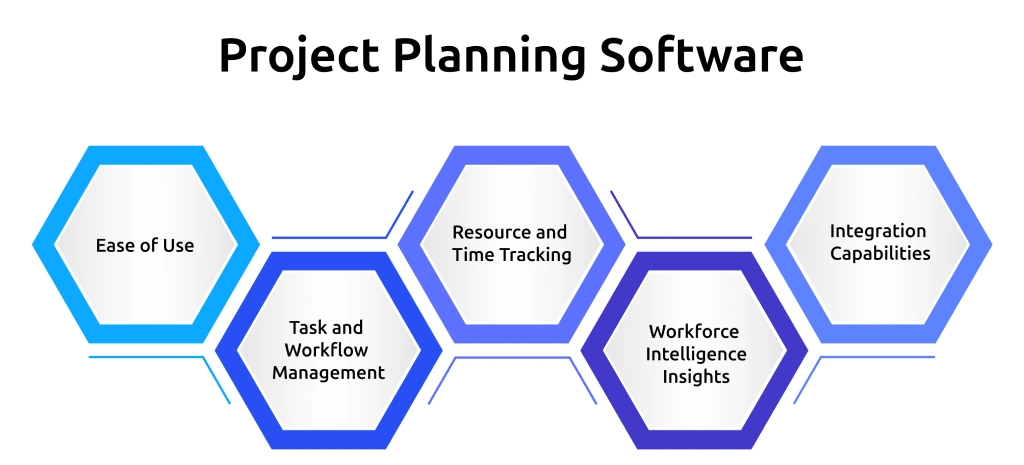
Choosing the right project planning software can significantly improve how you manage tasks, timelines, and team collaboration. Here are the key factors you need to consider while choosing a project planning software:
Ease of Use
Start with simplicity. Your project planning software needs to be easy for everyone on the team to understand and use. If the tool feels complicated, team members may avoid using it, which defeats the purpose. Look for a platform with a clean interface where you can quickly create tasks, assign work, and update progress without confusion.
Task and Workflow Management
Choose a tool that allows you to organize tasks and workflows effectively. Break projects into smaller tasks, assign responsibilities, and track progress through visual dashboards. Features like Kanban boards, task lists, and Gantt charts help you see what work is in progress, what is completed, and what tasks require attention.
Resource and Time Tracking
Effective project planning requires visibility into how your team spends time. Select software that provides time tracking and productivity insights so you can monitor workloads and allocate resources efficiently.
These insights help you identify bottlenecks and keep projects moving according to schedule.
Workforce Intelligence Insights
Modern project planning needs to go beyond basic task tracking. Many organizations now rely on workforce intelligence platforms to gain deeper insights into productivity and team performance.
For example, the Time Champ workforce intelligence platform gives you complete visibility into how your team works. You can track employee activity, monitor time spent on tasks, and analyze productivity trends across projects. These insights help you identify inefficiencies, balance workloads, and make better planning decisions.
Time Champ also provides real-time activity tracking, automated time tracking, and detailed productivity reports, allowing you to understand how work actually gets done across your projects. With these insights, you can plan tasks more accurately, set realistic timelines, and ensure your team stays focused on high-priority work.
Integration Capabilities
Finally, choose software that integrates with the tools your team already uses, such as communication platforms, file-sharing systems, and CRM tools. Strong integrations connect your workflows in one place, reduce manual data entry, and make your project planning process more efficient.
Conclusion
Project planning is the foundation for successful project execution. When you create a clear project plan, you can define goals, organize tasks, allocate resources, and guide your team toward completing the project efficiently. When you understand key components, follow a structured project plan, and apply the right strategies, you can reduce risks, improve collaboration, and keep projects on schedule. Using the right project planning tools and workforce intelligence insights further helps you monitor progress and make better decisions.
Looking for a smarter way to plan, track, and manage your projects?
See how Time Champ gives you the visibility and insights you need to keep every project organized and productive.

Table of Content
-
 What is Project Planning?
-
Importance of Project Planning
-
What Are the Key Components of Project Planning?
-
What Are the Examples of Project Planning?
-
How to Create a Project Plan?
-
Which Common Strategies Improve Project Planning?
-
What Are the Benefits of a Project Planning?
-
What Are Common Challenges in Project Planning?
-
How Does Project Plan Differ from Project Charter
-
How to Choose the Right Project Planning Software
-
Conclusion
Related Blogs
Explore 6 free project charter templates in Excel, Word, and PDF, including simple, agile, and six sigma formats for clear project starts.
Thasleem Shaik | November 07, 2025
Download 5 free Project Status Report Templates in Excel, Word, and PDF to track progress, spot risks early, and keep stakeholders aligned.
Tarun Kumar Reddy | Feb 11, 2026
Explore free downloadable goal-setting templates, including employee, smart, okrs, and project templates in excel, word, and pdf for goal tracking.
Jahnavi Pulluri | November 07, 2025
Learn what productivity intelligence is, why it's important, how it works, ways it transforms team performance, pros & cons, and how to measure it.
Shabana Shaik | Feb 11, 2026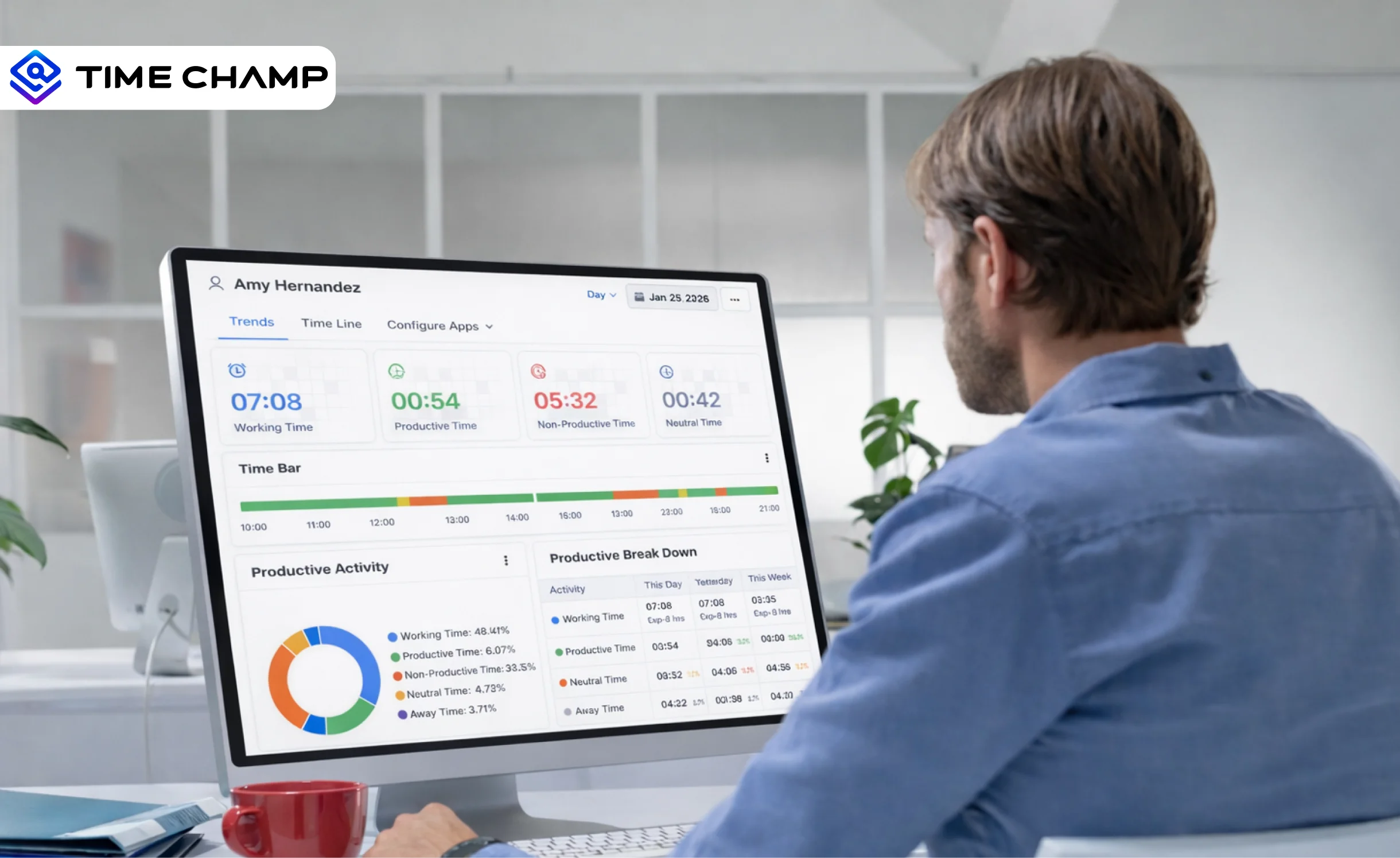
Discover what workforce intelligence is, why it's critical, real examples, implementation steps, key benefits, challenges & how AI transforms the future.
Guna Lakshmi | | Feb 11, 2026
Want to boost productivity? Uncover 20 time tracking best practices that can transform your workflow and help you achieve more with less effort.
Guna Lakshmi | July 01, 2025


 4.7/5 avg.
Ready to Manage Your Workforce Smarter?
Join our family of 1500+ companies using smart insights to redefine workforces!

Free Trial
No Credit Card Required