6 Free Project Scope Templates (Excel, Word & PDF)
Download free project scope templates in Excel, Word, and PDF to define requirements, avoid scope creep, and start projects with clarity easily.
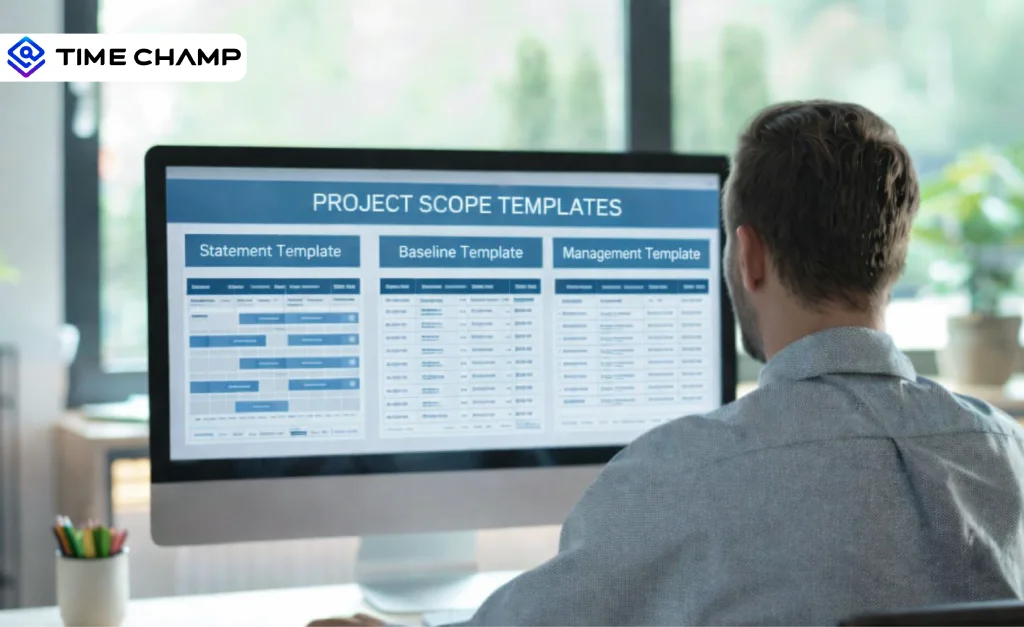
Are you searching for a well-structured project scope template to define your project clearly from the start? When a project begins without a well-documented scope, teams often face confusion, repeated revisions, missed deadlines, and scope creep. Many organizations begin with project charter templates and adapt them to their internal workflow. For the broader picture across this topic, our best project management software guide brings the moving parts together.
Using a clear project scope template helps you document requirements accurately, define deliverables upfront, and set clear boundaries before work begins. This clarity reduces rework, improves alignment, and keeps projects under control from day one.
In this blog, you’ll find 6 types of project scope templates that support effective project planning. Each template shows what to include and how to structure your project scope. Download each template for free in Excel, Word, or PDF to edit, share with stakeholders, and use it throughout the project.
What Are the 6 Types of Project Scope Templates?
A project scope template helps you clearly define what the project includes, what it excludes, and how to deliver the work. A well-defined project scope plays a critical role in project success. But many projects still go off track. According to project management success rate statistics, only 31% of projects meet time, budget, and scope goals, highlighting the need for clear scope documentation from the start.
Unclear project requirements often lead to scope creep and delays. The PMI Pulse report shows that poorly defined requirements remain one of the leading causes of scope creep in projects. Different project scope templates support you at various stages of a project. Some define requirements early, while others manage approved scope during execution. Understanding these types helps you choose the right template and maintain clarity throughout the project lifecycle.
Here are the 6 commonly used project scope templates:
- Project Scope Statement Template
- Project Scope Baseline Template
- Project Scope Management Template
- Software Project Scope Template
- ERP Project Scope Document Template
- IT Project Scope Template
1. Project Scope Statement Template
A project scope statement template helps you define a project in a clear, step-by-step way. Start by documenting the project’s objectives, then clearly specify what work you will include and exclude. You also list key project deliverables, assumptions, and constraints so every stakeholder understands the project boundaries before execution begins.
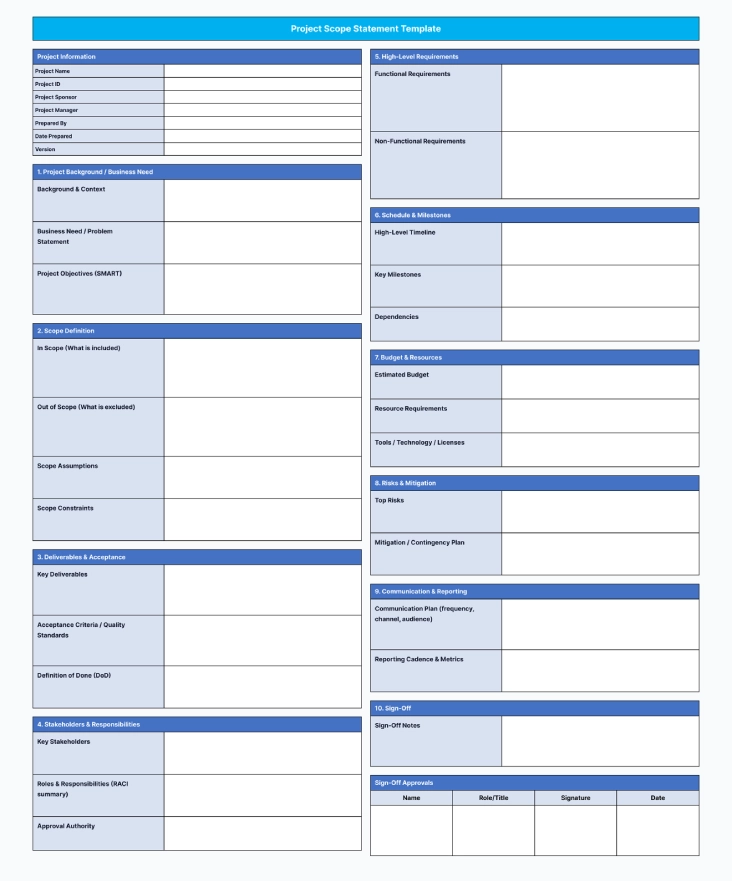
Use this template to maintain consistency between planned and actual work. It gives you a clear way to review scope requests and understand how changes may affect deliverables, timelines, and resources during execution.
Key Features
- Baseline Information: Records key project details such as project sponsor, manager, version, and baseline date for tracking and approval purposes.
- Project Objectives: Captures measurable goals so the team stays focused on the intended outcomes.
- Approved Deliverables: Lists the deliverables along with acceptance criteria and ownership to ensure accountability.
- Milestones & Dependencies: Defines key dates and dependencies to monitor progress against the baseline plan.
- Assumptions & Constraints: Documents what the scope depends on and the limitations that may impact delivery.
- Scope Exclusions: Clearly states what the project will not deliver to reduce scope creep and avoid misunderstandings.
- Baseline Sign-Off: Confirms formal approval from stakeholders before execution begins.
Best For
This template works best for projects that require strict scope control, involve client-facing deliverables, and include cross-functional teams. You can also use it for projects where you need to evaluate scope changes carefully to stay on schedule and within budget.
Keep Your Projects on Scope With Real-Time Workforce Visibility
Try Time Champ to see how your teams spend time across projects and catch scope drift before it impacts your timelines.
3. Project Scope Management Template
Effective scope management depends on well-defined processes. A project scope management template provides a structured way to define, validate, and control scope across the project lifecycle. It helps teams capture requirements clearly, define what the project includes and excludes, and manage scope changes without disrupting delivery.
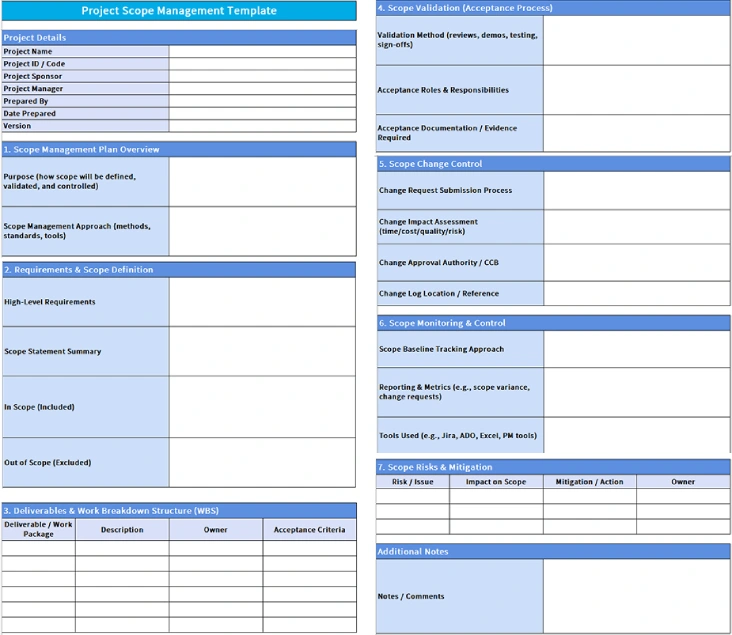
This template explains how teams manage scope during execution. It documents the scope validation process, change control steps, and tracking methods, making it easier to review requests, manage approvals, and keep the project aligned with the approved scope baseline.
Key Features
- Scope Planning Approach: Sets a clear method to gather requirements early and avoid confusion later.
- Scope Definition: Clarifies high-level requirements along with in-scope and out-of-scope items.
- Deliverables & Work Breakdown: Lists deliverables, owners, and acceptance criteria for better control.
- Scope Validation Process: Ensures deliverables meet quality standards before final approval.
- Scope Change Control: Controls scope changes by defining clear steps for review, approval, and tracking.
- Monitoring & Reporting: Tracks scope variance, change requests, and tools used for execution.
- Risks & Mitigation: Identifies scope-related risks and actions to prevent issues during delivery.
Best For
This template works best for complex projects, multi-stakeholder initiatives, agile or hybrid projects with evolving requirements, and organizations that follow formal governance and approval processes.
4. Software Project Scope Template
Software projects demand close alignment between business expectations and technical execution. A software project scope template gives you a clear structure to document what the software should deliver, how it should function, and which technical boundaries apply. This clarity helps you set expectations early and create a shared understanding before development begins.
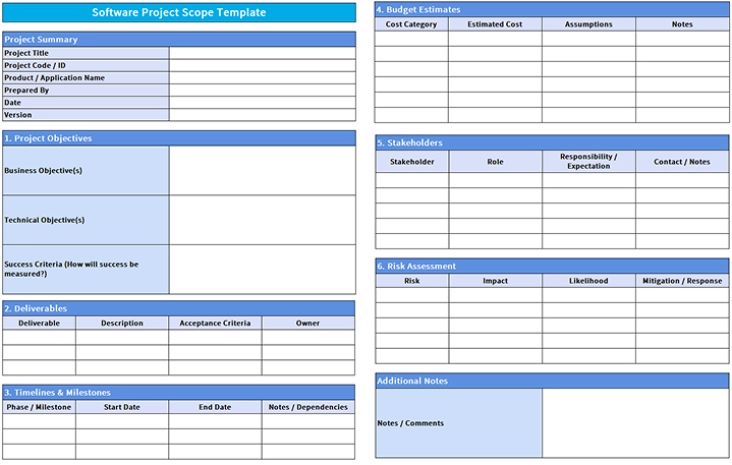
This template brings all key software requirements into a single reference, including functional needs, performance expectations, technical constraints, integrations, and delivery milestones. This level of clarity reduces misunderstandings, minimizes rework, and keeps developers, testers, and stakeholders aligned throughout development.
Key Features
- Business & Technical Objectives: Defines what the project must achieve from both business and development perspectives.
- Success Criteria: Specifies how you will measure success to keep delivery focused.
- Deliverables & Acceptance Criteria: Lists expected outputs along with quality requirements and ownership.
- Timelines & Milestones: Outlines phases, start and end dates, and key dependencies.
- Budget Estimates: Tracks cost categories, assumptions, and expected spend.
- Stakeholders & Responsibilities: Clarifies who owns what and what each stakeholder must deliver.
- Risk Assessment: Identifies risks early and includes mitigation plans to reduce impact.
Best For
This template works best for web applications, mobile apps, SaaS platforms, custom software development projects, and product-based engineering initiatives.
5. ERP Project Scope Document Template
An ERP project scope document template provides a structured way to outline and control scope across the organization. Start by identifying business processes and departments involved, then specify ERP modules, data migration requirements, system integrations, and change management activities to manage complexity effectively.
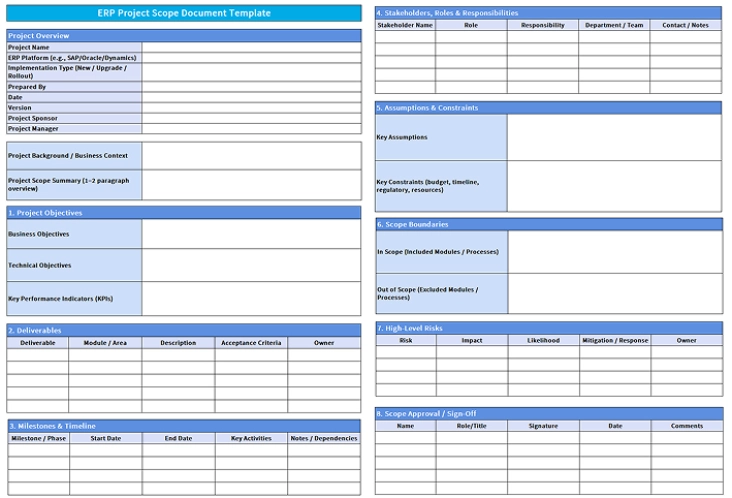
Use this template to document the full scope of your ERP implementation. It defines what the ERP system covers, who owns what, and what is out of scope. This clarity reduces risks and keeps all teams aligned during the rollout.
Key Features
- Project Overview & Business Context: States the ERP platform, implementation type, and the business problem the project will solve.
- Objectives & KPIs: Defines business and technical goals along with measurable KPIs to track success.
- Deliverables by Module/Area: Lists ERP deliverables with module ownership and acceptance criteria for clear accountability.
- Milestones & Timeline: Outlines key phases, start/end dates, dependencies, and major rollout activities.
- Stakeholders & Responsibilities: Documents stakeholder roles and responsibilities across departments and teams.
- Assumptions & Constraints: Records key assumptions and constraints like budget, timelines, regulatory needs, and resource limits.
- Scope Boundaries (In Scope / Out of Scope): Confirms which ERP modules or processes you include and which ones you exclude.
- High-Level Risks & Mitigation: Identifies major project risks and actions to reduce impact during implementation.
- Scope Approval & Sign-Off: Ensures formal stakeholder approval before execution begins.
Best For
This template works best for ERP implementations such as SAP, Oracle, Microsoft Dynamics, or NetSuite, as well as large-scale enterprise transformation and system modernization initiatives.
6. IT Project Scope Template
An IT project scope template defines the technical boundaries of an IT initiative. Begin by identifying the systems, infrastructure, and environments involved. Then document security requirements, dependencies, constraints, and post-implementation support expectations to keep the project aligned with business needs.
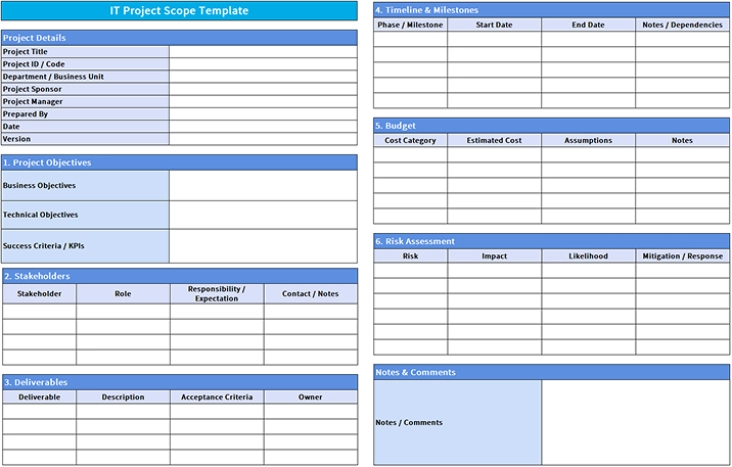
This template supports consistent scope documentation and control for technology-driven projects. Define the included systems, address risks with clear mitigation steps, and outline the required post-implementation support. These details minimize uncertainty, improve coordination between technical and business teams, and prevent scope-related issues during execution.
Key Features
- Project Objectives & KPIs: Defines business goals, technical goals, and success criteria.
- Stakeholders & Roles: Documents key stakeholders, roles, and responsibilities.
- Deliverables: Outlines deliverables along with acceptance criteria and assigned owners.
- Timeline & Milestones: Tracks project phases, target dates, and dependencies.
- Budget Estimates: Captures estimated costs along with assumptions and notes.
- Risk Assessment: Identifies risks and outlines mitigation steps.
- Notes & Comments: Records important project context and decisions for reference.
Best For
This template works best for IT infrastructure upgrades, cloud migration projects, system implementations, cybersecurity initiatives, and technology modernization efforts.
What Are the Pros and Cons of Project Scope Templates?
Project scope templates help you define project boundaries and maintain clarity throughout the project lifecycle. While they improve alignment and control, they also introduce certain challenges depending on project size, complexity, and flexibility needs. The table below outlines the key pros and cons of using project scope templates.
| Pros | Cons |
|---|---|
| Defines project boundaries by stating what the project includes and excludes. | Consumes upfront time because teams must gather details and document the scope accurately. |
| Strengthens stakeholder alignment by documenting shared goals and deliverables. | Loses value when teams fail to update the template after scope changes. |
| Prevents scope creep by recording approved requirements and exclusions early. | Slows projects that need rapid iterations and frequent adjustments. |
| Supports better planning by outlining deliverables, assumptions, and constraints. | Fails when stakeholders provide incomplete or unclear input. |
| Simplifies decision-making by providing a clear scope reference throughout the project. | Adds extra documentation work for small or low-risk projec |
How Time Champ Supports Effective Project Scope Management
Maintaining control over project scope during execution requires clarity into how work progresses across teams. With Time Champ, you clearly see how teams spend time across projects and stay focused on approved deliverables. Time Champ is a workforce intelligence software that brings clarity to how work flows across teams and projects, helping you identify misalignment early and keep execution aligned with the defined scope.
When new tasks, feature additions, or scope changes arise, Time Champ helps you make informed decisions based on real work patterns and workload distribution. You can assess the true impact of these requests before approving them, allocate resources more effectively, and reduce rework caused by unclear priorities. As a result, you protect timelines and budgets while maintaining control over project scope.
Conclusion
Clear scope documentation sets the foundation for successful project execution. The free project scope templates shared in this blog help you define requirements, set boundaries, and create alignment before work begins. By using these templates in Excel, Word, or PDF format, you can reduce rework, save planning time, and bring consistency to how projects start and move forward.
Once a project begins, maintaining scope requires ongoing visibility into how work progresses. Time Champ supports this by helping you see how teams spend time across projects and stay focused on approved deliverables. This visibility makes it easier to manage changes, protect timelines and budgets, and ensure projects stay aligned with the defined scope from start to finish.
Protect Your Timelines and Budgets With Smarter Oversight
Start using Time Champ to track real work patterns and make informed decisions when scope changes arise.

Sai Keerthi Uppala


Table of Content
-
 What Are the 6 Types of Project Scope Templates?
-
1. Project Scope Statement Template
-
3. Project Scope Management Template
-
4. Software Project Scope Template
-
5. ERP Project Scope Document Template
-
6. IT Project Scope Template
-
What Are the Pros and Cons of Project Scope Templates?
-
How Time Champ Supports Effective Project Scope Management
-
Conclusion
Related Blogs
Get 8 free pay stub templates with built-in calculators in Excel, PDF, and Word formats instantly. Customize as needed, save time, and simplify payroll.
Sai Keerthi Uppala | 25 November 2025
Discover resource planning templates for HR, projects, teams, and IT. Free downloads in Excel, Word, and PDF for efficient planning & how to manage it.
Thasleem Shaik | 30 October 2025
Access free downloadable Project Estimate Templates in Excel, Word, and PDF to plan costs, track budgets, and create accurate project estimates easily.
Thasleem Shaik | 03 November 2025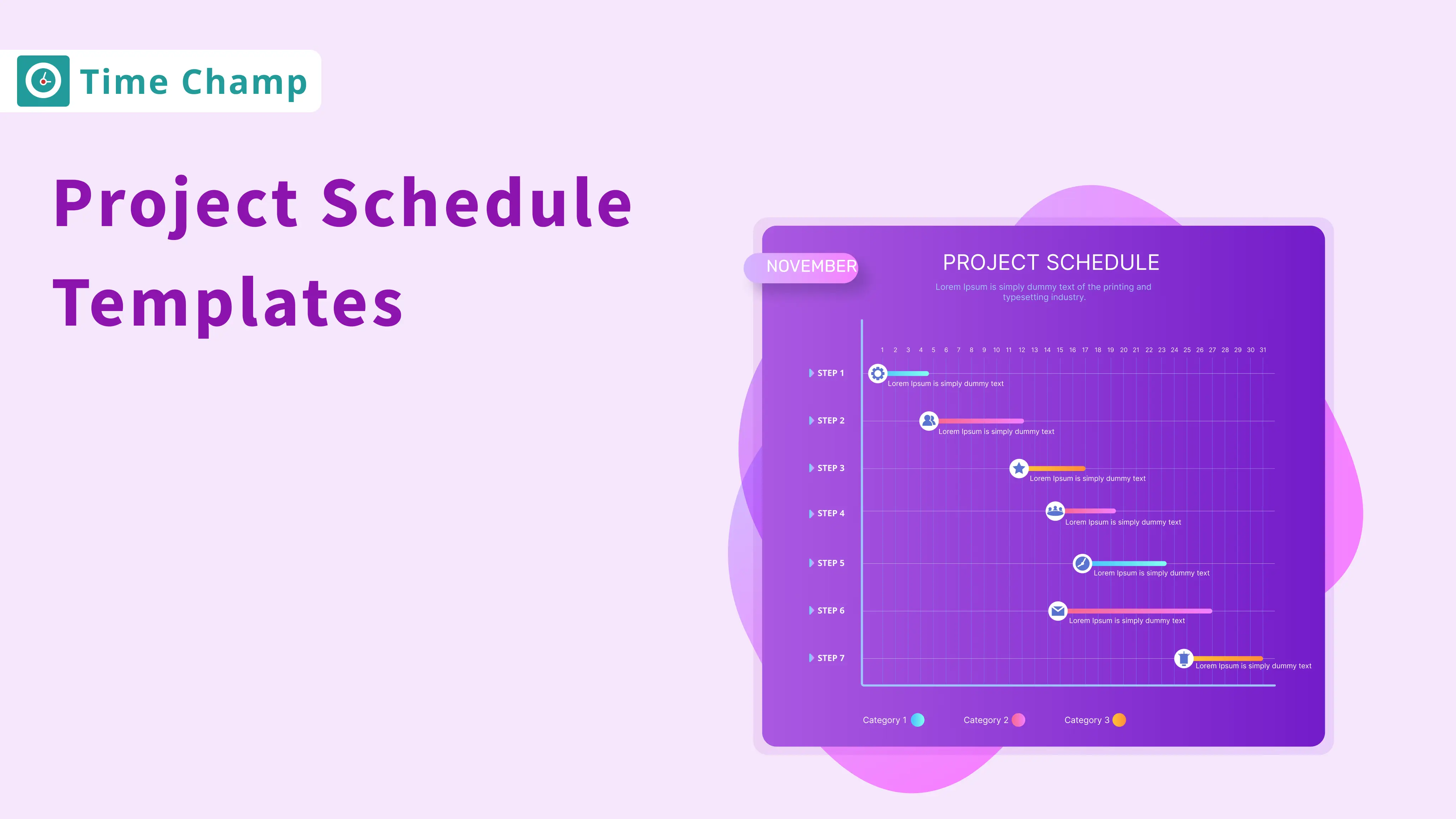
Explore 12 free project schedule templates in Excel, Word, and PDF, including simple, construction, tracking, timeline, and multi-project options.
Thasleem Shaik | 03 November 2025
Explore free downloadable sprint planning templates, including agile, scrum, weekly, and project templates in Excel, Word, and PDF for effective planning.
Guna Lakshmi | 07 November 2025
Explore 6 free project charter templates in Excel, Word, and PDF, including simple, agile, and six sigma formats for clear project starts.


 4.7/5 avg.
Ready to Manage Your Workforce Smarter?
Join our family of 1500+ companies using smart insights to redefine workforces!

Free Trial
No Credit Card Required