10 Workload Management Strategies to Prevent Burnout
Discover 10 proven workload management strategies to prevent employee burnout, improve productivity, and build a healthier workplace!

If your team is constantly racing behind deadlines, working overtime, or feeling overwhelmed, it's time to rethink how you distribute work. Effective workload management helps you assign tasks based on capacity, prevent employee burnout, and keep productivity on track.
To help you get started easily, we've gathered 10 proven workload management strategies that help you balance workloads, prevent employee burnout, and keep your team productive.
What Is Workload Management?
Workload management is the process of planning, prioritizing, and distributing work based on your team's capacity, skills, and deadlines. It helps you assign tasks fairly, prevent employee burnout, improve productivity, and complete projects on time without overloading your team. Regular workload reviews and timely adjustments help you create a more balanced, efficient, and sustainable workplace.

Did You Know?
Gallup found that 76% of employees experience workplace burnout, highlighting how common overload has become.
Why Workload Management Matters
Effective workload management benefits both your employees and your business. Here's why it matters:
- Prevents employee burnout by distributing work fairly across your team.
- Improves productivity by assigning tasks based on employees' skills, capacity, and availability.
- Helps meet deadlines through better planning, prioritization, and resource allocation.
- Maintains work quality by giving employees enough time to complete tasks without rushing.
- Boosts employee engagement as balanced workloads reduce stress and increase job satisfaction.
- Supports better teamwork by creating transparency and encouraging collaboration across teams.
- Reduces absenteeism and turnover because employees are less likely to feel overwhelmed or exhausted.
- Makes better use of resources by identifying underutilized employees and balancing workloads across the team.
- Enables faster decision-making with better visibility into team capacity and ongoing work.
- Creates a healthier work environment where employees can perform consistently without sacrificing their well-being.
Struggling to balance workloads across your team?
See how Time Champ helps you monitor team capacity, distribute work fairly, and prevent employee burnout!
7 Signs of Workload Imbalance and Employee Overload
Workload imbalance doesn't happen overnight. It often starts with subtle changes in employee behavior and performance before turning into burnout. Recognizing these warning signs early helps you take action, redistribute work, and support your team before productivity and well-being are affected.
| Warning Sign | What It Looks Like | What You Should Do |
|---|---|---|
| 1. Missed Deadlines | Employees who usually deliver on time begin missing deadlines or requesting last-minute extensions more frequently. | Review their workload during a one-on-one meeting and identify tasks that can be reprioritized or reassigned. |
| 2. Declining Work Quality | You notice more mistakes, customer complaints, rework, or a drop in attention to detail. | Assess whether the employee is overloaded and reduce or redistribute work where needed. |
| 3. Longer Working Hours | Employees regularly start early, stay late, or work on weekends just to keep up with their workload. | Reevaluate task assignments and encourage healthy working hours before overtime becomes the norm. |
| 4. Reduced Communication | Team members become less active in meetings, respond slowly to messages, or avoid collaboration. | Schedule a personal check-in to understand whether workload or stress is affecting communication. |
| 5. Increased Sick Days | Frequent unplanned absences or recurring sick leave may indicate physical or mental exhaustion. | Have a supportive conversation, review their workload, and offer flexibility if needed. |
| 6. Irritability and Shortened Patience | Employees become easily frustrated, defensive, or less patient with coworkers and clients. | Address the workload first before discussing performance or behavioral concerns. |
| 7. Top Performers Stop Volunteering | Employees who previously took initiative stop offering help or avoid taking on additional responsibilities. | Review workload distribution across the team to ensure work is shared fairly and consistently. |
10 Workload Management Strategies to Balance Your Team's Workload
Managing workloads effectively is about making sure your team has enough time, resources, and capacity to do their best work. The right workload management strategies help you prevent burnout, improve productivity, and keep projects on schedule. Here are 10 proven strategies you can start implementing to create a more balanced and efficient workplace.
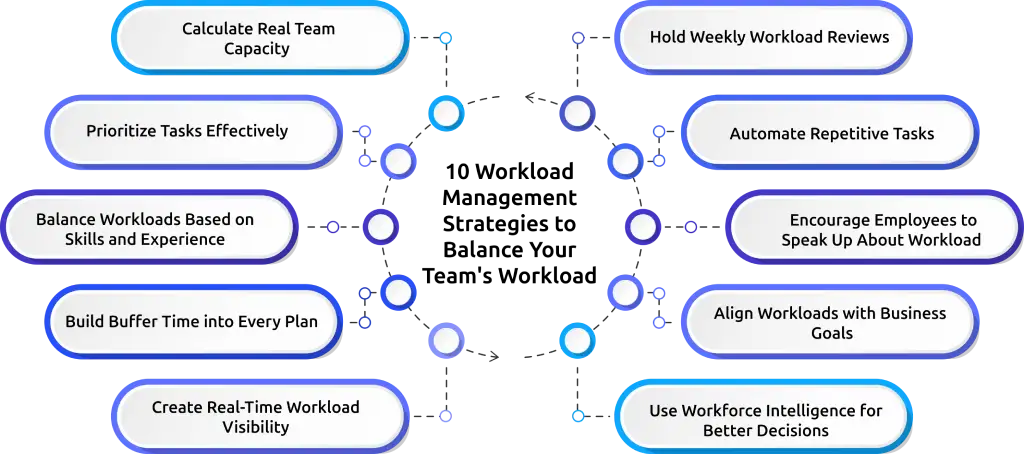
1. Calculate Real Team Capacity
Before assigning work, understand how much work your team can realistically handle. Consider meetings, leave, administrative tasks, and unexpected interruptions instead of assuming everyone is available for a full 40-hour workweek. Planning around actual capacity helps you distribute work fairly and prevents employees from becoming overwhelmed.
2. Prioritize Tasks Effectively
Not every task deserves the same level of attention. Use prioritization methods like the Eisenhower Matrix to separate urgent work from important work. This allows your team to focus on high-value activities while reducing unnecessary distractions. A clear prioritization process minimizes confusion and keeps everyone aligned on the tasks that deliver the greatest impact.
3. Balance Workloads Based on Skills and Experience
Assign tasks based on each employee's skills, experience, and current workload instead of dividing work equally. Matching the right person to the right task improves efficiency, reduces errors, and keeps projects moving smoothly. It also gives employees opportunities to develop new skills without feeling overwhelmed.
4. Build Buffer Time into Every Plan
Unexpected requests, urgent tasks, and project delays are inevitable, so avoid scheduling your team's capacity to 100%. Leave 10-20% of the schedule open to handle unforeseen work without disrupting deadlines. Buffer time helps you maintain productivity while reducing stress and overtime. It also gives your team the flexibility to adapt to changing priorities without compromising the quality of their work.
5. Create Real-Time Workload Visibility
You can't balance workloads effectively if you don't know who's overloaded and who has available capacity. Use dashboards or workload management tools to track assignments, deadlines, and team availability in real time. This visibility helps you identify bottlenecks early and redistribute work before it impacts performance. Regularly monitoring workload trends allows you to make proactive adjustments before small issues become major challenges.
6. Hold Weekly Workload Reviews
Regular workload reviews help you stay ahead of changing priorities and potential bottlenecks. Use weekly check-ins to discuss progress, identify challenges, and adjust task assignments when necessary. These conversations ensure workloads remain balanced and everyone stays aligned on team goals. Regular reviews make it easier to resolve workload issues early instead of reacting after deadlines are missed.
Did You Know?
80% of employees say a heavy workload, stressful jobs, and long work hours are the biggest obstacles to improving their well-being.
7. Automate Repetitive Tasks
Identify automatic and repetitive tasks like reporting, data entry, scheduling, or routine approvals. Reducing manual work frees up your team's time for more meaningful, high-impact activities. Even small automations can improve efficiency and reduce unnecessary workload over time. Over time, automation helps improve productivity without increasing your team's workload.
8. Encourage Employees to Speak Up About Workload
Create an environment where employees feel comfortable discussing workload concerns before they become serious issues. Open communication helps you identify overload early and make adjustments that support both productivity and well-being. When employees know their concerns will be heard, they're more likely to stay engaged and motivated.
9. Align Workloads with Business Goals
Make sure every task contributes to your team's objectives and overall business priorities. Regularly review ongoing work to eliminate low-value activities and focus on projects that create the greatest impact. When your team's workload aligns with business goals, you can improve productivity, make better use of resources, and deliver meaningful results faster.
10. Use Workforce Intelligence for Better Decisions
Use workforce intelligence to understand how work is distributed, where bottlenecks occur, and which employees may need additional support. Real-time insights help you make informed decisions instead of relying on assumptions. With accurate data, you can balance workloads proactively and prevent burnout before it affects your team. Over time, this data-driven approach creates a more balanced, productive, and resilient workforce.
The right strategies work even better with the right tools.
Try Time Champ and transform the way you manage workloads, boost productivity, and build a high-performing team.
The 4-Step Workload Management Process
Following a structured approach helps you distribute work fairly, respond to changing priorities, and keep your team productive without increasing the risk of burnout. Here's a simple four-step process you can follow.
Step 1: Assess Current Workload
Start by evaluating your team's current workload before assigning new tasks. Review ongoing projects, deadlines, employee availability, and existing commitments to understand who has the capacity to take on additional work. This helps you identify overloaded employees early and make better planning decisions.
Step 2: Distribute Tasks Based on Capacity
Once you've assessed your team's workload, assign tasks according to each person's available capacity and project priorities. Make sure no individual is overloaded while others have unused bandwidth. A balanced distribution keeps work moving efficiently, reduces bottlenecks, and helps your team meet deadlines without unnecessary stress.
Step 3: Monitor Workload and Progress
Keep track of workloads, project progress, and deadlines throughout the employee project lifecycle. Regular monitoring helps you identify delays, bottlenecks, or workload imbalances before they become larger problems. Using real-time insights allows you to respond quickly and keep projects on schedule.
Step 4: Adjust Workloads Regularly
As priorities, deadlines, and business needs change, revisit workload distribution and make necessary adjustments. Reassign tasks, shift resources, or update timelines to keep workloads balanced across the team. Regular adjustments help you maintain productivity, prevent burnout, and ensure work continues to move forward efficiently.
How to Calculate Team Capacity (The 80% Rule)
Calculating team capacity helps you understand how much work your team can realistically complete within a given timeframe. Instead of planning around 100% availability, the 80% rule leaves room for meetings, unexpected tasks, and interruptions, making your workload plans more accurate and sustainable.
The Capacity Calculation Formula
Use the following formula to estimate your team's available capacity:
Available Hours = Total Working Hours − (Leave + Holidays + Meetings + Administrative Tasks + Other Commitments)
Realistic Capacity = Available Hours × 80%
Example:
| Calculation | Hours |
|---|---|
| Total weekly working hours | 40 |
| Meetings | 6 |
| Administrative tasks | 4 |
| Available hours | 30 |
| Realistic capacity (30 × 80%) | 30 × 0.80=24 |
In this example, an employee has 24 hours available for project work, not the full 40 hours. Using this approach helps you assign realistic workloads, reduce overtime, and improve project planning.
Manual vs. Software-Based Workload Management
The right workload management approach depends on your team size, work environment, and business needs. While manual methods work well for small teams with simple workflows, software becomes essential as teams grow and workloads become more complex.
| Factor | Manual Workload Management | Software-Based Workload Management |
|---|---|---|
| Best For | Small teams with simple workflows | Growing businesses and large teams |
| Workload Tracking | Spreadsheets, emails, or manual updates | Real-time workload tracking and dashboards |
| Task Distribution | Assigned manually by managers | Automatically identifies team capacity and workload |
| Visibility | Limited visibility into team workloads | Complete visibility across projects and teams |
| Updates | Requires frequent manual updates | Updates automatically as work progresses |
| Reporting | Time-consuming and prone to errors | Automated reports with actionable insights |
| Scalability | Difficult to manage as teams grow | Easily scales with your business |
| Decision-Making | Based on estimates and assumptions | Driven by real-time data and analytics |
For small teams, manual workload management may be enough to coordinate daily tasks. However, as projects, employees, and priorities increase, keeping track of workloads manually becomes more time-consuming and less accurate.
Software-based workload management gives you real-time visibility into team capacity, task progress, and workload distribution. This allows you to make faster decisions, balance workloads proactively, and reduce the risk of employee burnout while keeping projects on schedule.
How Time Champ Supports Workload Management
Managing workloads effectively requires more than spreadsheets and regular check-ins. You need real-time visibility into team capacity, workload distribution, and productivity to make informed decisions. Time Champ helps you do that.
Time Champ is an employee monitoring and project management platform designed to help you balance workloads, improve team productivity, and optimize resource allocation. With real-time analytics and workforce insights, you can identify workload imbalances and take action before they affect performance.
Monitor Team Capacity in Real Time
Time Champ gives you real-time visibility into your team's workload, making it easy to identify overloaded employees and those with available capacity.
Automatic Time Tracking
Time Champ automatically tracks employee work hours in the background, eliminating the need for manual timers and timesheets.
Track Productivity and Workload Trends
Monitor how employees spend their work hours across projects and tasks with real-time productivity insights.
Improve Resource Allocation
View project and task workloads in one place to assign work based on employee availability and capacity.
Detect Burnout Risks Early
Identify warning signs such as extended work hours, increasing overtime, and declining productivity before they lead to burnout.
Make Data-Driven Decisions
Access real-time dashboards and reports to understand workload distribution and team performance.
Ready to simplify workload management?
Use Time Champ to automate time tracking, gain workforce insights, and make smarter decisions.
Conclusion
Managing workloads effectively is an ongoing process that requires regular planning, clear priorities, and the flexibility to adapt as work changes. When you use the right workload management strategies, you can reduce employee burnout, improve productivity, and help your team perform at its best.
If you're looking for an easier way to manage workloads, Time Champ gives you the visibility and insights you need to balance work, use resources more effectively, and keep every project on track.

Guna Lakshmi

Table of Content
 What Is Workload Management?
- Why Workload Management Matters
- 7 Signs of Workload Imbalance and Employee Overload
- 10 Workload Management Strategies to Balance Your Team's Workload
- The 4-Step Workload Management Process
- How to Calculate Team Capacity (The 80% Rule)
- Manual vs. Software-Based Workload Management
- How Time Champ Supports Workload Management

Related Blogs

Learn what time tracking is, why it matters in 2026, the best methods, and how to implement it without team pushback. A practical guide for modern teams.
Jahnavi Pulluri | May 19, 2026
Discover the pros and cons of time tracking software, its key features, and how it can improve productivity, accountability, and overall team performance.
Jahnavi Pulluri | Aug 17, 2024
Looking for the best freelance time tracking software? Explore the top free and paid tools to track work hours, manage projects, and improve productivity.
Guna Lakshmi | May 18, 2026
Learn how time tracking improves remote team productivity through better visibility, accountability, performance tracking, and smarter team management.
Anjali | May 16, 2026
Explore the top benefits of productivity tracking software for better visibility, balanced workloads, smarter planning, and improved business decisions.
Guna Lakshmi | Apr 30, 2026
A practical guide to choosing productivity tracking software for your team, with comparisons of features, pricing, privacy, security, and rollout risks.
Jahnavi Pulluri | May 01, 2026


 4.7/5 avg.
Ready to Manage Your Workforce Smarter?
Join our family of 1500+ companies using smart insights to redefine workforces!

Free Trial
No Credit Card Required