8 Free Eisenhower Matrix Templates (Excel, Word & PDF)
Explore free Eisenhower Matrix templates in Excel, Word, and PDF to prioritize tasks, streamline time management, reduce stress, and increase productivity.

Feeling overwhelmed with endless to-do tasks, urgent emails, and competing deadlines? What if a simple four-quadrant framework could help you to instantly decide what to do, what to schedule, delegate, and eliminate? The Eisenhower Matrix is one of the most effective time-management tools used by leaders, managers, entrepreneurs, and productivity experts worldwide, and the right template can make it even more effective. For the broader picture across this topic, our best project management software guide brings the moving parts together.
The Eisenhower Matrix helps you prioritize tasks by clearly distinguishing between what truly matters and what demands immediate attention. According to the American Psychological Association’s 2025 report, 54% of U.S. employees say that job insecurity significantly impacts their stress levels. When the tasks are clearly organized into four clear categories, it becomes easier to focus on actual work, eliminate unwanted pressure, and make better decisions.
In this blog, you'll discover 8 free Eisenhower Matrix templates available in Word, Excel, and PDF formats. You'll also understand the blank, printable, time management, decision, and time-based versions and how to select the right template for your requirements.
Struggling to prioritize tasks and manage deadlines?
Time Champ helps you track, plan, and improve productivity with clarity.
What are the 8 Types of Eisenhower Matrix Templates?
Using an Eisenhower matrix, but not sure about which template actually fits your workflow? Selecting the wrong format can make the prioritization harder than it needs to be. The right template simplifies the planning process and organizes the work more productively. Various formats serve different purposes, some focus on printing, some on tracking, and others on time allocation and collaboration.
Here, you will understand 8 different Eisenhower Matrix templates, including Excel, Word, PDF, printable, blank, time management, decision, and team-based templates. This will help you to understand which template will best fit your requirements and the workflow.
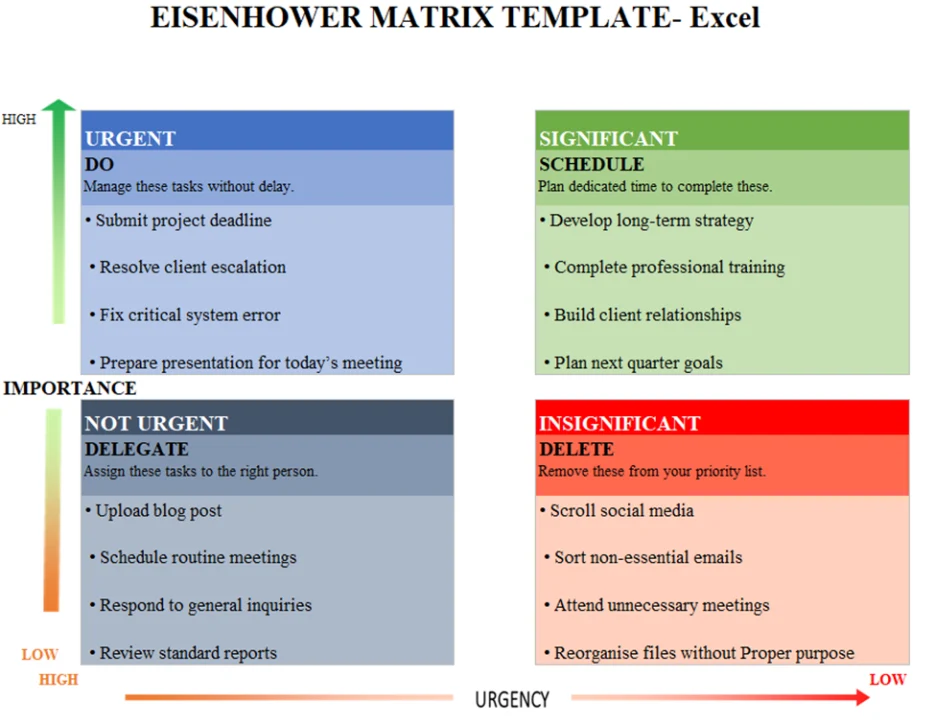
1. Eisenhower Matrix Template for Excel
The Eisenhower matrix template for Excel helps you to prioritize the tasks using a structured spreadsheet layout. It helps you to organize the work into clear quadrants while tracking the deadlines and progress. This format is effective when the professionals choose data-driven planning and need the flexibility to filter, sort, and update tasks frequently.
Key Features:
- It allows easy task sorting with the built-in spreadsheet filters.
- Conditional formatting provides a clear visual distinction between priority levels and enhances task visibility.
- It helps to add deadlines and status monitoring columns.
- You can customize the colors to match the brand guidelines.
Best For
Data-driven professionals, analysts, and managers.
2. Eisenhower Matrix Template for Word
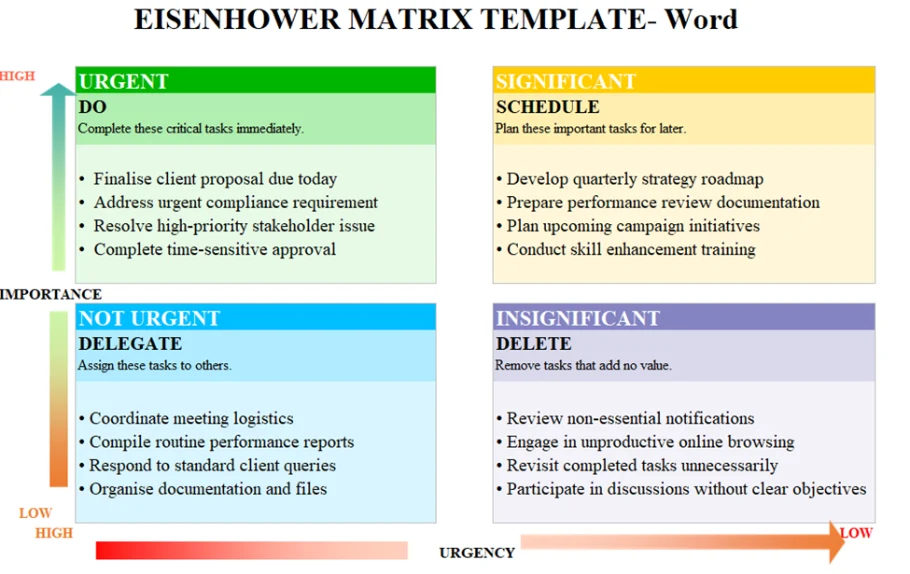
The Eisenhower matrix template Word offers a professional and clean document layout. It helps you to organize the work effectively while maintaining a presentable structure or format in meetings or reports. This version effectively works with a formal template, which is easy to edit and share with others.
Key Features:
- Provides a simple four-quadrant structured design.
- Easily customizes the formatting styles and headings.
- Supports adding the descriptive task explanations below the quadrants.
- Allows better and more effective printing for physical documentation use.
Best For
Corporate professionals and documentation needs.
3. Eisenhower Matrix Template for PDF
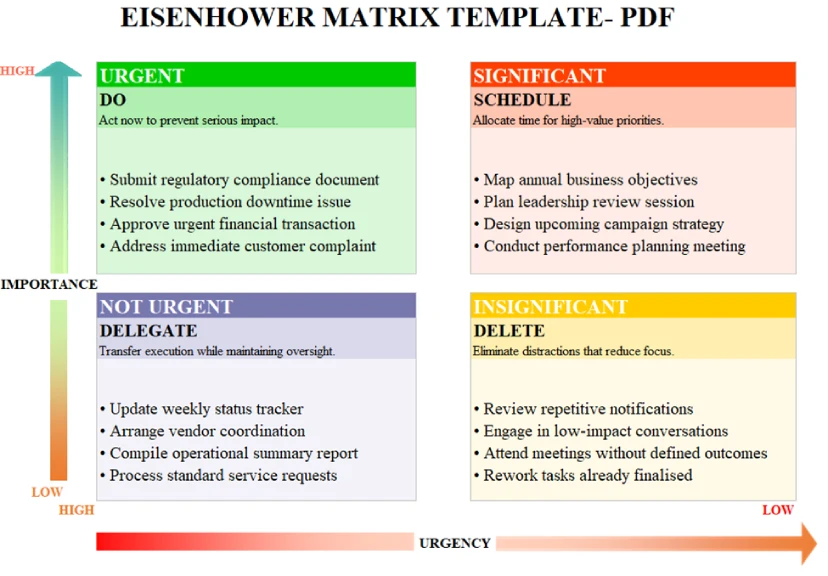
The PDF version of the Eisenhower Matrix provides a clear and organized format for the prioritization of every activity. It works effectively for professionals who choose a fixed and ready-to-use format without frequent edits. This version guarantees consistency in sharing, printing, or presenting priorities among the teams or departments.
Key Features:
- Provides a visual design that is not obtrusive.
- Keeps a proper and consistent structure across all the devices.
- Allows easy printing either in A4 or in Letter format.
- Provides a fixed quadrant format that does not have any accidental edits.
Best For
Offline planning and workshop sessions.
4. Printable Eisenhower Matrix Template
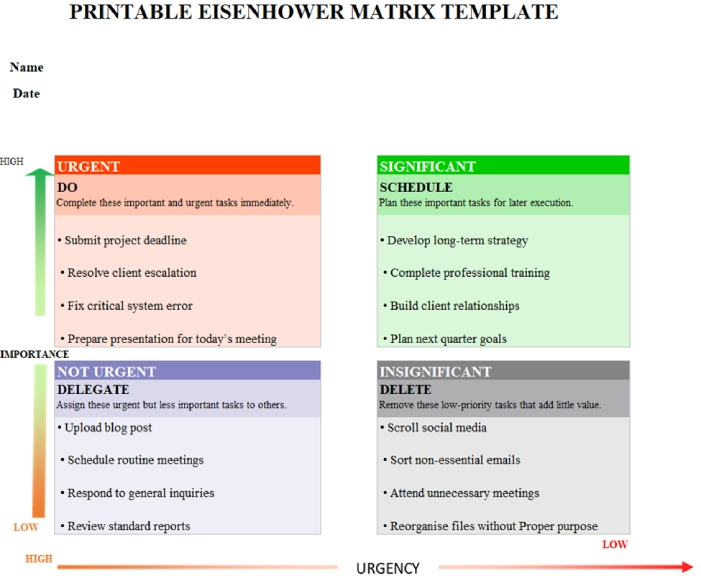
The main focus of the Printable Eisenhower Matrix Template is on better clarity and fast accessibility. It helps you to write the tasks manually and organize them effectively into the quadrants. This version works best when you prefer the handwritten planning or need to have an accurate daily prioritization sheet.
Key Features:
- Provides a large writing space within every quadrant.
- Utilizes the clear quadrant labels for an easy understanding.
- Helps in manually organizing the tasks every day.
- It is easily printable without losing the original visual structure.
Best For
Individuals who choose the paper-based planning.
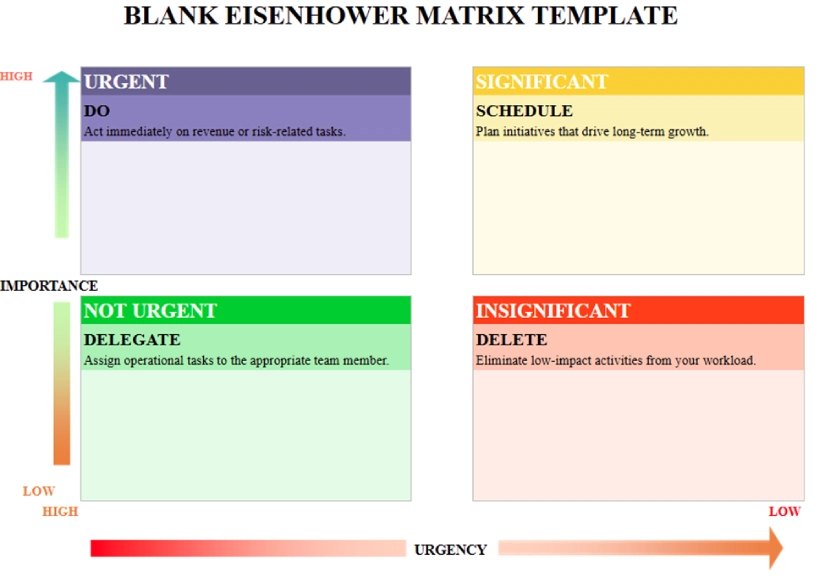
5. Blank Eisenhower Matrix Template
The Blank Eisenhower Matrix Template gives you the complete freedom to organize priorities based on your exclusive workflow. It facilitates creative planning and flexible prioritization requirements as it allows you to create tasks, categories, and labels based on your needs. This version works effectively when flexibility is extremely important.
Key Features:
- Involves empty quadrants for flexible input of the tasks.
- Helps with the personalized color coding systems.
- Allows complete customization of labels and categories.
- Performs well with the printed and digital usage.
Best For
Users who need flexible and custom planning layouts.
6. Eisenhower Time Management Template
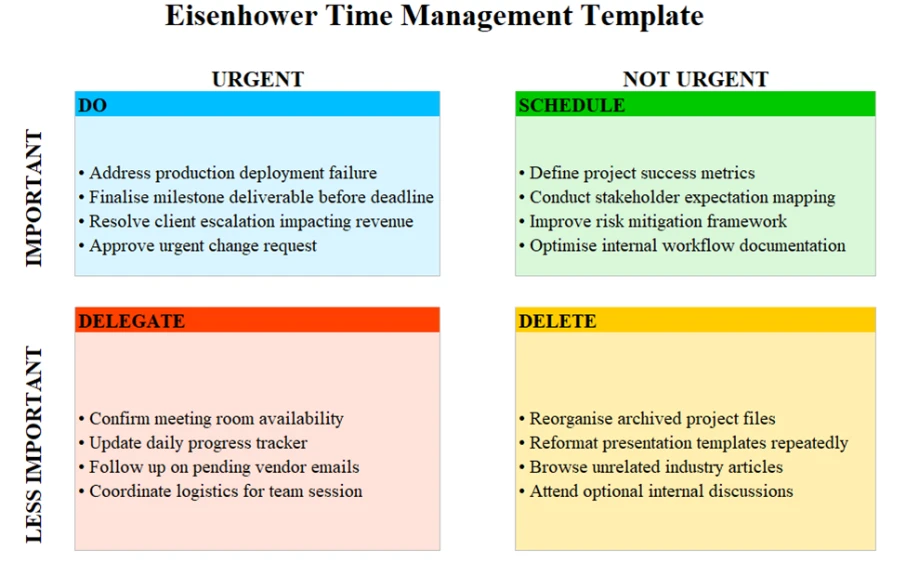
The Eisenhower Time Management Template is not simply a prioritization tool as it relates tasks to the actual time allocation. It helps you to accurately coordinate the urgent and essential work while planning realistic schedules. This version is effective by aligning the priorities with deadlines, time blocks, and daily workload capacity.
Key Features:
- Includes deadline columns for acquiring better scheduling clarity.
- Allows adding estimated task duration details.
- Supports aligning the priorities with the calendar planning.
- Helps to balance the workload across available time slots.
Best For
Managers who handle many deadlines at the same time.
7. Eisenhower Decision Matrix Template
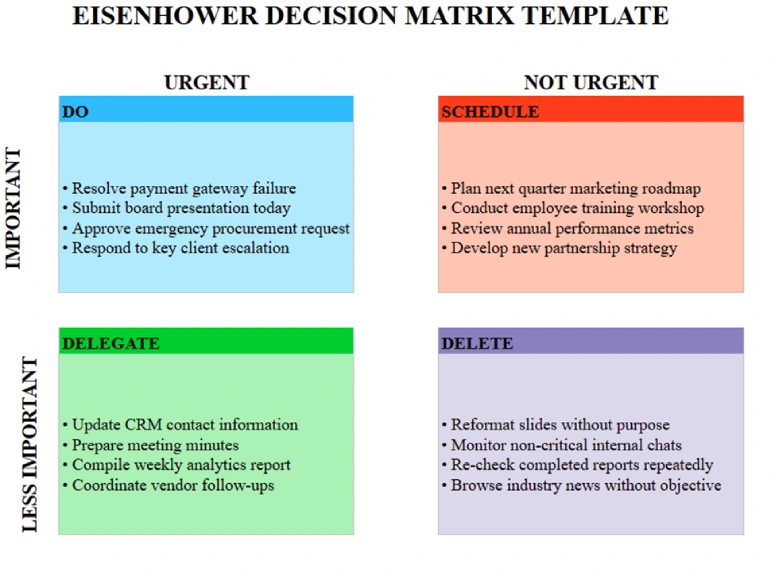
The Eisenhower Decision Matrix Template can improve the process of prioritization by providing a formal layer of evaluation to your tasks. It helps you to make decisions based on the effort, impact, and urgency before taking any action. This model is suitable for the leaders and managers who require a more analytical approach to prioritizing duties and strategic initiatives.
Key Features:
- Includes the scoring options for impact evaluation.
- Allows comparing the effort levels across different tasks.
- Supports the structured analysis before the final decisions.
- Provides the space for the notes and justification details.
Best For
Leaders and strategic decision-makers.
8. Team-Based Eisenhower Matrix Template
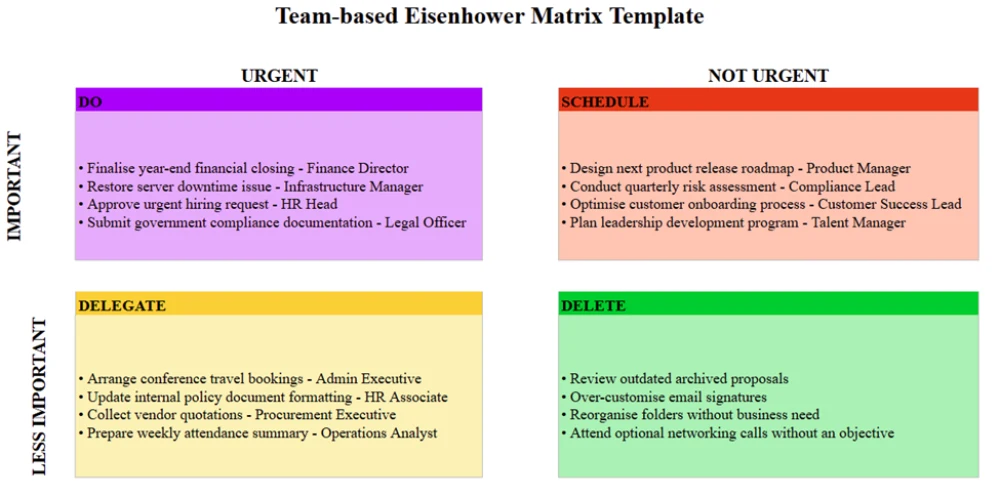
Team-Based Eisenhower Matrix Template adapts the classical prioritization framework for collaborative work environments. It helps the teams to organize the allocated tasks clearly while assigning responsibilities and tracking progress together. The version guarantees alignment between members, enhances coordination, and supports execution of urgent and critical priorities within common projects.
Key Features:
- Includes the task ownership or assignment columns.
- Supports the tracking progress for each team member.
- Enables the shared visibility between teams and departments.
- Enhances accountability and well-defined priorities.
Best For
Teams and project managers handling shared workloads.
What are the Pros and Cons of Eisenhower Matrix Templates?
Before choosing an Eisenhower matrix template, you need to clearly understand its advantages and limitations. This helps you to effectively use the framework and avoid common prioritization mistakes.
| Pros | Cons |
|---|---|
| Clearly separates the crucial and urgent tasks, which simplifies prioritization. | May overly simplify the projects that have numerous dependencies. |
| Minimizes the decision fatigue through providing a structured framework. | It does not consider the task duration and workload capacity. |
| Helps to eliminate the low-value tasks and distractions. | Needs regular updating to remain effective. |
| Encourages better delegation by identifying non-essential urgent work. | Less effective in situations where priorities frequently change. |
| It is simple and easy to implement without requiring any advanced tools. | Does not automatically track the progress or performance. |
| Works well for the managers, individuals, and small teams. | Tasks may be misclassified if the urgency and significance are misunderstood. |
| Accessible in various formats such as Excel, Word, and PDF. | Lacks integration with the advanced project management systems. |
How Can Time Champ Workforce Intelligence Enhance Your Eisenhower Matrix Strategy?
Using an Eisenhower matrix template helps you to prioritize the tasks, but what happens after you categorize them? You still need to have complete transparency of the work progress across your teams. When using the static Excel spreadsheet or the printable PDF, you can miss the workload imbalances, project delays, and productivity gaps. Although an Eisenhower decision matrix template will help you to decide what is worth considering, real-time insights ensure that those priorities lead to measurable results.
That’s where Time Champ workforce intelligence makes the difference. Time Champ helps you connect the planning and the implementation process. It helps you easily track work trends, improve the process of task assignment, and assess the productivity changes. Using the Time Champ with your Eisenhower matrix template PDF or Excel, you can convert the simple prioritization into constant performance optimization. With organized planning, supported by workforce intelligence, you can get control over the efficiency, accountability, and long-term outcomes.
Want better visibility into how work actually gets done?
Use Time Champ to gain real-time insights and drive smarter productivity decisions.
Conclusion
An effective Eisenhower matrix template will help you to bring the proper structure to the daily activities and long-term objectives. Through separating the urgent work from important priorities, you can get clarity, minimize confusion, and concentrate on things that yield results. The right template also supports consistent planning and better decision-making across changing workloads.
However, when you evaluate and update your matrix consistently, prioritization becomes extremely powerful. Frequent assessment can help you adapt to the changing due dates, workload and distractions. When you use this framework effectively, you create a proactive work system which strengthens productivity, enhances decision-making and supports sustained performance development.

Table of Content
-
 What are the 8 Types of Eisenhower Matrix Templates?
-
What are the Pros and Cons of Eisenhower Matrix Templates?
-
How Can Time Champ Workforce Intelligence Enhance Your Eisenhower Matrix Strategy?
-
Conclusion
Related Blogs

Master time efficiency to boost productivity and reduce stress. Discover tips and strategies for your team to achieve more with less effort.

Deliver better outcomes in a shorter span of work hours by using time management tips that speed up your workday and minimize pressure.

Discover different productivity styles, their unique approaches, and find the best way to maximize your efficiency and workflow.
Thasleem Shaik | Mar 13, 2025
Boost team productivity and reduce stress with effective time management. Discover key tips and how Time Champ can streamline your workflow.

Discover what workforce intelligence is, why it's critical, real examples, implementation steps, key benefits, challenges & how AI transforms the future.

Discover the top 20 productivity hacks to get more done, boost efficiency, and stay focused. Learn expert tips to maximize your workflow and results!


 4.7/5 avg.
Ready to Manage Your Workforce Smarter?
Join our family of 1500+ companies using smart insights to redefine workforces!

Free Trial
No Credit Card Required