Resource Efficiency Time Tracking for Smarter Productivity
Learn how resource efficiency time tracking improves workload balance, productivity, resource utilization, and project outcomes without burnout for teams.

You may notice that your team stays busy throughout the day, but the work still takes longer than expected. One project keeps getting revised, another misses its deadlines, and your employees constantly move between approvals, meetings, messages, and urgent requests without getting enough uninterrupted time to complete meaningful work. Over time, you may start spending more time on projects without seeing improved results or output. Resource efficiency time tracking helps you identify where work hours are actually going, what tasks take unnecessary time, and whether your team’s capacity is used efficiently.
This guide explains how to calculate resource efficiency, measure the right performance metrics, and identify what factors decrease team efficiency over time. You’ll also know how to manage the workload effectively, use resources effectively, and get better project outcomes without overloading employees.
What Is Resource Efficiency Time Tracking?
Resource efficiency time tracking is the practice of monitoring how your team uses their working hours within projects, tasks, meetings, and other daily routines to understand if their time is spent wisely. It helps you discover where productive working hours are wasted, which tasks require more effort, and whether the workload distribution among team members is appropriate.
Why Does Resource Efficiency Slip Even When Everyone Seems Busy?
Your team may work all day long, but projects still lag, and your workload keeps on increasing. Understanding the common reasons behind this problem helps you identify where productive time is wasted by your team.
Too Much Work Creates Hidden Delays
If everyone stays overwhelmed, the tasks will increase, and the work moves more slowly than expected. Teams spend more time waiting for responses, approvals, or updates, which quietly impact the project timelines and overall performance.
Frequent Task-Switching Reduces Focus
Your employees move between the meetings, tasks, projects, and urgent requests throughout the day. This can break the focus, increase mental fatigue, and make simple tasks take more time to complete.
Bottlenecks Become Bigger Issues
Employees usually concentrate on completing their tasks, which might make it difficult to find where work is actually getting stuck. Over time, these small delays will lead to additional problems in other departments, reduce collaboration, and slow down the overall project progress.
Burnout Causes Inefficiencies or Rework
In case employees are constantly under stress, they will become less efficient. Mistakes increase, revisions become frequent, and they work extra hours fixing issues that could have been avoided earlier.
How To Calculate Resource Efficiency?
You may struggle to understand why projects consume more hours even when teams work throughout the day. Following these steps helps you calculate resource efficiency and identify how effectively your team uses its available work hours.
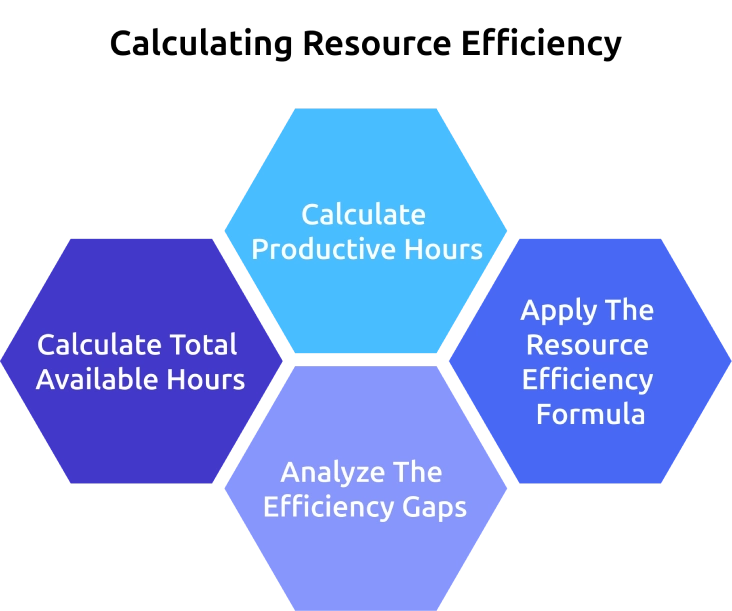
Step 1: Calculate Total Available Hours
Start by identifying the total number of work hours available for an employee or team within a particular period. This includes daily working hours multiplied by the number of working days.
Formula: Total Available Hours = Working Hours Per Day × Number of Working Days
Example: 8 working hours × 22 working days = 176 available hours
This means the employee or team had 176 total work hours available during the particular month for completing tasks and project work.
Step 2: Calculate Productive Hours
The next step is to identify how many hours were actually spent on productive work, such as project tasks, client work, development, design, or operational activities. Exclude the break time, unnecessary meetings, idle time, and non-work activities from this calculation.
Formula: Productive Hours = Total Work Hours − Non-Productive Hours
Example: 176 total work hours - 36 non-productive hours = 140 productive hours
This means the team spent 140 hours on actual productive work after excluding time lost in meetings, idle periods, interruptions, and other non-work activities.
Step 3: Apply The Resource Efficiency Formula
Once you identify both the available working hours and productive hours, you can measure how efficiently your team is utilizing its total working capacity.
Formula: Resource Efficiency = Total Available Hours/Productive Hours × 100
Example: If your team worked productively for 140 hours out of 176 available hours:
140/176 × 100 = 79.5% resource efficiency
Step 4: Analyze The Efficiency Gaps
This final percentage helps you understand whether your team capacity is being used effectively or whether too much time is getting consumed by delays, rework, meetings, or workload imbalance. Analyzing these patterns can help you enhance workload distribution, planning, and overall productivity.
Key Metrics to Track for Better Resource Efficiency
Tracking the right metrics helps you understand how effectively your team utilizes work hours, handles workloads, and contributes to project outcomes. These metrics also help you identify productivity gaps, workload imbalance, and operational inefficiencies before they start affecting overall performance.
1. Resource Utilization Rate measures how much of an employee’s total work time is spent on billable and productive work. It helps you see if your team capacity is utilized effectively or if employees are underutilized.
2. Productive Hours show how much time employees spend on meaningful work activities such as project tasks, client work, development, or operations. Tracking this helps you to identify where valuable work time is being lost.
3. Idle Time refers to periods when employees are inactive or not engaged in productive work. Monitoring idle hours helps you to clearly identify workflow gaps, delays, and operational issues that reduce overall efficiency.
4. Workload Distribution helps you understand whether work is distributed evenly across the team. It helps you identify the overloaded employees, unused capacity, and workload imbalance that may affect productivity and employee well-being.
5. Task Completion Rate measures how consistently employees or teams complete assigned work within expected timelines. Low completion rates often indicate workflow bottlenecks, distractions, or resource allocation issues.
6. Project Profitability helps you to compare project revenue against the time and resources spent on delivery. It helps you understand whether projects are utilizing resources efficiently while maintaining healthy profit margins.
What ROI Can Businesses Expect from Resource Efficiency Time Tracking?
You might lose a significant amount of productive time without even realizing it. Small delays, repeated work, uneven workloads, missed deadlines, and unnecessary meetings slowly increase operational costs and reduce overall profitability. When you start tracking how work hours are actually being utilized, you can gain better control over productivity, resource planning, and project performance.

Reduced Time Loss Across Teams
One of the biggest improvements you notice is reduced wasted work hours. Teams become aware of how time is used in meetings, follow-ups, interruptions, and other non-productive activities. This helps you identify where the time is lost and make better workload decisions before any small inefficiencies become bigger operational issues.
Better Resource Utilization
Resource efficiency tracking enables you to determine whether the employees are overworked, underworked, or working on non-priority tasks. You can balance the employees' workload and make necessary plans to progress with projects without any delays or stress on the employees.

Did You Know?
Mosaic’s Professional Services Benchmarks reported that average billable utilization dropped from 68.9% in 2024 to 66.4% in 2025, showing that many businesses continue losing a noticeable portion of their available team capacity and productive work hours.
Improved Project Profitability
When teams spend more time on productive work, projects become easier to manage within planned budgets and timelines. This way, you can save on overtime spending, avoid rework, and achieve consistent project execution. The slight improvement in productivity can create a significant effect on revenue, especially for agencies, service organizations, and project-oriented companies.
Faster Decision-Making
Clear workload and productivity data help you make faster operational decisions without depending on assumptions. You can identify issues earlier, monitor workload patterns more effectively, and take the right action before deadlines slip or project performance starts getting affected.
Better Employee Performance Without Burnout
Monitoring resource efficiency also enables companies to build healthy working habits. You can identify overstressed employees, minimize unnecessary switching of tasks, and ensure better workload balance. This helps your employees remain productive without creating constant stress, excessive overtime, or work-related fatigue.
How Does Time Champ Help Improve Resource Efficiency?
You may struggle to get a clear view of where productive hours are being lost during the workday. Teams stay busy always, but you still face missed deadlines, reduced productivity, uneven workloads, and increasing employee pressure. Time Champ is employee time tracking and monitoring software can help you know how your teams spend their working hours on tasks, projects, and daily activities.
With Time Champ, you can analyze productive time, detect idle time, manage workload distribution, and understand how efficiently team capacity is used. Features such as automated time tracking, productivity reports, application usage insights, workload analysis, idle time detection, and project-based time tracking help you recognize operational gaps before they impact the project delivery. Time Champ also helps you reduce any unnecessary work patterns, improve resource allocation, balance workloads, and make efficient workforce planning decisions without creating additional stress on employees.
Conclusion
Managing a busy team becomes difficult when you cannot clearly see how employees use the work hours across projects and daily tasks. Delays, uneven workload, repetition of work, and continuous interruptions slowly reduce productivity and impact project results. Resource efficiency time tracking helps you to understand the lost productive hours and the actual utilization of your team's capacity. Through tracking the right metrics, improving workload distribution, and identifying operational gaps early, you can make better planning decisions, improve team performance, and maintain effective productivity.

Anjali

Table of Content
 What Is Resource Efficiency Time Tracking?
- Why Does Resource Efficiency Slip Even When Everyone Seems Busy?
- How To Calculate Resource Efficiency?
- Key Metrics to Track for Better Resource Efficiency
- What ROI Can Businesses Expect from Resource Efficiency Time Tracking?
- How Does Time Champ Help Improve Resource Efficiency?
- Conclusion

Related Blogs
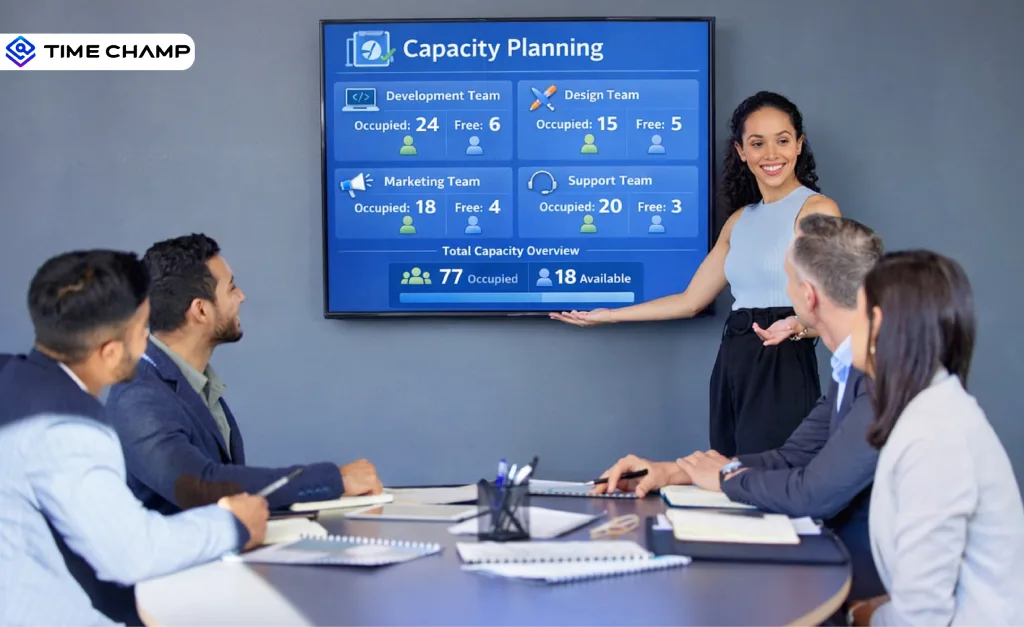
Capacity Planning: Explore what it is, types, strategies, real-world examples, benefits, challenges, and how to implement it effectively in projects
Tarun Kumar | Apr 02, 2026
Improve ROI with productivity tracking software by reducing wasted time, recovering billable hours, and improving workforce efficiency.
Guna Lakshmi | May 11, 2026
Find the 10 best workforce intelligence software for 2026. Compare features, pricing, pros, cons to boost operational clarity and team performance.
Thasleem Shaik | Feb 11, 2026
Discover essential time-tracking features that improve productivity, payroll accuracy, and workforce visibility, and learn how to use them effectively.
Guna Lakshmi | May 16, 2026
Explore 8 key trends shaping the future of employee productivity tracking, including AI, workforce intelligence, hybrid work, and wellbeing analytics.
Thasleem Shaik | May 13, 2026
Learn what workforce efficiency means in 2025, why it matters, key factors, how to measure, tips to improve, and what a good workforce efficiency rate is.
Guna Lakshmi | September 15, 2025


 4.7/5 avg.
Ready to Manage Your Workforce Smarter?
Join our family of 1500+ companies using smart insights to redefine workforces!

Free Trial
No Credit Card Required