What is Capacity Planning? A Complete Guide for (2026)
Capacity Planning: Explore what it is, types, strategies, real-world examples, benefits, challenges, and how to implement it effectively in projects
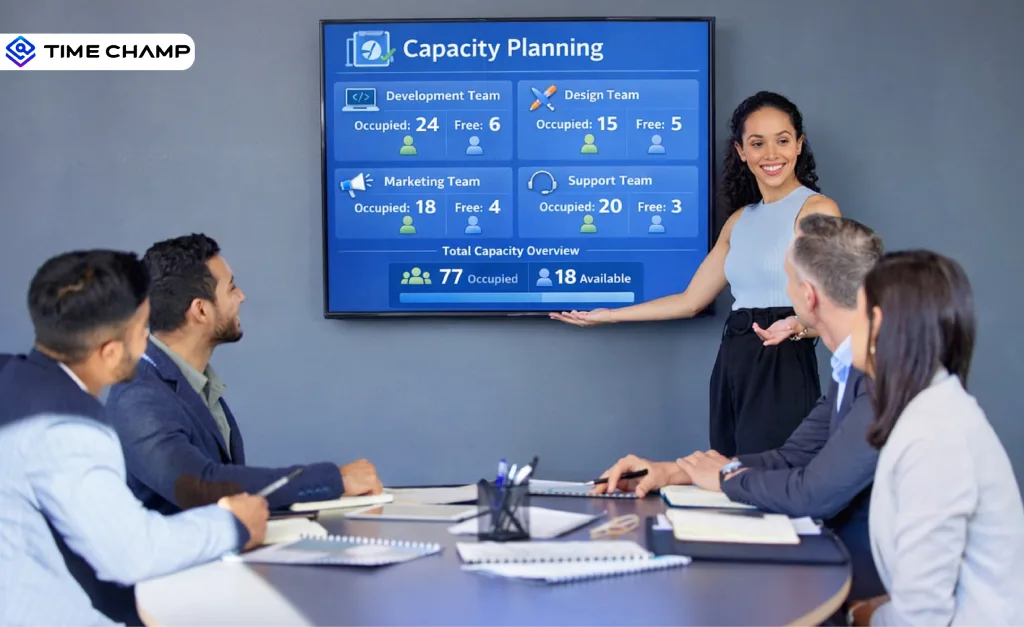
Projects often miss deadlines and exceed budgets when you take on too much work or use your resources inefficiently. Capacity planning offers a structured method of matching your team, tools, and time to project requirements. It assists you in forecasting resource requirements, workload balancing, and informed decision-making to ensure that projects proceed effectively and reliably. Misunderstandings about planning methods compared are responsible for more late-stage scope changes than any technical issue. For the broader picture across this topic, our best project management software guide brings the moving parts together.
This guide will assist you in discovering the meaning of capacity planning in project management, the types of capacity planning, real-world examples, and how to implement, manage, and calculate capacity planning. You will also understand key strategies, advantages, difficulties, and the most appropriate software to support regular planning. By the end, you will have the insight to optimize resources, avoid bottlenecks, enhance team productivity, and complete projects on time without overlooking your workforce.
What Is Capacity Planning in Project Management?
Capacity planning in project management is a structured process of identifying the resources, skills, and time required to complete project tasks efficiently within a specified timeframe. It provides clear visibility into resource utilization so you can allocate tasks based on skills and availability.
It assists in forecasting future requirements, balancing workloads, and making informed decisions that enhance project efficiency. Knowledge of available capacity helps teams to improve productivity, reduce delays, and maintain consistent performance across projects.
What Are the Different Types of Capacity Planning in Project Management?
Capacity planning helps you use your team and resources effectively. In project management, there are three main types of capacity planning. Each type focuses on different timeframes and goals to ensure that your projects run smoothly and meet deadlines.
1. Short-Term Capacity Planning
Short-term capacity planning focuses on the days or weeks ahead. You assign tasks, redistribute work, and allocate resources to suit the present project requirements. This kind of planning will assist you in reacting fast to unexpected changes, delays, or absences of team members. With a structured short-term capacity planning process, you ensure that day-to-day operations remain within schedule without straining your team. It keeps projects on track and deadlines achievable.
2. Medium-Term Capacity Planning
Medium-term capacity planning is a forward-looking plan that spans weeks to months. You forecast workloads, prepare resources for future projects, and ensure your team has the right skills when needed. This planning will enable you to allocate tasks effectively, schedule training or support of team members, and prevent bottlenecks before they impact delivery. It also assists in prioritizing projects based on urgency and importance and ensures that you work on what is most important.
3. Long-Term Capacity Planning
Long-term capacity planning covers months to years and assists you in planning for the general resource needs and workforce expansion. You will be able to plan hiring, build team skills, and invest in capacity planning tools or software to support future projects. This strategy will make sure that your organization is capable of managing big projects and demand in the future without overusing the available resources. Long-term planning provides a clear picture of the growth requirements and strategic priorities.
What Are Some Examples of Capacity Planning?
Different industries use capacity planning to determine how much work they can handle with the resources available during a specific period. The following examples show how organizations calculate, allocate, and manage capacity in practical situations.
1. Capacity Planning in Software Development
Software development teams commonly use capacity planning during sprint planning or release planning. For example, if 5 developers work 8 hours per day over 10 working days, the theoretical capacity is 400 hours. However, the team removes the time spent on meetings, reviews, support tasks, and leaves to determine the actual productive capacity.
Once the team knows the actual capacity, it estimates the effort required for each user story or task. The team then compares the total estimated effort with the available capacity before it finalizes the sprint backlog. This helps teams plan only the work they can realistically complete in that time frame.
2. Capacity Planning in Manufacturing
In manufacturing, planners use capacity planning to determine how many units they can produce within a given period based on machine time and labor availability.
A production planner calculates total available machine hours for the month and subtracts scheduled maintenance or downtime. Labor shifts and workforce availability are also considered. If producing one unit requires a fixed number of machine hours, planners divide total available machine hours by the time required per unit to determine maximum production capacity.
This calculation shows how many units planners can schedule for production during that period without exceeding operational limits.
3. Capacity Planning in E-Commerce and Warehouse Operations
E-commerce companies use capacity planning to manage order fulfillment operations. Based on historical sales data and demand forecasts, planners estimate the expected number of orders for a specific period. Then they calculate the average time required to pick, pack, and ship each order. By multiplying expected orders by time per order, they determine the total labor hours required.
Planners compare this requirement with the available warehouse staff hours. The result defines whether existing staffing levels can support projected demand for that period.
How to Implement and Manage Capacity Planning for Projects?
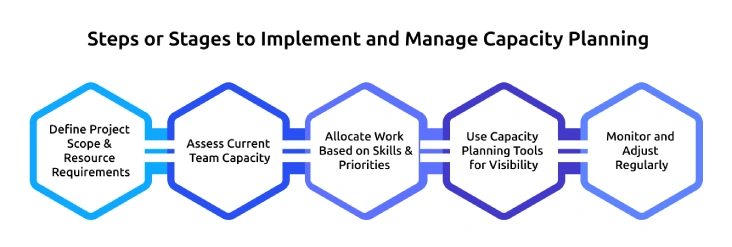
Capacity planning needs a clear structure and regular monitoring. When you do it right, you have more control over workloads, fewer delays, and achieve more reliable delivery. The steps below will help you to implement and manage capacity planning in your projects.
1. Define Project Scope and Resource Requirements
Begin with a clear definition of project objectives, deliverables and timelines. Break the work into small tasks and estimate the amount of effort needed for each task. Determine the skills, roles and tools required to complete the work. Proper scope definition ensures accurate workload estimation and a solid basis for capacity planning.
2. Assess Current Team Capacity
Assess your team’s actual availability before assigning work. Check working hours, existing assignments, approved leave, and other duties. Focus on realistic available hours rather than the theoretical full-time capacity. This assessment gives you an accurate picture of resource capacity planning and avoids overloading or underutilizing your team.
3. Allocate Work Based on Skills and Priorities
Assign the work based on the expertise, experience, and availability of each team member. Give priority to critical tasks and allocate enough time and resources to key milestones. You avoid giving too much work to some team members while others receive too little work. Strategic allocation improves productivity, reduces delays, and eliminates bottlenecks. Aligning skills with responsibilities improves overall project performance and keeps progress steady.
4. Use Capacity Planning Tools for Visibility
Use reliable capacity planning tools or capacity planning software to track workloads and utilization levels in real time. These tools help you forecast demand, identify gaps, and reassign tasks quickly. Clear visibility aids in making informed decisions and enhances the overall project management capacity planning in several projects.
5. Monitor and Adjust Regularly
You need to review and refine capacity planning regularly. Compare the actual progress with the planned capacity at regular intervals. As the priorities change or the workload grows, revise your plan immediately. Continuous monitoring maintains work balance, safeguards team performance, and keeps the project on track and within the set deadlines and organizational objectives.
How to Calculate Capacity Planning Effectively?
Accurate calculation makes your capacity planning more reliable. When you clearly understand how much work you have and how much time your team actually has, you avoid making unrealistic promises and reduce the risk of delays. A clear and practical approach helps you plan better, use resources wisely, and keep your projects aligned with business goals.
1. Calculate Total Available Capacity
Start by calculating the total productive hours available in a given period. Multiply the number of team members by their actual working hours and subtract leave, public holidays, meetings, training sessions, and administrative tasks. Only focus on the hours that your team can actually commit to project work. This provides you with a realistic view of resource capacity planning and prevents overestimating availability, which usually results in missed deadlines and performance pressure.
2. Estimate the Total Project Workload
Divide the project into clearly defined tasks and estimate the amount of time needed to complete each activity. Sum up these estimates to get the total effort required during the selected period. Whenever possible, use historical data from similar projects to enhance accuracy. An accurate workload estimate eliminates guesswork and provides a solid foundation on which to apply any formula or model of capacity planning.
3. Compare Capacity with Demand
After calculating the available capacity and the required workload, compare the two in the same timeframe. Calculate the difference between the number of hours you need and the number of hours you have to determine whether you have extra or shortage. When demand exceeds capacity, you have to change timelines, re-prioritize work or get more resources. This comparison will enable you to make timely decisions before the risks of delivery rise.
4. Measure Resource Utilization
Divide productive project hours by total available working hours to calculate utilization. This shows the efficiency of your team in utilizing its capacity. Very high utilization may indicate overload and low quality, whereas low utilization may indicate underutilization of resources. Monitoring utilization assists you in balancing, enhancing productivity, and supporting team performance in projects.
5. Review and Update Calculations Regularly
Capacity calculations should evolve with the progress of the project and shift in priorities. Recalculate when scope changes, new projects begin, and team availability varies. Periodic review ensures that your capacity planning process is accurate and responsive to actual conditions. Consistent updates enhance forecasting, decision making and make sure that your organization is in control of the workload and delivery expectations.
Want complete visibility into your team’s capacity and workload?
Start using Time Champ to plan smarter and deliver projects on time without overloading your team.
What Are the Main Strategies Used for Capacity Planning?
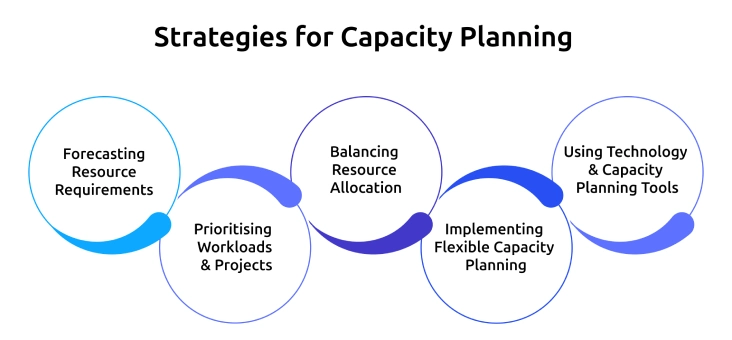
Effective capacity planning uses a set of strategies to help you balance workload, resources, and timelines. These strategies help you make informed decisions, avoid bottlenecks, and deliver projects on time. Here are the 5 key strategies you should use.
1. Forecasting Resource Requirements
Forecasting is the process of predicting how many and what type of resources your projects will need. You take into account previous project information, the present workload, and upcoming demands to determine future requirements. This is a good strategy to avoid overloading your team and to make sure that you have the right skills and capacity available when needed. Proper forecasting minimizes the risks of delays and enables you to allocate resources more effectively across multiple projects.
2. Prioritizing Workloads and Projects
Not every task or project is urgent or important. When you prioritize tasks based on their impact, deadlines, and dependencies, you ensure that your team completes high-priority work on time. This will prevent overstretching your team and will keep the project on track. Clear prioritization helps you decide when to defer low-priority tasks or redirect resources to meet urgent needs.
3. Balancing Resource Allocation
Balancing involves distributing work evenly among your team based on skills, availability, and project requirements. You avoid giving too much work to some team members while others receive too little work. You keep the productivity constant and the quality of the outcomes high by monitoring the workloads and redistributing the tasks when needed. Balancing resources also enhances morale and burnout, which allows your team to maintain performance even when several projects are running at the same time.
4. Implementing Flexible Capacity Planning
Flexibility enables you to adjust plans quickly when priorities change, new projects come, or unforeseen problems occur. This plan entails keeping a buffer capacity, cross-training team members, and reassigning work effectively with capacity planning tools. Flexible planning will keep your projects on schedule without overworking your team. It also assists you in reacting to the evolving business requirements without losing sight of your overall resource capacity.
5. Using Technology and Capacity Planning Tools
Capacity planning software and tools simplify the process, making it faster and more accurate. They assist in monitoring workloads, availability, and utilization in real time. These tools allow you to forecast resource requirements, model various situations, and make informed decisions. The appropriate software enhances visibility, minimizes manual errors, and facilitates agile team capacity planning. It also enables you to develop repeatable processes and have uniform performance in all projects.
What Are the Benefits of Capacity Planning?
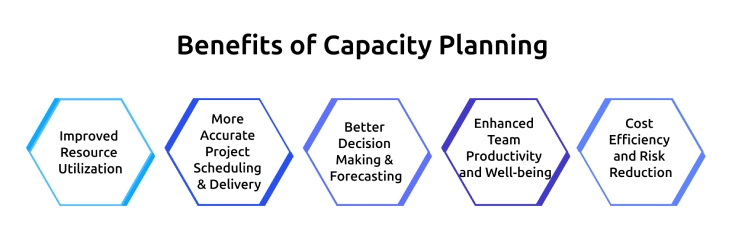
Capacity planning enables you to plan better, make data-driven decisions, and deliver projects reliably. According to an industry study, 87% of project managers reported that structured capacity planning improved their project delivery timelines by giving them a clearer understanding of workloads, risks, and resource requirements.
1. Improved Resource Utilization
Capacity planning assists you in utilizing your team's time, skills, and tools effectively. You can identify who has available capacity and who already has a full workload, which helps you plan work without giving too much work to anyone. This enhances productivity and maintains the flow of work across projects.
2. More Accurate Project Scheduling and Delivery
Being aware of your capacity enables you to set realistic schedules. Capacity planning assists you in avoiding overpromising and ensures deadlines are achievable. Your team experiences fewer last-minute changes, less rushed work, and less stress because you schedule projects in a way that allows the team to complete them on time.
3. Better Decision Making and Forecasting
Capacity planning gives clear data on workloads, future demand, and resource gaps. You will be able to make informed choices regarding hiring, shifting workloads, or adjusting schedules. Forecasting ahead assists in avoiding issues before they arise, enhancing the overall project control.
4. Enhanced Team Productivity and Well‑being
Equal workloads allow your team to work at a sustainable pace. Preventing overload reduces burnout and boosts morale. When you give your team clear tasks and manageable workloads, they stay focused, produce consistent results, and contribute to a stable work environment.
5. Cost Efficiency and Risk Reduction
Knowing your team capacity will help you avoid unnecessary costs from overtime, rushed work, or unplanned hires. You are able to allocate resources precisely, control budgets, and reduce risks associated with underestimated workloads or sudden resource shortages.
What Are the Challenges of Implementing Capacity Planning?
It is not always easy to implement capacity planning. Teams usually encounter problems such as inaccurate data, changing priorities, skill gaps, workload stress, and resistance to new processes. When you address these challenges proactively, you make planning easier, improve decision-making, and ensure successful project delivery.
Ensuring Accurate Data Collection
Capacity planning requires accurate data. You should track actual working hours, task completion times, and availability of resources. Capacity planning tools or software help you reduce errors and give you a reliable view of your team’s workload. When you review data regularly, you ensure that your decisions rely on real information instead of estimates.
Adapting to Changing Workloads and Priorities
Workloads and priorities change continuously in projects. To overcome this, have a flexible planning process. Use agile capacity planning strategies, keep buffer capacity, and update your resource allocation on a regular basis. This will make sure that you react to changes without overloading the team or missing deadlines.
Aligning Skills with Project Requirements
Projects need the right skills at the right place. Avoid skill gaps by aligning the skills of your team with the project requirements. Train where needed and delegate based on experience. Capacity planning software can assist you in determining skill shortages and future resource needs.
Preventing Overload and Burnout
Even with a solid plan, managers can still overload their teams without realizing it. Monitor workloads and redistribute tasks to achieve balance. Use capacity planning templates to visualize underutilized or overstretched people. Managing workloads is a way of enhancing morale, sustaining productivity, and ensuring consistent quality of projects.
Managing Resistance to New Processes
Teams may resist using capacity planning processes or tools. Overcome this by explaining the benefits clearly, how it will reduce stress, and improve delivery. Provide training, involve team members in planning, and show results with real examples. Gradual adoption encourages participation and smooth integration.
Is Capacity Planning the Same as Workforce Capacity Planning?
No, capacity planning is not the same as workforce capacity planning. While both aim to optimize resources, capacity planning covers all types of resources, including tools, equipment, and time, whereas workforce capacity planning focuses specifically on the availability, skills, and utilization of your team members. When you understand this difference, you can plan better and allocate resources more effectively.
| Aspect | Capacity Planning | Workforce Capacity Planning |
|---|---|---|
| Definition | Planning and allocating all project resources such as time, tools, technology, and team capacity to meet project goals efficiently | Planning and managing employee availability, skills, and workload to deliver projects on time. |
| Scope | Broader, includes equipment, software, tools, budget, and workforce | Narrower, focuses solely on employees and their skill sets |
| Goal | Optimize overall resource utilization and project delivery | Ensure the right people with the right skills are available for tasks and projects |
| Tools Used | Capacity planning software, project management tools, resource allocation templates | Workforce management software, timesheets, skill matrices, HR tools |
| Application | Across all projects, departments, and organizational resources | Specifically within human resource management and team allocation |
How to Choose the Right Capacity Planning Software
Selecting the right capacity planning software ensures efficient projects, optimizes resources, and helps your team deliver on time. An effective selection process can help you avoid tools that are too complicated, inflexible, or do not fit your organization.
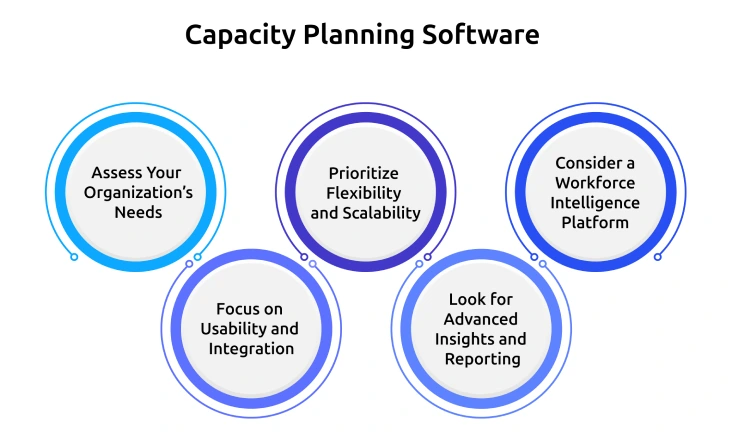
1. Assess Your Organization’s Needs
Start by understanding your project types, team size, and resource requirements. Evaluate how many people you need, what tools you use, and how much time your projects require. Knowing this allows you to select software that handles your specific workload, reporting, and planning requirements effectively.
2. Focus on Usability and Integration
Choose software with an easy-to-use interface that your team can learn quickly. It should connect smoothly with existing project management systems, calendars, and communication tools. A user-friendly platform reduces training time and makes capacity planning a natural part of your workflow.
3. Prioritize Flexibility and Scalability
Projects and priorities often change. Opt for a system that allows easy adjustments, task reassignment, and updates without disrupting ongoing plans. Scalable software accommodates growing teams and complex projects, helping you manage short-term and long-term capacity needs efficiently.
4. Look for Advanced Insights and Reporting
Select a platform that provides clear visibility into resource allocation, workload distribution, and utilization rates. Advanced analytics and reporting features help you forecast potential bottlenecks, identify skill gaps, and make informed decisions to keep projects on track and resources optimized.
5. Consider a Workforce Intelligence Platform
A workforce intelligence platform like Time Champ gives you a clear view of your team’s capacity, availability, and future resource needs. It provides real-time dashboards and predictive insights to help plan workloads, balance resources across projects, and make informed decisions. This ensures that your team works efficiently, avoids bottlenecks, and that projects proceed smoothly without overloading anyone.
Ready to make your capacity planning more accurate and reliable?
Use Time Champ to gain clear visibility into team availability and make better resource decisions for every project.
Conclusion
Capacity planning gives you clarity and control over your projects. When you understand your available capacity and match it with real workload demands, you stop guessing and start planning with confidence. You reduce overload, avoid missed deadlines, and make better decisions about priorities, hiring, and resource allocation. Whether you manage a small team or multiple projects, a structured capacity planning approach helps you use your people, time, and tools effectively so you can deliver consistently without putting pressure on your workforce.

Table of Content
-
 What Is Capacity Planning in Project Management?
-
What Are the Different Types of Capacity Planning in Project Management?
-
What Are Some Examples of Capacity Planning?
-
How to Implement and Manage Capacity Planning for Projects?
-
How to Calculate Capacity Planning Effectively?
-
What Are the Main Strategies Used for Capacity Planning?
-
What Are the Benefits of Capacity Planning?
-
What Are the Challenges of Implementing Capacity Planning?
-
Is Capacity Planning the Same as Workforce Capacity Planning?
-
How to Choose the Right Capacity Planning Software
-
Conclusion
Related Blogs

Find the best capacity planning software tools for IT, manufacturing, and more. Compare features, pricing, pros, and cons to choose the right tool for 2025.
Guna Lakshmi | November 11, 2025
Learn what strategic planning is, why it matters, elements, steps, models & frameworks, examples, pros & cons & how workforce intelligence improves it.
Tarun Kumar Reddy | Feb 11, 2026
Learn what aggregate planning is, why it matters, examples, how to create plans, key strategies, benefits & how to overcome challenges effectively.
Chethana Choudary | Feb 19, 2026
Explore 7 free project planning templates to plan, schedule, and manage projects effectively. Download in Excel, Word & PDF and boost your project success.
Chethana Choudary | November 11, 2025
Discover 10 workforce planning models every HR professional should know to align talent with business goals, improve efficiency, and plan for the future.
Thasleem Shaik | September 30, 2025
Discover 10 key workforce planning metrics for 2025. Learn how these analytics metrics impact hiring, retention, productivity & strategic HR planning.
Guna Lakshmi | September 15, 2025


 4.7/5 avg.
Ready to Manage Your Workforce Smarter?
Join our family of 1500+ companies using smart insights to redefine workforces!

Free Trial
No Credit Card Required