Workforce Management Software: A Complete 2026 Guide
Learn what workforce management software is, how it works, its key features, benefits, types, and how to choose the best solution for your team in 2026.

Managing a workforce can be challenging. One moment you're creating schedules, the next you're tracking attendance, handling last-minute shift changes, or making sure you're following labor laws. As your business grows, keeping everything organized becomes even harder.
That's why many businesses are turning to workforce management software to simplify daily operations and keep their teams running efficiently, but with so many options available, choosing the right solution isn't always easy.
In this blog, I’ll explain what workforce management software is, how it works, its key features and benefits, and how to choose the right solution for your business in 2026.
What Is Workforce Management Software?
Workforce management software is a digital solution that helps businesses efficiently manage their workforce by automating and streamlining everyday employee operations. It enables organizations to handle key workforce management tasks such as employee scheduling, time and attendance tracking, leave management, shift planning, labor forecasting, and performance reporting from a single platform.
Benefits of Workforce Management Software
Now that you know what workforce management software is, let's take a quick look at the key benefits it can bring to your business.
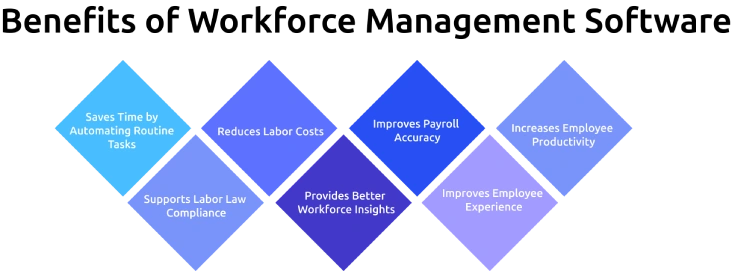
1. Saves Time by Automating Routine Tasks
Manual scheduling, attendance tracking, and leave approvals can take hours every week. Workforce management software automates these repetitive tasks, allowing you to focus on higher-value work.
2. Reduces Labor Costs
With better workforce planning and labor forecasting, you can avoid overstaffing, understaffing, unnecessary overtime, and scheduling conflicts. This helps optimize labor expenses without affecting productivity.
3. Improves Payroll Accuracy
Automatic time and attendance tracking reduces payroll errors caused by manual data entry, missed punches, or inaccurate timesheets. It also helps prevent issues like time theft and buddy punching.
4. Increases Employee Productivity
Employees always know when and where they're scheduled to work, while you can quickly adjust shifts based on demand. This improves workforce efficiency and keeps operations running smoothly.
5. Supports Labor Law Compliance
Many workforce management platforms help you comply with labor laws by tracking work hours, overtime, breaks, and leave policies. This reduces compliance risks and simplifies audits.
6. Provides Better Workforce Insights
Built-in dashboards and reports give you a clear view of attendance trends, labor costs, overtime, productivity, and staffing needs. These insights support faster, data-driven workforce decisions.
7. Improves Employee Experience
Features such as mobile access, shift swapping, leave requests, and self-service portals give employees more flexibility and transparency, leading to higher satisfaction and engagement.
What are the Main Types of Workforce Management Software?
Not every business needs the same type of workforce management software. Some tools focus on a single task, like tracking employee hours, while others offer an all-in-one solution for managing your entire workforce. Choosing the right type depends on your business size, industry, and workforce needs.
| Type | Best For |
|---|---|
| Time and Attendance Software | Businesses that need accurate employee time tracking, attendance monitoring, and payroll-ready records. |
| Employee Scheduling & Rostering Software | Shift-based businesses such as retail, healthcare, hospitality, and manufacturing need efficient staff scheduling. |
| Comprehensive Workforce Management Software | Organizations looking for a complete solution that includes scheduling, attendance, leave management, labor forecasting, and reporting. |
| Workforce Analytics & Intelligence Software | Businesses that want deeper insights into workforce productivity, labor costs, employee performance, and staffing trends. |
As your business grows, your workforce management needs may change. Many organizations start with a basic time-tracking or scheduling tool and later move to a complete workforce management platform that brings all workforce operations together in one place.
Run a More Efficient Workforce!
Replace manual tasks with workforce insights that help you save time and improve productivity
How to Choose the Best Workforce Management Software
Choosing the right workforce management software isn't about picking the platform with the most features, it's about finding one that fits your business needs, workforce size, and daily operations.
Here are six factors to consider before making your decision:
1. Identify Your Biggest Workforce Challenge
Start by understanding the problem you want to solve. Whether it's employee scheduling, attendance tracking, payroll accuracy, labor compliance, or workforce visibility, knowing your priorities will help you narrow down the right solution.
2. Choose Software That Fits Your Workforce
Different businesses have different workforce needs. Retail, healthcare, hospitality, manufacturing, remote, and field teams all require different features, so choose software designed for the way your employees work.
3. Check Integrations
Make sure the software integrates with your existing payroll, HR, accounting, and communication tools. Seamless integrations reduce manual work and keep your business data synchronized.
4. Prioritize Ease of Use
A feature-rich platform is only valuable if you and your employees actually use it. Look for software with an intuitive interface, mobile access, and a simple onboarding process.
5. Make Sure It Can Scale
Your workforce will likely grow over time. Choose software that can support more employees, multiple locations, and additional features without requiring you to switch platforms later.
6. Take Advantage of a Free Trial or Demo
Before committing, test the software with a small team. A trial or live demo helps you evaluate usability, performance, and whether it meets your business requirements before making a long-term investment.
What are the Challenges of Workforce Management Software?
While workforce management software offers many benefits, implementing it comes with its own challenges. Choosing the wrong solution or failing to plan the rollout can lead to low adoption, disconnected systems, and limited business value.
Here are some of the most common challenges businesses face:
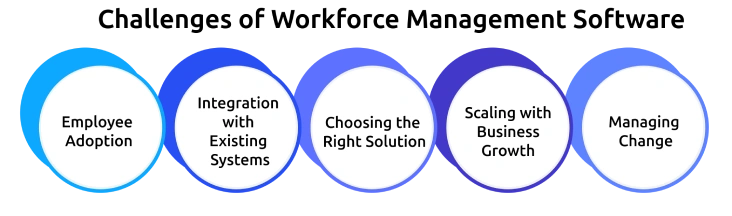
1. Employee Adoption
Even the best software won't deliver results if employees don’t use it. Choosing a user-friendly platform with proper training can significantly improve adoption.
2. Integration with Existing Systems
If your workforce management software doesn't integrate with payroll, HR, or communication tools, teams may end up entering the same data multiple times, increasing the risk of errors.
3. Choosing the Right Solution
Not every workforce management platform is built for every business. A small company may only need scheduling and attendance tracking, while larger organizations often require advanced features like labor forecasting, compliance management, and workforce analytics.
4. Scaling with Business Growth
As your workforce expands, your software should be able to support additional employees, locations, and changing operational needs without affecting performance.
5. Managing Change
Moving from manual processes or spreadsheets to a digital workforce management system requires planning, training, and clear communication to ensure a smooth transition.
Understanding these challenges before implementation helps you choose the right workforce management software and get the most value from your investment.
Why Choose Time Champ for Workforce Management?
Time Champ is an employee monitoring software with workforce intelligence features that help you manage your workforce more effectively. It gives you everything you need to improve team performance, optimize resources, and make smarter business decisions, all from a single platform.
Key Features of Time Champ
- Employee Time Tracking: Automatically record employee work hours with accurate timesheets and payroll-ready reports, making time tracking simple and error-free.
- Attendance Management: Monitor employee attendance, late arrivals, absenteeism, and work hours in real time, so you always have a clear picture of your team's availability.
- Shift Scheduling: Create schedules, assign shifts, and manage changes effortlessly to keep operations running smoothly.
- Leave Management: Handle leave requests, approvals, and leave balances from a single dashboard, saving time for both employees and managers.
- Employee Productivity Monitoring: See productivity trends, active and idle time, and daily work patterns to identify opportunities for better performance and balanced workloads.
- App & Website Usage Tracking: Track app and website usage during work hours to understand work habits, reduce distractions, and improve productivity.
- Project & Task Management: Assign tasks, monitor project progress, and track time spent on projects, all from one place to stay on top of deadlines.
- Workforce Analytics & Reports: Generate detailed reports on attendance, productivity, labor utilization, and workforce performance to support better decision-making.
Simplify Workforce Management with Time Champ!
Manage employee time, attendance, productivity, and workforce insights in one place
Conclusion
Workforce management software has become an essential tool for businesses looking to improve efficiency, reduce manual work, and make better workforce decisions. From employee scheduling and attendance tracking to workforce analytics and productivity insights, the right solution can simplify daily operations while supporting business growth. Choosing workforce management software that fits your business needs can help you improve productivity, simplify operations, and build a more efficient workforce.

Jahnavi Pulluri

Table of Content
 What Is Workforce Management Software?
- Benefits of Workforce Management Software
- What are the Main Types of Workforce Management Software?
- How to Choose the Best Workforce Management Software
- What are the Challenges of Workforce Management Software?
- Why Choose Time Champ for Workforce Management?
- Conclusion

Related Blogs

Learn what time management skills are, compare key skills, explore examples with stats, and see how they differ from time management techniques.
Thasleem Shaik | Apr 08, 2026
Explore the essentials of project time management, its importance, best processes and top tips to meet deadlines without fail and boost workforce productivity.
Shabana Shaik | Oct 10, 2024
Still believe multitasking saves time? Discover 10+ common time management myths that are holding you back and learn what actually works.
Guna Lakshmi | Jun 03, 2026
Discover practical time management techniques to improve focus, prioritize tasks, reduce distractions, and manage your workday more effectively.
Thasleem Shaik | May 21, 2026
Compare the 10 best time management apps for 2026, with free plans, pricing, and what each tool is best for, so you can pick the right one for your team fast.
Guna Lakshmi | May 26, 2026
Setting the right time management goals can improve focus, organize priorities, and help you manage work with more clarity and consistency every day.
Thasleem Shaik | May 27, 2026


 4.7/5 avg.
Ready to Manage Your Workforce Smarter?
Join our family of 1500+ companies using smart insights to redefine workforces!

Free Trial
No Credit Card Required