How to Speed Up Your Workday: 10 Smart Tips
Learn practical ways to speed up your workday, improve focus, reduce distractions, and manage time effectively without increasing work stress.

Have you ever finished your workday and wondered why you still had not completed your most important tasks?
You stayed busy all day answering emails, attending meetings, and switching between tasks, but your real work still felt unfinished. Don’t think it’s your mistake! Here, the main problems are constant distractions, poor prioritization, and a lack of focused time that slow your day down.
That is why learning how to speed up your workday matters. It means working smarter, managing your time better, and focusing on the tasks that matter most.
In this guide, you will learn simple and practical ways to work faster, reduce distractions, improve productivity, and get more done without feeling overwhelmed.
5 Productivity Challenges That Slow Down Your Workday
Every workday has hidden productivity blockers. A quick notification, an unplanned meeting, or constantly switching between tasks may seem small at first. But these habits slowly reduce your focus, waste time, and make your workday feel longer and more stressful.
Here are some of the productivity challenges that affect your daily work.
Procrastination Keeps Important Work Waiting
Procrastination at work means delaying or avoiding important tasks even when you know they need attention. It often starts with small delays. You plan to begin an important task, but then an email appears, a message distracts you, or another small task takes your attention. Slowly, your important work gets pushed to the end of the day.
One simple way to handle this is to break large tasks into smaller, easier steps.
Constant Distractions Break Your Focus
Distractions are everywhere in today’s workplace. Emails, notifications, calls, meetings, and messages can interrupt your focus throughout the day. Every interruption forces your brain to stop and restart, which makes tasks take longer than expected.
This is known as context switching. Even short distractions can reduce concentration and increase mistakes. That is why reducing interruptions is one of the fastest ways to improve productivity.
Poor Time Management Creates Unnecessary Pressure
Without a proper plan, your workday can quickly become disorganized. You may spend most of your time reacting to emails, requests, and unexpected tasks instead of focusing on important work. As a result, you stay busy all day but still feel unproductive.
Planning your tasks in advance helps you manage your time better and stay focused on your priorities.
Feeling Overwhelmed Makes Work Slower
Handling too many tasks at the same time can quickly become mentally exhausting. When your workload feels too large, it becomes harder to focus, make decisions, and complete tasks efficiently. Many people try multitasking to finish work faster, but it usually creates more confusion and reduces productivity.
Focusing on one task at a time helps you work more clearly and efficiently.
Lack of Motivation Reduces Productivity
Lack of motivation can make your entire workday feel slower and more exhausting. When you feel mentally tired, stressed, or disconnected from your work, even simple tasks can start feeling difficult. Repetitive work, unclear goals, heavy workloads, or burnout can slowly reduce your energy and focus throughout the day.
Small goals, regular breaks, and focused work sessions can make your workload feel more manageable and help you maintain productivity throughout the day.
Struggling to understand where your workday actually goes?
See how Time Champ helps you identify distractions, improve focus, and manage work more efficiently!
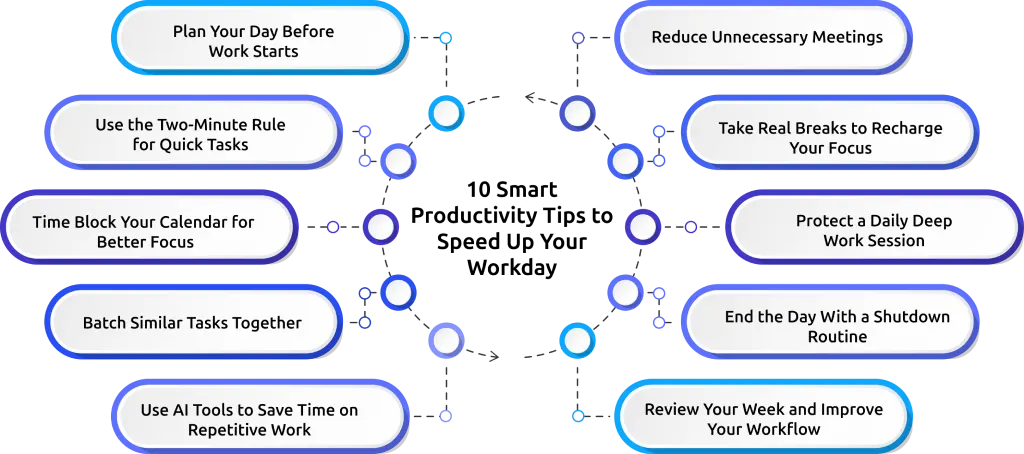
10 Smart Productivity Tips to Speed Up Your Workday
Working faster does not mean rushing through tasks or staying busy all day. The real goal is to manage your time better, reduce distractions, and focus on the work that truly matters.
Here are 10 practical tips that can help you finish tasks faster and work more efficiently.
1. Plan Your Day Before Work Starts
Starting your day without a plan can quickly make your work feel disorganized. Instead of deciding what to do after logging in, spend a few minutes planning your tasks before your workday begins. List your top priorities and focus on the most important tasks first.
A simple plan helps you avoid confusion, manage your time better, and stay focused throughout the day. It also prevents small distractions from taking over your schedule.
2. Use the Two-Minute Rule for Quick Tasks
Small tasks can quietly pile up and make your workload feel overwhelming.
The Two-Minute Rule is simple. If a task takes less than two minutes, complete it immediately. Replying to a short email, confirming a meeting, or organizing a file are good examples.
This habit helps you clear small tasks quickly before they become distractions later in the day.
3. Time Block Your Calendar for Better Focus
Time blocking helps you give every important task a specific time slot in your schedule. Instead of working randomly throughout the day, divide your calendar into focused work sessions. For example, you can reserve one block for meetings, another for emails, and another for project work.
This method helps you stay organized, avoid multitasking, and focus better on one task at a time.
4. Batch Similar Tasks Together
Switching between different types of work can reduce your focus and waste time. Instead of checking emails, attending calls, and doing project work all at once, group similar tasks together. You can answer emails during one time block and complete admin work during another.
Batching helps your brain stay focused on one type of activity, which makes your work feel smoother and faster.
5. Use AI Tools to Save Time on Repetitive Work
AI tools can help you complete repetitive tasks faster and save valuable time during your workday. You can use AI tools to summarize meetings, draft emails, organize notes, or assist with research. This reduces manual effort and allows you to focus more on important work.
However, AI should support your work, not completely replace your thinking. Always review and improve AI-generated content before using it.

Did You Know?
Research from the Federal Reserve Bank of St. Louis found that workers using generative AI reported saving an average of 5.4% of their work hours.
6. Reduce Unnecessary Meetings
Too many meetings can interrupt your focus and consume a large part of your day. Before accepting or scheduling a meeting. Some updates can be shared through messages or emails instead.
You can also make meetings shorter by setting clear agendas and limiting unnecessary discussions. Fewer meetings create more time for focused work.
7. Take Real Breaks to Recharge Your Focus
Working continuously for long hours can reduce your concentration and energy. Short breaks help your brain recover and improve focus. Instead of scrolling through your phone during breaks, try walking around, stretching, or stepping away from your screen for a few minutes.
Even small breaks throughout the day can help you stay refreshed and productive.
8. Protect a Daily Deep Work Session
Deep work means focusing completely on one important task without interruptions. Choose a time during the day when your energy is highest and reserve it for focused work. During this session, avoid notifications, meetings, emails, and unnecessary distractions.
Protecting even one uninterrupted work session daily can help you complete tasks faster and improve work quality.
9. End the Day With a Shutdown Routine
Ending your workday properly helps you feel more organized and less stressed. Before finishing work, review your unfinished tasks, check tomorrow’s schedule, and organize your priorities for the next day. This simple routine helps you mentally disconnect from work and prepare for a smoother start tomorrow.
A shutdown routine also prevents unfinished work from constantly staying on your mind after office hours.
10. Review Your Week and Improve Your Workflow
Improving productivity becomes easier when you regularly review your work habits. At the end of each week, look at what helped you stay productive and what slowed you down. Identify distractions, time-wasting habits, or tasks that took longer than expected.
Small improvements each week can help you build better routines and create a faster, more organized workday over time.
A Sample Workday Plan to Finish Tasks Faster
A structured workday can help you stay focused, reduce distractions, and manage your time more effectively. Here is a simple workday template you can follow and adjust based on your schedule:
| Time | Activity |
|---|---|
| Before 9:00 AM | Review your priorities and plan your day |
| 9:00 – 11:00 AM | Work on your most important tasks |
| 11:00 – 11:15 AM | Take a short break away from screens |
| 11:15 – 12:00 PM | Reply to emails and finish quick tasks |
| 12:00 – 1:00 PM | Take a lunch break |
| 1:00 – 2:30 PM | Attend meetings and team discussions |
| 2:30 – 2:45 PM | Take a short refresh break |
| 2:45 – 4:30 PM | Continue project work and focused tasks |
| 4:30 – 5:00 PM | Finish admin work and check emails |
| 5:00 – 5:15 PM | Review unfinished work and plan for tomorrow |
You do not need to follow this routine perfectly every day. The goal is to create a simple schedule that helps you stay focused, organized, and less overwhelmed during your workday.
How Time Champ Helps You Speed Up Your Workday
Managing your workday becomes much easier when you clearly understand where your time is going. That is why many businesses now use productivity tracking and employee monitoring tools like Time Champ to improve focus, reduce distractions, and manage work more efficiently.
Time Champ is an employee monitoring and productivity tracking software that helps you improve focus, manage time better, and reduce productivity gaps throughout the day.
Here is how it helps you speed up your workday:
Tracks Time Automatically
You rarely notice how much time gets lost between meetings, distractions, and task switching.
Time Champ automated time tracking tracks work hours, active time, and task duration, helping you understand how your day is actually spent. This makes it easier to identify time-wasting activities and improve your daily workflow.
Helps You Reduce Distractions
Constant app switching and unnecessary browsing can quietly reduce productivity.
Time Champ gives you visibility into app and website usage, helping you identify distractions that interrupt your focus during work hours. This helps you build better work habits and stay focused longer.
Improves Task and Time Management
You can plan your work more easily when you organize tasks and schedules clearly.
Time Champ helps you manage tasks, projects, deadlines, and work hours in one place. This supports better time blocking, prioritization, and workflow management throughout the day.
Supports Better Productivity Decisions
Productivity reports and work insights help you understand what improves performance and what issues slows you down.
When you review work patterns regularly, you can identify bottlenecks, improve focus time, and make smarter productivity decisions without increasing workload pressure.
Ready to create a faster and more organized workday?
Use Time Champ to track work patterns, manage time better, and build more productive daily routines.
Conclusion
Speeding up your workday means managing your time better, reducing distractions, and focusing on the tasks that matter most. Simple habits like planning your day, batching similar tasks, taking proper breaks, and protecting focused work sessions can help you work faster and feel less overwhelmed.
You do not need to change everything at once. Start with a few small improvements and build better routines over time. The more intentionally you manage your workday, the easier it becomes to stay productive, organized, and in control of your time.

Guna Lakshmi

Table of Content
 5 Productivity Challenges That Slow Down Your Workday
- 10 Smart Productivity Tips to Speed Up Your Workday
- A Sample Workday Plan to Finish Tasks Faster
- How Time Champ Helps You Speed Up Your Workday
- Conclusion

Related Blogs

Learn the difference between productivity tracking and time tracking, how they work, and which approach helps improve team performance and visibility.
Guna Lakshmi | May 09, 2026
Want productivity tracking without the micromanagement? Learn the four signals that separate healthy oversight from surveillance, and practical rules.
Anjali | May 07, 2026
A practical guide to choosing productivity tracking software for your team, with comparisons of features, pricing, privacy, security, and rollout risks.
Jahnavi Pulluri | May 01, 2026
Discover how employee productivity tracking builds accountability, drives ownership, and turns daily activity into measurable team performance.
Guna Lakshmi | May 01, 2026
Learn how to track productivity in the workplace using proven methods, role-based metrics, and tools. A practical 2026 guide for modern managers and teams.
Jahnavi Pulluri | May 06, 2026
Discover the real pros and cons of employee productivity tracking, how it impacts your team, and the right way to use it to support trust and performance.
Anjali | May 02, 2026


 4.7/5 avg.
Ready to Manage Your Workforce Smarter?
Join our family of 1500+ companies using smart insights to redefine workforces!

Free Trial
No Credit Card Required