How to Track Productivity in the Workplace: Methods, Metrics, and Tools
Learn how to track productivity in the workplace using proven methods, role-based metrics, and tools. A practical 2026 guide for modern managers and teams.

If you have ever sat in a performance review and struggled to explain your team’s productivity. Most workplaces still rely on scattered spreadsheets, surface-level activity, and who seems busy.
The issue is that being busy isn’t the same as being productive. Without clear visibility into how work moves, it’s hard to find blockers, recognize strong performance, or make better decisions.
This blog shows you how to track productivity in the workplace, I am going to cover the methods that work, the metrics that matter, and the tools that make it sustainable.
What is Productivity in the Workplace?
Productivity in the workplace is the amount of useful output produced relative to the time, effort, and resources invested. What changes across teams is how “output” and “input” are defined.
For instance, in factories, productivity is easy to quantify because output is units produced and input is time worked. When it comes to digital workplaces, output includes completed tasks like deals or designs, while input involves focus time, meetings, and cognitive effort.
Productivity is not the same as busyness. A team that spends the day moving from one meeting to another without any results is busy, not productive. True productivity comes from consistently delivering meaningful outcomes without wasted effort or distractions.
Why Should You Track Productivity in Workplace?
Tracking productivity isn’t about catching slackers. It is about understanding how work actually gets done.
- Visibility: You can see what is moving forward and what is getting stuck, without relying on long status updates.
- Fairness: Reviews are based on consistent data instead of memory or perception.
- Coaching: It becomes easier to identify where someone needs support or where processes are slowing things down.
- Planning: Hiring, timelines, and project scope become more realistic when based on actual output.
- Retention: Clear expectations reduce confusion and help employees stay aligned with their work.
Tracking productivity creates clarity. Once you define what “productive” means for each role, gaps and assumptions become obvious.
What are the Main Methods to Track Productivity in the Workplace?
There are five core ways to track productivity. Strong systems usually combine three or four of them instead of depending on just one.
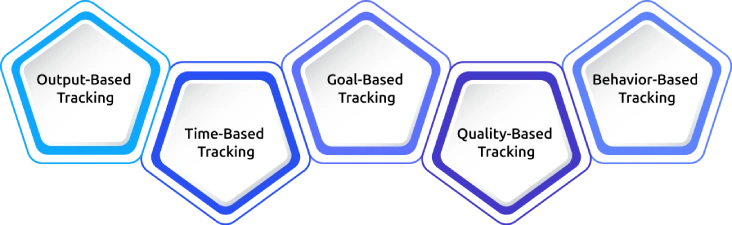
1. Output-Based Tracking
Measure what gets delivered such as deals closed, code merged, designs approved, articles published, or tickets resolved. This is the most direct signal of productivity and the one customers ultimately care about. The challenge is that some types of output are harder to quantify, especially in cross-functional or research-heavy roles.
2. Time-Based Tracking
Track how time is spent like hours worked, focus time, idle time, or time across tools and projects. Time data is easy to capture, but also easy to misread. Hours alone tell you very little, focus time combined with output gives a much clearer signal.
3. Goal-Based Tracking
Use frameworks such as OKRs, KPIs, milestones, or sprint commitments. This approach measures whether the team delivers what it sets out to achieve. It works best when goals are specific, measurable, and reviewed regularly.
4. Quality-Based Tracking
Look at the quality of output such as error rates, customer feedback, NPS, code quality, or number of revisions. High output does not mean much if the work is inconsistent or flawed. Considering quality leads to a more accurate measure of productivity.
5. Behavior-Based Tracking
Track patterns like focus time, context switching, app usage, and meeting load. Behavior does not measure output directly, but it shows the conditions under which work happens. It is especially useful for identifying overload, interruptions, and loss of focus.
The most effective systems combine multiple methods. A practical starting point is one metric per category for each role: output, time, goal, and quality.
Want to See How Productivity Flows in Your Team?
Try it out and review your first productivity report within a week.
How Do You Measure Productivity in the Workplace?
Measurement is where most teams get stuck. These four approaches cover most real-world situations.
The Basic Productivity Formula
The simplest way to measure productivity is:
Productivity = Output // Input
Role-Specific Productivity Formulas
Generic formulas can be misleading. Productivity should be defined differently for each role based on what the business actually values. For example, sales teams may measure deals closed, while support teams focus on tickets resolved and engineers on work shipped.
| Role | Output unit | Sample formula |
|---|---|---|
| Sales | Closed-won deals | Deals ÷ rep-weeks |
| Engineering | PRs merged | PRs ÷ engineer-weeks |
| Customer support | Tickets resolved at first contact | Resolved tickets ÷ agent-hours |
| Design | Designs approved | Approvals ÷ designer-weeks |
| Marketing | MQLs generated | MQLs ÷ campaign cost |
| Field operations | Visits completed | Visits ÷ field-hours |
Quality-Adjusted Productivity
Output alone does not capture quality, a more complete view does:
QAP = Output × Quality Score / Input
The quality score typically ranges from 0 to 1. For example, resolving 100 tickets with a 60% satisfaction score is less effective than resolving 80 tickets with a 95% score.
Productivity By Context
Different work setups require different inputs:
- In-office: Work is visible, so combine hours with focus blocks for a complete picture
- Remote: Hours are less visible, so focus on output and response time for a complete picture.
- Hybrid: Work is mixed, so use output as the main signal supported by focus time and meeting load for a complete picture.
Using the same rules and metrics for remote work as in-office work leads to inaccurate results and misleading conclusions about productivity.
Which Metrics Matter for Productivity in the Workplace?
Stop tracking everything, as it consumes a lot of time and effort. A small set of well-chosen metrics will give you a clearer signal than dozens of scattered ones.
| Metric | What it Shows | When It’s Useful |
|---|---|---|
| Output per role-relevant unit | Actual work produced | When output is clearly defined |
| Focus time per day | Uninterrupted deep work | Knowledge and office-based roles |
| Project velocity | Speed of delivery | Project-based and engineering teams |
| Goal completion rate | Whether commitments are met | Performance reviews and planning |
| Meeting load | Workload and sustainability | Identifying overload and burnout risk |
| Quality score | Consistency and quality of output | Customer-facing and execution roles |
The right metrics depend on the role, with each team measured against the output that drives its impact.
What Tools are Used to Track Productivity in the Workplace?
Most tools fall into four categories. Teams usually combine a few of them based on how their work is structured.
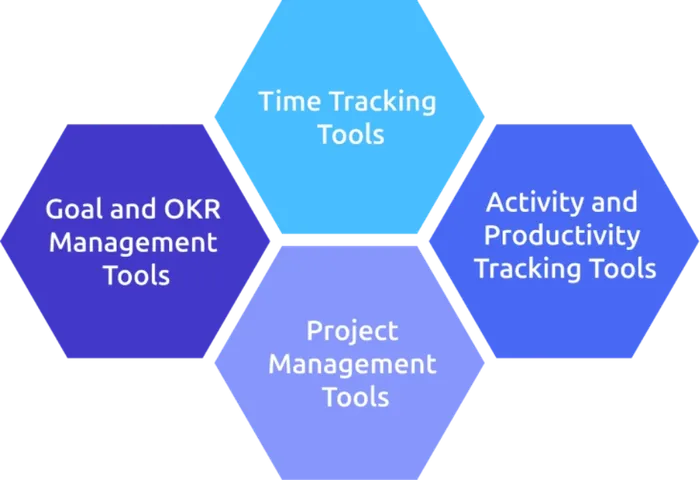
Time Tracking Tools
Time tracking tools help you to track work hours, projects, and billable time. Tools like Time Champ, Toggl Track, Harvest, and Clockify help you understand where time is going and are especially useful for billing and utilization.
They work best when time directly maps to value. On their own, however, they do not tell you much about productivity, you need to pair them with output or results.
Activity and Productivity Tracking Tools
These tools capture focus time, app usage, and work patterns provide visibility into how work happens during the day.
Platforms, such as Time Champ, combine time tracking, activity insights, and productivity reporting in one place, which can simplify your setup.
These tools are useful for identifying patterns like excessive meetings, frequent context switching, or lack of uninterrupted focus time. They work best when used to understand team-level trends rather than to closely monitor individuals.
Project Management Tools
Project management tools track tasks, deadlines, ownership, and overall progress. Some examples include Asana, Trello, Jira, and ClickUp.
These tools show which task is in progress, what is blocked, and what has been completed. They are essential for tracking deliverables and execution speed, but only if teams update them consistently.
Goal and OKR Management Tools
These tools track goals, KPIs, and progress over time. Platforms like Lattice, Betterworks, and Workday Performance Management connect day-to-day work with broader business outcomes.
They are most effective during planning and review cycles, but without any clear and measurable goals, they quickly lose their value.
Together, these tools form the foundation most teams use to track and improve productivity.
Want a Simpler Way to Manage it All?
Use Time Champ to bring time tracking, activity insights, and reporting into one platform.
How Time Champ Helps Improve Productivity in the Workplace
Time Champ is employee monitoring software with a workforce intelligence layer, designed to give you a clear, shared view of how productivity actually flows across the workweek.
Instead of depending on multiple tools or assumptions, it brings time, activity, and output signals into one system, so productivity can be understood easily.
Key Capabilities That Support Productivity Tracking:
Unified Visibility Across Teams
Whether teams are in-office, remote, or hybrid, Time Champ captures all the data and presents them in a single dashboard. This removes the need to switch between tools or compare disconnected reports.
Employees can also view their own data, which improves accountability and helps them understand their productivity patterns over time. This visibility makes it easier to identify trends in focus, workload, and performance, allowing employees to self-correct and improve how they work.
Role-Based Productivity Scoring
Productivity is not treated as one-size-fits-all. The system allows you to categorize productivity by department, role, or project, ensuring that different teams are reviewed using relevant criteria instead of a generic framework.
Focus on Meaningful Work Patterns
Beyond activity tracking, the software captures everyday activity across tasks and tools to provide a clearer picture of how work is actually being spent. This helps you identify what is supporting or slowing down productivity at a granular level.
Ready-to-Use Performance Insights
All collected data is presented through detailed, easy-to-read reports that simplify analysis. These insights support faster decision-making for you by highlighting trends in output, performance, and goal completion.
Transparent Reporting for Teams
Instead of one-sided monitoring, the system creates shared visibility where both you and your employees can access the same productivity insights. This builds alignment and encourages more self-driven improvement.
Built-In Integrations with Your Workflow
Time Champ integrates well with tools like Slack, Microsoft Teams, Jira, Trello, and Google Workspace, so productivity tracking fits naturally into existing workflows without disrupting how teams already work.
Ready to Track Workplace Productivity the Right Way?
Start a free 7-day trial of Time Champ and set it up in under 30 minutes.
Conclusion
Tracking productivity in the workplace is one of the most effective ways to replace assumptions with real data. The goal is not to track everything, but to focus on a small set of meaningful metrics and use them consistently. Pick three or four core metrics, define productivity clearly for each role, and review them regularly with your team. If you use this approach consistently for a quarter, it gives you a far clearer view of how work actually happens than depending on intuition alone.

Jahnavi Pulluri

Table of Content
 What is Productivity in the Workplace?
- Why Should You Track Productivity in Workplace?
- What are the Main Methods to Track Productivity in the Workplace?
- How Do You Measure Productivity in the Workplace?
- Which Metrics Matter for Productivity in the Workplace?
- What Tools are Used to Track Productivity in the Workplace?
- How Time Champ Helps Improve Productivity in the Workplace
- Conclusion

Related Blogs
Discover if remote workers are truly less productive. Explore key insights, challenges, and benefits of remote work in boosting employee productivity.
Shabana Shaik | May 30, 2023
Toxic productivity at the workplace harms employee well-being and leads to burnout. Discover what it is, signs to watch for, and strategies to overcome it.
Sai Keerthi Uppala | Jan 10, 2025
Productivity Tracking Software helps remote teams stay on top, track progress, streamline workflows & boost efficiency effortlessly. Learn more!
Shabana Shaik | Mar 15, 2025
Learn how to boost productivity by finding the right balance in employee monitoring, focusing on key indicators, and maintaining transparency for a driven team.
Tarun Kumar Reddy | Mar 14, 2025
Discover different productivity styles, their unique approaches, and find the best way to maximize your efficiency and workflow.
Thasleem Shaik | Mar 13, 2025
Productivity vs. Efficiency, Are you focusing on the wrong one? Discover the key difference and how to master both and strike the perfect balance!
Tarun Kumar Reddy | Jun 13, 2024


 4.7/5 avg.
Ready to Manage Your Workforce Smarter?
Join our family of 1500+ companies using smart insights to redefine workforces!

Free Trial
No Credit Card Required