OKR Framework for Employee Productivity: A Practical Guide
Apply the OKR framework to boost employee productivity with clear goals, aligned teams, and measurable progress you can track weekly.

Improving employee productivity can feel unclear. You may try different approaches, but without clear goals and measurable results, it’s hard to know what actually works. The OKR framework fills this gap. It helps you turn broad productivity ideas into clear targets and track real progress using actual work data.
With the right approach, you can keep your team focused, measure improvement easily, and make sure daily work is moving in the right direction.
In this guide, you’ll learn how to apply OKRs for employee productivity, set clear productivity goals for different teams, and track progress using real data.
What Is the OKR Framework?
OKR stands for Objectives and Key Results. An objective is a clear and meaningful goal you want to achieve within a set time, usually a quarter. A key result is a specific number that shows whether you are making progress toward that goal. The objective and key results work together. The objective sets the direction, and the key results define what success looks like in measurable terms.
Andy Grove developed OKRs at Intel in the 1970s and popularized them at Google in the late 1990s when investor John Doerr introduced the framework to Larry Page and Sergey Brin. Since then, organizations from early-stage startups to global enterprises have adopted OKRs as their primary goal-setting framework.
The table below shows the structure of a complete OKR set for an employee productivity goal.
| Component | What It Is | Example for Employee Productivity |
|---|---|---|
| Objective | What do you want to achieve? Ambitious, qualitative, and time-bound. Describes a direction, not a task. | Improve team productivity across all remote teams this quarter |
| Key Result 1 | A specific, numeric, and verifiable measure of progress toward the objective. | Increase team average active time percentage from 58% to 72% |
| Key Result 2 | A second measurable outcome. Together, key results define what success looks like. | Reduce the average idle time rate from 28% to 18% across the team |
| Key Result 3 | A third measurable outcome. Most objectives have 2 to 4 key results maximum. | Achieve 85% on-time task completion rate across all projects. |
OKRs and KPIs both support productivity management, but teams use them in different ways. OKRs focus on setting new goals and driving improvement within a specific time, usually a quarter. KPIs track how the team is performing regularly using set benchmarks. Many metrics you already track as KPIs, like active time, productivity score, and idle time, can also be used in OKRs. When you set targets for these metrics, they become key results that help you measure progress.
For a deeper look at the metrics involved, see our guide on employee monitoring metrics.
Want to clearly see how your team is working every day?
Start tracking real-time productivity with Time Champ and turn insights into action.
Why OKRs Are Essential for Improving Employee Productivity
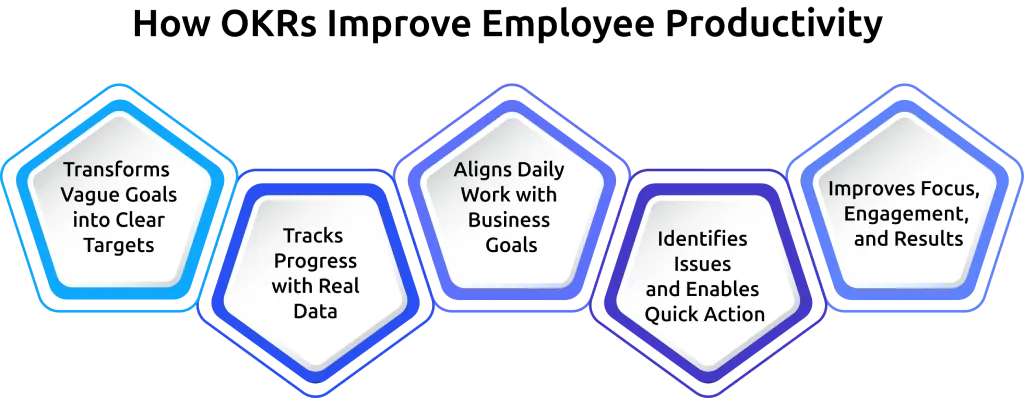
Most productivity efforts fail because goals are unclear, progress is hard to measure, and targets are set without using real data. The OKR framework solves these challenges by giving you clear direction and measurable outcomes.
Transforms Vague Goals into Clear Targets
Productivity goals often sound broad and difficult to measure. You may aim to improve focus or increase output, but these ideas do not clearly show what success looks like. The OKR framework helps you turn these into specific targets with numbers and timelines. For example, increasing active time from 58% to 72% within a quarter gives you a clear goal to work toward. That numerical clarity helps you and your team understand what needs to be achieved.
Tracks Progress with Real Data
OKRs help you track progress using accurate data. Each key result is tied to a measurable metric, so you can easily see how your team is performing at any time. When progress is visible, it becomes easier for you to understand whether your team is moving in the right direction and where adjustments are needed.
Aligns Daily Work with Business Goals
The OKR framework helps you connect everyday tasks with larger team goals. When your team understands how their work contributes to overall success, they stay more focused and engaged. This alignment creates a sense of purpose and helps you prioritize the right activities.
Identifies Issues and Enables Quick Action
OKRs follow a structured cycle with regular check-ins, which makes it easier for you to monitor progress throughout the quarter. Regular check-ins help you identify issues early and take action before they impact results. You can quickly understand what is slowing your team down and make informed decisions using real data.
Improves Focus, Engagement, and Results
Clear goals and visible progress help your team stay focused on what truly matters. Your employees can see how their efforts contribute to outcomes, which improves accountability and motivation. Over time, this leads to stronger performance and better results across your team.
Want to set better OKRs using real performance data?
Time Champ helps you set data-driven goals with real-time performance tracking.
OKR Examples for Employee Productivity by Team Type
The OKR structure stays the same across all team types. What changes is the specific key results, which should reflect the monitoring metrics most relevant to how each team works. The examples below use real-time monitoring data as the basis for each key result so that progress can be tracked automatically and accurately.
Remote Teams
When you manage remote teams, you need clear visibility into how work is happening each day. Since you cannot rely on physical presence, OKR key results help you track productivity using real data.
| Team Type: Remote Teams | Details |
| Objective | Build a high-performing remote team with consistent daily output |
| Key Result 1 | Increase team average active time percentage from 55% to 70% across all remote employees. |
| Key Result 2 | Reduce the late login rate from 22% to under 8% by the end of the quarter |
| Key Result 3 | Achieve 80% of employees with a weekly productivity score at or above the team baseline. |
With remote employee monitoring, you can automatically capture active time, login patterns, and productivity scores from every work session. This gives you reliable weekly data to review progress and run effective OKR check-ins without adding extra meetings.
Hybrid Teams
Hybrid team monitoring gives you clear visibility into both remote and office work in one place. It brings all productivity data into a single dashboard, making it easy for you to compare WFH and WFO performance.
| Team Type: Hybrid Teams | Details |
| Objective | Eliminate the productivity gap between office and remote work days |
| Key Result 1 | Bring WFH and WFO productivity scores within 10 points of each other by the end of the quarter. |
| Key Result 2 | Increase focus time blocks on remote days from 1.2 per day to 2.0 per day |
| Key Result 3 | Reduce overtime sessions on office days from 35% to under 15% of all logged sessions. |
Customer Support and Back-Office Teams
For teams handling high-volume tasks, you need clear data to measure performance. Activity monitoring and idle time detection give you accurate insights at the end of each cycle. The productivity classification engine tracks how employees use each application and labels it based on their role. This means your productivity metrics reflect actual work done, helping you measure key results more accurately.
| Team Type: Customer Support and Back-Office Teams | Details |
|---|---|
| Objective | Improve throughput and reduce idle time across the high-volume processing roles. |
| Key Result 1 | Reduce the average idle time rate from 32% to 18% across the billing and admin teams. |
| Key Result 2 | Increase productive app usage from 61% to 78% for the data entry and case management role. |
| Key Result 3 | Achieve 90% task completion rate on daily work queues within contracted hours. |
Management and Leadership Teams
Management OKRs for productivity focus on how effectively you manage your team, along with the results your team delivers. They help you improve consistency, decision-making, and overall team performance. Use Time Champ to track attrition risk, which analyzes employee behavior and engagement signals. This gives you a clear view of employees who may be at risk of leaving, so you can take action early.
| Team Type: Management and Leadership Teams | Details |
|---|---|
| Objective | Make team performance visible and data-driven across all departments |
| Key Result 1 | Review team productivity dashboards weekly with documented management action for 3 or more weeks out of 4 |
| Key Result 2 | Reduce the attrition risk score above the warning threshold from 8 employees to 3 within the quarter. |
| Key Result 3 | Resolve all flagged workload imbalances within 5 business days of the alert being raised. |
How to Track OKR Progress Using Workforce Data
Teams often fail with OKRs because they don’t track progress consistently throughout the cycle. Even when goals are clear, relying on manual timesheets, manager opinions, or occasional surveys makes tracking slow and less reliable.
To track OKRs effectively, you need continuous data from your team’s daily work activity. This helps you understand how work is happening in real time and keeps your progress accurate.
Match Each Key Result to a Monitoring Metric
Each key result needs a specific metric to measure progress. When you connect key results to the right data, tracking becomes simple and accurate.
| Key Result Type | Monitoring Metric | Feature |
|---|---|---|
| Improve active time percentage | Active time % per employee and team | Activity monitoring |
| Reduce the idle time rate | Idle time % per session, configurable threshold | Idle time detection |
| Improve productivity score | Role-based productivity score updated in real time | Productivity classification engine |
| Improve attendance compliance | Late login rate and shift adherence per employee | Automated attendance |
| Reduce overtime signals | Session length vs contracted hours per employee | Time tracking and overtime alerts |
| Reduce attrition risk score | Per-employee behavioral risk score trend over time | Attrition prediction module |
All these metrics are captured from daily work activity and updated continuously. This means your OKR progress stays current without waiting for reports or manual updates. You can also export this data for end-of-cycle evaluation.

Did You Know?
Research from the European Commission shows that organizations using OKRs can see around a 37% rise in employee engagement and a 19% improvement in productivity within the first year.
Review OKR Progress at the Right Frequency
Tracking becomes more effective when you review progress regularly.
Weekly check-ins
Weekly reviews help you spot early changes in productivity. If your target is 72% active time and the team is still at 58% after a few weeks, you can take action quickly. Automated alerts can help you notice these changes early.
Monthly reviews
Monthly reviews give you a broader view of work progress. You can compare current performance with your midpoint target. For example, moving from 58% to 72% over 12 weeks means a midpoint of around 65%. If progress is lower, you can adjust your approach. This stage also helps you identify issues related to workload, tools, or processes.
End-of-cycle scoring
At the end of the cycle, you measure results using actual data. You compare the final numbers with your targets and calculate the score. For a complete picture of how to connect monitoring data to management decisions beyond OKR cycles, see our guide on workforce productivity analytics.
How Time Champ Helps You Track OKRs More Effectively
Tracking OKRs becomes much easier when you have accurate, real-time data about how work is happening. When your data is clear and continuously updated, it becomes simple to measure progress and make better decisions with confidence. An employee monitoring software like Time Champ captures all the key metrics needed for productivity-focused OKRs automatically across remote, hybrid, in-office, and field teams.
Time Champ helps you track how your team uses different apps and classifies each one as productive, non-productive, or neutral based on their work. It keeps performance visible with real-time updates, so you can understand progress as work happens. It also simplifies attendance and overtime tracking, removing manual effort and keeping records accurate. With this level of visibility, you can easily identify where work is slowing down, where teams are performing well, and where support is needed.
For a full breakdown of the metrics and how to read them, see our guide on organizational health metrics.
Ready to turn your productivity goals into measurable results?
Start using Time Champ to get real-time performance insights and improve team productivity.

Guna Lakshmi


Table of Content
-
 What Is the OKR Framework?
-
Why OKRs Are Essential for Improving Employee Productivity
-
OKR Examples for Employee Productivity by Team Type
-
How to Track OKR Progress Using Workforce Data
-
How Time Champ Helps You Track OKRs More Effectively
Instant Signup
Thank you for your request!
We have received your signup request and our team will get back to you soon. In the meantime, you can book a demo to see Time Champ in action.
Book a DemoFree trial. No credit card required. Prefer a walkthrough? Book a demo.
Related Blogs
Learn what workforce productivity is, key factors, metrics, and ways to measure and optimize it. Discover AI’s role in improving workforce efficiency.
Chethana Choudary | October 01, 2025
Struggling with remote work productivity challenges? Learn what’s slowing your team down and how to improve focus, communication, and performance.
Guna Lakshmi | Apr 15, 2026
Learn how employee productivity monitoring software can boost your company with key features, usage tips, and advantages of using tools like Time Champ.
Tarun Kumar Reddy | Jun 24, 2024
Workforce productivity analytics turns daily work data into clear decisions. Learn the key metrics, monitoring signals, and AI tools that improve team output.
Thasleem Shaik | Apr 21, 2026
Transform your team's productivity with our guide. Discover benefits and strategies to measure and improve performance.
Shabana Shaik | Jun 21, 2024
Scattered teams, missed deadlines? Improve remote team productivity with practical tips and the right tools to keep your distributed teams more focused.
Anjali | Sep 30, 2026


 4.7/5 avg.
Ready to Manage Your Workforce Smarter?
Join our family of 1500+ companies using smart insights to redefine workforces!

Free Trial
No Credit Card Required