Employee Productivity Monitoring Software: A Practical 2026 Guide
Choose the right employee productivity monitoring software. A 2026 guide covering features, evaluation criteria, remote work needs, and rollout tips.

Your planning meeting ends, the team looks stretched, and yet the output doesn't match the effort. Activity is everywhere, but real insight is not. The gap that employee productivity monitoring software fills is exactly here, replacing the appearance of activity with actual output. When it’s used properly, it helps you see where time is going, what’s slowing work down, and where effort isn’t turning into results.
In this blog, I’ll walk you through what the software does, the key features, how to choose the right tool, and how to roll it out effectively.
What is Employee Productivity Monitoring Software?
Employee productivity monitoring software is a workplace tool that helps you understand how work actually happens across your team. It tracks how employees use their time and applications, applies role-based rules to that activity, and turns it into reports you can act on. In simple terms, it builds on time tracking and helps you see whether time is actually turning into productive work and where things are slowing down.
How Does Employee Productivity Monitoring Software Work?
Employee productivity monitoring software works in three simple stages. First, it captures activity through an agent on each device. Then it classifies that activity using role-based rules and tags. Finally, it turns everything into clear reports through dashboards, alerts, and exports. The capture happens automatically, the rules can be configured, and the reports are what you can actually use to understand work patterns.
In practice, it tracks things like app usage, active time, idle time, and how work is spread across different tools. Each app or website can be labeled as productive, neutral, or non-productive based on the employee’s role. From there, the software highlights useful patterns like daily focus time, meeting load, most-used productive apps, and trends across the team. The better platforms also give your employees access to the same view, so discussions are based on real data instead of assumptions.
See How Productivity Actually Flows Across Your Organization
What Are the Core Features of Employee Productivity Monitoring Software?
The core features of employee productivity monitoring software help you turn raw work activity into clear, role-based productivity insights. They give you clear visibility into how work happens across teams without making the process feel intrusive.

Activity and Time Tracking
This shows how your team spends their work hours, including active time, idle time, and time spent on different applications. It gives you a base layer of visibility so you can understand actual work patterns rather than assumptions.
App and Website Classification
This helps you categorize tools as productive, neutral, or non-productive based on each role. For example, a CRM tool may be productive for sales but not relevant for engineering, helping you review work fairly across teams.
Productivity Scoring by Role
This converts activity data into a productivity score based on what each role is expected to deliver. It ensures you’re evaluating performance in context, rather than using the same yardstick for every team.
Reports and Dashboards
This gives you a clear view of focus time, meeting load, tool usage, and productivity trends. Simple dashboards help you quickly understand team performance without digging through raw data.
Integrations with Daily Tools
These connect with platforms your team already uses, like Slack, Jira, Trello, Asana, and Google Workspace. It keeps workflows smooth and avoids forcing your team to switch between multiple systems.
Privacy and Compliance Controls
This includes access controls, screenshot settings, and compliance support for standards like GDPR, SOC 2, and ISO 27001. These controls ensure transparency and help you implement monitoring in a way that stays compliant and trusted.
These features combine to deliver concrete changes in how your team works.
What Are the Benefits of Employee Productivity Monitoring Software?
The benefits of employee productivity monitoring software go beyond tracking work. It helps you see how work actually happens, make fairer decisions, and improve how your team operates.
Visibility into the Whole Workweek
You get a clear view of how your team’s time is actually spent across tasks, tools, and focus areas. When monitoring data is used effectively, it often helps you improve focus, structure tasks better, and make more efficient use of work hours over time.
Fair Performance Reviews
Instead of depending on memory or perception, you can evaluate performance using actual work data. This helps reduce bias and makes it easier to recognize consistent contributors who might otherwise go unnoticed.
Workload Balance and Burnout Signals
You can quickly find uneven workloads, excessive meetings, or declining focus time. This helps you address burnout risks early and keep work distribution more balanced across the team.
Quick Inefficiencies Detection
You can identify where work is slowing down, whether it’s frequent context switching, unclear priorities, or overloaded roles. These patterns usually become visible within the first few weeks of usage.
Shared Source of Truth
When both you and your team have the same data, discussions stop being a debate of opinions and start being a review of patterns. It helps shift conversations from “how busy we feel” to “what the data is showing.”
How to Choose the Right Employee Productivity Monitoring Software?
Choosing the right employee productivity monitoring software becomes easier when you focus on what actually matters for your team instead of just comparing features. Here are five key factors to guide your decision.
Assess Your Needs
Start with your real work setup. Think about whether you need better visibility for teams, accurate time tracking, or stronger data privacy. When your needs are clear, it becomes much easier to filter the right tools.
Set Your Budget
Decide what you’re comfortable spending but also think beyond cost. Look at the value the tool brings in terms of time saving, better decisions, and improved productivity. A slightly higher investment often pays off if the tool fits well.
Evaluate Features
Don’t get distracted by long feature lists. Focus on what your team will actually use, like time tracking, activity insights, productivity reports, or role-based views. The right tool should simplify work, not add complexity.
Check Reviews and Ratings
See what real users are saying. Reviews help you understand how the software performs in everyday use, not just in product demos.
Use the Trial Period
Always test the tool before committing. A trial helps you see how it fits into your workflow, whether the data is useful, and if your team is comfortable using it.
How to Roll Out Productivity Monitoring Without Hurting Morale
Roll out employee productivity monitoring software like any change that impacts trust. Here are a few key steps that can help you do it without affecting morale.
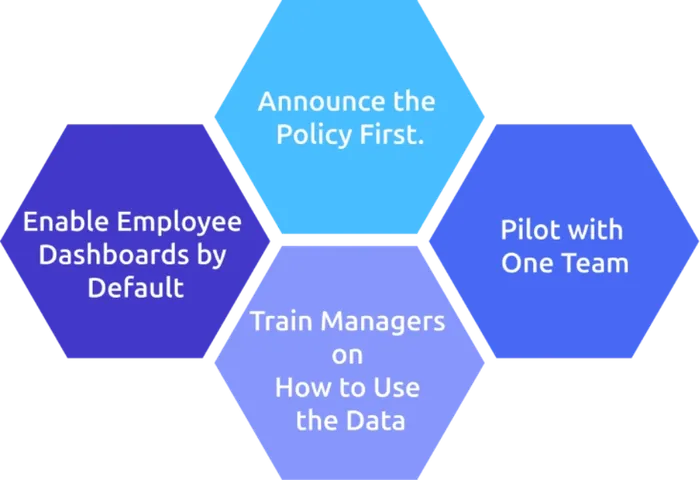
1. Announce the Policy First
Share a clear policy before rollout. It should explain what is tracked, what isn’t, who can access the data, and how it will be used. If employees discover monitoring only after it starts, it can quickly hurt morale.
2. Pilot with One Team
Start with one team and be open to sharing dashboards. The goal is to improve work, not monitor individuals. Run it for two weeks, keep reporting transparently, and review the results at the end.
3. Train Managers on How to Use the Data
Without guidance, productivity data can be misused. Train your other managers to focus on patterns such as time spent on focus, workload balance, and inefficiencies, rather than short-term dips or idle time.
4. Enable Employee Dashboards by Default
Every employee gets the same view you see as a manager. This creates transparency, reduces the feeling of monitoring, and helps employees understand how their work patterns look in real time so they can self-correct and stay aligned with team expectations.
Why Time Champ Stands Out as Employee Productivity Monitoring Software
Time Champ is employee monitoring software with built-in workforce intelligence. It gives you a clear view of how productivity flows across your team. Instead of separating tracking and reporting into different tools, it brings both together in one system and turns raw activity into usable insights.
Here are the key capabilities that set it apart:
Unified Visibility Across Teams
It provides a clear, single dashboard that works across in-office, remote, and hybrid teams. Activity, time, and project data are all captured in one place, and both you and your employees see the same view, so there’s no disconnect in understanding performance.
Role-Based Productivity Scoring
Time Champ allows you to categorize productivity based on departments by tagging apps and websites as productive, neutral, or non-productive. This ensures that performance is measured in context, since different roles contribute in different ways.
Productivity Trends & Patterns
It shows how productivity changes over time, including trends in focus, workload, and activity patterns. This helps you spot issues early and improve how work is structured.
Cross-Platform Agents
Time Champ works across Windows, macOS, Linux, Android, iOS, and Chrome OS. It also supports offline tracking and GPS-based attendance for field teams, so you don’t lose visibility in low-connectivity situations.
Reports Built for Action
Reports are designed to be quick to read and easy to act on. They highlight key signals like focus time, meeting load, and productivity trends, so you can understand team performance in minutes instead of digging through data.
Compliance and Security
The platform follows enterprise-grade security standards, including GDPR, SOC 2, and ISO 27001. It also gives you control over data access, capture settings, and regional compliance requirements.
Ready to Track Productivity the Right Way?
Start your free 7-day trial of Time Champ and set it up in under 30 minutes.
Conclusion
Employee productivity monitoring software delivers value when it brings hidden work into clear view and helps you have clearer, more fair conversations about how workflows. Define what you need to see first, then find the tool that shows it clearly. Run a pilot before committing and treat both the policy and employee visibility as non-negotiable. The teams that benefit most aren’t the ones with the most data, but the ones that use a few clear patterns to make better decisions consistently.
If you still have questions before deciding, here are the ones we hear most often.

Jahnavi Pulluri

Table of Content
 What is Employee Productivity Monitoring Software?
- How Does Employee Productivity Monitoring Software Work?
- What Are the Core Features of Employee Productivity Monitoring Software?
- What Are the Benefits of Employee Productivity Monitoring Software?
- How to Choose the Right Employee Productivity Monitoring Software?
- How to Roll Out Productivity Monitoring Without Hurting Morale
- Why Time Champ Stands Out as Employee Productivity Monitoring Software
- Conclusion

Related Blogs
Invest in employees to supercharge performance! Learn strategies for boosting productivity and loyalty to optimize your workforce.
Shabana Shaik | Apr 11, 2024
Analyze and improve employee performance with 'Lifetime Heat Maps' for detailed insights and data-driven results.
Thasleem Shaik | Mar 18, 2025
Want to improve employee performance and retention? A strong performance appraisal system can make all the difference. See how to get it right!
Shabana Shaik | Jun 24, 2024
Explore the top productivity metrics that matter for success. Gain insights to drive performance and improve organizational outcomes.
Thasleem Shaik | Nov 06, 2024
Explore key types and strategies for employee performance monitoring to boost productivity and align team goals with company success.
Jahnavi Pulluri | Jan 21, 2025
Discover 15 employee appreciation email templates to recognize and reward good work. Boost morale and engagement with these easy-to-use examples.
Jahnavi Pulluri | July 24, 2025


 4.7/5 avg.
Ready to Manage Your Workforce Smarter?
Join our family of 1500+ companies using smart insights to redefine workforces!

Free Trial
No Credit Card Required