How to Introduce Productivity Monitoring at the Workplace
Learn how to introduce productivity monitoring with clear policies, employee communication, rollout planning, and trust-focused implementation steps.

When you introduce productivity monitoring without clear communication, your team may see it as surveillance, not as support. While many employees accept monitoring when they understand the purpose behind it, unclear policies and poor rollout strategies often create stress, resistance, and trust issues across the organization. In fact, many workplace change initiatives fail because employees feel excluded from the process. The success of productivity monitoring depends less on the tool itself and more on how transparently you introduce it to your team.
This guide explains how to introduce productivity monitoring in a transparent and employee-friendly way. You’ll also learn the 8-step rollout approach, how to communicate the change clearly, handle employee concerns, and create a practical 30-day implementation plan for your organization.
What You Should Decide Before Introducing Productivity Monitoring
Before you announce any monitoring initiative to employees, you need to build a clear foundation internally. Many organizations rush into implementation without defining policies, legal boundaries, or communication plans, which often leads to confusion and resistance later. These four steps help you introduce productivity monitoring with more transparency, structure, and employee trust from the beginning.
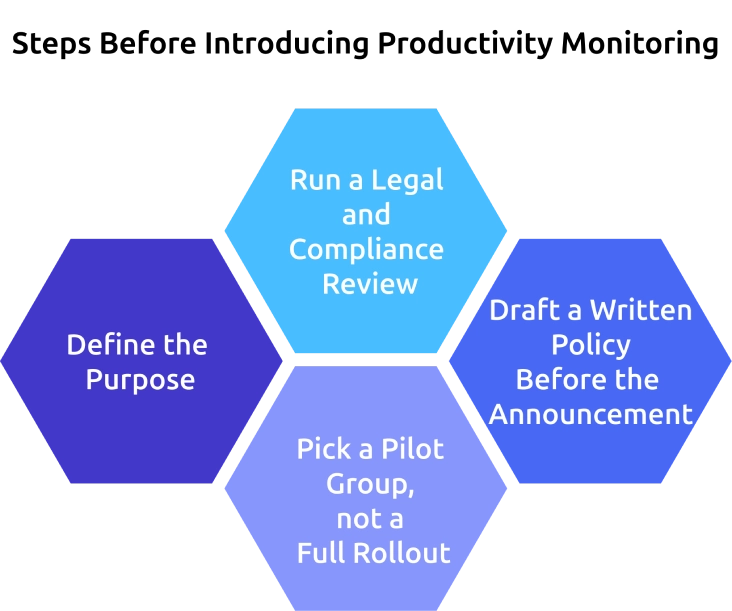
Step-1: Define the Purpose
Begin by deciding exactly why your organization wants to introduce monitoring and what business problem it should solve. Write a short purpose statement that clearly explains the goal, such as improving workload visibility, protecting sensitive data, or helping teams manage projects more effectively. Also, mention what the system will not be used for, so employees can understand the boundaries from the beginning and do not assume it is meant for constant surveillance.
Step-2: Run a Legal and Compliance Review
Review the employee monitoring laws and compliance requirements that apply to your business before enabling any tracking features. Check regulations such as GDPR, CCPA, HIPAA, or SOC 2, and document the legal basis for collecting employee activity data. This step helps you avoid compliance risks and ensures your policies align with privacy standards before communicating anything internally.
Step-3: Draft a Written Policy Before the Announcement
Create a written policy that explains what activities are monitored, what is excluded, who can access the data, and how long the information will be stored. Make the policy simple, transparent, and easy for employees to understand before the rollout begins. Once the draft is ready, get approval from HR, legal, and frontline managers so everyone communicates the same expectations across the organization.
Step-4: Pick a Pilot Group, not a Full Rollout
Start with a small pilot group of around 8 to 15 employees before launching the system company-wide immediately. Choose a team that is open to testing new processes and collect feedback during a two-week trial period to identify concerns, communication gaps, or technical issues early. This approach gives you time to refine the rollout process and improve employee communication before expanding productivity monitoring across the organization.
How to Communicate Productivity Monitoring to Your Team
Clear communication decides whether employees see monitoring as a support system or a control mechanism. These five steps help you communicate productivity monitoring more transparently and make the rollout easier for your team to accept.

1. Run a Manager Briefing Before the Company Announcement
Meet with managers 5 to 7 business days before informing the rest of the organization. Explain the purpose of the rollout, what employees will see, and how managers should respond to common concerns consistently. Give them a simple FAQ sheet so they can confidently answer questions about privacy, reporting, and performance impact.
2. Send a Clear Written Announcement to Employees
Share a written announcement that explains why the organization is introducing the system, what activities are monitored, and what is excluded. Include the rollout timeline, support contact details, and a link to the complete internal policy. Keep the message professional and direct so employees clearly understand the purpose behind productivity monitoring.
3. Explain How the Data Will Be Used
Explain clearly how employee activity data will support business operations and team productivity. For example, the information may help improve workload distribution, project planning, or operational visibility without tracking every small employee action. When employees understand the actual purpose, it becomes easier to reduce unnecessary fear and confusion.
4. Host a Live Q&A Session After the Announcement
Schedule a live Q&A session within 48 hours after sending the announcement so employees can ask questions openly. Keep the session optional, record it for future reference, and share a summary afterward for employees who miss it. Prepare answers in advance for common concerns related to privacy, reporting visibility, and manager access.
5. Give Employees Access to Their Own Data
Allow employees to view their own dashboards and activity insights from the beginning of the rollout. This creates transparency because employees can see the same information that you can access, which does not create a feeling of being monitored. Giving employees shared access helps to position productivity monitoring as a collaborative improvement process, not as a hidden surveillance system.
Are your employees resisting monitoring because of privacy and surveillance concerns?
Time Champ helps you introduce monitoring with more transparency and employee trust.
5 Common Employee Concerns About Productivity Monitoring
Employees usually resist monitoring when they feel uncertain about how the system works or how the data will be used. Addressing employee concerns openly and honestly helps to reduce fear, improve transparency, and create better acceptance across the organization.
My Productivity Can’t Be Measured by Numbers Alone
- Employee Concern: Some employees worry that their work quality, creativity, collaboration, or problem-solving ability cannot be represented through reports or dashboards alone. This concern is common in strategic, creative, or knowledge-based roles.
- How to Respond: Acknowledge that performance should never be evaluated using numbers alone. Clarify that productivity monitoring data is only one input and should always be combined with your feedback, communication quality, collaboration, and overall contribution.
You Don't Trust Us
- Employee Concern: Employees may feel monitoring is a sign that leadership doubts their effort, especially in remote or hybrid environments. This often creates frustration because people feel they are being watched, not supported.
- How to Respond: Explain that the goal is to improve systems, workload visibility, and operational fairness, not just tracking individuals constantly. Without reliable data, decisions often depend on visibility, meeting participation, or assumptions.
You Will Start Micromanaging Everything
- Employee Concern: Employees may fear that you will constantly monitor activity reports, idle time, or application usage throughout the day. This creates anxiety because employees feel pressured to appear active at every moment.
- How to Respond: Set clear expectations about how often you review reports and document those expectations in the policy itself. When employees understand that reports are used for operational visibility, workload planning, and productivity improvement, it helps reduce concerns about constant oversight or unnecessary micromanagement.
What Happens to My Privacy?
- Employee Concern: Privacy concerns usually increase when employees do not fully understand what information is being collected or who can access it. Many employees assume monitoring tools can read personal conversations, private emails, or unrelated activity.
- How to Respond: Walk employees through exactly what is and is not monitored during the rollout process. Demonstrate privacy protections such as screenshot blurring, role-based access controls, and restricted visibility settings to improve transparency. You can also help employees understand their employee privacy rights more clearly.
Will This Be Used Against Me During Performance Reviews?
- Employee Concern: Employees often worry that monitoring reports will automatically affect promotions, appraisals, or disciplinary decisions without additional context. Unclear policies usually make this concern much worse.
- How to Respond: Clearly explain whether monitoring data will be used during performance reviews and how it will be evaluated alongside other factors. Honest communication builds more trust than vague reassurance, especially during sensitive organizational changes.
A 30-Day Productivity Monitoring Rollout Plan
A structured rollout helps you introduce monitoring gradually without creating confusion or unnecessary resistance across teams. Breaking the process into clear weekly milestones also gives you and your employees enough time to adapt, ask questions, and provide feedback during implementation.
| Timeline | Key Actions |
|---|---|
| Week 1 | Complete the legal and compliance review, finalize the internal monitoring policy, and select a pilot team for the initial rollout phase. Define communication guidelines and ensure HR, legal, and management teams align expectations before implementation begins. |
| Week 2 | Launch the pilot program with a small team and conduct short daily check-ins to gather early feedback. Monitor technical issues, employee concerns, reporting clarity, and communication gaps before expanding the rollout further. |
| Week 3 | Conduct manager briefing sessions and distribute the internal FAQ sheet to leadership teams. Send the written company-wide announcement explaining the purpose, scope, timeline, and employee policy details clearly. |
| Week 4 | Host a live Q&A session where employees can ask questions openly and review concerns directly with leadership or HR teams. Begin the broader rollout process and enable employee dashboards so team members can access their own activity insights from day one. |
| Week 5 | Collect employee feedback through a short pulse survey and review overall adoption across teams. Identify communication gaps, policy concerns, or reporting issues and make necessary adjustments to improve transparency and employee experience moving forward. |
How Time Champ Supports Transparent Productivity Monitoring
Time Champ is an employee monitoring software with complete workforce intelligence features. The platform helps you introduce productivity monitoring with more transparency, controlled access, productivity tracking, and better employee visibility from the beginning of the rollout process. Features like role-based access controls support policy management by limiting who can view sensitive information, while phased rollout configurations help you test implementation with smaller pilot groups before expanding organization-wide.
Time Champ also helps to reduce employee concerns during adoption through features designed for transparency and privacy. Employee self-view dashboards allow team members to access their own productivity data, which improves trust and visibility across teams. Screenshot blur settings, configurable tracking controls, and transparent activity categories make it easier to communicate which work activities and data are visible during announcements and onboarding. The platform also includes audit logs for admin access, helping organizations maintain accountability and reduce concerns around unnecessary oversight or micromanagement.
Struggling to roll out productivity monitoring without creating confusion or resistance?
Time Champ helps you simplify productivity monitoring with transparent visibility and employee-friendly tracking.
Conclusion
The success of monitoring does not depend on the software you choose, but depends on how clearly and transparently you introduce it to your team. When employees understand the purpose, privacy boundaries, and practical benefits behind the rollout, they are far more likely to support the process and engage with it positively. A structured approach that includes clear policies, manager alignment, employee communication, pilot testing, and ongoing feedback helps reduce resistance before it becomes a larger organizational issue. Productivity monitoring works best when it creates shared visibility, improves operational decisions, and supports employees with better workload balance, clearer expectations, and a more transparent work environment across your organization.

Anjali

Table of Content
 What You Should Decide Before Introducing Productivity Monitoring
- How to Communicate Productivity Monitoring to Your Team
- 5 Common Employee Concerns About Productivity Monitoring
- A 30-Day Productivity Monitoring Rollout Plan
- How Time Champ Supports Transparent Productivity Monitoring
- Conclusion

Related Blogs
Discover how to create an effective employee monitoring policy with our comprehensive guide. Enhance productivity while respecting privacy. Learn best practices today!
Jahnavi Pulluri | Jul 31, 2024
Learn about employee monitoring laws, what they mean for businesses, and how they protect employee privacy and rights.
Shabana Shaik | Jul 10, 2024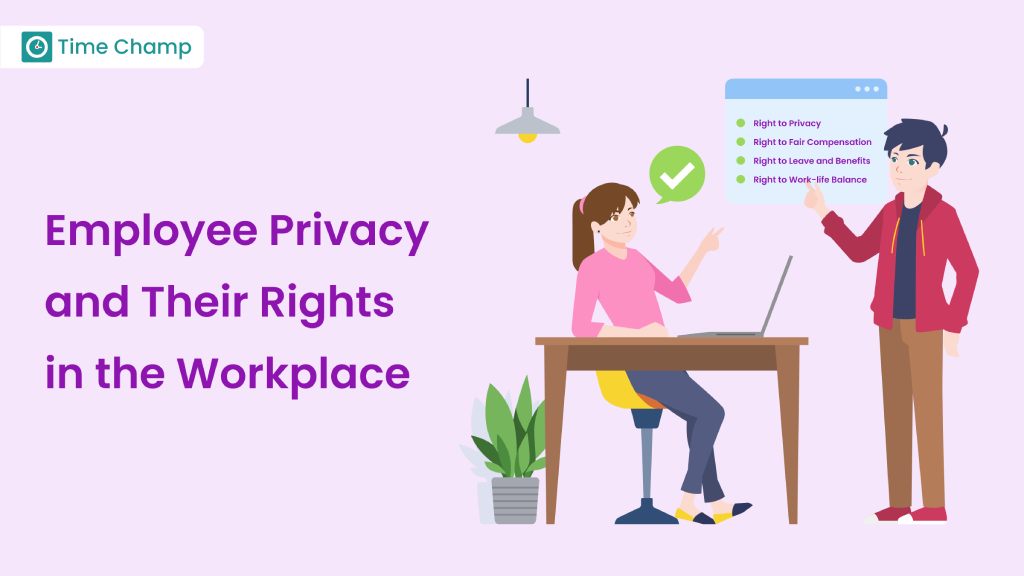
Learn about employee privacy rights, how to protect personal information, and balance company needs with privacy laws.
Jahnavi Pulluri | Sep 18, 2024
Change management makes employee monitoring adoption smoother. Learn strategies to reduce resistance, communicate transparently, and roll out in phases.
Anjali | Apr 15, 2026
Explore common employee monitoring myths and learn what
Anjali | Apr 14, 2026
Find answers to the top 20 most asked questions about employee monitoring, including how it works, its benefits, legal concerns, and practices for businesses.
Jahnavi Pulluri | May 07, 2026


 4.7/5 avg.
Ready to Manage Your Workforce Smarter?
Join our family of 1500+ companies using smart insights to redefine workforces!

Free Trial
No Credit Card Required