10 Employee Monitoring Myths That Hurt Team Productivity
Explore common employee monitoring myths and learn what's actually true. Find out how proper monitoring boosts productivity, trust, and team performance.

Have you ever held back from using employee monitoring software because it felt like spying on your team? Employee monitoring is the practice of capturing work-related activity, such as time use, app usage, and task progress, to help teams stay aligned and productive. According to Gallup, only 31% of U.S. employees were engaged at work, meaning productivity and trust are still major workplace challenges for employers today. That is exactly why many businesses are rethinking how they manage performance, accountability, and team visibility. Strong cultures treat remote monitoring ethics as a non-negotiable, not an afterthought. Anyone weighing this decision usually starts with our enterprise employee monitoring guide for the full landscape.
This blog explains the most common employee monitoring myths that may be holding you back. You’ll learn what is actually true and how the right approach to monitoring can help your team without damaging trust.
The Truth Behind Common Employee Monitoring Myths
Employee monitoring often gets misunderstood because many employee monitoring myths still shape how people view it. In this section, you’ll explore some of the most common myths and understand what employee monitoring really means in today’s workplace.
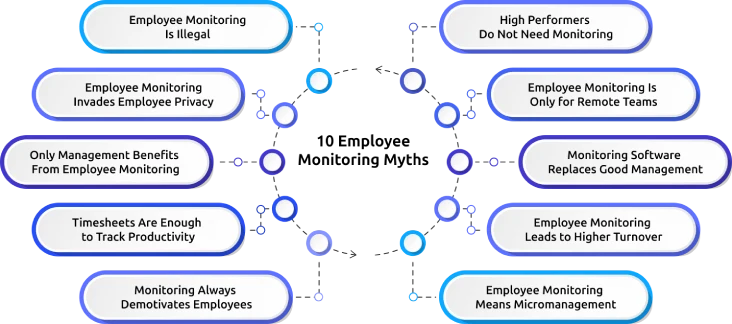
Myth 1: Employee Monitoring Is Illegal
Many employers avoid employee monitoring because they think that it is against the law. In reality, employee monitoring is legal in many cases when it is done transparently, ethically, and for valid business reasons. What matters most is how you monitor employees, what data you collect, and whether your team is clearly informed about it.
If you use monitoring to improve productivity, protect company data, or support performance, it can be a legitimate business practice. The real risk is not monitoring itself, but believing employee monitoring myths without clear policies, communication, or respect for employee rights.
Myth 2: Employee Monitoring Invades Employee Privacy
Privacy invasion happens when someone tracks things outside their authority, such as personal messages, activity after hours, or content on personal devices. Ethical monitoring focuses only on work-related activities such as time usage, task progress, attendance, or app usage during working hours. It must never feel like constant personal surveillance.
Employees can see it as support when you clearly explain what is being tracked and why. The goal of monitoring is to help you understand work patterns and improve team performance, not to make employees feel like every move is being watched for the wrong reasons.
Myth 3: Only Management Benefits From Employee Monitoring
This is one of the most misleading beliefs about employee monitoring. Yes, monitoring gives managers visibility into productivity patterns and workflow bottlenecks, but employees can also benefit. Monitoring can help create fair workloads, clearer expectations, and more accurate performance reviews. It also makes it easier to spot when someone is overloaded, distracted, or struggling with a task. When used properly, monitoring builds a more balanced work environment where both employers and employees can work with greater clarity and confidence.
Myth 4: Timesheets Are Enough to Track Productivity
Timesheets only show you when someone logged in and logged out. They tell you nothing about what happened in between. An employee may log full working hours but still face distractions, delays, or workflow issues that a timesheet cannot show. Employee monitoring software gives you deeper visibility into work patterns, task focus, and productivity trends. It helps you understand whether time is being spent effectively and where improvements are needed. If you only rely on timesheets, you miss the clear picture of what’s helping or hurting your team’s performance, which is one of the common employee monitoring myths.
Struggling to understand how your team is really working?
Time Champ gives you clear work insights without hurting employee trust.
Myth 5: Monitoring Always Demotivates Employees
Many people assume monitoring pressures employees because it feels like constant watching. Employees are more likely to feel demotivated when monitoring is hidden, unfair, or used only to point out mistakes. When it is transparent and focused on support, it can actually increase accountability and fairness. It helps employees understand expectations, track their own progress, and receive better guidance. Use monitoring to improve performance and remove obstacles, but not as a tool to create fear, pressure, or unnecessary stress.
Myth 6: High Performers Do Not Need Monitoring
High performers may need less supervision, but managers still need visibility into their work. In fact, monitoring can reveal what makes high performers successful. Their work habits, focus patterns, and productivity trends can offer useful insights for the rest of the team. Monitoring can also help you notice signs of overload or burnout before they affect performance. Even top employees can deal with stress, distractions, or workflow issues. The goal is not to question their performance but to help them stay consistent, which many employee monitoring myths often overlook.
Myth 7: Employee Monitoring Is Only for Remote Teams
Employee monitoring became more popular with remote work, but it is not only useful for remote teams. It can also help in-office and hybrid teams work more effectively. Whether your team works remotely, in the office, or in a hybrid setup, you still need visibility into productivity, workload, time usage, and team performance. Monitoring can help you identify inefficiencies, improve accountability, and support employees across different work environments. Work may happen in different locations, but you still need to know how things are getting done. Effective monitoring is not about where your team works, it's about helping them stay focused, organized, and productive.
Myth 8: Monitoring Software Replaces Good Management
Monitoring software can give you useful data, but it cannot replace leadership, communication, or trust. It does not train your employees, solve team conflicts, or create a healthy work culture on its own. It only helps you make better decisions by showing where people are doing well and where they may need support. The employee monitoring software gives you visibility, but your role is still to lead with clarity, fairness, and empathy. Monitoring works best when it supports good management.
Myth 9: Employee Monitoring Leads to Higher Turnover
Some employers worry that monitoring might make employees leave. But turnover usually increases when employees feel unsupported, unfairly judged, or constantly pressured. Ethical employee monitoring can even improve retention by creating fairness, transparency, and better communication. It allows you to find the problems early, such as workload imbalance, disengagement, or unclear expectations. When employees know the purpose behind monitoring and feel it is used fairly, it can actually improve trust among them. The real issue isn’t monitoring itself, it’s how transparently and responsibly you use it.
Myth 10: Employee Monitoring Means Micromanagement
Employee monitoring and micromanagement are not the same thing. Micromanagement happens when managers control every small action and constantly interfere with how employees work. Monitoring, on the other hand, is about gaining visibility into performance, time use, and workflow patterns. It helps you understand what is happening without needing to interrupt your team all the time. Effective monitoring can reduce micromanagement by giving you the right insights you need. When you trust the data and use it wisely, you can give employees more independence while still staying informed about performance and progress.
How Employee Monitoring Improves Team Productivity
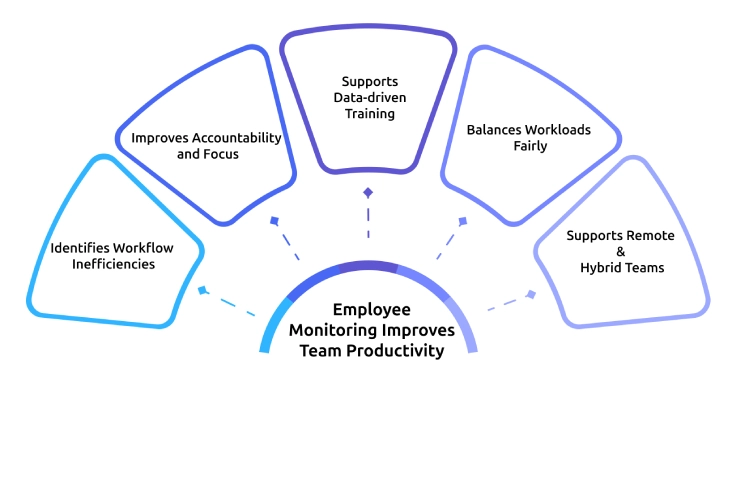
Employee monitoring can help you understand how your team works and where productivity may be slipping. This section will help you see how the right monitoring approach helps you spot inefficiencies, improve focus, balance workloads, and support better team performance.
Identifies Workflow Inefficiencies
One of the biggest benefits of employee monitoring is that it helps you identify where time and effort are being lost. You can see which tasks take too long, where employees get distracted, and what may slow down daily work. This kind of visibility helps you fix inefficiencies faster and improve employee productivity more practically.
Improves Accountability and Focus
Employee monitoring helps employees stay more aware of how they use their work hours. When teams know that work-related activity is fairly tracked, it often leads to better focus and stronger accountability. Over time, transparent monitoring improves focus and productivity by helping your team stay on track without constant follow-ups.
Supports Data-driven Training
Employee monitoring software can show you where employees may be struggling, whether it is time management, task delays, or inconsistent performance. This makes it easier to give support based on the real work patterns. With better visibility, you can offer more useful training and help employees improve in the important areas.
Balances Workloads Fairly
Uneven workload distribution is one of the most common causes of burnout and disengagement. Employee monitoring helps you see who is overloaded, who has capacity, and where work may be unevenly distributed. This allows you to create a more balanced workflow and support your team without putting too much pressure on a few people.
Supports Remote & Hybrid Teams
Managing work becomes more difficult when your team works from different locations. Employee monitoring gives you better visibility into how remote teams work across tasks, time use, and daily output. This helps you stay connected, support team performance, and manage remote or hybrid teams with more clarity and confidence.
Struggling to monitor your team without affecting trust?
Time Champ helps you monitor work clearly while keeping it fair and transparen
How Employee Monitoring Differs Across Work Models
Employee monitoring does not look the same for every team. The way you monitor employees often depends on where and how they work. A remote team may need more visibility into daily activity, while in-office teams may need better workload and performance tracking. Whereas hybrid teams may need a mix of both. Here’s a simple comparison to help you understand how employee monitoring can vary across different work setups:
| Work Model | What Monitoring Focuses On | Why It Matters |
|---|---|---|
| Remote Teams | Time tracking, activity levels, task progress, app and website usage. | Helps you understand productivity and stay connected when employees work from different locations. |
| Hybrid Teams | Work patterns, attendance, productivity, collaboration, and task visibility. | Helps you manage consistency and performance across both remote and in-office workdays. |
| In-Office Teams | Attendance, task completion, workflow efficiency, and time usage. | Helps you identify bottlenecks, improve accountability, and keep operations running smoothly. |
How to Introduce Employee Monitoring Without Losing Employee Trust
A successful employee monitoring rollout starts with three things: honesty, clarity, and respect for your team. When your team knows what you track, why you track it, and how it helps them, trust becomes much easier to maintain.
Be Clear About What You Are Monitoring
Tell employees exactly what you plan to track, such as work hours, task progress, or app usage during work time. Clear communication removes confusion and helps your team understand what to expect. When employees know what you monitor, they feel more comfortable and informed.
Explain Why You Are Using It
Employees accept monitoring more easily when they understand the reason behind it. Are you trying to improve workload balance? Identify workflow bottlenecks? Support performance reviews with real data? Say that clearly before you launch the software, which helps them to see it as helpful.
Keep It Focused on Work, Not Personal Activity
Track only work-related activity during working hours. Avoid anything that crosses into personal space or makes employees feel uncomfortable. A clear boundary helps you respect privacy and keeps monitoring fair and professional.
Use the Data to Support, Not Punish
Use monitoring insights to train your employees, solve workflow problems, and offer help when needed. Never treat the data as a tool to find mistakes or pressure employees. When you use it to support growth, employees will more likely trust the process.
Give Employees Access to Their Own Data
Let employees see their own reports, time usage, or productivity insights. This gives them a chance to understand their work patterns and improve on their own. It also creates more transparency and makes employees feel more involved and informed.
Best Practices for Using Employee Monitoring Software Effectively

Using employee monitoring software is not just about tracking work. It is about using the right data in the right way to support your team and improve how work gets done. When you focus on clarity, fairness, and purpose, monitoring software becomes an asset. The practices below help to monitor your team in the right way.
Focus on the Right Work Data
Track only the data that actually helps you understand work, such as time usage, task progress, and productivity patterns. Avoid collecting unnecessary information that does not add value. When you focus on useful data, it becomes easier to make better decisions.
Keep Monitoring Clear and Simple
Do not complicate your monitoring setup. Use simple metrics that help your team to understand easily. When everything is clear, employees feel more comfortable and know what is expected from them.
Use Insights to Improve Workflows
Look at the data to find delays, repeated issues, or inefficient processes. Use those insights to fix problems and improve how work flows across your team. This helps you turn activity data into real productivity gains.
Avoid Over-Monitoring
Tracking too many things can create confusion and pressure. Focus only on what truly matters for your team’s performance. A balanced approach helps you maintain trust while still getting the insights you require.
Review and Adjust Your Approach Regularly
Your team’s work patterns can change over time. Review your monitoring approach regularly and adjust it based on what works best. This keeps your process relevant and useful.
Finding it hard to balance visibility, trust, and productivity?
Time Champ helps you monitor work with clarity and fairness.
Conclusion
Employee monitoring works when it is built on transparency, purpose, and trust. The myths around it have stopped too many businesses from using a tool that genuinely helps teams perform better. When you keep it clear, fair, and focused on support, it can help you improve productivity, build trust, and manage your team better. The key is not just to monitor work, but to use those insights in a way that helps your team grow effectively.

Anjali


Table of Content
-
 The Truth Behind Common Employee Monitoring Myths
-
How Employee Monitoring Improves Team Productivity
-
How Employee Monitoring Differs Across Work Models
-
How to Introduce Employee Monitoring Without Losing Employee Trust
-
Best Practices for Using Employee Monitoring Software Effectively
-
Conclusion
Related Blogs
Discover the ins and outs of employee monitoring: from its benefits to ethical considerations. Everything you need to know in one comprehensive guide.
Discover the ultimate guide to employee monitoring & time tracking software. Learn features, benefits, and tips to boost productivity effectively.
Explore the best remote employee management software systems for productivity, collaboration, and performance tracking.
Get insights for workforce tracking: Meaning, importance, methods, how to implement it, benefits, challenges, and FAQs to support better team productivity.
Explore key types and strategies for employee performance monitoring to boost productivity and align team goals with company success.

Discover the best ways to introduce productivity monitoring in your organization smoothly and effectively.


 4.7/5 avg.
Ready to Manage Your Workforce Smarter?
Join our family of 1500+ companies using smart insights to redefine workforces!

Free Trial
No Credit Card Required