Change Management for Employee Monitoring Adoption
Change management makes employee monitoring adoption smoother. Learn strategies to reduce resistance, communicate transparently, and roll out in phases.

Are your employees pushing back against employee monitoring software, even when you intend to improve productivity and fairness? This is a common challenge many teams face today. According to the U.S. Government Accountability Office (GAO), the use of employee monitoring tools is growing as organizations increasingly rely on digital technologies to track productivity and performance. Without the right approach, even well-intended tools can create confusion, fear, and resistance. Most teams underestimate the planning phase, which is exactly where employee monitoring challenges pays off.
In this blog, you will understand how to manage change effectively when adopting employee monitoring software. You'll also explore simple strategies to reduce resistance, communicate clearly, roll out in phases, and build trust so your team accepts and uses the tool with confidence.
Why Do Employees Resist Employee Monitoring Software?
Employees’ resistance to monitoring software does not mean they are unproductive or trying to hide something. In most cases, it comes down to three things - fear, lack of context, and broken trust.
Fear of Being Watched
Many employees fear that monitoring only means someone is constantly watching them, tracking every break. Even if that’s not true, unclear communication makes them assume the worst about how the software actually works.
No Clear “Why”
When a company installs monitoring software without explaining the reason behind it, employees default to suspicion. “They don’t trust us” becomes the story. Research shows that transparency plays a key role in trust, with 86% of leaders saying it directly improves employee trust. Without a clear “why,” even a well-intentioned implementation can feel like punishment.
Past Experiences and Culture
If your company has a history of top-down decisions that ignore employee input, implementing monitoring is going to be even more painful. People carry their past experiences into every new change. If employees have faced broken promises or ignored feedback before, they become cautious and defensive when new monitoring is introduced. Change management exists to break that cycle.
Employees pushing back against monitoring tools?
Time Champ helps you introduce it clearly and build trust from day one.
What Are the Key Steps in Change Management for Employee Monitoring?
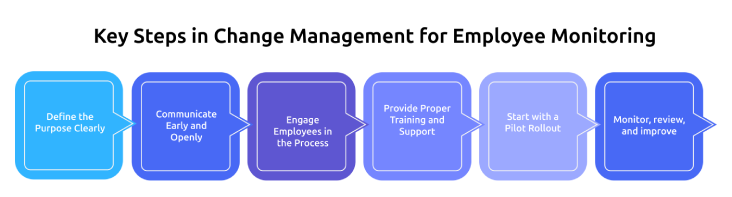
Successfully adopting employee monitoring software is not just about installing a tool. It’s about managing how people adapt to it. An organized and transparent change management strategy will help in minimizing resistance and make the process of adoption easier. These are the main steps to consider to make such a transition effective and accepted.
Define the Purpose Clearly
Begin by determining the reason behind the implementation of employee monitoring software and the issue it will address. Make it clear how it can help the organization and employees. This transparency creates a better foundation for improved acceptance.
Communicate Early and Openly
Before the implementation of the software, inform your employees about the change. Explain what will be monitored, how it works, and what it does not do. Early communication reduces fear and prevents misunderstandings.
Engage Employees in the Process
Include your employees in the discussions, feedback sessions, or pilot programs. When people feel heard, they are more likely to support the change. This also helps you identify the concerns early and address them effectively.
Provide Proper Training and Support
Ensure employees know how to use the software and understand its purpose. Provide easy training, guides, or demonstrations. This helps them feel confident without overwhelming with the new features all at once.
Start with a Pilot Rollout
Start with a small group and test the implementation process in real conditions. Use feedback to improve before expansion. This minimizes risks and boosts confidence across teams.
Monitor, Review, and Improve
After implementation, continuously track how the software is being used and gather feedback. Determine what is doing well and what requires modification. Constant improvement guarantees success and improved adoption in the long term.
How Should You Communicate Employee Monitoring to Your Team?
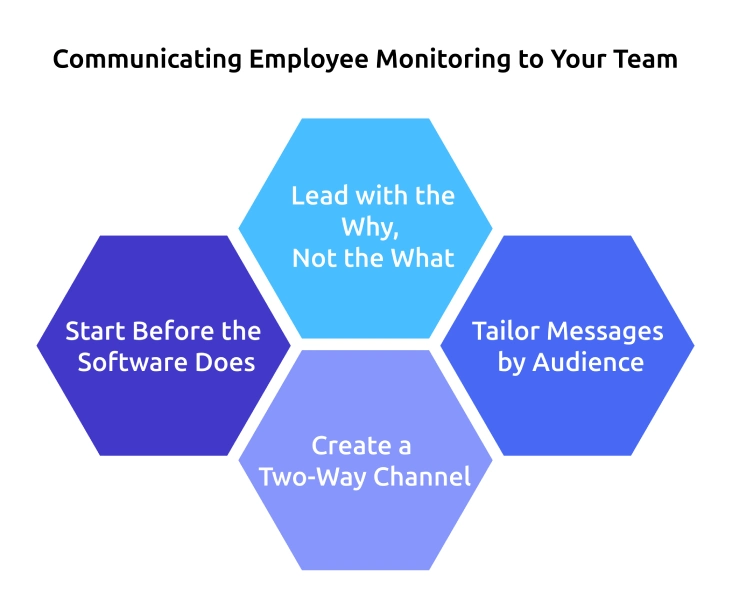
Communication plays the most important role in deciding whether monitoring succeeds or fails. You don’t need anything complex, just be honest, share at the right time, and give the right message to the right people.
Start Before the Software Does
Don’t install monitoring software before explaining it to your team. Start communication 2-4 weeks early. Clearly share what is being introduced, why it matters, and what employees can expect. Keep the message simple, honest, and free of confusion.
Lead with the Why, Not the What
Employees don’t care about features. They care about how it affects them. Present monitoring as a way to improve fairness and reduce workload issues. Clear and thoughtful messaging can completely change how employees perceive and accept it.
Tailor Messages by Audience
Different groups need different messages. Leaders focus on business value, managers need guidance on using data, and employees need clarity on what is tracked, who can see it, and how it supports them, not punishes them.
Create a Two-Way Channel
Communication is not a one-time update. Create simple ways for employees to ask questions, like feedback forms or Q&A sessions. Listen to their concerns and respond openly. This helps them feel involved and shows the change is not forced.
How Does a Phased Rollout Reduce Resistance to Employee Monitoring?
A phased rollout introduces employee monitoring software step by step. It gives people time to adjust and helps fix issues early. It also shows real value, so even skeptical employees feel more comfortable accepting it.
Phase 1 - Pilot with a Willing Team (Weeks 1–2)
Start with one team that is open to using new tools. Run the pilot for about two weeks and collect feedback on what feels useful or uncomfortable. Use this input to adjust settings and introduce features step by step.
Phase 2 - Expand with Adjustments (Weeks 3–4)
Use feedback from the pilot to improve your setup. Keep what employees find helpful and adjust what they find uncomfortable. Roll out to a few more teams and share positive experiences from the pilot group to build trust and confidence.
Phase 3 - Company-Wide Rollout (Weeks 5–6)
When you roll out across the company, employees already understand the tool. Share how feedback improved the setup and explain how it works. Make it clear who can access the data so employees feel more secure and informed.
Phase 4 - Review and Optimize (Ongoing)
Keep checking how the tool is used after implementation. Review results regularly and listen to employee feedback. Show teams their data in a helpful way so they can improve their work, which increases acceptance and reduces resistance over time.
Struggling to roll out monitoring without confusion or resistance?
Time Champ makes step-by-step adoption simple, smooth, and transparent.
How Do You Handle Employee Resistance During the Rollout?
When you introduce monitoring, it’s common for employees to push back, so you need to handle their concerns with understanding. When you listen to concerns, involve employees in decisions, and show them exactly how the tool works, they feel more comfortable accepting the change.
Listen Before You Defend
When employees push back, the first reaction is often to explain why monitoring is needed. Take a step back and listen first. Ask what concerns them. Many times, their concerns come from unclear policies, a lack of transparency, or past bad experiences. Addressing their real concerns works better than repeating standard explanations.
Involve Resistors, Don’t Isolate Them
Employees who resist often care deeply about workplace culture. Bring them into the process without pushing them away. Invite them to share feedback or help shape policies. When they feel heard and involved, they become more supportive and open to the change.
Show, Don’t Just Tell
Simple promises about privacy are never enough. Show employees how the system works, walk them through the dashboards, and let them see their own data so they clearly understand it. When they understand how their work is shown, their fear and uncertainty reduce.
What Are the Benefits of Proper Change Management in Software Adoption?
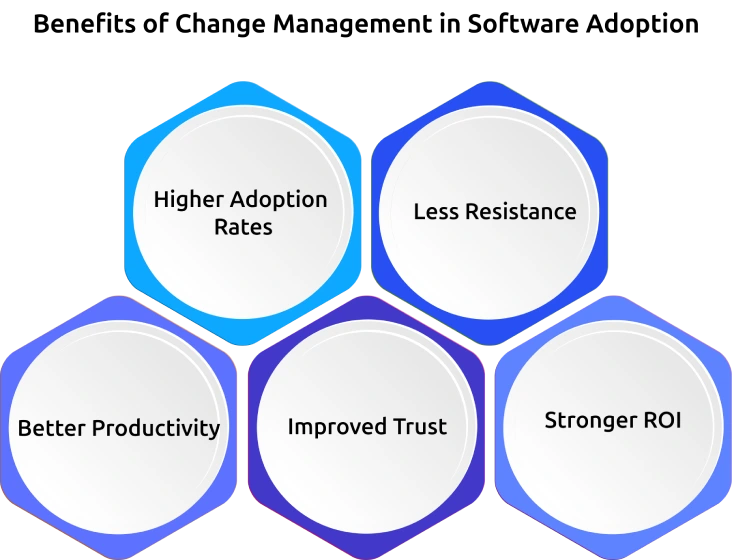
Proper change management makes it easier for employees to accept and use new software without confusion or resistance. It creates clarity, builds trust, and ensures everyone understands the purpose behind the change.
Higher Adoption Rates
Once the change is implemented in a clear, step-by-step manner, the employees know how to use the software and why it is important, doing this minimizes confusion and hesitation. This leads to increased use of the tool by employees in their work.
Less Resistance
Clear communication makes employees feel informed without forcing them. Fear and doubt will diminish when they understand the intent of the change. This causes a smoother adoption with minimal pushback or objections.
Better Productivity
Employees can adjust to the new software a lot quicker when they are directed through the transition. They spend less time figuring things out and more time focusing on their work. This helps teams to remain efficient even in the change.
Improved Trust
Being transparent about monitoring builds confidence among the employees. They feel respected and included without feeling more controlled. Over time, this strengthens trust between employees and management.
Stronger ROI
Software can only bring value when it is effectively used by employees. Through effective change management, adoption is enhanced, and features are used as intended. This ensures that the organization receives maximum return on its investment.
How Does Time Champ Make Employee Monitoring Adoption Easier?
Employee monitoring adoption works best when the tool respects employees and builds trust. Time Champ is designed with this approach, making phased rollouts easier, improving transparency, and helping teams feel comfortable with the change. Its productivity and activity monitoring give you real-time insights into app usage, idle time, and work patterns while staying clear of personal boundaries. The system classifies apps as productive, non-productive, or neutral, so the focus stays on improving work, without controlling behavior. Features like screenshot blur protect sensitive information, while role-based access ensures only the right people can view data. Employees can also access their own dashboards, making monitoring more open and balanced.
Time Champ also helps organizations manage employee experience during adoption. Its attrition prediction module tracks patterns like reduced engagement, irregular work hours, and changes in activity levels to identify employees who may be at risk of leaving. This allows you to step in early, address concerns, and have meaningful conversations before frustration turns into disengagement or resignation.
Worried that your employees won’t accept monitoring software?
Time Champ helps you build genuine trust, improve adoption, and avoid employee pushback.
Conclusion
Successful adoption of employee monitoring depends on how you introduce and manage the change. When you communicate clearly, involve employees, and roll out in phases, resistance reduces, and trust grows. A thoughtful approach helps employees understand the purpose and see the value, making adoption smoother and more effective. With the right strategy and tools like Time Champ, organizations can create a balanced system that supports productivity while respecting employees, leading to better outcomes for both teams and the business.

Anjali


Table of Content
-
 Why Do Employees Resist Employee Monitoring Software?
-
What Are the Key Steps in Change Management for Employee Monitoring?
-
How Should You Communicate Employee Monitoring to Your Team?
-
How Does a Phased Rollout Reduce Resistance to Employee Monitoring?
-
How Do You Handle Employee Resistance During the Rollout?
-
What Are the Benefits of Proper Change Management in Software Adoption?
-
How Does Time Champ Make Employee Monitoring Adoption Easier?
-
Conclusion
Related Blogs
Get insights for workforce tracking: Meaning, importance, methods, how to implement it, benefits, challenges, and FAQs to support better team productivity.
Explore the best remote employee management software systems for productivity, collaboration, and performance tracking.
Find the best employee monitoring tools for 2026. Compare features, pricing, pros & cons to manage workforce performance and improve productivity.
Learn how time tracking works, its benefits, common challenges, and how to choose the right software to improve productivity.
Learn what staff Monitoring and tracking to increase productivity at the workplace, make sure that the policies are followed, and improve employee responsibility.

Discover how to monitor remote employees effectively, boost productivity, and address challenges while respecting privacy.


 4.7/5 avg.
Ready to Manage Your Workforce Smarter?
Join our family of 1500+ companies using smart insights to redefine workforces!

Free Trial
No Credit Card Required