8 Employee Monitoring Challenges and How to Solve Them
Learn how to overcome employee monitoring challenges like low trust, privacy concerns, and data misuse. Discover 8 common challenges and solutions that work.

Employee monitoring challenges rarely come from the technology itself. Most problems arise from how the tool is introduced, set up, and used in daily work. The same system that builds trust in one company can create frustration in another. The real difference comes down to how it is implemented, not the features it offers. Most teams underestimate the planning phase, which is exactly where RACI matrix employee monitoring pays off.
This guide explains the 8 most common employee monitoring challenges teams face after implementation. It also breaks down why these issues happen and what you can do to fix them. This guide helps the teams already using it who want to solve real problems quickly.

Did You Know?
According to the Washington Center for Equitable Growth research, more than 68% of U.S. workers experience some form of electronic monitoring at work.
Why Employee Monitoring Challenges Happen
Most employee monitoring challenges come from one core issue, i.e., how the system is used. In many cases, monitoring is set up to control employees without giving teams better visibility into work. When the goal becomes capturing mistakes, the approach often becomes too broad, and the data is used strictly or negatively. This leads to predictable problems like resistance, stress, legal risks, and unreliable data.
To fix these challenges, you first need to understand the real cause. Not every issue has the same solution. For example, trust issues caused by a lack of transparency need a different approach than issues caused by unfair use of data. The challenges below explain both the reasons behind each problem and the practical way to solve it.
The 8 Most Common Employee Monitoring Challenges
Employee monitoring challenges often appear after the system implementation. Most of them come from how monitoring is set up and used in daily work. The challenges below explain what usually goes wrong and what you can do to fix it.

Challenge 1: Employee Resistance and Trust Breakdown
Problem: Employees often discover monitoring only after it has already started, which is one of the most common employee monitoring challenges. They may notice it through a system alert, hear it from a colleague, or find it during an IT check. This creates immediate doubt: “If this was hidden by the company, what else is being hidden?” Once trust is affected, employees are more likely to resist. Fixing this later is more difficult than being clear from the beginning.
Solution: Inform employees before monitoring starts. Tell employees what will be tracked, why it is needed, how the data will be used, and who can access it. Keep the conversation simple and direct, and also give employees access to their own data through a dashboard. When people can see their own activity, monitoring feels like a helpful tool, not something done behind their backs.
Also Read: Best Ways to Introduce Productivity Monitoring to an Organization
Challenge 2: Privacy Concerns from Excessive Data Collection
Problem: Monitoring is often set up to collect everything the tool can track, even when it is not needed. Employees may notice keystrokes being recorded, frequent screenshots, or checks on personal communication on the work devices. Even if this is allowed by law, it can make people uncomfortable. The level of tracking feels too much compared to its actual use.
Solution: Before enabling any feature, ask a simple question: Do we really need this data? If it does not help in making a clear decision, skip it. In most cases, basic data like active time, app usage, productivity scores, attendance, and overtime is enough for managing teams. Use features like screenshot monitoring to blur and protect sensitive information. Keep monitoring limited to work-related activity during working hours on company devices. This approach feels more acceptable to employees and also reduces legal risk.
Challenge 3: Monitoring Data Used to Punish Rather Than Support
Problem: When you see a drop in a productivity score, don’t jump to a formal warning, start a conversation first. An employee with high idle time may face action before anyone checks what caused it. It could be a process delay, unclear tasks, or uneven workload. When employees see that monitoring data leads to punishment, they become careful and focus on improving their numbers, not the actual work that matters.
Solution: Set a clear rule for how you use monitoring data. Use it to understand where your team needs support, where work is uneven, and where processes can improve. Avoid using it as direct proof for taking action. When you see changes in metrics, treat them as a signal to start a conversation. If a productivity score drops for a few weeks, talk to the employee and understand what’s causing it. Don’t move straight to a warning, use the data to guide where you need to look, and the next step depends on what you find.
Struggling with employee resistance and misuse of monitoring data?
Use Time Champ to track transparently and support your team with the right insights.
Challenge 4: Legal Compliance Gaps
Problem: You set up monitoring without informing employees as required by law. You may also collect certain types of data without a clear legal reason or store monitoring data without proper security. These gaps can create serious risks. In the EU, hidden or routine monitoring without proper justification can violate GDPR. In the U.S., states like New York, Connecticut, and Delaware require you to give written notice to employees before monitoring begins. Missing these steps can lead to compliance issues.
Solution: Review the legal requirements before you set up monitoring. Make sure employees know that monitoring is active, what data is being collected, and how it will be used. Keep monitoring limited to work-related activity on company devices during working hours. Control who can access monitoring data by setting clear permissions, track who accesses the data, and store it securely with a clear retention policy. Put all of this into a written monitoring policy and have employees acknowledge it during onboarding, which helps you stay compliant and avoids future risks.
Challenge 5: Over-Monitoring That Lowers Morale
Problem: You may be tracking too much. Screenshots every few minutes, recording keystrokes, tracking location all the time, and measuring productivity based on mouse movement can quickly add up. This creates a lot of data, but not everything is useful. Most of it doesn’t lead to any action. At the same time, employees start feeling watched, which can affect morale. The data you collect may end up showing activity, but not the actual work or results.
Solution: Review your current monitoring setup with a simple question, “Which of these data points helped you decide in the last 30 days?” If a data point doesn’t help you to take action, you likely don’t need it. Adjust screenshot frequency based on your actual need. Focus on keystroke activity for engagement signals, not what employees type, and measure productivity based on the tools and apps relevant to each role. Keep your monitoring focused on what helps you make decisions. When the data is useful, it becomes easier to manage your team without creating unnecessary pressure.
Challenge 6: Inconsistent Application Across Teams or Roles
Problem: Applying monitoring to some employees but not others is one of the common employee monitoring challenges. In some cases, teams follow different levels of visibility across roles. You monitor remote employees, but do not monitor the in-office employees who also do the same work. Some roles have screenshots enabled, while others don’t, even when the work is similar. This creates a sense of unfairness, as your team may feel that monitoring is applied to certain groups and not across the entire organization. It may raise questions about the trust and consistency.
Solution: Apply the same monitoring rules to everyone in the same role. Keep it consistent across teams, locations, and seniority levels. If a feature is enabled for one group, use the same setup for others doing similar work. Define monitoring settings based on roles, but not the individuals. Make these settings visible to your team so they can clearly see that the same rules are applied to everyone, which builds fairness and improves trust in the system.
Facing inconsistency and confusion in how monitoring is applied across teams?
Time Champ helps you standardize tracking with role-based settings and clear visibility.
Challenge 7: Managers Not Reviewing or Acting on Monitoring Data
Problem: You have dashboards, reports, and alerts, but they are not reviewed regularly. Data keeps building up without leading to any action. Over time, the tool feels like an extra cost, but not something that helps to manage your team. This usually happens when monitoring is set up as a requirement, and there is no clear plan on how to use the data.
Solution: Set a clear review routine and make it part of your regular workflow. Review key data daily to identify attendance issues and any immediate productivity concerns. Look at weekly trends to understand changes in productivity, patterns in idle time, and early warning signs. Use monthly reviews to track overtime, workload balance, and any signals that show risk of burnout or attrition. Also, clearly define who is responsible for reviewing the data for each team. Monitoring data becomes useful only when you take action based on what you see.
Challenge 8: Monitoring Anxiety Leading to Performative Busywork
Problem: When employees feel constantly watched, they focus on looking busy. They keep their mouse active, switch to work apps quickly, and try to maintain visible activity. This increases activity metrics, but actual work may not improve. Task completion can drop as the focus shifts towards appearing productive, and the data may look positive, but it does not reflect real performance.
Solution: Fix the way you use monitoring data. Make it clear that the metrics are signals, but not the final judgments. Give employees access to their own data so they understand what is being tracked. Keep monitoring focused and avoid collecting unnecessary data. Along with activity metrics, track outcomes like task completion and project progress. When you combine both, you can get a clear picture of real performance. When employees understand how data is used, they focus less on managing numbers and more on doing meaningful work.
Did You Know?
According to Gallup’s research, about 42% of U.S. employees say their work is monitored using technology, and 17% are not even sure if monitoring is happening.
Monitoring That Avoids These Challenges from the Start
The eight employee monitoring challenges above follow a common pattern. You face fewer problems when monitoring is clear, limited to what is needed, applied consistently, and used to support employees. Issues usually come up when monitoring is hidden, too broad, inconsistent, or used to take action quickly. You can avoid most of these challenges by setting the right approach before you start.
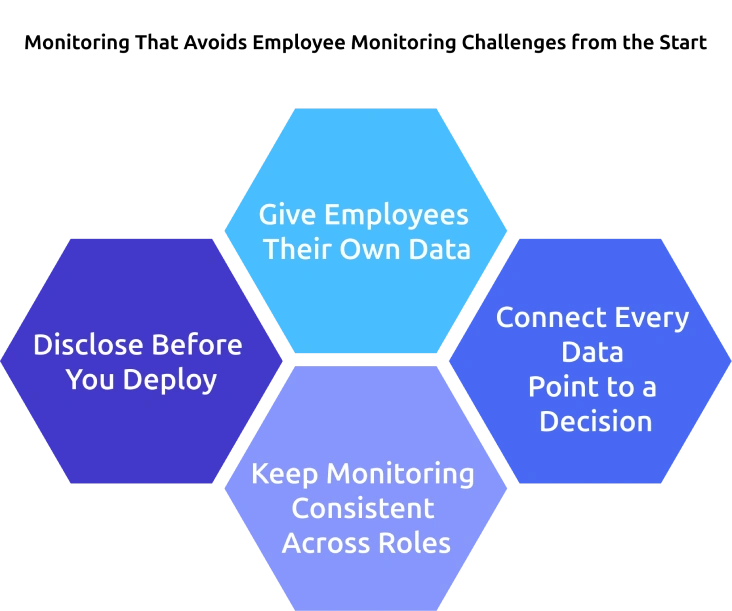
Disclose Before You Deploy
Inform employees before monitoring begins. Clearly explain what you track, why it is needed, who can access the data, and how it will be used. Include this in your monitoring policy, share it during onboarding, and also ask employees to acknowledge it.
This one step helps you avoid most trust and resistance issues. When employees know what is happening, they will accept it and work accordingly.
Give Employees Their Own Data
Provide each employee with access to their own data through a personal dashboard. This can include productivity data, attendance, and activity patterns.
Employees who see their own data understand how they work day to day and make improvements on their own. It also removes the feeling that monitoring is one-sided and helps reduce unnecessary anxiety.
Connect Every Data Point to a Decision
Before you enable any monitoring feature, ask yourself what decision it will support. Automated attendance data helps with shift planning, attrition signals help you take early action, and work patterns help balance workloads.
If a data point does not help you make a decision, you do not need it. Keeping only useful data makes monitoring more effective and easier to manage.
Keep Monitoring Consistent Across Roles
Apply the same monitoring approach to employees in similar roles. Keep the rules clear and consistent across teams, locations, and levels.
When your team sees that the same standards apply to everyone, it builds trust and avoids confusion. Consistency also helps you compare data accurately and make better decisions.
How Can You Use Time Champ to Monitor Without Creating These Challenges?
Time Champ is designed to help you monitor employees clearly and practically. You can inform your team from the start, keep the monitoring process visible, and give each employee access to their own data through a personal dashboard. You can control who sees the data with role-based access and set monitoring levels based on each role. This helps you track what matters without collecting unnecessary information.
Time Champ also supports compliance with standards like GDPR, ISO 27001:2022, HIPAA, and SOC 2 Type I. Your data stays secure with encryption, audit logs, and generates reports for reviews and compliance needs. It tracks time automatically for payroll, and identifies early signs of employee burnout or attrition so you can take timely action.
Dealing with multiple employee monitoring challenges at once?
Time Champ gives you a simple, transparent way to monitor without creating problems.
Conclusion
Employee monitoring challenges are not caused by the tool itself but by how you use it. When you keep the monitoring clear, focused, and consistent, most of the issues become easy to manage. Inform your team early, track only what matters, and use data to support better decisions. When done right, monitoring helps you improve productivity, balance workloads, and build trust within your team.

Anjali


Table of Content
-
 Why Employee Monitoring Challenges Happen
-
The 8 Most Common Employee Monitoring Challenges
-
Monitoring That Avoids These Challenges from the Start
-
How Can You Use Time Champ to Monitor Without Creating These Challenges?
-
Conclusion
Instant Signup
Thank you for your request!
We have received your signup request and our team will get back to you soon. In the meantime, you can book a demo to see Time Champ in action.
Book a DemoFree trial. No credit card required. Prefer a walkthrough? Book a demo.
Related Blogs

Companies are watching remote workers more than ever. But is it ethical? We break down where monitoring is justified and where it crosses the line.

Learn the key ethical considerations in employee monitoring. Know what to track, how to stay transparent, and how to build trust with your team.
Explore how to implement employee monitoring software effectively with clear steps, legal tips, best practices, ROI metrics, and key pitfalls to avoid.
Anjali | Apr 15, 2026
Struggling with remote work productivity challenges? Learn what’s slowing your team down and how to improve focus, communication, and performance.
Struggling to build trust in your remote team? Discover proven ways to create a connected, motivated, and high-performing remote team today!

Explore features of employee monitoring tools, including tracking, security, and productivity insights, to choose the right solution.
Thasleem Shaik | Apr 21, 2026


 4.7/5 avg.
Ready to Manage Your Workforce Smarter?
Join our family of 1500+ companies using smart insights to redefine workforces!

Free Trial
No Credit Card Required