How to Implement Employee Monitoring Software Effectively
Explore how to implement employee monitoring software effectively with clear steps, legal tips, best practices, ROI metrics, and key pitfalls to avoid.
Struggling to track productivity and understand what your team is actually working on every day? According to the U.S. Bureau of Labor Statistics, productivity trends continue to change as workplaces move toward remote and hybrid models, making visibility into work more important than ever. That’s why many organizations are turning to employee monitoring software to stay informed and improve performance. Programs that overlook lawful monitoring implementation often run into avoidable disputes once enforcement starts. For the broader picture across this topic, our enterprise employee monitoring guide brings the moving parts together.
In this blog, you’ll walk through how to implement employee monitoring software effectively without harming trust or compliance. You’ll also learn how it works, step-by-step implementation, legal considerations, best practices, benefits, and common mistakes to avoid.
What Is Employee Monitoring?
Employee monitoring is the process of tracking and analyzing employee work activities during working hours using digital tools such as software, systems, or tracking technologies. It helps organizations understand productivity, monitor workflows, improve accountability, strengthen data security, and gain better visibility into how work is performed across teams.
The main purpose of employee monitoring is to help organizations understand work patterns and improve efficiency without relying on assumptions. It helps you identify productivity gaps, remove workflow bottlenecks, and keep employees aligned with business goals.
Employee monitoring is important because it supports data-driven decision-making and improves overall workplace performance. It also helps maintain accountability, enhances transparency, and ensures that both employees and organizations benefit from structured and fair work practices.
How Does Employee Monitoring Software Work?
Employee monitoring software works by collecting and analyzing employee work activity on company devices and digital systems. It tracks details such as active time, application usage, website visits, and other work-related actions to give you a clear view of how work gets done. This data helps you understand productivity levels, work patterns, and how employees spend their time during the day.
The software then converts this data into simple reports and dashboards that are easy to understand. These insights help you identify productivity gaps, improve workflow efficiency, and manage workload distribution more effectively across your team. It also helps you support better decision-making while maintaining visibility into performance and daily operations.
Why Implementing Employee Monitoring Software Matters
Without clear visibility into how work gets done, it becomes difficult to improve productivity, manage teams fairly, and spot operational gaps early. Implementing employee monitoring software gives you the data and clarity needed to make better decisions, support performance, and run a more efficient workplace.
Improves Productivity and Reduces Distractions
Employee monitoring software helps you understand how employees spend their work hours and where time might get wasted. Through identifying the distractions, idle time, and unproductive habits, you can take timely action to improve focus and encourage better work patterns.
Strengthens Data Protection and Workplace Compliance
Employee monitoring software gives you better visibility into digital activities such as file access, application usage, and online behavior. This helps you reduce security risks, prevent policy violations, and support compliance with internal rules and industry standards.
Supports Fair and Insight-Based Performance Evaluation
When you rely on actual work data without assumptions, performance reviews become more accurate and fairer. Employee monitoring software helps you assess consistency, productivity, and engagement more effectively, making it easier to support both high performers and struggling employees.
Helps Streamline Workflows and Use Resources Better
Monitoring tools reveal where time is wasted, where workflows slow down, and which processes need improvement. With these insights, you can optimize task distribution, reduce inefficiencies, and make better use of your team’s time and available resources.
Makes Remote and Hybrid Team Management Easier
Managing distributed teams becomes easier when you have visibility into daily work activity and progress. Employee monitoring software helps you stay informed, support accountability, and ensure remote and hybrid employees remain aligned with team goals.
Struggling to see how your team really spends work hours?
Time Champ gives you clear visibility into daily work.
Step-by-Step Process to Implement Employee Monitoring Software
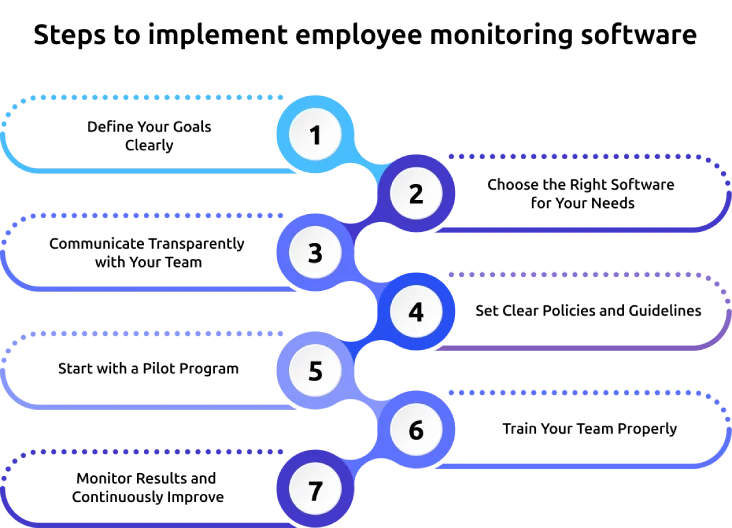
Implementing employee monitoring software becomes much easier when you follow a clear, structured process. A clear step-by-step plan helps you introduce it smoothly, avoid confusion, and get better results over time.
Define Your Goals Clearly
Start by identifying what you want to achieve with employee monitoring software. You might want to improve productivity, track time usage, enhance accountability, or gain better visibility into workflows. When you set clear goals, you can choose the right features and measure success more effectively.
Choose the Right Software for Your Needs
Select a tool that aligns with your business requirements and team structure. Look for features like ease of use, detailed reporting, integrations, and scalability. The right employee monitoring software should support your goals without making the process complicated for your team.
Communicate Transparently with Your Team
Explain what you are implementing, why it is necessary, and how it will benefit both the company and employees. Open communication helps reduce fear and builds trust. When employees understand the purpose, they are more likely to accept and support the system.
Set Clear Policies and Guidelines
Create clear rules on what you will monitor, how data will be used, and how privacy is protected. Explain acceptable work behavior and ensure employees are aware of these policies. This step helps you maintain transparency and avoid confusion or legal issues.
Start with a Pilot Program
Test the software with a small group before launching it across the organization. This allows you to identify any technical issues, workflow challenges, or employee concerns early. You can make necessary adjustments before complete implementation.
Train Your Team Properly
Provide proper training so employees understand how the software works and what is expected from them. Show them how it can help improve their productivity and work experience. Training ensures smoother adoption and reduces resistance.
Monitor Results and Continuously Improve
Once everything is set up, regularly review reports and insights to understand what is working and what needs improvement. Use the data to optimize workflows, support employees, and refine your approach. Continuous improvement ensures that you get the best value from your monitoring efforts.
Finding it hard to improve productivity without creating pressure?
Time Champ helps you track work with clarity and trust.
Legal and Ethical Considerations of Employee Monitoring
When you implement employee monitoring software, you must balance business needs with employee rights. A clear and ethical approach helps you stay compliant, build trust, and avoid legal risks. Following the right practices ensures that monitoring supports productivity without harming workplace culture.
Follow Local Laws and Regulations
Make sure you understand the labor laws and data protection regulations in your region. Different countries and states have specific rules about employee monitoring and data collection. Staying compliant protects your business from legal issues and penalties.
Maintain Transparency
Always inform employees about what you are monitoring and why. Clear communication builds trust and reduces fear or resistance. When employees know the purpose, they will accept the system easily.
Respect Employee Privacy
Focus only on work-related activities and avoid tracking personal data. Do not monitor outside working hours or access private communications. Respecting boundaries helps maintain a healthy and fair work environment.
Create a Clear Monitoring Policy
Develop a written policy that explains how monitoring works, what data is collected, and how it will be used. Share this policy with your team and ensure everyone understands it clearly. This creates clarity and avoids misunderstandings.
Use Data Responsibly
Use the collected data to support employees and improve workflows, not to micromanage or create pressure. Handle all data securely and limit access to authorized personnel. Responsible use of data builds trust and ensures long-term success.
Best Practices for Implementing Employee Monitoring Software
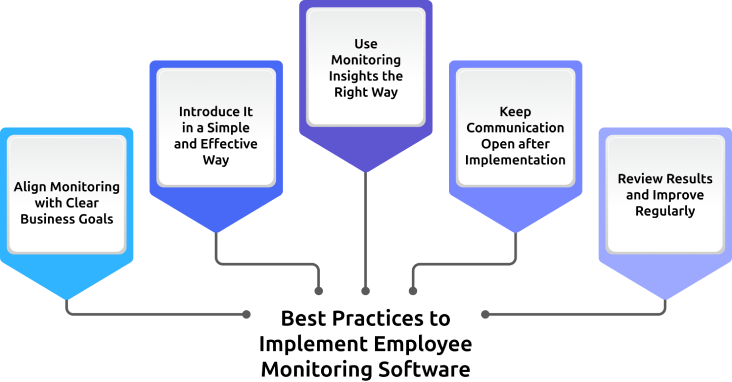
Implementing employee monitoring software successfully takes more than just choosing the right tool. You also need the right approach to ensure your team accepts it, uses it well, and benefits from it over time.
Align Monitoring with Clear Business Goals
Start with one clear reason for implementation: improving productivity, increasing accountability, or gaining workflow visibility. When you connect monitoring to specific business goals, it becomes easier to use the software effectively and measure its impact.
Introduce It in a Simple and Effective Way
Avoid introducing too many features at once, as it can overwhelm your team and create resistance. Begin with the most useful functions, then expand gradually as employees become more comfortable with the system.
Use Monitoring Insights the Right Way
Use the data to understand work patterns, identify bottlenecks, and support better performance across teams. When you focus on useful insights rather than constant supervision, you can make smarter decisions and improve workplace efficiency.
Keep Communication Open after Implementation
Do not stop communicating once the software is live. Continue explaining how the system is being used, what insights it provides, and how it helps improve work processes. Ongoing communication keeps expectations clear and strengthens trust over time.
Review Results and Improve Regularly
Implementation does not end after setup. Regularly review reports, gather feedback, and make small improvements based on what is working and what needs attention. This helps you get better long-term value from your employee monitoring strategy.
Common Implementation Mistakes to Avoid
When you identify the mistakes early, you can implement the system more smoothly and build better trust, adoption, and long-term results.
1. Lack of Transparency with Employees
When you introduce monitoring without clearly explaining it, employees may feel confused or uncomfortable. Always communicate what you are tracking, why you are tracking it, and how it supports both business goals and team performance.
2. Over-Monitoring or Micromanaging
If you use monitoring data to control every small activity, it can create pressure and damage trust. Focus on work patterns and meaningful insights that help you to improve productivity and support employees more effectively.
3. Ignoring Legal Requirements
If you move forward without understanding labor laws or privacy regulations, you can expose your business to serious risks. Make sure your monitoring practices align with legal requirements and internal policies before implementation.
4. Choosing the Wrong Tool
Selecting a tool that does not match your business needs makes implementation harder and reduces long-term value. Choose software that fits your team size, work model, reporting needs, and management goals.
5. Not Training Employees Properly
If employees do not understand how the software works, they may resist it or use it incorrectly. Proper training helps your team feel more confident, improves adoption, and makes the implementation process more effective.
How Can Time Champ Simplify Employee Monitoring for Your Team?
Implementing employee monitoring software can feel overwhelming when you try to manage tracking, reporting, and team adoption all at once. You need a solution that gives you clear visibility into daily work without adding complexity or confusion. This is where Time Champ helps you bring everything together in a simple and structured way.
Time Champ gives you real-time insights into employee activity, productivity trends, and work patterns, making it easier to understand how work actually gets done. With clear reports and easy-to-use features, you can manage performance, improve workflows, and support your team more effectively while keeping the process transparent and easy to follow.
Need better team visibility without making work feel intrusive?
Time Champ makes employee monitoring simple and transparent.
Conclusion
Implementing employee monitoring software isn’t just about tracking work. It helps you gain better visibility, improve productivity, and make more confident decisions across your team. When you follow a clear process and communicate openly, the software becomes a practical tool that supports both business performance and employee accountability.
Keep the implementation simple, stay transparent, and use the insights to improve workflows and team performance. When you apply it thoughtfully, employee monitoring software can create a more efficient, organized, and well-managed workplace.

Anjali


Table of Content
-
 What Is Employee Monitoring?
-
How Does Employee Monitoring Software Work?
-
Why Implementing Employee Monitoring Software Matters
-
Step-by-Step Process to Implement Employee Monitoring Software
-
Legal and Ethical Considerations of Employee Monitoring
-
Best Practices for Implementing Employee Monitoring Software
-
Common Implementation Mistakes to Avoid
-
How Can Time Champ Simplify Employee Monitoring for Your Team?
-
Conclusion
Related Blogs
Discover how to create an effective employee monitoring policy with our comprehensive guide. Enhance productivity while respecting privacy. Learn best practices today!
Discover the ins and outs of employee monitoring: from its benefits to ethical considerations. Everything you need to know in one comprehensive guide.
Learn about employee monitoring laws, what they mean for businesses, and how they protect employee privacy and rights.

Understand employee monitoring legal compliance, key laws, and best practices to track work activity while protecting privacy and avoiding legal risks.
Explore the top 10 remote desktop monitoring software to enhance your team's productivity. Find the perfect tool with detailed features, pricing, and ratings.
Learn about the detailed pros and cons of employee monitoring to better understand its overall impact on employees and employers.


 4.7/5 avg.
Ready to Manage Your Workforce Smarter?
Join our family of 1500+ companies using smart insights to redefine workforces!

Free Trial
No Credit Card Required