Enterprise Employee Monitoring: A Complete Guide
Learn how enterprise employee monitoring helps large organizations track productivity, improve security, and stay compliant with the right tools and strategies.
When a company grows from 50 employees to 500, or even 5,000, simple tools stop working. Spreadsheets become hard to manage. Manual check-ins take too much time, and small gaps in visibility turn into costly problems. Approaches to agency workforce monitoring carry constraints that off-the-shelf tools rarely address out of the box.
Enterprise employee monitoring helps solve this challenge by providing large organizations with the ability to see how work happens across departments, locations, and time zones. It combines productivity tracking, workforce analytics, insider threat detection, and compliance monitoring in one system. For organizations with remote or global teams, it is no longer optional. It becomes a key part of daily operations. However, employee monitoring is complex, requiring advanced tools, strict compliance, higher security, and coordination across multiple teams and stakeholders.
In this guide, you will learn what enterprise employee monitoring includes, why it matters, how to choose the right tools, and how to monitor teams without losing employee trust.
What Is Enterprise Employee Monitoring?
Enterprise employee monitoring is a system that tracks, records, and analyzes how employees use company devices, applications, and time across an entire organization. Unlike basic monitoring tools designed for small teams, enterprise solutions handle thousands of users across multiple offices, time zones, and regulatory environments. They combine activity tracking, productivity monitoring, enterprise workforce analytics, and security features into a single platform.
The goal is not just to track activity, but to deliver operational intelligence. Large organizations use enterprise monitoring to understand workforce utilization patterns, identify productivity bottlenecks, detect insider threats early, and meet compliance requirements across jurisdictions.
Why Do Large Organizations Need Workforce Monitoring?
When a company has hundreds or thousands of employees, even minor problems can escalate rapidly. A small daily delay across teams can turn into huge time and cost losses over a year. Without clear visibility, these issues can go unnoticed.
This is why many large companies rely on enterprise employee monitoring. It helps to understand how work is actually getting done and where improvements are needed.
Productivity Gaps Across Distributed Teams
In large and remote teams, productivity is harder to track. Employees may look busy, but actual output can be lower. According to Gallup’s research, global employee engagement dropped to 21%, which has caused around $8.9 trillion in lost productivity worldwide. Productivity monitoring helps enterprises identify these gaps at the department and team level. It answers questions like: Which departments have the highest utilization? Where is context-switching eating into focus time? Which teams consistently miss deadlines, and why?
Insider Threats and Data Loss Prevention at Scale
In many cases, employees cause the problem by mistake. Around 55% of incidents happen due to negligence, such as accidental data sharing or system errors. For organizations handling sensitive data like customer details, financial records, or intellectual property, even one mistake can be costly.
Enterprise employee monitoring helps prevent these risks by tracking normal employee behavior and quickly detecting unusual activity. For example, if someone downloads large files late at night or accesses systems they usually don’t use, the system sends an alert. This allows security teams to act early and stop problems before becoming serious issues.

Did You Know?
A recent Ponemon Institute report found that organizations take an average of 81 days to detect insider threats. If detected within 31 days, the cost is about $10.6 million, but if delayed beyond 91 days, it rises to $18.7 million.
Compliance Requirements Across Multiple Jurisdictions
Enterprises that operate in countries like the United States, the European Union, India, and Brazil must follow different employee monitoring laws. Each region has its own rules, and companies must follow all of them carefully.
For example, the General Data Protection Regulation requires companies to collect only necessary data and clearly define its purpose. In the United States, laws change from state to state. India’s Digital Personal Data Protection Act requires employee consent. Brazil's LGPD follows similar rules to GDPR but applies them locally. Enterprise monitoring platforms must support multi-jurisdictional compliance with configurable policies per region, automated consent workflows, and audit-ready data retention controls.
| Region | Key Regulation | Monitoring Requirement | Enterprise Action |
|---|---|---|---|
| United States | ECPA + State Laws | Written notice required in CT, DE, NY, TX; varies by state | State-specific policy templates, documented consent |
| European Union | GDPR (Art. 6, 9, 88) | Lawful basis required, purpose limitation, data minimization | DPIA before deployment, works council consultation |
| United Kingdom | UK GDPR + DPA 2018 | Proportionality test, legitimate interest assessment | ICO-aligned impact assessment, employee notice |
| India | DPDP Act 2023 | Consent-based processing, purpose limitation | Explicit consent collection, local data processing |
| Brazil | LGPD | Legal basis required, transparency obligation | Portuguese-language privacy notice, DPO appointment |
| Canada | PIPEDA + Provincial | Reasonable purpose, proportional collection | Province-specific consent, limited collection scope |
Struggling to See Where Your Team’s Time is Going?
Time Champ gives you clear visibility to fix productivity gaps quickly.
What Should Enterprise Employee Monitoring Software Include?
Not every tool works well for large organizations. What works for 50 users will not work for 5,000. When choosing enterprise employee monitoring software, you need to focus on features that support scale, flexibility, and control.
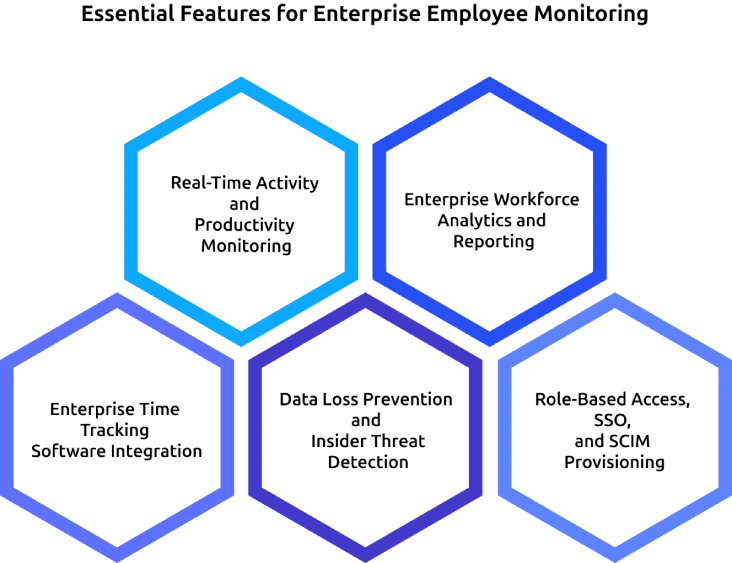
Real-Time Activity and Productivity Monitoring
Enterprises need more than basic tracking. The system must show which apps employees use and clearly classify work into productive, non-productive, and neutral categories across teams, departments, and locations. This gives you a clear, real-time view of how work happens across the organization.
Choose tools that:
- Let you customize productivity categories (different roles need different definitions).
- Provide live dashboards with detailed views.
- Send alerts when productivity patterns change.
Enterprise Workforce Analytics and Reporting
Enterprise workforce analytics transforms raw activity data into strategic insights. This means custom report builders, scheduled executive dashboards, trend analysis over months and quarters, and the ability to compare performance across departments or office locations.
The best platforms also offer API access, allowing enterprises to feed monitoring data into existing BI tools such as Tableau, Power BI, or Looker for deeper analysis.
Enterprise Time Tracking Software Integration
Organizations that bill by the hour, such as agencies, consulting firms, and professional services, need accurate time tracking. Enterprise employee monitoring software must connect directly to time-tracking systems.
The system should:
- Capture time automatically without manual entry
- Tag time to specific projects and tasks
- Separate billable and non-billable hours
- Send data directly to payroll and invoicing systems
It also must integrate with tools like Jira, Asana, and monday.com. This ensures time tracking matches actual work and deliverables.
Data Loss Prevention and Insider Threat Detection
Enterprise monitoring must protect company data at all times. It includes strong data loss prevention (DLP) features such as monitoring file transfers, controlling USB device usage, detecting sensitive data like financial or personal records, and sending alerts when it detects unusual behavior. These features turn enterprise employee monitoring into a security layer, not just a productivity tool.
Role-Based Access, SSO, and SCIM Provisioning
Large organizations need simple and automated user management. The system syncs employee accounts automatically using SCIM and supports SSO through platforms like Okta, Microsoft Azure Active Directory, and Google Workspace. It also provides role-based access controls so that HR teams see productivity data, security teams see threat alerts, and managers can see only their team data. This keeps access secure, organized, and easy to manage at scale.
How Does Enterprise Employee Monitoring Improve Team Productivity?
Monitoring alone does not improve productivity. Enterprise employee monitoring improves productivity when you use the visibility it provides and take action on it. At scale, this visibility helps you make better decisions across teams and departments.
Measuring Workforce Utilization Across Departments
Workforce utilization shows how much of your team’s available time goes into productive work. In large organizations, this is not just about individuals. It helps you understand performance at the team, department, and company level. With enterprise employee monitoring, you can easily spot gaps between teams.
For example, if one team works at 85% and another at 52%, you can step in, balance the workload, and fix what is slowing things down. Without this data, these gaps stay hidden until deadlines are missed or costs increase.
Identifying Workflow Bottlenecks Before They Escalate
You cannot always spot problems just by looking at daily work. Monitoring helps you see patterns that are easy to miss.
For example, if a team spends too much time in meetings, the issue is scheduling. If an engineering team switches tasks too often, the problem is planning. Instead of guessing, employee monitoring software helps you clearly see what’s wrong and fix it with the right data.
Did You Know?
According to Microsoft, 68% of employees say they don’t have enough uninterrupted focus time during the workday, which directly impacts productivity and output quality.
From Productivity Monitoring to Predictive Analytics
The most advanced enterprise monitoring platforms use historical data to predict future patterns.
For example, if productivity drops at the same time every month, you can adjust planning, and if employee engagement slowly decreases, you can act before they leave. This is where monitoring becomes more than tracking. It gives you clear insights that you can use to make better decisions and steadily improve outcomes.
Not sure why your teams are missing deadlines?
Time Champ helps you find bottlenecks and improve performance with real data.
How Do You Deploy Enterprise Employee Monitoring Across a Large Organization?
Rolling out enterprise employee monitoring goes beyond a technical setup. It requires clear communication, the right processes, and proper involvement from your teams.
Phase 1: Pilot Team and Baseline (Days 1–14)
Start with a pilot group of 30–50 employees from one department. Install the monitoring system and track basic metrics like productivity levels, app usage, and security activity. This helps you understand current performance.
Be clear with the team from the start. Explain what you are tracking, why it matters, and how the data will be used. Give employees access to their own dashboards so they can see their data.
Phase 2: Department Expansion (Days 15–45)
Once the pilot works well, expand to 3–5 departments. Use what you learned to fine-tune the setup.
Adjust productivity definitions for each team. What counts as productive work for engineers may not be the same for the customer support teams. Train managers to read dashboards and take action based on insights. If your teams are in different regions, set up compliance rules for each location during this phase.
Phase 3: Organization-Wide Rollout (Days 46-90)
Now roll out enterprise employee monitoring across the entire organization. Use department-specific settings so each team gets relevant insights.
Set up executive dashboards, schedule regular reports, and define clear governance rules for how data will be used.
By the end of 90 days, you must be able to confirm:
- Monitoring is active across all devices.
- Clear comparison between past and current performance.
- A documented governance policy.
- Leadership support based on real data.
How Do You Track Remote Enterprise Teams Effectively?
Managing remote teams at scale is not just about tracking activity, it is about understanding how work happens across different locations and time zones. To do this well, you need the right balance between visibility and flexibility, so that you can support productivity without creating friction.
Monitoring Across Time Zones and Geographies
When your team works from New York, London, Bangalore, and Sao Paulo, a fixed “9-to-5” schedule does not work the same for everyone because each location follows a different time zone. Your monitoring system must handle this clearly by supporting different work schedules for each location, timezone-based reporting, and flexible shift settings, so productivity data reflects actual working hours instead of one central office schedule.
Balancing Visibility with Employee Trust
Remote work often mixes personal and professional space, which can make employees feel uncomfortable with the monitoring. Research shows that 56% of monitored employees feel tense or stressed at work, compared to 40% of those who are not monitored, highlighting the psychological impact of electronic monitoring on employees.
To handle this, stay transparent with your team. Give them access to their own data and clearly explain what you track and why. When employees can see and understand their own performance, monitoring feels more supportive than controlling.
Tools and Techniques for Remote Workforce Monitoring
To manage remote teams effectively, use a mix of the right tools and methods:
- Automatic time tracking that runs in the background without manual input.
- Application and website tracking based on productivity levels.
- Optional screen capture with employee-controlled privacy settings.
- GPS-based location tracking for field teams like construction, sales, and logistics.
- Asynchronous reporting so managers can review data on their own time.
How Should You Evaluate Enterprise Employee Monitoring Tools?
Choosing the right tool for enterprise employee monitoring is not simple. What works for a small team may not handle the needs of thousands of users. You need a clear way to compare features, scalability, and overall fit.
Enterprise Feature Comparison Table:
When you evaluate tools, focus on what matters for large organizations. The table below shows how popular tools compare across key features.
| Feature | Time Champ | Teramind | ActivTrak | Hubstaff | Insightful | Veriato |
|---|---|---|---|---|---|---|
| Activity monitoring | Yes | Yes | Yes | Yes | Yes | Yes |
| Productivity analytics | Yes | Yes | Yes | Yes | Yes | Limited |
| Enterprise time tracking | Yes | Limited | No | Yes | Yes | No |
| DLP / insider threat | Yes | Yes | No | No | Limited | Yes |
| SSO / SCIM | Yes | Yes | Yes | Yes | Yes | Yes |
| HRIS integration | Yes | Limited | Yes | Limited | Yes | Limited |
| Workforce analytics | Yes | Yes | Yes | Limited | Yes | Limited |
| Multi-jurisdiction compliance | Yes | Yes | Limited | Limited | Yes | Yes |
| Employee self-service dashboard | Yes | No | Yes | Yes | Yes | No |
| GPS / Location tracking | Yes | No | No | Yes | No | No |
| Starting price (per user/month) | $3.90 | $15 | $10 | $4.99 | $6.40 | Custom |
Why Time Champ Is Built for Enterprise Workforce Monitoring
Most enterprise employee monitoring tools start small and add enterprise features later. Time Champ is built differently. It is designed from the start to handle large teams across multiple locations, time zones, and compliance needs.
Time Champ automatically tracks how time is spent across apps, websites, and tasks without manual input. You can set what counts as productive work for each team, since different roles work differently. You can also get real-time dashboards for quick decisions and use reports to plan effectively.
It supports large-scale workforce analytics, giving you insights from individual performance to overall trends. At the same time, it keeps your data secure with features like activity tracking, anomaly detection, and compliance support. Employees can see their own data too, which keeps monitoring transparent and builds trust.
Managing remote teams without clear visibility?
Time Champ helps you track work across locations while keeping employee trust intact.
Conclusion
Enterprise employee monitoring helps you bring clarity, control, and consistency to large-scale operations. When you use it the right way, you can see how work happens across teams, identify gaps early, and make better decisions based on real data. It allows you to improve productivity, strengthen security, and stay compliant without adding complexity.
To get the best results, you need to focus on transparency, choose the right tools, and follow a structured rollout. When you give employees visibility into their own data, you can build trust while improving performance. With the right approach, enterprise employee monitoring becomes a practical system that supports both the business goals and teams every day.

Anjali


Table of Content
-
 What Is Enterprise Employee Monitoring?
-
Why Do Large Organizations Need Workforce Monitoring?
-
What Should Enterprise Employee Monitoring Software Include?
-
How Does Enterprise Employee Monitoring Improve Team Productivity?
-
How Do You Deploy Enterprise Employee Monitoring Across a Large Organization?
-
How Do You Track Remote Enterprise Teams Effectively?
-
How Should You Evaluate Enterprise Employee Monitoring Tools?
-
Why Time Champ Is Built for Enterprise Workforce Monitoring
-
Conclusion
Instant Signup
Thank you for your request!
We have received your signup request and our team will get back to you soon. In the meantime, you can book a demo to see Time Champ in action.
Book a DemoFree trial. No credit card required. Prefer a walkthrough? Book a demo.
Related Blogs
Learn how IAM and employee monitoring work together to manage access, track activity, and reduce risks across your systems.
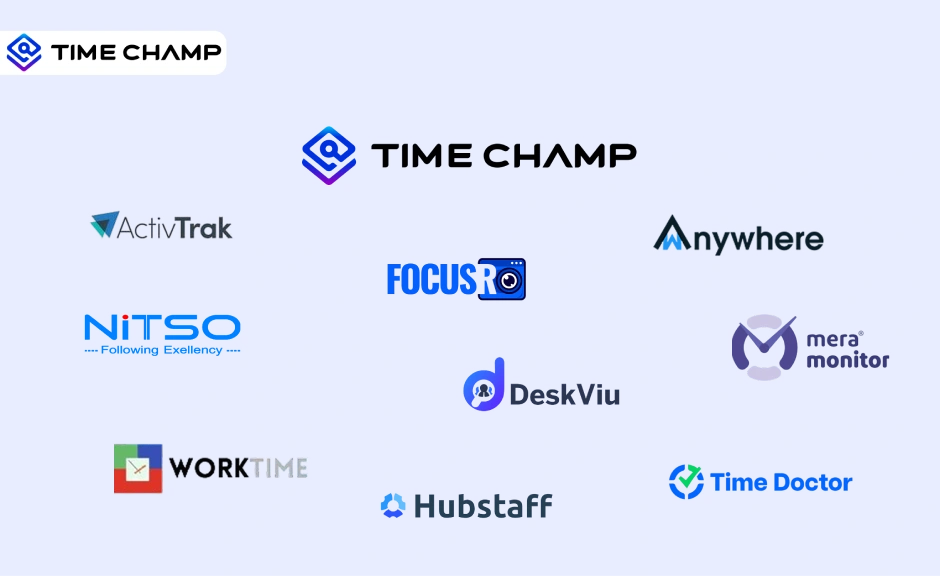
Find the best employee monitoring tools for 2026. Compare features, pricing, pros & cons to manage workforce performance and improve productivity.

Roll out employee monitoring the right way with our training guide. Learn what to teach managers and employees before and after launch for smooth adoption.

Learn how to address employee monitoring concerns with transparency, clear policies, and trust-building practices that improve engagement and reduce resistance.

Employee screen monitoring captures work activity in real time. Learn all monitoring types, how they boost productivity, and how to implement them ethically.

Understand employee monitoring legal compliance, key laws, and best practices to track work activity while protecting privacy and avoiding legal risks.


 4.7/5 avg.
Ready to Manage Your Workforce Smarter?
Join our family of 1500+ companies using smart insights to redefine workforces!

Free Trial
No Credit Card Required