Employee Monitoring Training: A Manager's Support Guide
Roll out employee monitoring the right way with our training guide. Learn what to teach managers and employees before and after launch for smooth adoption.

Employee monitoring often fails not because of the tool, but because teams are not properly trained or informed of it. When you don’t know how to use the data or employees don’t understand what’s being tracked, it leads to confusion, resistance, and low adoption. Research by Cyberpsychology shows that clearly explaining the purpose and scope of monitoring can increase employee acceptance by nearly 70%. This shows how important communication and training are for success, as clear guidance and transparency help build trust within your organization. Without automation in employee monitoring, dashboards quickly become decoration rather than a decision tool. Anyone weighing this decision usually starts with our enterprise employee monitoring guide for the full landscape.
This guide walks you through how to roll out employee monitoring the right way. You’ll learn what to include in your training, how to use monitoring data responsibly, how to introduce monitoring to your team without resistance, and what support systems to put in place after launch to ensure long-term adoption.
Why Training and Support Matter More than the Tool
Choosing the right employee monitoring software is only one part of the process. Success depends on how clearly you introduce, explain, and support the tool for your team. When employees aren’t clearly told what is being tracked or why it matters, uncertainty might build fast. This often leads to resistance, low adoption, and missed opportunities to use the tool effectively.
Clear communication and structured training set the foundation for trust. Establishing simple and transparent employee monitoring guidelines helps to remove confusion and ensures everyone understands how data will be used. When you clearly explain the purpose, like improving productivity, balancing workloads, or supporting fair reviews, monitoring feels useful and transparent to your team.
Ongoing training and support also make it easier to follow employee monitoring best practices in daily workflows. You can use data to guide meaningful conversations and make informed decisions, without relying on assumptions. With the right approach, employee monitoring becomes a practical tool that brings clarity and helps your team improve productivity, performance, and work habits.
Struggling to get your team comfortable with monitoring?
Time Champ helps you introduce it clearly with full transparency and ease.
What Should Your Employee Monitoring Training Cover?
Employee monitoring training needs to be clear, structured, and easy to follow. It helps teams understand what is being tracked, why it matters, and how it affects their daily work. Covering the right areas reduces confusion and builds trust from the beginning.
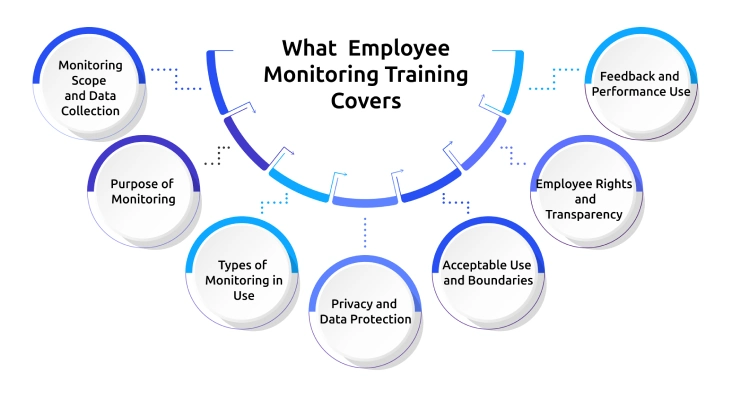
Monitoring Scope and Data Collection
Clearly explain what data is being collected and when monitoring takes place. This includes activities like application usage, website tracking, and work hours. Defining the scope removes assumptions and sets clear boundaries.
Purpose of Monitoring
Explain why employee monitoring is being implemented. Connect it to goals such as improving productivity, maintaining security, and supporting better work management. A clear purpose helps teams understand the value behind it.
Types of Monitoring in Use
Outline the specific monitoring methods being used. This may include tracking app usage, system activity, or work time. Keeping this simple helps employees understand what applies to their role.
Privacy and Data Protection
Explain how employee data is stored, who has access to it, and how it is protected. Clear information about data handling builds confidence and reduces concerns.
Acceptable Use and Boundaries
Define what is considered appropriate and inappropriate use during work hours. Setting clear expectations helps employees understand what is allowed and what is not.
Employee Rights and Transparency
Provide clear information about employee rights. This includes the right to know about monitoring and access relevant information. Transparency supports trust and reduces misunderstandings.
Feedback and Performance Use
Explain how monitoring data is used in feedback and performance discussions. Show how it helps improve work habits, guide conversations, and support better decisions.
How Do You Train Managers to Use Monitoring Data Effectively?
Training focuses on helping you use monitoring data practically and responsibly. The goal is to help you make better decisions, communicate clearly with your team, and handle performance discussions fairly. It is important to track these sessions with tools like Riverside recording, giving remote employees a resource they can revisit when needed. When you understand how to use the data correctly, it improves both team performance and trust.
Use Data to Support Your Team
Use monitoring data to understand work patterns and identify where your team may need support. Data works best when it helps you start conversations about workload, challenges, and productivity.
Understand Reports and Metrics Clearly
Take time to understand what each report and metric shows. Look at activity levels, app usage, and work patterns in context so you can avoid incorrect assumptions.
Use Data in Performance Discussions Carefully
Use monitoring data as supporting information during performance discussions. Combine it with actual work outcomes to keep conversations balanced and fair.
Practice Data-Based Conversations
Prepare for conversations using real scenarios. This helps you communicate clearly and avoid misunderstandings when discussing performance or productivity.
Set Clear Expectations for Data Usage
Decide how often you will review monitoring data and stick to a consistent approach. This keeps your management style balanced and avoids over-checking.
Understand Boundaries and Limitations
Be clear about what you can and cannot do with monitoring data. Follow the defined rules for access, sharing, and usage to maintain trust within your team.
Not sure how to use monitoring data clearly?
Time Champ helps you understand it easily and take the right actions.
How Do You Introduce Employee Monitoring to Your Team Without Resistance?
The way you introduce employee monitoring shapes how your team responds to it. A clear, transparent, and structured approach helps to reduce pushback and makes adoption smoother within the team.
Be Clear and Transparent From the Start
Explain the purpose behind monitoring in simple terms. Focus on real reasons like improving productivity, supporting workflows, or identifying workload gaps. Clear communication removes uncertainty early.
Involve Your Team in the Process
Create space for discussion without just announcing the change. Let employees ask questions and share their concerns. This makes the rollout feel more inclusive and less forced.
Set Clear Boundaries
Define exactly what is being monitored and what is not. Clear boundaries help employees understand limits and avoid assumptions about personal tracking.
Focus on Outcomes, Not Activity
Keep the focus on results like work output and task completion. This helps employees see monitoring as a way to improve performance, not track every action.
Let Employees See Their Own Data
Give employees access to their own dashboards. When they can view their data, it increases clarity and reduces uncertainty around monitoring.
Position Monitoring as Support
Present monitoring as a tool that helps improve work, not as a way to control behavior. This shift in approach makes it easier for employees to accept it.
What Does a Practical Employee Monitoring Training Plan Look Like?
A practical training plan gives structure to how employee monitoring is introduced and adopted across the team. It ensures the right information reaches the right people at the right time. Breaking the rollout into clear stages makes the process easier to manage and improves long-term adoption.
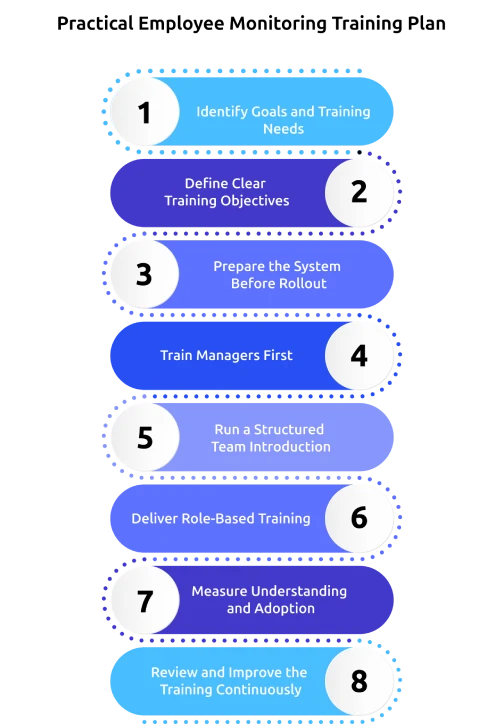
Identify Goals and Training Needs
Start by defining what you want to achieve with employee monitoring. Focus on goals like improving productivity, balancing workloads, or improving visibility into work patterns. A clear goal helps you design training that solves real problems.
Define Clear Training Objectives
Set specific outcomes for each training stage. Decide what your team needs to understand, such as how monitoring works, how data is used, and how it supports daily work. Clear objectives keep training focused and easy to follow.
Prepare the System Before Rollout
Set specific outcomes for each training stage. Decide what your team needs to understand, such as how monitoring works, how data is used, and how it supports daily work. Clear objectives keep training focused and easy to follow.
Train Managers First
Train managers before rolling out monitoring to employees. Focus on how to read data, interpret reports, and use insights in team discussions. Early preparation helps you lead the rollout with confidence and avoid confusion later.
Run a Structured Team Introduction
Introduce monitoring through a dedicated session. Explain what is changing, how it impacts daily work, and what employees need to know. Keep the session clear and focused so your team can easily understand the process.
Deliver Role-Based Training
Adapt training based on different roles in your team. Show how monitoring applies to specific tasks and workflows. Role-based sessions make training more relevant and easier to apply in daily work.
Measure Understanding and Adoption
Check how well your team understands the system after training. Look at usage patterns, feedback, and common questions. Measuring adoption helps you identify gaps early and improve training where needed.
Review and Improve the Training Continuously
Treat training as an ongoing process. Collect feedback, update sessions, and adjust based on how your team uses the tool. Continuous improvement keeps the system effective and aligned with your team’s needs.
What Support Should You Have in Place After Launch?
Rolling out employee monitoring software does not end at launch, and the real impact depends on the support you provide afterwards. When support is consistent and structured, your team adapts faster and uses the system with greater clarity. A well-supported rollout also helps you maintain trust and avoid common adoption issues.
A Clear Point of Contact
Assign a specific person on your team to contact with any questions or concerns about monitoring. This keeps communication direct and avoids delays in resolving issues. Quick support helps you address concerns before they affect adoption.
A Central FAQ Resource
Create a shared FAQ that answers common questions about monitoring practices and data usage. Update it regularly based on real concerns raised by your team. Easy access to information reduces confusion and repeated queries.
A Feedback and Concern Channel
Set up a dedicated channel where your team can share feedback or raise concerns. This gives employees a clear way to speak up without hesitation. Acting on feedback shows that their concerns are taken seriously.
Regular Review of Data Usage
Review how monitoring data is used across teams regularly. This helps ensure the data supports productivity but not unnecessary tracking. Regular checks help you maintain fairness and consistency.
Ongoing Manager Guidance
Provide continuous guidance to managers on how to use monitoring data effectively. This keeps their approach consistent and aligned with team goals. Clear direction reduces the chances of misuse or confusion.
Clear Communication of Updates
Inform your team about any changes in monitoring practices or policies before they take effect. This prevents confusion and keeps everyone aligned. Consistent communication helps maintain trust over time.
A Defined Complaint Handling Process
Create a clear process for handling monitoring-related complaints within your team. Explain how issues are reviewed and what actions will follow. A structured process builds confidence and ensures fairness.
Ongoing Training and Support
Continue training sessions after launch to reinforce key concepts and address new challenges. This helps your team stay aligned as the system evolves. Ongoing support improves long-term adoption and usage.
Worried that your monitoring tool won’t be used after rollout?
Time Champ keeps your team engaged with easy access and ongoing clarity.
How Does Time Champ Make Employee Monitoring Training and Support Easier?
Rolling out employee monitoring software often becomes challenging when your team feels confused about what is being tracked or how the data is used. You may also find it difficult to train managers consistently or answer repeated questions from employees. Without clarity and visibility, even the best efforts to implement employee monitoring can lead to low adoption and ongoing resistance.
Time Champ simplifies this entire process by making monitoring clear, accessible, and easy to explain. You get employee-facing dashboards that help your team see their own data, which reduces confusion and builds transparency from the start. Its flexible setup helps you define monitoring scope based on your needs, so you can train your team on what actually matters. With structured insights and easy-to-understand reports, you can follow employee monitoring best practices and guide your team with confidence, making training, communication, and long-term adoption much easier.
Conclusion
Employee monitoring works well when you focus on clarity, communication, and support from the start. You need to train your team on what is tracked, explain the purpose clearly, and prepare managers to use data responsibly. A structured rollout plan helps you introduce monitoring without resistance, while ongoing support keeps adoption strong. When you stay transparent and consistent, your team understands the system and uses it effectively. With the right approach and tools, you can implement employee monitoring in a way that builds trust, improves performance, and supports better decision-making across your organization.

Anjali


Table of Content
-
 Why Training and Support Matter More than the Tool
-
What Should Your Employee Monitoring Training Cover?
-
How Do You Train Managers to Use Monitoring Data Effectively?
-
How Do You Introduce Employee Monitoring to Your Team Without Resistance?
-
What Does a Practical Employee Monitoring Training Plan Look Like?
-
What Support Should You Have in Place After Launch?
-
How Does Time Champ Make Employee Monitoring Training and Support Easier?
-
Conclusion
Instant Signup
Thank you for your request!
We have received your signup request and our team will get back to you soon. In the meantime, you can book a demo to see Time Champ in action.
Book a DemoFree trial. No credit card required. Prefer a walkthrough? Book a demo.
Related Blogs
Explore key types and strategies for employee performance monitoring to boost productivity and align team goals with company success.

Choose the right employee monitoring tool for your team with this 2026 guide. Explore types, key features, a 5-step framework, and top software options.
Discover the ultimate guide to remote employee monitoring software, including its features, benefits, and how to choose the best one for your business.
Maximize productivity with comprehensive PC Activity Monitoring. Track, analyze, and optimize work habits for peak efficiency and performance.
Learn about the detailed pros and cons of employee monitoring to better understand its overall impact on employees and employers.
Discover how to create an effective employee monitoring policy with our comprehensive guide. Enhance productivity while respecting privacy. Learn best practices today!


 4.7/5 avg.
Ready to Manage Your Workforce Smarter?
Join our family of 1500+ companies using smart insights to redefine workforces!

Free Trial
No Credit Card Required