10 Automation Trends in Employee Monitoring in 2026
From AI-powered behavior analytics to no-code workflow builders, explore the top 10 automation trends that are reshaping employee monitoring in 2026.
Employee monitoring is evolving at light speed this year, but do you know what is really driving that change? It’s automation. AI-powered tools have made monitoring smarter, much faster, and way less hands-on than even a year ago.
According to Gartner’s 2026 outlook on workforce intelligence, over 70% of mid-size and enterprise companies now use some form of AI-assisted employee monitoring, up from just 38% in 2022. That jump is not a coincidence. It’s the result of automation quietly rewriting how HR, IT, and security teams think about visibility at work.
In this blog, I’ll walk you through the 10 biggest automation trends reshaping employee monitoring in 2026, plus how they actually work, who benefits, and what to prepare for. Let us get into it.
Where It All Started: From Punch Cards to AI Agents
Before we look at the trends closely, here’s a quick history moment. Employee monitoring is older than you might think, it traces back to the punch card systems of the late 1800s, invented by Herman Hollerith in 1888 for the U.S. Census Bureau. Those punch cards eventually became the backbone of IBM, and factory floors across the world adopted them really quickly to log work hours.
Then came software-based time tracking in the 1990s, remote desktop monitoring in the 2000s, and activity analytics in the 2010s. And now in 2026, we are in the era of agentic AI, autonomous software that does not just log what happened, but actually reads context, predicts what is coming, and takes action on your behalf.
FYI, each of those shifts took roughly 20 years, but the shift from dashboards to agentic AI solutions is happening within just 3.
Why Is Automation Reshaping Employee Monitoring in 2026?
There are three forces pushing automation forward in 2026.
First, the scale problem. Remote and hybrid work means security and HR teams now monitor endpoints spread across dozens of time zones, and manual review just cannot keep up. Automation handles the volume that humans would drown in.
Second, the cost problem. IBM’s 2024 Cost of a Data Breach Report locked the global average breach at $4.88 million, and insider-driven incidents are consistently the slowest to detect. Every week of dwell time is a week of extra exposure, so compressing detection time is basically free money.
Third, the trust problem. Employees do not want to feel watched. They do want to feel supported. Automation makes it possible to surface only the risk signals that actually matter, so the vast majority of normal activity never reaches a human reviewer.
Want to see automation in action for your team?
Time Champ’s AI-powered employee monitoring runs in the background so your people can focus on the work.
What Are the Top Automation Trends in Employee Monitoring This Year?
Here are the 10 trends reshaping the space in 2026, from the biggest already-deployed shifts to the early-access capabilities you are about to see roll out everywhere.
1. AI-Powered User Behavior Analytics (UEBA)
UEBA is the foundation trend that everything else builds on. In 2026, UEBA does not just look at one person’s activity, it compares each user to peer groups, to their own baseline, and what’s typical for that time of day, all at once.
The result is a risk score that updates live. A finance analyst downloading spreadsheets at 2 p.m. on Wednesday? Score 2 out of 100. That same analyst is doing it at 2 a.m. Sunday from a personal device? Score 85. Yep, you guessed it right, that is the one the system escalates.
2. Predictive Burnout and Attrition Detection
This one is a big deal for HR. Predictive analytics now watch for the early warning signs of burnout, long hours, dropping activity quality, reduced collaboration, fewer meetings attended, and flag at-risk employees 3 to 6 weeks before they would typically resign.
Gallup's State of the Global Workplace 2026 report: only 20% of employees worldwide were engaged in 2025, costing the world economy $10 trillion in lost productivity.
3. Agentic AI for Alert Triage and Response
Agentic AI is the buzzword of 2026, but for once, the hype is real. These are autonomous agents that can pick up an alert, pull context from your HR, IT, and identity systems, write a draft incident report, and recommend a response, all without a human lifting a finger.
For overworked SOC teams, agentic AI is the difference between 200 unread alerts and 20 that actually need a human. The best platforms still keep a human in the loop for any action that affects a real person, agentic AI helps, but it does not decide on anything.
4. Privacy-Preserving On-Device AI and Federated Learning
Here is where privacy and power meet each other. On-device AI means the model runs on the employee’s laptop, so raw screen data never leaves the device, only the risk signal does. Federated learning takes it a step further, models learn from many endpoints without any one device’s data being uploaded.
For EU and UK teams that need to satisfy GDPR and works council expectations, this trend is quietly the most important one on the list.
5. Automated Compliance and Policy Enforcement
Compliance used to mean quarterly audits, now it's always on. Automated systems watch for GDPR issues like new data being collected, transfers across borders, or expiring retention windows, and either fix them right away or alert the legal team.
The best employee monitoring tools now ship with 20+ pre-built policy packs for GDPR, CCPA, BIPA, HIPAA, and DPDP. Turn them on, and the platform handles all the paperwork.
6. No-Code Workflow Builders for HR and IT
Now you no longer need a developer to build a monitoring automation. No-code builders let HR and IT managers drag-and-drop triggers, conditions, and actions, like “if an employee’s weekly hours exceed 55, send a wellbeing nudge and notify their manager.”
This is the trend that takes automation out of the IT team’s backlog and puts it directly in the hands of the people who know the workflows best.
7. AI-Generated Policy Drafting and Employee Notices
Drafting a monitoring notice used to take Legal two weeks. In 2026, generative AI writes the first draft in plain language, in the right tone, and that too localized for each region, and Legal only has to review that draft. Same for employee FAQs, manager enablement materials, and works council briefing documents.
A heads-up: Legal still has to sign off. AI drafts are just a starting point, not a shortcut around review, so a manual review is always appreciated.
8. Intelligent Screen Monitoring and Session Replay
Old screen monitoring records everything all day, causing privacy issues and eating up a ton of storage. New screen monitoring only comes in when risk is high, and AI automatically blurs sensitive content, like your customer data, banking info, or personal chats, before anyone sees it.
Natural-language search across recorded sessions is the quiet power move for you here. Instead of scrubbing through hours of long videos, investigators just type “show me any moment this user opened a USB drive”, and the system just jumps to it.
9. Automated Data Retention and Right-to-Erasure
Employee data cannot sit on your servers forever. Automation workflows now delete or anonymize monitoring data according to retention policies and handle right-to-erasure requests from intake through deletion confirmation when an employee leaves or submits a request.
For Indian companies under DPDP 2023 and global companies under GDPR, this one is no longer optional.
10. Integration Automation via iPaaS and Open APIs
Employee monitoring data is most valuable when it flows into your other systems, your SIEM, your HRIS, your ticketing platform, and your BI dashboards. In 2026, iPaaS platforms like Workato, tray.ai, and Make have native connectors for the major monitoring tools, so the integration plumbing takes hours, not months.
And the final result you’ll have is a perfectly unified picture of work across every tool your team touches.
Ready to move from manual monitoring to automated workflows?
Time Champ’s automation library lets you turn on workflows in minutes.
How Is AI Changing Screen Monitoring and Activity Tracking?
Screen monitoring in 2026 barely resembles what it looked like even three years ago. The old model was “record everything, search manually.” The new model is “record only when needed, auto-blur what is sensitive, and let AI do all the searching.”
Here is a quick before-and-after, so you can see the gap at a quick glance.
| Capability | 2022–2024 Approach | 2026 Approach |
|---|---|---|
| Recording trigger | Always-on, every minute of the day | Triggered by risk score or rule |
| Sensitive data in recordings | Visible, manually redacted later | Auto-blurred by AI before storage |
| Search across recordings | Scrub through the timeline manually | Natural-language search |
| Storage footprint | Terabytes per user per year | Gigabytes (only flagged sessions stored) |
| Privacy exposure | High | Low: most activity never reaches a human |
| Analyst review time | Hours per investigation | Minutes per investigation |
The shift is not just about cost or storage. It’s about making monitoring something employees can actually live with.
What Are the Business Benefits of Automating Employee Monitoring?
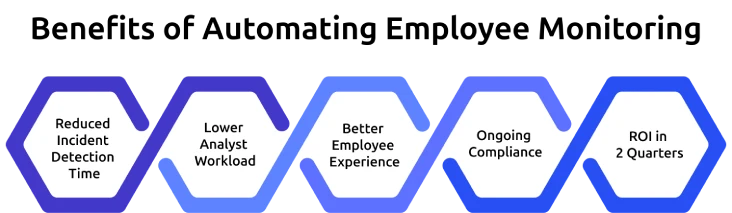
Automation in monitoring is not just a nice-to-have thing, it produces real, measurable wins. Here are the top five benefits teams are reporting in 2026.
Reduced Incident Detection Time: AI and UEBA reduce incident detection time (MTTD) by more than 80 days to less than 14 days in most cases of insider risk.
Lower Analyst Workload: Agentic AI saves up to 40-60 minutes in the triage time per alert, so analysts can work on actual incidents.
Better Employee Experience: Triggered recording and auto-redaction mean the overwhelming majority of normal activity is never seen by a human, and employees know it.
Ongoing Compliance: Automated policy packs handle GDPR, CCPA, BIPA, HIPAA, and DPDP events in real-time, rather than scrambling the day before an audit.
ROI in 2 Quarters: The majority of 2026 deployments report payback within 6 months, primarily due to analyst hours saved and exposure to breaches.
What Challenges Come with Automated Employee Monitoring?
Automation for sure brings power, but it also brings new responsibilities. Here are the four biggest challenges teams run into, and I have also covered how to handle them.
Algorithmic Bias and False Positives
AI models only learn from the data they are trained on. If a model is trained on a narrow group, it can flag normal behavior from other groups as suspicious.
Fix: Always keep a human in the loop for decisions that affect real people, and audit your model’s alerts by demographic regularly.
Privacy and Works Council Concerns
Automation can make monitoring feel omnipresent.
Fix: Here, the fix is transparency, publish what is captured, when, and how long it’s kept. For EU teams, works councils will want this written down. Automated tools should be able to support automated privacy notices and DPIAs.
Over-Reliance on Automation
If your team starts assuming the AI caught everything, the one time it misses will hurt.
Fix: Run quarterly tabletop exercises where you test a simulated incident from detection through resolution, both manual and automated.
Implementation Complexity
Agentic AI and automation workflows are powerful, but the rollout has real moving parts, policy, platform tuning, integrations, and training.
Fix: Start with one high-value workflow, get it right, then scale.
How to Prepare Your Organization for Automation in Employee Monitoring
Here is the step-by-step prep checklist if you are planning to bring automation into monitoring in 2026.
- Check what your monitoring tools already track and what your team still reviews by hand.
- Get HR, IT, Legal, and the works council to agree on what can be automated and what can't.
- Pick one high-value area to test first, usually insider risk or compliance reporting.
- Choose a monitoring tool with built-in AI, no-code workflows, and ready-made compliance templates.
- Run a 60-day pilot with alerts only, tune the settings to cut down false alarms.
- Slowly turn on automated actions, starting with safe ones like notifications and reports.
- Connect the tool to your SIEM, HRIS, and BI systems for one clear view of your workforce.
- Track detection time, hours saved, and compliance incidents every quarter. Scale what works.
What Is the Future Outlook Beyond 2026?
If 2026 is the year of agentic AI in monitoring, 2027–2028 is about what comes next. Three signals to watch:
Autonomous Compliance Officers: AI agents that handle the entire regulatory lifecycle, from policy drafting to audit response, with a human sign-off.
Cross-platform Workforce Graphs: Unified models that connect time, productivity, wellbeing, and security signals across every tool your team uses.
Regulation Catching Up: The EU AI Act, state-level AI workplace laws in the US, and DPDP in India will all start enforcing specific requirements on automated monitoring systems. Expect more compliance packs, more transparency reports, and more mandatory human review gates.
Automate Your Employee Monitoring with Time Champ
Time Champ is an employee time and productivity tracking platform built for the automation era. It brings AI-powered analytics, triggered screen monitoring, predictive burnout detection, and no-code workflow automation together in one dashboard.
Time Champ surfaces activity patterns across your team through real-time dashboards, productivity reports, and configurable alerts, so your security and HR teams can focus on the moments that actually matter instead of combing through raw data. Everything runs inside SOC 2 Type II controls, with automated retention and GDPR-ready workflows built in.
You get real-time dashboards, one-click compliance reports, and pre-built integrations with the tools your team already uses, Slack, Microsoft 365, Jira, BambooHR, and more.
Most importantly, your employees get transparency. They can see their own data, understand what is captured, and trust that automation is working for them, not the other way around.
See Time Champ’s 2026 automation features for yourself!
Start a free trial and turn on your first AI-powered workflow in just 10 minutes.
Conclusion
In conclusion, automation in employee monitoring is not a future story, it’s already here, and it’s reshaping how HR, IT, and security teams work in 2026. From AI-powered UEBA and agentic alert triage to predictive burnout detection and no-code workflows, the shift is making monitoring smarter, faster, and far less intrusive than the old always-on model.
You do not have to rebuild your stack from scratch. Start with one high-value workflow, measure, and scale from there. Keep humans in the loop for decisions that affect real people. Be transparent with employees. And remember that automation is a partner, not a replacement, for good management.
Lastly, automation in employee monitoring is here to stay. The teams that learn to use it well in 2026 will be the ones leading the way in 2027 and beyond.

Shabana Shaik


Table of Content
-
 Where It All Started: From Punch Cards to AI Agents
-
Why Is Automation Reshaping Employee Monitoring in 2026?
-
What Are the Top Automation Trends in Employee Monitoring This Year?
-
How Is AI Changing Screen Monitoring and Activity Tracking?
-
What Are the Business Benefits of Automating Employee Monitoring?
-
What Challenges Come with Automated Employee Monitoring?
-
How to Prepare Your Organization for Automation in Employee Monitoring
-
What Is the Future Outlook Beyond 2026?
-
Automate Your Employee Monitoring with Time Champ
-
Conclusion
Instant Signup
Thank you for your request!
We have received your signup request and our team will get back to you soon. In the meantime, you can book a demo to see Time Champ in action.
Book a DemoFree trial. No credit card required. Prefer a walkthrough? Book a demo.
Related Blogs

Explore common employee monitoring myths and learn what's actually true. Find out how proper monitoring boosts productivity, trust, and team performance.
Anjali | Apr 14, 2026
Learn about employee monitoring laws, what they mean for businesses, and how they protect employee privacy and rights.
Shabana Shaik | Jul 10, 2024
Explore the top questions about employee monitoring, including legal requirements and best practices to ensure compliance and protect privacy.
Thasleem Shaik | Jul 29, 2024
Learn about the detailed pros and cons of employee monitoring to better understand its overall impact on employees and employers.
Shabana Shaik | Oct 16, 2024
Choose the right employee monitoring tool for your team with this 2026 guide. Explore types, key features, a 5-step framework, and top software options.
Jahnavi Pulluri | Apr 13, 2026
Explore the possible ethical considerations of monitoring employee's activities to increase their productivity while respecting their privacy.
Jahnavi Pulluri | Jul 31, 2024


 4.7/5 avg.
Ready to Manage Your Workforce Smarter?
Join our family of 1500+ companies using smart insights to redefine workforces!

Free Trial
No Credit Card Required