What Is a Data Breach? Causes, Impact, and How to Prevent One
A data breach is unauthorized access to private data. Learn the common causes, the real impact on people and companies, and what to do in the first 72 hours.

You open your inbox, and there it is. An email from a company you used years ago, telling you that your name, email, and password were part of a data breach. And the very next minute, your stomach drops, and panic starts kicking in with questions flooding: which password was it? Did you reuse it anywhere? Is your bank next?
If you have felt that little jolt of panic, you already understand why data breaches matter. And you are far from alone. In 2024 alone, more than 1.7 billion people got a notice exactly like that one.
Global data breaches cost around $4.44M per incident, which is nearly 55 years' worth of a typical American household's income.
So let us slow down and make sense of it. In this guide, I will walk you through what a data breach actually is, the common causes of data breaches, the real impact on individuals and companies, some recent examples, and, most importantly, how to prevent one. There is also a section almost no one covers: exactly what to do in the first 72 hours after a breach hits.
What is a Data Breach?
A data breach is any incident where sensitive, private, or confidential information is accessed, stolen, or exposed without permission. That can mean names, passwords, card numbers, health records, or company secrets ending up in the wrong hands. It can be the work of an outside hacker, a careless mistake, or someone on the inside.
The key word is unauthorized. A data breach is not always a dramatic hack. Sometimes it is a laptop left in a taxi, a misconfigured cloud folder, or a file sent to the wrong person. If protected data reaches someone who was never meant to see it, that is a breach, whether it happened through data theft or a simple slip.
What are the Common Causes of Data Breaches?
Most data breaches trace back to a very short list of causes, and the majority involve real people, not just technology. FYI, attackers rarely use the digital door, they walk in with a stolen password or trick someone into opening it.
Here are the common causes of data breaches you should know:
| Cause | How it Happens |
|---|---|
| Phishing and social engineering | A fake email or message tricks someone into handing over credentials or clicking malware. |
| Stolen or weak credentials | Reused, guessable, or leaked passwords let attackers log in as a real user. |
| Malware and ransomware | Malicious software steals data or locks systems until a ransom is paid. |
| Malicious or careless insiders | An employee leaks data on purpose, or exposes it by accident. |
| Lost or stolen devices | An unencrypted laptop or phone falls into the wrong hands. |
| Unpatched vulnerabilities | Attackers exploit known software flaws that were never updated. |
| Misconfiguration | A wrongly set cloud bucket or database is left open to the internet. |
| Brute force and DoS attacks | Automated guessing cracks weak logins, or traffic floods overwhelm defenses. |
A lot of these overlap: Phishing leads to stolen credentials, which lead to data exfiltration. You know the common thread is that a human is usually involved somewhere in the chain, that is exactly why awareness matters as much as having a firewall.
What Kind of Data do Attackers Target?
Attackers often go after data they can sell, exploit, or hold for ransom. You know the drill, right, the more sensitive and reusable the data is, the more it is worth. Some of it hurts you directly, and some of it is used to attack someone else. These are the categories that most attackers target in a data breach.
- Personal Identifiers: Names, addresses, phone numbers, and government IDs like Social Security numbers.
- Financial Data: Bank account details, credit card numbers, and payment records.
- Login Credentials: Usernames and passwords, which unlock even more accounts when reused.
- Health Records: Medical and insurance data, which is highly valuable and hard to change.
- Business Secrets: Contracts, source code, customer lists, and internal plans.
What is the Impact of a Data Breach?
The impact of a data breach lands in two places: on the individuals whose data leaks, and on the companies that lost it.
- For people, it is stress and financial risk.
- For businesses, it is money, trust, and legal exposure.
And both can take years to recover from.
Impact of a Data Breach on Individuals
For a person, a breach can mean identity theft, drained accounts, fraudulent loans taken in your name, and months of cleanup.
The damage is not just financial. Many people feel real anxiety and loss of trust after their private data is exposed. If your information has leaked, it is worth watching your accounts closely and considering a credit monitoring service so you catch fraud early. Cutting down where you share your real number, for example by using a virtual phone number for sign-ups, also lowers your exposure.
Impact of a Data Breach on Companies
For a business, the impact of a data breach is brutal. IBM's 2025 research puts the global average cost of a breach at 4.44 million dollars, and 10.22 million in the United States. On top of that come regulatory fines, lawsuits, lost customers, and downtime. There is also the reputation hit, which is the hardest to price. Strong business intelligence and clear reporting help leaders understand the true cost, and in regulated markets, data protection laws can add penalties on top of the cleanup bill.
Reality Check
Most breaches are not stopped by a bigger firewall. They are caught by noticing unusual behavior early, like a user pulling files they never even touched before. Time Champ surfaces exactly those signals, so a risky moment is flagged before it becomes a data breach headline.
What are Some Recent Data Breach Examples?
Now you know what a data breach is, let me give you a few real-time examples so that you know it when it starts to happen.
Data breach news can feel constant, and the scale keeps growing. Looking at real cases makes the risk concrete, from record-breaking recent incidents to the classic breaches that reshaped security. Here are a few worth knowing.
Change Healthcare (2024)
A ransomware attack on Change Healthcare exposed the data of roughly 192.7 million people, it is one of the largest healthcare breaches ever, disrupting billing and care across the US for weeks.
Kaseya (2021)
A supply-chain ransomware attack through Kaseya's software hit more than 1,000 businesses at once, showing how one weak link can cascade to thousands of victims.
Equifax (2017)
The Equifax breach exposed the data of about 147 million people and led to a settlement of up to 700 million dollars, a landmark in how seriously breaches are now taken.
Marriott (2018) and Facebook (2021)
Marriott's Starwood system leaked data on about 500 million guests. Facebook exposed details of over 500 million users. Yahoo lost 3 billion accounts. LinkedIn lost 700 million. Mind you, these are not small companies, and it still happened to them too.
How to Prevent a Data Breach?
Now for the most important section of this blog, how to actually prevent data breaches. This is your 7-step cheat sheet to do it:
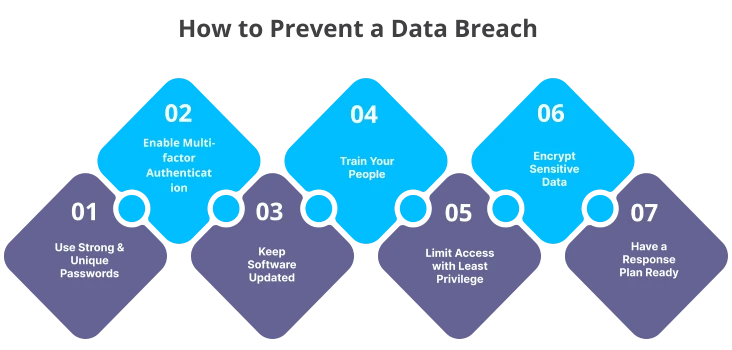
1. Use Strong, Unique Passwords: Admit it, 12345678 is not a real password, even a grade one kid gets it on the first try. Put some effort into setting stronger passwords, do not go with birthdates and anniversary dates. Hackers are advanced now, they connect the dots really well. Also, do not use the same password for all your accounts just because that’s the only strongest password you can remember.
2. Turn on Multi-factor Authentication: Set up multi-factor authentication, it acts as a second shield to your account, so that even the hacker somehow cracks the password he/she will still need one more authentication to get in.
3. Keep Software Updated: Turn on automatic updates wherever you can. Outdated software is what hackers love the most, because the latest security updates will not be reflected in it, and it’s easy to tamper with something that needs improvement.
4. Train Your People: Since most breaches involve a human, regular, practical security training on phishing and safe data handling is one of the highest-return moves you can make. Pair it with the right enterprise security tools so good habits are backed by good technology.
5. Limit Access with Least Privilege: Restrict access to your sensitive files, your whole company does not need to access everything, only allow them to use the data their job needs. At the end of the day, fewer open doors means less to steal.
6. Encrypt Sensitive Data and Secure Endpoints: Encrypt all your sensitive files, it makes the stolen data useless and also enables endpoint data loss prevention, which stops your sensitive files from leaving the devices.
7. Have a Response Plan Ready: Decide who does what before a breach, not during one. Have plan A, plan B, and even plan C if needed in action. Brains go blank when you undergo a breach, so having a tested planturns panic into process.
Most breaches start with people!
See risky data activity early with Time Champ.
Critical 72 Hours After a Data Breach (Things to do Immediately)
Ok, you failed to prevent the data breach and fell prey to a hacker, what now? Also, regulations like GDPR give you just 72 hours to report certain breaches, so speed and order matter. Let me tell you the action plan you need to follow in the first and critical 72 hours after a data breach.
| When | What to Do |
|---|---|
| Hour 0 to 1: Contain | Isolate affected systems, revoke compromised access, and stop the bleeding before anything else. |
| Hour 1 to 24: Assess | Find out what data, whose data, and how much. Preserve evidence and start a written log. |
| Hour 24 to 72: Notify | Tell regulators and affected people as required, in clear language, with steps they can take. |
| After 72 hours: Investigate | Find the root cause, fix the gap, and document lessons so it cannot happen the same way twice. |
Remember two rules make this a lot less painful. Decide these steps in advance, and never delete or hide evidence to look better. Regulators forgive breaches far more easily than cover-ups.
Catch the risky moment before it becomes a breach!
Time Champ gives you user-activity visibility and insider-risk alerts that help you spot trouble early.
Why Do So Many Data Breaches Start on the Inside?
Because people are the common thread here. Verizon's 2024 research found that 68% of breaches involved a human element, whether a mistaken click, a reused password, or an employee copying files before they quit. The scary breaches make the news, but the everyday ones start with ordinary people doing very ordinary things.
That is exactly why watching behavior matters as much as watching the file perimeter. Time Champ is employee monitoring software with a workforce intelligence and DLP layer for breach prevention, it covers the human side most tools miss. It provides user activity monitoring, flags unusual access to sensitive files, and keeps audit-ready records, so a risky pattern is caught early. If insider risk is your worry, our guide to insider threat programs goes a little deeper in the context.
Final Thoughts on Data Breaches
A data breach is simply sensitive data reaching someone who should never actually have it, and the causes almost always run through people: a weak password, a clever phishing email, a careless click. The impact, on individuals and companies alike, is real and lasting, but it is also largely preventable.
Final call on the remember list: Build the layers, train your people, and know your first 72 hours cold. Do that, and the next breach notice you read might be about someone else's company (not yours).

Shabana Shaik

Table of Content
 What is a Data Breach?
- What are the Common Causes of Data Breaches?
- What Kind of Data do Attackers Target?
- What is the Impact of a Data Breach?
- What are Some Recent Data Breach Examples?
- How to Prevent a Data Breach?
- Critical 72 Hours After a Data Breach (Things to do Immediately)
- Why Do So Many Data Breaches Start on the Inside?
- Final Thoughts on Data Breaches
Instant Signup
Thank you for your request!
We have received your signup request and our team will get back to you soon. In the meantime, you can book a demo to see Time Champ in action.
Book a DemoFree trial. No credit card required. Prefer a walkthrough? Book a demo.
Related Blogs
Identify cyber threats early with Indicators of Compromise (IOCs). Learn how IOCs help detect breaches and protect your business from potential attacks.
Sai Keerthi Uppala | Jan 20, 2025
Explore the different types of data loss and learn how they can impact your information. Understand the risks and protect your data effectively.
Thasleem Shaik | Jan 17, 2025
Learn how to create a BYOD security policy to protect company data, manage employee-owned devices, improve security, and reduce data theft.
Thasleem Shaik | May 11, 2026
Learn the top 10 insider threat indicators for 2026, including warning signs, suspicious activity, and detection best practices for modern teams today.
Anjali | May 08, 2026
Explore the real-world examples of Business Email Compromise (BEC) and discover practical prevention tips to protect your business from email fraud.
Shabana Shaik | Jan 23, 2025
Discover effective data loss prevention strategies to protect sensitive information, enhance security, and safeguard your business from data breaches.
Shabana Shaik | Jan 22, 2025


 4.7/5 avg.
Ready to Manage Your Workforce Smarter?
Join our family of 1500+ companies using smart insights to redefine workforces!

Free Trial
No Credit Card Required