Endpoint Data Loss Prevention: A Complete Guide
Learn what endpoint data loss prevention is, how it works, its key features, and how to protect sensitive data from unauthorized access.
Every laptop, desktop, and mobile device in your organization is a potential entry point for data leaks. Endpoint data loss prevention (endpoint DLP) helps you protect sensitive data at the device level by monitoring data activity, enforcing security policies, and preventing unauthorized transfers.
In this guide, you'll learn what endpoint DLP is, how it works, its key features, and how it strengthens your overall data protection strategy.
What Is Endpoint Data Loss Prevention?
Endpoint data loss prevention (endpoint DLP) is a cybersecurity solution that protects sensitive data on endpoint devices such as laptops, desktops, smartphones, and tablets. It monitors how data is accessed, copied, shared, or transferred and enforces security policies to prevent unauthorized actions, whether the device is connected to your corporate network or working offline.
Unlike network-based security, endpoint DLP protects data directly at the device level, helping you reduce the risk of accidental leaks, insider threats, and unauthorized data transfers.
- An endpoint is any device that connects to your organization's network, such as a laptop, desktop, smartphone, tablet, or server.
- Endpoint data includes the files, emails, customer records, and other sensitive information stored or accessed on these devices.

Did You Know?
According to the 2026 Verizon Data Breach Investigations Report, 31% of data breaches now start with software vulnerabilities, making them the most common entry point for attackers, ahead of stolen credentials.
Why Endpoints Are the Biggest Data Loss Risk
Every day, your employees access, edit, and share sensitive business data on laptops, desktops, and mobile devices. Since these endpoints are where data is actively used, they are also the most common targets for data leaks and cyberattacks.
Here are the primary reasons endpoints are the biggest source of data loss risks:
- Sensitive Data Stays on Endpoints: Employees frequently access and store business documents, customer records, financial data, and intellectual property on endpoint devices.
- Human Errors Happen Every Day: Accidental file sharing, copying data to USB drives, or uploading files to personal cloud storage can expose sensitive information.
- Remote and Hybrid Work Expands the Attack Surface: Devices used outside your corporate network are more vulnerable to unauthorized access and data theft.
- Cybercriminals Target Endpoints First: Malware, ransomware, phishing attacks, and compromised devices are common entry points for stealing sensitive data.
- Unauthorized Data Transfers Are Hard to Detect: Without endpoint DLP, activities like USB transfers, printing, screenshots, and file uploads can go unnoticed.
- A Single Compromised Endpoint Can Lead to a Major Breach: One unsecured device is often enough to expose sensitive data across your organization.
Don't wait for a data leak to reveal security gaps.
Use Time Champ to monitor endpoint activity, block unauthorized data transfers, and protect your organization's sensitive information.
How Does Endpoint Data Loss Prevention Work?
Endpoint data loss prevention works by continuously monitoring sensitive data on endpoint devices and applying security policies whenever risky actions occur. Instead of reacting after a data breach, it helps you identify, control, and prevent unauthorized data movement in real time.
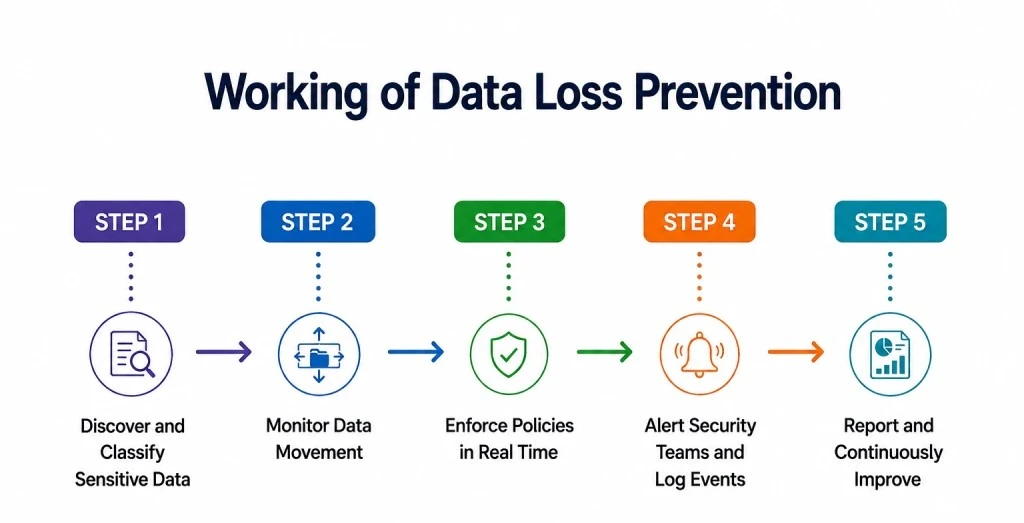
Step 1: Discover and Classify Sensitive Data
Endpoint DLP starts by identifying where your sensitive data exists. It scans files, folders, and applications on your endpoint devices to detect information such as customer records, financial data, intellectual property, and confidential documents. It then classifies the data based on its sensitivity so you can apply the right level of protection.
Step 2: Monitor Data Movement
Once your sensitive data is identified, endpoint DLP continuously monitors how it's accessed and shared. It tracks activities such as copying files to USB drives, uploading documents to cloud storage, sending email attachments, printing files, or taking screenshots to detect risky behavior.
Step 3: Enforce Policies in Real Time
If someone attempts an action that violates your security policies, endpoint DLP responds immediately. Based on your configured rules, it can block the action, request user justification, encrypt the data, or allow the transfer while logging the event.
Step 4: Alert Security Teams and Log Events
Whenever a policy violation or suspicious activity occurs, endpoint DLP records details such as the user, device, file, time, and action performed. It also sends real-time alerts to your security team, helping you investigate incidents quickly and support compliance requirements.
Step 5: Report and Continuously Improve
Endpoint DLP provides reports and dashboards that give you visibility into data movement, policy violations, and high-risk users or devices. These insights help you fine-tune your security policies, reduce false positives, and continuously strengthen your overall data protection strategy.
Did You Know?
IBM's 2025 Cost of a Data Breach Report found that the global average cost of a data breach is USD 4.4 million, highlighting how expensive security incidents can become without strong data protection measures.
What Are the Key Features of Effective Endpoint DLP Solutions?
Not all endpoint DLP solutions are the same. The best ones protect sensitive data across every endpoint, prevent unauthorized data transfers, reduce insider risks, and help you maintain compliance without interrupting your daily operations.
Here are the key features to look for:
USB and Removable Media Control
USB drives and external hard disks make it easy to transfer files, but they also increase the risk of data leaks. Endpoint DLP lets you control which removable devices can connect to your systems. You can block unauthorized USB devices, allow approved ones, or restrict the types of files that can be copied.
Worried about sensitive data leaving through USB drives?
Time Champ lets you control USB access and block unauthorized devices to keep your sensitive data secure.
Print, Screen Capture, and Clipboard Controls
Data doesn't always leave through file transfers. Employees can print confidential documents, take screenshots, or copy sensitive information using the clipboard. Endpoint DLP helps you control these actions by blocking or restricting them based on your security policies.
Offline Enforcement
Employees often work from home, while traveling, or in places without a secure network connection. A good endpoint DLP solution continues to protect sensitive data even when a device is offline, then automatically syncs policies and activity logs once it's back online.
Application Control
Some applications can become easy channels for data leaks. Endpoint DLP allows you to decide which applications can access sensitive data and blocks unauthorized apps or personal cloud storage services from transferring company information.
Data Classification and Content Inspection
Before protecting your data, you need to know what is sensitive. Endpoint DLP scans files and automatically identifies information such as customer records, financial details, or confidential business documents. It then applies the appropriate security policies based on the type of data.
Cross-Platform Support
Your employees may use Windows PCs, Macs, Linux systems, or mobile devices. An effective endpoint DLP solution provides consistent protection across all supported platforms, allowing you to manage security from a single dashboard.
User Behavior Analytics
Endpoint DLP doesn't just monitor files. It also analyzes how users interact with sensitive data. If someone suddenly downloads hundreds of files, repeatedly connects USB drives, or accesses confidential information at unusual hours, the system flags these activities so your security team can investigate before they become serious incidents.
Endpoint DLP vs Network DLP vs Endpoint Security
These three security solutions are often used together, but they serve different purposes. While endpoint DLP focuses on protecting sensitive data on individual devices, network DLP secures data as it moves across your network, and endpoint security protects devices from cyber threats like malware and ransomware.
Here's how they compare:
| Feature | Endpoint DLP | Network DLP | Endpoint Security |
|---|---|---|---|
| Primary focus | Protects sensitive data on endpoint devices | Protects data moving across the network | Protects endpoint devices from cyber threats |
| Where it works | Laptops, desktops, mobile devices, and tablets | Network gateways, email, and internet traffic | Endpoint devices such as laptops, desktops, and servers |
| Protects against | Data leaks, insider threats, and unauthorized data transfers | Data leaving the organization through network channels | Malware, ransomware, phishing, viruses, and unauthorized access |
| Monitors | File transfers, USB usage, printing, screenshots, clipboard activity, and cloud uploads | Emails, web traffic, file transfers, and network communications | Device health, applications, system activity, and security threats |
| Works offline | Yes | No | Yes |
| Best for | Preventing sensitive data from leaving endpoint devices | Monitoring and controlling data moving across your network | Securing endpoint devices from cyberattacks |
Why Is Endpoint DLP Important for Remote and Hybrid Work?
Remote and hybrid work have changed the way your employees access and share business data. Instead of working only from the office, they now use laptops, mobile devices, and home networks to stay productive. While this flexibility improves collaboration, it also increases the risk of data leaks and unauthorized access.
Here are the key reasons endpoint DLP has become essential for remote and hybrid workplaces:
Protects Devices Outside Your Corporate Network
Employees often work from home, client locations, or public places where traditional network security has limited visibility. Endpoint DLP protects sensitive data directly on the device, even when it isn't connected to your corporate network.
Reduces Risks from Personal and BYOD Devices
Many organizations allow employees to use personal laptops, smartphones, or tablets for work. Endpoint DLP helps you apply security policies to these devices, reducing the risk of sensitive business data being copied, shared, or stored in unauthorized locations.
Prevents Unauthorized Data Sharing
Working remotely makes it easier for employees to transfer files through personal email accounts, cloud storage services, USB drives, or messaging apps. Endpoint DLP helps you detect and block these unauthorized transfers before sensitive information leaves your organization.
Protects Against Insider Threats
Not every data breach comes from external attackers. Insider threats can occur when employees intentionally or accidentally expose sensitive information. Endpoint DLP helps you identify risky activities, such as downloading large amounts of confidential data, copying files to USB drives, or transferring information to unauthorized applications.
Supports Compliance Requirements
Many regulations require organizations to protect sensitive customer and business data regardless of where employees work. Endpoint DLP helps you enforce security policies, maintain audit logs, and demonstrate compliance with standards such as GDPR, HIPAA, and PCI DSS.
Maintains Consistent Security Everywhere
Your employees may switch between the office, home, and client sites throughout the week. Endpoint DLP applies the same security policies across all endpoint devices, helping you protect sensitive data no matter where work happens.
Strengthen Your Endpoint DLP with Time Champ
Protecting sensitive data requires more than simply detecting security risks. You need complete visibility into how data is accessed, shared, and transferred across every endpoint. Time Champ is built to do that exactly.
Time Champ is an employee monitoring and data loss prevention (DLP) software that helps you protect sensitive data while giving you complete visibility into employee activities across endpoint devices. From controlling USB access to monitoring file activity and restricting unauthorized applications, it helps you reduce data leaks without disrupting your daily operations.
USB Device Control
Manage how employees use removable storage devices across your organization. You can block unauthorized USB drives, allow approved devices, or restrict file transfers to prevent sensitive data from leaving your endpoints.
File Activity Monitoring
Get real-time visibility into file activities on endpoint devices. Time Champ records file creation, modification, deletion, and transfer events, helping you quickly identify suspicious behavior and investigate potential security incidents.
Website and Application Access Control
Reduce the risk of data leaks by restricting access to unauthorized websites and applications. You can block personal cloud storage platforms, file-sharing services, or other applications that could be used to transfer sensitive information.
Real-Time Alerts
Receive instant notifications whenever risky activities occur, such as unauthorized USB usage, unusual file transfers, or policy violations. This enables your security team to respond quickly before a minor incident becomes a major data breach.
Centralized Reports and Audit Trails
Access detailed reports that show user activities, security events, and policy violations across all endpoint devices. These audit logs simplify investigations, support compliance requirements, and help you continuously improve your data protection strategy.
Ready to strengthen your endpoint data protection?
Book a free demo and see how Time Champ helps you prevent data leaks and protect sensitive information with confidence.
Conclusion
One unnecessary click, file transfer, or USB connection can put sensitive data at risk. Endpoint DLP helps you prevent these risks before they turn into costly security incidents. If you're looking for a complete solution, Time Champ combines employee monitoring with powerful endpoint DLP capabilities to help you secure sensitive data, detect suspicious activities, and gain complete visibility across your organization.

Table of Content
 What Is Endpoint Data Loss Prevention?
- Why Endpoints Are the Biggest Data Loss Risk
- How Does Endpoint Data Loss Prevention Work?
- What Are the Key Features of Effective Endpoint DLP Solutions?
- Endpoint DLP vs Network DLP vs Endpoint Security
- Why Is Endpoint DLP Important for Remote and Hybrid Work?
- Strengthen Your Endpoint DLP with Time Champ
- Conclusion

Related Blogs
Protect sensitive business data in hybrid work environments with strong security controls and practical strategies to prevent data breaches.
Guna Lakshmi | Jun 10, 2026
Track time across multiple devices without missing a second and learn key features, common challenges, and smarter tracking methods.
Guna Lakshmi | May 22, 2026
Protect your business from insider risks with insider threat prevention best practices for monitoring, access control, employee security, and data protection.
Guna Lakshmi | May 08, 2026
Protect your business from BYOD security risks like data breaches and phishing. Learn practical ways to secure employee devices and reduce security threats.
Guna Lakshmi | May 07, 2026
Learn how to ensure data privacy in productivity tracking with key controls, vendor evaluation, and setup steps that reduce risk and protect employee data.
Guna Lakshmi | May 02, 2026
Learn how to balance screenshot monitoring and employee privacy with best practices that protect data, improve trust, and support compliance.
Guna Lakshmi | Apr 27, 2026


 4.7/5 avg.
Ready to Manage Your Workforce Smarter?
Join our family of 1500+ companies using smart insights to redefine workforces!

Free Trial
No Credit Card Required