Employee Screenshot Privacy: Best Practices for Monitoring
Learn how to balance screenshot monitoring and employee privacy with best practices that protect data, improve trust, and support compliance.
Screenshot monitoring is already common in many workplaces. In fact, 43% of employees say their employer monitors their online activity at work. This growing use of monitoring makes it even more important to implement it in a clear and privacy-focused way. When monitoring is not set up properly, it can create confusion and concerns among employees. Teams using screenshot monitoring frequency for the first time often over-collect; the better default is the minimum needed. For the broader picture across this topic, our enterprise employee monitoring guide brings the moving parts together.
Employee screenshot monitoring and privacy work together when you manage them properly. Problems usually happen when monitoring is applied without clear rules or protections, which can make it feel intrusive or unclear to employees. The good part is that protecting privacy does not require complex changes. A few simple practices can make monitoring fair, transparent, and respectful of employee data. Employees are more comfortable with monitoring when they clearly understand it.
In this article, you will learn six key privacy practices that make screenshot monitoring responsible and compliant. You will also understand which roles need extra protection, how to handle employee concerns, and what major compliance frameworks expect when it comes to privacy.
Why Screenshot Privacy Is Critical for Monitoring Success
Screenshot monitoring can create concern when your employees do not clearly understand how it works. When there is a lack of clarity, your employees may assume that everything on their screen is being tracked or misused. At the same time, you may not always have clear visibility into who can access the data or how long screenshots are stored. These issues are not caused by how it is configured and communicated before monitoring begins.
The real impact of poor privacy practices goes beyond legal risk. It directly affects how your employees work and respond to monitoring. When monitoring feels unclear or excessive, your team may disengage, avoid using certain tools, or become less productive. Your team is more likely to accept monitoring and continue working confidently when you handle privacy properly with clear communication and controls.
Managing screenshot privacy properly goes beyond compliance. It helps you build trust, encourage adoption, and improve overall team performance.

Did You Know?
Research by Forbes says 39% employees report that their employer monitoring their online activity hurts their relationship with their employer, and 43% say it negatively affects company morale.
6 Key Privacy Measures for Effective Screenshot Monitoring
To make screenshot monitoring both effective and privacy-friendly, you need to apply the right practices from the start. These practices help you limit unnecessary data exposure, control access, and align your monitoring practices with legal and compliance requirements.
The table below maps each privacy protection to the roles that need it, what it does, and the compliance frameworks it satisfies.
Let's employees see their own screenshots and activity data
| Practice | What It Means | Who Needs It | Why It Matters |
|---|---|---|---|
| Screenshot blur | Blurs sensitive information in screenshots while still showing that monitoring was active | Healthcare, legal, finance, and any role handling personal data | Protects sensitive data and avoids privacy risks |
| Role-based access controls | Limits who can view or manage screenshots | All roles, especially senior staff | Keeps data secure and restricts access to authorized people only |
| Employee self-access dashboard | Let's employees see their own screenshots and activity data | All roles, especially highly monitored teams | Improves transparency and reduces concerns |
| Monitoring scope limits | Captures screenshots only during work time and work tasks | All roles, especially BYOD users | Prevents personal recording or non-work activity |
| Defined retention period | Deletes screenshots after a set time instead of storing them forever | All roles | Reduces data risk and supports compliance |
| Disclosure before monitoring | Informs employees before monitoring starts | All roles | Builds trust and meets legal requirements |
Is your monitoring creating more confusion than clarity?
See how Time Champ turns that confusion into clear, usable insights.
Key Roles That Require Additional Privacy Controls in Screenshot Monitoring
Not every role carries the same level of privacy risk in screenshot monitoring. Some roles deal with highly sensitive or regulated data, which means they need stronger privacy controls. Identifying these roles early helps you apply the right settings and avoid unnecessary risks.
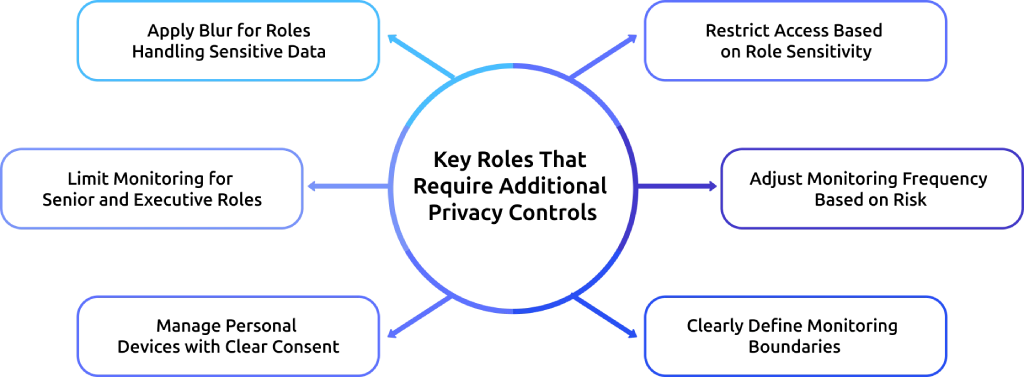
Apply Blur for Roles Handling Sensitive Data
Enable screenshot blur for roles like healthcare, legal, finance, and HR, where sensitive information is regularly visible on screen. This makes the content unreadable and protects your monitoring system from exposing sensitive data.
Limit Monitoring for Senior and Executive Roles
Reduce monitoring scope and frequency for senior leaders and executives who work with highly confidential information. Lower capture frequency, stricter access controls, and a clearly defined purpose help you maintain a balance between oversight and privacy.
Manage Personal Devices with Clear Consent
Take explicit written consent before enabling screenshot monitoring on personal devices. Since these devices contain personal data, limit monitoring to work-related activity and active work hours. This helps you reduce both legal and privacy risks.
Restrict Access Based on Role Sensitivity
Limit access to screenshots based on roles and responsibilities. Not everyone needs visibility into all monitoring data, especially when sensitive information is involved. This reduces the risk of misuse and keeps data secure.
Adjust Monitoring Frequency Based on Risk
Adjust screenshot frequency based on the role and level of risk involved. High-sensitivity roles may require tighter controls, while others may need less frequent monitoring. This helps you avoid over-monitoring and keeps your approach balanced.
Clearly Define Monitoring Boundaries
Clearly define when monitoring starts and stops, especially for remote or hybrid teams. Limit monitoring to work hours to protect privacy and reduce unnecessary data collection.
For more guidance on setting the right monitoring intervals, see Employee Screenshot Monitoring Frequency: Best Practices.
How to Handle Employee Privacy Concerns About Screenshots
Employee concerns around screenshot monitoring are common, and they usually come from a lack of clarity. When you address these concerns early and communicate clearly, monitoring becomes easier to accept and manage.

Address Concerns Before Monitoring Starts
Start by explaining how screenshot monitoring works before it is introduced. Share what will be captured, how often it will happen, who can access the data, how long it will be stored, and why it is needed. When employees understand this upfront, they are more likely to accept monitoring without hesitation. Early communication helps prevent confusion and reduces the chances of complaints later.
Allow Control During Personal Breaks
Give employees the option to pause screenshot capture during personal breaks. This creates a clear boundary between work and personal time and removes the fear that private activity will be recorded. Monitoring that respects these boundaries feels more balanced and reduces resistance.
Clearly Define Access and Visibility
Explain who can view screenshots and for what purpose. Without this clarity, employees may assume that their data is visible to everyone. Limiting access to specific roles and communicating this clearly helps reduce unnecessary concern. When employees know exactly who can see their data, trust improves.
Explain the Purpose of Monitoring
Clarify that screenshot monitoring is used to support work, not to watch employees constantly. When you position monitoring as a tool for productivity, support, and improvement, it feels less intrusive. How you communicate and use monitoring shapes how employees respond to it.
Share Visibility with Employees
Allow employees to view their own screenshots and activity data. This transparency removes uncertainty and helps them understand how monitoring works in practice. When employees can see their own data, it builds confidence and reduces mistrust.
Not sure if your monitoring is helping or hurting your team?
Get a clear view with Time Champ’s real-time insights, screenshots, and activity tracking.
How Time Champ Supports Screenshot Privacy
Effective screenshot monitoring depends on how well privacy is built into the system from the start. Time Champ is designed to help you monitor work activity while maintaining clear boundaries around employee data and access.
Time Champ is an employee monitoring tool with advanced workforce intelligence features that turn raw activity data into decisions, and it lets you configure screenshot blur at the company, team, or individual level. This protects sensitive on-screen information for roles handling regulated data, without affecting visibility into work activity. At the same time, employees can access their own screenshots, activity data, and productivity trends through a personal dashboard, which improves transparency and reduces uncertainty.
Role-based access controls limit who can view, download, or manage screenshots, keeping data restricted to authorized users only. Screenshot capture automatically pauses when the tracker is stopped, helping you maintain a clear separation between work sessions and personal time. You can also adjust screenshot frequency based on role, so monitoring stays proportionate and relevant.
Time Champ meets major compliance standards, including the General Data Protection Regulation, ISO 27001, HIPAA, and SOC 2 Type I. Limit monitoring to work activity during defined work hours, and use automated alerts to highlight productivity changes without requiring constant review.
For a deeper understanding of how to implement screenshot monitoring effectively in remote teams, explore our detailed guide on Visual Proof of Work for Remote Teams: A Complete Guide.
Conclusion
Employee screenshot privacy is a core part of effective monitoring. When you apply the right practices, like clear communication, limited access, defined boundaries, and proper data handling, monitoring becomes easier to accept and more effective in real work environments. When privacy is handled well, employees understand the purpose, trust the process, and continue working with confidence. When it is ignored, even the same monitoring setup can lead to confusion, resistance, and reduced productivity. When you get this right, screenshot monitoring becomes a reliable system that supports both performance and trust.

Guna Lakshmi


Table of Content
-
 Why Screenshot Privacy Is Critical for Monitoring Success
-
6 Key Privacy Measures for Effective Screenshot Monitoring
-
Key Roles That Require Additional Privacy Controls in Screenshot Monitoring
-
How to Handle Employee Privacy Concerns About Screenshots
-
How Time Champ Supports Screenshot Privacy
-
Conclusion
Instant Signup
Thank you for your request!
We have received your signup request and our team will get back to you soon. In the meantime, you can book a demo to see Time Champ in action.
Book a DemoFree trial. No credit card required. Prefer a walkthrough? Book a demo.
Related Blogs

Employee screen monitoring captures work activity in real time. Learn all monitoring types, how they boost productivity, and how to implement them ethically.
Jahnavi Pulluri | Apr 17, 2026
Learn how to address employee monitoring concerns with transparency, clear policies, and trust-building practices that improve engagement and reduce resistance.
Anjali | Apr 17, 2026
Learn how to choose the right remote employee monitoring software with the right features, scalability, and usability to manage remote teams effectively.
Guna Lakshmi | Apr 14, 2026
Background screening also known as pre- employment screening, is a comprehensive screening process that employers implement to filter the history of candidates.
Vijaya Lakshmi | February 14, 2024
Learn how to choose the right remote employee monitoring software with the right features, scalability, and usability to manage remote teams effectively.
Guna Lakshmi | Apr 14, 2026
Companies are watching remote workers more than ever. But is it ethical? We break down where monitoring is justified and where it crosses the line.
Guna Lakshmi | Apr 16, 2026


 4.7/5 avg.
Ready to Manage Your Workforce Smarter?
Join our family of 1500+ companies using smart insights to redefine workforces!

Free Trial
No Credit Card Required