How to Choose the Right Remote Employee Monitoring Software
Learn how to choose the right remote employee monitoring software with the right features, scalability, and usability to manage remote teams effectively.

Selecting the right remote employee monitoring software is a critical decision for any business managing distributed teams. With dozens of tools available, each offering different capabilities, it is easy to choose a solution that looks powerful but fails in real-world usage. For the broader picture across this topic, our enterprise employee monitoring guide brings the moving parts together.
But not every tool is built the same. Some are built for accountability. Others for security. Some focus on output, while others dig deep into desktop activity. Picking the wrong one can quietly damage the trust your team has in you.
This guide walks you through everything you need to make the right call, from understanding what these tools actually do to building a clear framework for choosing the one that fits your team's real needs.
What Is Remote Employee Monitoring Software?
At its core, employee remote monitoring software is a digital tool that helps you track how your remote workers spend their time during work hours. That might sound simple, but modern platforms do a lot more than just log hours. A right system lets you track application usage, capture screenshots at scheduled intervals, measure productive versus idle time, flag unusual behavior for security review, generate performance reports, and even integrate with payroll.
Think of it less as a surveillance camera and more as a performance dashboard, one that both you and your employees can benefit from equally. In fact, according to a 2024 Gartner study, 70% of businesses are now investing in technology tools specifically to make remote work smoother and measurable.
Key Features to Look for in Your Remote Monitoring Software
Not every feature will matter for your specific team. But there's a core set of capabilities that any serious remote work monitoring software should offer you.
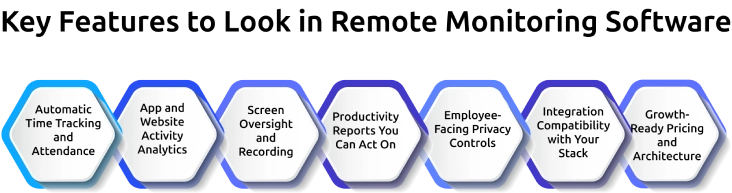
1. Automatic Time Tracking and Attendance
Time tracking is the foundation of any remote employee monitoring tool. If a platform cannot accurately record when your team is working and for how long, nothing else matters. Look for automatic time capture with one-click timers, offline sync for when connectivity drops, and manual edits for honest corrections. Avoid tools that rely on employees filling timesheets manually. That data is easy to manipulate and almost never accurate.
2. App and Website Activity Analytics
Activity tracking gives you context beyond raw hours. Knowing a team member spent three hours in a code editor tells you something useful. Knowing they were "active" for three hours tells you almost nothing. The best remote monitoring software classifies apps and websites as productive, non-productive, or neutral, and connects that data to actual work output so you see the full picture, not just the time online.
3. Screen Oversight and Recording
Screenshots and screen recordings serve a real purpose in roles that need output verification, but only when configured right. Look for adjustable screenshot frequency, blur modes for sensitive information, and employee-facing dashboards that let each person see their own logs. Transparency reduces resistance significantly. If a tool hides screenshots from employees or records constantly by default, walk away from it.
4. Productivity Reports You Can Act On
Productivity analytics turn raw activity data into decisions you can actually make. Good platforms automatically generate weekly and monthly reports that show who is performing well, who is struggling, and where workflows are stuck. Visual heatmaps, hour by hour timeline views, and team versus individual comparisons give managers a clear read at a glance. Anything less and you are drowning in raw numbers with no direction to take.
5. Employee-Facing Privacy Controls
Privacy controls are non-negotiable for any remote employee monitoring program. The software should let employees pause tracking during personal breaks, operate in a privacy mode for sensitive work, and review the data being collected about them. Role-based access controls, encrypted storage, and clear activation indicators protect both your team's trust and your legal defensibility across jurisdictions.
6. Integration Compatibility with Your Stack
Integration compatibility matters more than most buyers realize at first. If your monitoring tool cannot connect to your project management software, HR system, and payroll processor, you will create more manual work than you started with. Pre-built integrations with Slack, Jira, Google Workspace, Zoom, and the common payroll platforms are worth more than raw API access. Pre-built means the vendor maintains the connection, not your internal team.
7. Growth-Ready Pricing and Architecture
Think about growth from day one. A tool that works beautifully for a 20-person remote team often becomes clunky and expensive at 200. Check the pricing model carefully and calculate your total cost at your current team size, then at 2x and 5x that size. Tools that look cheap upfront frequently trigger tier changes that add 20 to 40 percent as your team scales. Verify the true long-term cost before you sign.
How to Choose the Right Remote Employee Monitoring Tool: 7-Step Guide
This is where most guides get confused. Let's be specific about what you actually need to do.
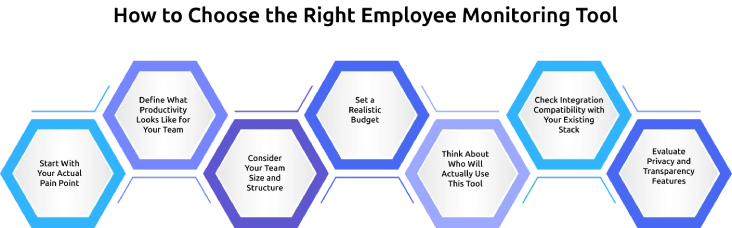
Step 1: Start With Your Actual Pain Point
Don't choose remote employee software based on a feature list. Choose it based on the specific problem you're trying to solve right now. Are you struggling to understand why your projects keep missing deadlines? You need productivity analytics and task tracking. Are you worried about data security and insider risk? You should know that 71% of organizations say they are concerned about insider security threats. If security is your primary concern, you need behavior monitoring with an anomaly detection feature.
Step 2: Define What Productivity Looks Like for Your Team
Before you can measure productivity, you need to define what productivity means for your specific team. That sounds obvious, but it's the step most managers skip entirely. For your customer support team, productivity might mean tickets resolved per hour. For your software developers, it might mean pull requests reviewed and code committed. For your content team, it might mean drafts completed or client approvals received. The right tool lets you build metrics around your team's actual work.
Gartner research found that employees who have schedule control and clear performance expectations are 20% more productive than those who don't.
Step 3: Consider Your Team Size and Structure
If you're managing a small team of under 25 people, you'll usually do well with lightweight, intuitive tools that are fast to deploy and easy to explain. You don't need enterprise-grade dashboards for a 10-person startup. If you're managing a larger distributed team, you need something stronger, deeper analytics, role-based access controls, and multi-time zone support.
Step 4: Set a Realistic Budget
Pricing models vary widely across the market. Most platforms charge per user per month, with costs typically ranging from $3 to $25 per employee, depending on the features you need. Before you commit, calculate your total cost at your current team size and then again at double that size. Some platforms look affordable upfront, but get expensive quickly as you scale.
Step 5: Think About Who Will Actually Use This Tool
Your monitoring platform will be used by your managers, your HR team, and in many cases, your employees themselves. Each group has different needs from the same platform. Your managers need clean dashboards that surface the most important information without requiring a data science background to interpret. Your HR team needs exportable reports and compliance documentation. Your employees need transparency, access to their own data, the ability to flag inaccuracies, and clear communication about what you're tracking and why.
Step 6: Check Integration Compatibility with Your Existing Stack
The best work-from-home monitoring software does not exist in isolation. It connects to the tools your team already uses every day. Before you finalize any platform, run through your existing tech stack, such as a project management tool, HR software, and payroll system.
Step 7: Evaluate Privacy and Transparency Features
Look for platforms that offer employee-facing dashboards, the ability to pause monitoring during breaks, clear notifications when monitoring is active, and configurable privacy modes for sensitive work. Your employees will be significantly more comfortable with monitoring when they can see exactly what data is being collected about them and why.
Struggling to choose the right remote employee monitoring software for your team?
Try Time Champ to monitor productivity with clear insights and complete visibility.
Common Mistakes to Avoid When Choosing Monitoring Software
Choosing remote employee monitoring software is less about finding the tool with the most features and more about avoiding the buying mistakes that turn a good purchase into an expensive one. What are the most common mistakes buyers make, and how do you avoid them?
1. Buying on Feature Count Instead of Feature Fit
A platform with 60 features you will never use is not stronger than one with 20 features that map to your actual workflow. Go back to your pain point from Step 1 of the buying guide above, and score tools against that, not against the longest checklist on the vendor's site.
2. Ignoring What Your Employees Will Actually See
If the tool has no employee-facing dashboard, no way to pause monitoring during breaks, and no clear indicator that monitoring is active, your team will resist it, even if the data is perfect. The best remote monitoring tools give employees access to their own activity reports. Transparency is the single biggest predictor of whether monitoring will stick.
3. Skipping the Free Trial, or Running it Wrong
Most platforms offer a 14-day trial with full feature access. Buyers often install it, poke around for an hour, and make a decision. A meaningful trial means deploying the tool to 3-5 real team members for 10-14 working days and reviewing the reports it produces against what you already know about those team members. If the reports do not match reality, the tool is wrong for your team, no matter what the sales demo looked like.
4. Under-Estimating the Price at Scale
A $5-per-user tool for 20 people costs $1,200 a year. The same tool for 200 people costs $12,000 a year, often with a tier change that adds another 20–40% on top. Before signing, calculate your cost at current team size, 2× team size, and 5× team size. Tools that look cheap at 20 seats frequently become the most expensive at 200.
5. Forgetting about the Integration Effort
A monitoring tool that does not connect to your project management, HR, and payroll tools creates more manual work than it saves. Before you commit, check for pre-built integrations, not just API access. Pre-built integrations mean the vendor maintains them; API access means your team does.
6. Over-Specifying for Team Size
Enterprise-grade dashboards, role-based access for 15 user types, and advanced compliance reporting all sound useful until you realize a 12-person startup does not need any of it. Match the tool tier to your real team size today, not to the size you imagine reaching in five years.
7. Prioritizing Monitoring Depth over Productivity Insight
Keystroke logging, every-30-second screenshots, and constant video recording will give you the most data and the most employee pushback. The tools that actually improve performance focus on output, activity patterns, and early disengagement signals, not exhaustive behavioral tracking.
8. Skipping the Regional Legal Check Before You Buy
Employee monitoring laws vary by state and country. Tools that are fully compliant in one jurisdiction may require additional consent workflows, data-retention limits, or feature restrictions in another. If your team spans multiple regions, confirm the tool's compliance posture for every location before you sign.
Avoiding these eight mistakes is usually more valuable than any single feature on a comparison chart. Most failed monitoring deployments trace back to one of the items above, not to a missing capability in the software itself.
Legal and Ethical Considerations You Need to Know
Monitoring your remote employees is legal in most jurisdictions, but the specifics vary, and getting this wrong can be costly for you and your business. You always need to be aware of monitoring laws before implementing any system. In the United States, you generally have broad rights to monitor your employees using company equipment during work hours. However, transparency requirements vary by state. In Europe, GDPR sets strict rules around the employee data you collect, how you obtain consent, and how long you retain that data.
A few practical rules you should follow almost universally:
- Always disclose your monitoring before you deploy it. Your employees should know what you're tracking, how that data is stored, who can access it, and how long you're keeping it.
- Never monitor personal devices without explicit written consent from your employees. Even if they occasionally use personal equipment for work, that equipment is off-limits for your monitoring unless your policy specifically addresses it and they've agreed in writing.
- Avoid keystroke logging and video recording unless you have a specific, documented business reason. These features are widely considered invasive and are restricted or prohibited in several jurisdictions where your employees may be located.
How Time Champ Compares to Other Remote Monitoring Tools
Time Champ is an employee monitoring software that pairs activity tracking with workforce intelligence analytics, giving you one system for time, productivity, attendance, GPS, data loss prevention, and attrition risk. Most remote monitoring tools cover one or two of those layers. Time Champ covers all of them, which is the difference that matters when your team sits across offices, homes, and job sites at the same time.
Where most remote monitoring tools stop, and where Time Champ keeps going
Time-tracking-first tools give you timesheets but no productivity insight. Activity-monitoring tools show app and website usage but leave billing, field work, DLP, and attrition signals to other vendors. Point solutions for each layer mean three more subscriptions, three more logins, and three more sets of reports nobody reconciles. Time Champ is built as a single product across every layer, with time data connecting directly to productivity, billing, attendance, field operations, and security.
Feature comparison criteria to score any remote monitoring tool against:
| Capability | What to Demand | Time Champ |
|---|---|---|
| Time tracking | Automatic capture, offline sync, billable classification | One-click timers, offline sync, task-level billable tagging |
| Activity and productivity | Category-based usage, productivity scoring, and idle detection | Built-in classification engine, visual heatmaps, timeline view |
| Screen oversight | Configurable screenshots, blur, live view, stealth mode | Office TV live-view, anomaly-triggered recordings, encrypted storage |
| GPS and field operations | Geofencing, geo-verified clock-ins, and visit management | Native, not an add-on module |
| Attendance and scheduling | Auto-capture, timezone support, flexible shift compliance | WFH, WFO, and field coverage in one dashboard |
| Billing and invoicing | Billable rates, budget alerts, timesheet-to-invoice | One-click billable tagging, budget vs actuals reports |
| Data loss prevention | USB blocking, file monitoring, upload/download alerts | Real-time USB monitoring, violation logs, compliance reports |
| Attrition prediction | Behaviour-based risk scoring | Unified attrition risk index with configurable signals |
| Privacy and trust | Role-based access, employee dashboards, blur, encryption | All four, plus non-intrusive design principles |
Worried about balancing employee privacy with productivity monitoring?
Time Champ helps you track work transparently while maintaining trust and control.
Conclusion
After all the research, demos, and feature comparisons you've done, the question comes down to this: Does this tool actually fit the way your team works? Don’t worry! Start with a free trial. Most major platforms offer 14-day trials with full feature access. Use that time to test your real daily workflow. Your main goal is to understand how work is happening, and to use that understanding to remove obstacles, recognize great performance, and build a remote environment where your people can do their best work without anyone guessing in the dark.

Guna Lakshmi


Table of Content
-
 What Is Remote Employee Monitoring Software?
-
Key Features to Look for in Your Remote Monitoring Software
-
How to Choose the Right Remote Employee Monitoring Tool: 7-Step Guide
-
Common Mistakes to Avoid When Choosing Monitoring Software
-
Legal and Ethical Considerations You Need to Know
-
How Time Champ Compares to Other Remote Monitoring Tools
-
Conclusion
Related Blogs
Discover the top 11 software solutions designed to track and monitor remote employee productivity effectively. Find the right tool for your team today!
Mounika Sai | 17 November 2023
Productivity Tracking Software helps remote teams stay on top, track progress, streamline workflows & boost efficiency effortlessly. Learn more!
Shabana Shaik | 15 March 2025
earn how to detect employee monitoring software, identify the key signs on your computer, and understand what to do if your activity is being monitored.
Anjali | 13 April 2026
Boost your team's efficiency with our top 10 productivity monitoring software picks. Find the perfect tools to track progress and enhance productivity.
Mounika Sai | 29 August 2023
Avoid common remote team management mistakes that hurt productivity. Learn how to handle communication, collaboration, and efficiency challenges effectively.
Jahnavi Pulluri | 15 March 2025
Discover how to monitor remote employees effectively, boost productivity, and address challenges while respecting privacy.
Tarun Kumar Reddy | 09 August 2024


 4.7/5 avg.
Ready to Manage Your Workforce Smarter?
Join our family of 1500+ companies using smart insights to redefine workforces!

Free Trial
No Credit Card Required