How to Detect Employee Monitoring Software in 2026
Learn how to detect employee monitoring software, identify the key signs on your computer, and understand what to do if your activity is being monitored.

Have you ever had the feeling that someone might be watching what you do on your work device? In fact, employee monitoring has become increasingly common, with many organizations using software to track productivity, app usage, website activity, and more. A survey by ExpressVPN shows that 74% of U.S. employers use online tracking tools, which is nearly 3 in 4 companies actively monitoring their employees' activity. That’s exactly why understanding how employee monitoring works and how to spot it matters. Treating employee monitoring software cost as a project, not just an install, produces noticeably better adoption.
This blog will help you understand how to detect employee monitoring software, warning signs to look for, and the practical steps you can take if you suspect your work device is being monitored. You’ll also know why companies use monitoring tools, best practices for ethical implementation, and how transparent solutions can create a better balance between productivity and privacy.
What Is Employee Monitoring Software?
Employee monitoring software is a tool installed on the organization devices to track, record, and analyze employee activities during work hours. It captures websites visited, applications used, internet usage, and keystrokes to ensure security, compliance, and efficiency of the project.
The main purpose of employee monitoring software is to help organizations improve productivity, manage remote and hybrid teams, protect sensitive company data, and maintain accountability across workflows. It helps to identify bottlenecks, enhance resource planning, and clearly understand the work patterns more effectively.
The importance of employee monitoring has significantly grown as workplaces have become more digital and distributed. Businesses need reliable ways to ensure work continuity, operational efficiency, and data security, with employees working across offices, homes, and multiple devices. At the same time, when the software is implemented transparently and ethically, it can support performance without damaging employee trust.

Did You Know?
A Forbes Advisor survey found that 43% of employees said their online activity was being monitored at work. This explains why many employees actively search for ways to detect monitoring tools on their work devices.
What are the Different Ways to Detect Employee Monitoring Software?
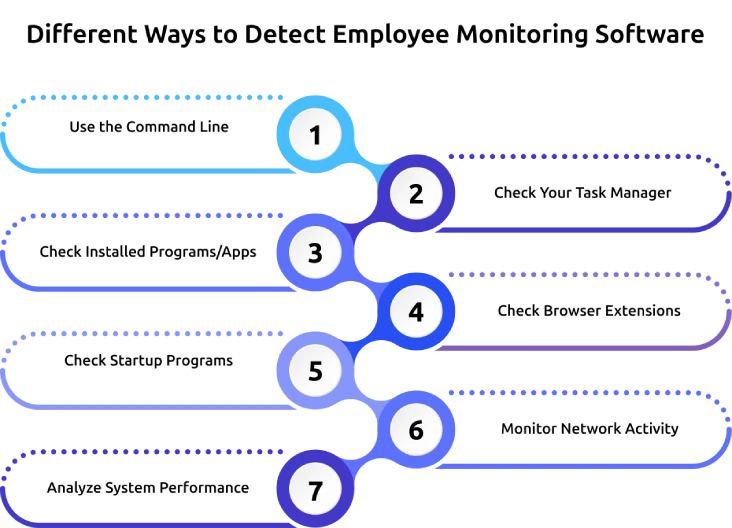
Employee monitoring software often runs quietly in the background, which makes it difficult to notice at first. However, a few simple ways can help you identify unusual activity, unknown tools, or hidden programs that might track your work system.
- Use the Command Line
At first, use the command line to gain a deeper understanding of the processes running on your system, including background tasks that you might not even notice. It gives you a more detailed view of what is active behind the scenes.
For Windows, you can use the tasklist command. On Mac or Linux, ps aux is commonly used. These commands display active processes, allowing you to review software names and identify anything unusual or unfamiliar that might connect with the monitoring activity.
2. Check Your Task Manager
The easiest way to spot employee monitoring software is to check the programs currently running on your computer. On Windows, you can open the Task Manager, and on Mac, you can use Activity Monitor to view active apps and background processes.
See the list carefully and watch for unfamiliar program names, unusual background services, or tools consuming more CPU, memory, or disk usage than expected. While not every unknown process is suspicious, repeated unfamiliar entries might be worth investigating further.
3. Check Installed Programs/Apps
Another simple way to detect monitoring software is to review the list of programs installed on your computer. Many employee monitoring tools might appear installed in your system, even if they run quietly in the background.
Review the installed software list and look for tools you do not recognize, especially those related to tracking, time logging, screen capture, security management, or remote access. If anything seems unfamiliar, checking the software publisher or searching the name can help you to understand its purpose.
4. Check Browser Extensions
Some monitoring tools do not depend only on the desktop applications and may also work through browser extensions. These extensions can track browsing activity, website usage, search behavior, and time spent online.
Open your browser’s extension settings and review any add-ons that are installed. If you notice extensions you did not add yourself or tools with permissions related to tracking, they need a proper examination. Pay close attention to extensions that can read website data, manage tabs, or access browsing activity.
5. Check Startup Programs
Many monitoring applications are designed to launch automatically whenever the computer starts, so they can begin tracking activity without requiring manual opening. That is why checking your startup programs can show software running automatically in the background.
Check the list of startup programs and look for unfamiliar apps or services that load as soon as the system turns on. Programs with generic names or unclear functions may require a closer look, especially if you do not remember installing them.
6. Monitor Network Activity
Employee monitoring tools also send the activity data, screenshots, logs, or usage information to a company server or cloud dashboard. Because of this, unusual network activity can sometimes indicate that monitoring software is active on the device.
You can use built-in tools or trusted network monitoring tools to check which applications are using the internet in the background. If you notice any unknown processes consistently sending or receiving data even when you are not actively working, that might be a sign of tracking or reporting software.
7. Analyze System Performance
Sometimes, the clearest sign of monitoring software is not only the software itself, but the impact it shows on your system. If your computer suddenly feels slower than usual, takes longer to start, or shows unexpected lag during normal work, background monitoring tools might also be one of the reasons.
Observe the unusual behavior, such as frequent freezing, increased fan noise, delayed response times, or high resource usage without a clear reason. While these issues can happen for many reasons, they may also point to hidden software operating continuously in the background.
Unsure if your work activity is being monitored?
See exactly what Time Champ tracks - and what it doesn't.
What Should You Do If You Suspect Monitoring?
Noticing unusual activity on your work device can raise different questions and uncertainty. Before directly coming to conclusions, it’s important to take the right steps to clearly understand what is happening, protect your privacy, and manage the situation effectively.
Understand the Company Monitoring Policies
Start by checking your company’s monitoring or IT usage policy. Many organizations already mention what they track, such as websites visited, app usage, login hours, or screen activity. When you understand these rules, you can know whether the activity on your device matches what your employer has already shared. This gives you more clarity before making any assumptions.
Use Detection Tools
If you still notice anything unusual, check your system more closely. Open your task manager, review installed apps, browser extensions, and startup programs, or use simple command line tools to spot anything unfamiliar. These checks can help you find out the hidden tools or unusual software running in the background. When you notice several warning signs together, you’ll have a better reason to look deeper.
Safeguard Your Privacy
If you suspect monitoring, keep your personal and work activities separate. Avoid logging into personal email, banking apps, private social media accounts, or storing personal files on your work device. Use your own phone or personal laptop for anything private whenever possible. This simple habit can protect your information and reduce unnecessary risk.
Communicate Your Concerns with HR
If you still feel unsure, talk to your HR or IT team directly. Ask clear and professional questions about the tools installed on your system and what they actually monitor. A transparent conversation can clear confusion and help you better understand your workplace policies. It can also give you peace of mind and help you handle the situation more confidently.
What are the Best Practices to Implement Monitoring Software?
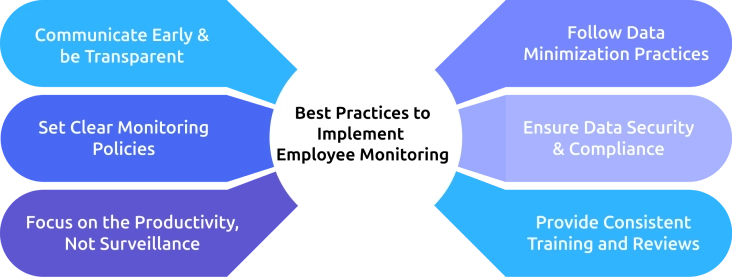
Using employee monitoring software effectively is not just about tracking work, but also about how you introduce and manage it. When you follow the right practices, you can improve productivity, protect privacy, and build more trust within your team.
Communicate Early & be Transparent
Talk to your employees before you start using any employee monitoring software. Tell them what you plan to monitor, why you’re doing it, and how the data will support business goals. When you communicate openly about what you track, you can build trust and reduce unnecessary confusion.
Set Clear Monitoring Policies
Create clear policies that explain what you monitor, such as app usage, websites, work hours, or employee productivity tracking. When you define these boundaries clearly, you avoid misunderstandings and set the right expectations from day one. Strong policies can also help you apply employee monitoring in a fair and consistent way.
Focus on the Productivity, Not Surveillance
Use monitoring tools to improve workflows, not just to control every move of your employees. When you focus on employee productivity tracking, you can identify work patterns, remove bottlenecks, and support better time management. This approach helps you create a healthier work environment where monitoring feels useful without any stress.
Follow Data Minimization Practices
Only collect the data you truly need to improve performance, security, or accountability. You don’t need to track everything to make employee monitoring software effective. When you collect only the data you truly need without tracking everything, it can help to respect employee privacy. This keeps your employee monitoring software more balanced and responsible.
Ensure Data Security & Compliance
Once you collect monitoring data, you need to protect it properly. Use secure systems, restrict access to sensitive information, and make sure your employee monitoring practices follow legal and company requirements. If you fail to protect employee data, you can quickly lose trust and create unnecessary risk. Strong security shows your team that you take both performance and privacy seriously.
Provide Consistent Training and Reviews
Train your employees regularly so that everyone understands how the monitoring system works. Review your employee monitoring practices frequently to ensure they still align with your goals and workplace culture. Regular reviews help you keep your employee monitoring software effective, fair, and aligned with your team’s needs.
Why Do Companies Use Employee Monitoring Software?
Organizations use employee monitoring software to gain better visibility into work, improve efficiency, and support teams more effectively. When used correctly, it helps businesses make smarter decisions while keeping work processes clear and organized.
Enhance Productivity
Organizations use employee monitoring software to understand how employees spend their work time. It helps you identify distractions, reduce time waste, and improve overall employee productivity tracking. This allows teams to stay focused and work more efficiently.
Manage Remote and Hybrid Teams Better
When teams work from different locations, it becomes difficult to track the progress and stay aligned. Employee monitoring helps to stay connected and understand how work is moving across the teams.
Protect Sensitive Data and Reduce Security Risks
Organizations use monitoring tools to keep an eye on how employees manage the company data. It helps them detect unusual activity, prevent data leaks, and reduce internal security risks. This becomes especially important when employees access sensitive information regularly.
Track Performance and Work Patterns
Employee monitoring software helps organizations analyze work patterns and measure performance more clearly. It allows managers to identify areas where employees may need more support, training, or direction. This helps teams improve their performance and work more effectively.
Improve Time and Resource Management
Through tracking how time and resources are used, organizations can plan work more effectively. Employee monitoring helps identify where time gets wasted and where resources need adjustment. This leads to better workload distribution and smoother operations.
How Time Champ Makes Monitoring Transparent and Ethical?
If you’re worried about hidden tracking or unclear monitoring, transparency is what makes the biggest difference. Time Champ makes employee monitoring software easier to understand by clearly showing what gets tracked, including work hours, app and website usage, attendance, idle time, and productivity patterns. This gives you better clarity and reduces the uncertainty that frequently comes with workplace monitoring.
Time Champ focuses on helping organizations improve performance with clear, work-related insights rather than making monitoring feel excessive or unclear. It gives teams better visibility into how work happens, where time goes, and what needs improvement. When employee monitoring stays open, relevant, and easy to understand, it creates a more balanced experience for both employees and employers.
Feeling unsure about how monitoring works at your workplace?
Use Time Champ and see your own work activity data the same way your manager does.
Conclusion
As employee monitoring becomes more common, knowing how to detect it can help you stay informed and prepared. Knowing the warning signs, understanding company policies, and protecting your personal privacy can help you respond with more confidence. Keeping your personal activity separate from work is also an important step in protecting your privacy. The better you understand it, the easier it becomes to handle the situation without confusion or stress.

Anjali


Table of Content
-
 What Is Employee Monitoring Software?
-
What are the Different Ways to Detect Employee Monitoring Software?
-
What Should You Do If You Suspect Monitoring?
-
What are the Best Practices to Implement Monitoring Software?
-
Why Do Companies Use Employee Monitoring Software?
-
How Time Champ Makes Monitoring Transparent and Ethical?
-
Conclusion
Related Blogs
Find the best employee monitoring tools for 2026. Compare features, pricing, pros & cons to manage workforce performance and improve productivity.
Thasleem Shaik | Apr 02, 2026
Explore the best remote employee management software systems for productivity, collaboration, and performance tracking.
Jahnavi Pulluri | Mar 12, 2025
Get insights for workforce tracking: Meaning, importance, methods, how to implement it, benefits, challenges, and FAQs to support better team productivity.
Thasleem Shaik | September 25, 2025
Desktop monitoring software is a technological approach that organizations use to record and study the activities, as well as the output of persons who are working with computers provided by the organization.
Mounika Sai | Aug 24, 2023
Discover the best ways to introduce productivity monitoring in your organization smoothly and effectively.
Thasleem Shaik | Mar 18, 2025
Maximize productivity with comprehensive PC Activity Monitoring. Track, analyze, and optimize work habits for peak efficiency and performance.
Mounika Sai | Jan 09, 2024


 4.7/5 avg.
Ready to Manage Your Workforce Smarter?
Join our family of 1500+ companies using smart insights to redefine workforces!

Free Trial
No Credit Card Required