Employee Screen Monitoring: How It Boosts Team Productivity
Employee screen monitoring captures work activity in real time. Learn all monitoring types, how they boost productivity, and how to implement them ethically.

Imagine your 40-person team is fully remote, spread across three time zones. Everyone is logging hours, meetings are happening, and on paper, everything looks fine. Distributed teams that get remote worker productivity metrics right tend to outperform colocated teams on output measures. The detail here sits inside a wider conversation covered in our enterprise employee monitoring guide.
Yet, projects keep slipping, and no one can clearly explain why.
That’s where employee screen monitoring can make a difference. Instead of depending only on assumptions, it shows how work actually happens day to day, what tools people use, how time is spent, and where things slow down.
In this blog, I’ll break down the different types of employee screen monitoring, how it can improve productivity, the best tools available, and what you need to know about legal and ethical use. Whether you’re trying it for the first time or refining your current approach, this will give you a clear, practical overview.
What Is Employee Screen Monitoring and How Does It Work?
Employee screen monitoring is the practice of capturing and analyzing what appears on an employee's computer screen during work hours. It records visual data (screenshots, video), application usage, website visits, and active-versus-idle time to give managers objective visibility into how work gets done.
The goal isn’t to monitor people, but to gain visibility, understanding how time is spent, which tools are used, and where inefficiencies arise, so teams can work more efficiently.
Real-Time Screen Viewing vs. Scheduled Screenshot Capture
Employee screen monitoring generally works in two main ways. Real-time viewing allows you to see an employee’s screen as work happens. This approach is often used in BPOs and customer support environments, where immediate feedback and quality checks are important.
The second method is scheduled screenshot capture, which takes snapshots at set intervals, such as every 5, 10, or 15 minutes, and saves them for later review. This is better suited for knowledge workers, agencies, and remote teams, where constant live monitoring can feel unnecessary and intrusive.
Today, most organizations prefer scheduled screenshots over live viewing. The reason is simple, periodic snapshots provide enough insight to understand work patterns without creating the pressure of being watched in real time.
The Three-Step Process Behind Screen Monitoring Software
An employee installs the monitoring agent, and the agent runs in the background and captures screenshots, logs application usage, and measures active time. That data flows to a cloud dashboard where you can review productivity reports, flag anomalies, and identify coaching opportunities. The three steps are: capture, analyze, act.
What Types of Employee Screen Monitoring Exist?
Employee screen monitoring isn’t just one feature, it includes several types, each tracking different kinds of data for different needs. The right choice depends on what you want to understand and how detailed you need the insights to be.
| Monitoring Type | What It Captures | Best For | Privacy Level |
|---|---|---|---|
| Periodic screenshots | Screen images at set intervals (5 to 15 min) | Remote teams, agencies, general productivity | Moderate |
| Continuous screenrecording | Full video of screen activity, playable on demand | BPOs, call centers, compliance-heavy industries | Low (most intrusive) |
| Application andwebsite analytics | Time spent per app, website category, productive vs. non-productive | Knowledge workers, hybrid teams | High (least intrusive) |
| Idle detection andactive time | Mouse/keyboard activity, idle periods, break time | All team types, attendance verification | High |
| AI behavior analytics | Anomaly detection, predictive burnout scoring, risk alerts | Enterprise, security-focused organizations | Moderate to High |
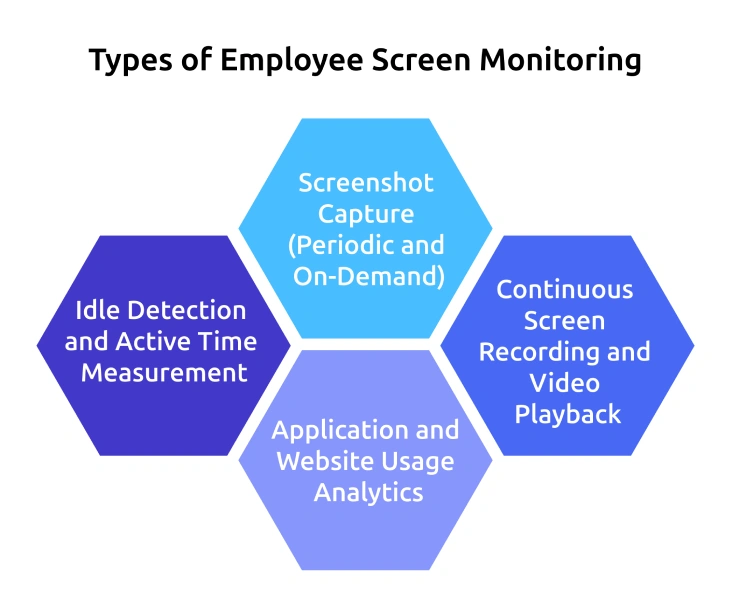
Screenshot Capture (Periodic and On-Demand)
This is the most common type of screen monitoring. The software takes screenshots at regular intervals, and sometimes on request. It gives a visual record of work without tracking every second, making it a balanced option for most teams.
Continuous Screen Recording and Video Playback
This method records everything on the screen as a video. It provides the most detail and is often used in industries that require strict compliance or quality checks, like finance or healthcare. The downside is higher storage use and greater privacy concerns.
Application and Website Usage Analytics
This tracks which apps and websites employees use during work hours. Instead of showing screens, it shows how time is spent across tools. It helps you understand productivity without viewing actual content.
Idle Detection and Active Time Measurement
This tracks whether an employee is actively working or away from their device. It separates active time from idle time, giving a clearer picture of real work. This is especially useful for hourly billing.
AI-Powered Behavior Analytics and Anomaly Detection
This is the most advanced type & it uses AI to find unusual work patterns and send alerts. For example, if someone’s activity suddenly drops, the system flags it. This helps you act early instead of reacting later.
And if you're wondering which tool brings all of this together, Time Champ has you covered. It combines these features into a single platform, making it easier to track, understand, and improve team productivity from one dashboard.
Want to See How Time Champ Works in Action?
Start your 7-day free trial today.
How Does Employee Screen Monitoring Actually Increase Productivity?
This is the question most blogs tend to skip. While many claim that employee screen monitoring improves productivity, few explain how it actually works.
Productivity doesn’t improve simply because employees feel watched. It improves because you gain three things you usually lack - visibility, pattern recognition, and data-driven intervention.
1. Visibility Into Time Allocation and Work Patterns
Employee screen monitoring gives you a clear view of how time is spent across projects, tools, and tasks. Without it, you might assume a developer is coding for eight hours straight. In reality, that time could be split between coding, meetings, messaging apps, and idle periods. This gap between assumption and reality is where productivity leaks occur. Monitoring helps close that gap by replacing guesswork with actual data.
2. Pattern Recognition: Identifying Bottlenecks Early
The second benefit is pattern recognition.
Monitoring data often reveals inefficiencies that are hard to find in meetings or timesheets. For example, you may notice that team members spend significant time switching between tools, suggesting workflow fragmentation. Or that idle time consistently increases on certain days, pointing to meeting overload or burnout risk.
These aren’t assumptions, they are clear behavioral patterns that help you fix system-level issues instead of focusing on individual performance.
3. Data-Driven Intervention and Workflow Optimization
The third mechanism is action. Once you understand how time is used and identify patterns, you can make targeted improvements, redistribute workloads, reduce unnecessary tool usage, adjust meeting schedules, or address skill gaps.
For example, you find out that designers were spending nearly two hours a day on administrative tasks like emails and internal requests. After introducing a monitoring tool, designers were able to focus more on core work. As a result, billable utilization increased from 58% to 74% within one quarter.
The Accountability Effect: How Awareness Drives Focus
Cambridge highlights that employees tend to become more productive when they know they are being observed, even in situations where the only change is increased attention and measurement, rather than improvements in working conditions or pay.
This isn’t about pressure, it’s about awareness. When monitoring is transparent, employees tend to reduce distractions and stay more focused on meaningful tasks.
How Can Screen Monitoring Support Remote and Hybrid Teams?
Employee screen monitoring becomes especially useful when teams are distributed. You can’t walk over to desks or observe work as it happens. Monitoring helps bridge that visibility gap without depending on constant video calls or frequent check-ins that can interrupt focused work.
Monitoring Across Time Zones Without Micromanaging
When your team is spread across different time zones, employee screen monitoring gives you asynchronous visibility. You can review activity summaries and screenshots from a developer working in Manila while you’re in New York, without needing to schedule a live call. This helps you understand how work is progressing, how time is being used, and when people are actually active, without asking for constant manual updates.
Instead of repeated check-ins, you can rely on structured data such as:
- Daily activity summaries instead of sync meetings
- Automated alerts that notify you of unusually long idle periods instead of manual checking
- Weekly productivity reports to use during one-on-one conversations
- Focus on project outcomes rather than minute-by-minute activity tracking
This approach helps you reduce unnecessary meetings while still staying aligned with your team.
Building Trust Through Transparent Monitoring
Your team is more likely to accept screen monitoring when it’s transparent, when they understand what is being tracked, why it’s being tracked, and who has access to the data.
In some organizations, employees can even access their own dashboards, helping them understand their own work patterns. In these setups, monitoring shifts from “watching employees” to creating a shared view of how work actually gets done.
What Are the Best Employee Screen Monitoring Software Options in 2026?
Choosing the right employee screen monitoring software depends on your team size, level of monitoring required, and budget. Different tools focus on different strengths.
Here is a comparison of some of the most widely used employee screen monitoring tools in 2026, based on their features and positioning in the market.
Feature and Pricing Comparison Table
| Tool | Screen Monitoring Features | Starting Price | Best For |
|---|---|---|---|
| Time Champ | screen monitoring, screenshots, app/website analytics, idle detection, AI insights, video playback, real-time alerts | $3.9/user/month (annual) | Employee screen monitoring, remote workforce tracking, productivity analysis, and performance management |
| Teramind | live view & historical playback, work time analysis, keystroke logging | $13.69/user/month | Security-focused enterprises |
| Hubstaff | screenshots, activity tracking, and optional screen recording | $4.99/seat/month | Field teams and remote contractors |
| Insightful | screenshots, app usage, productivity analytics | $6.40/seat/month | Mid-to-large team workforce analytics |
| Time Doctor | screenshots, app/website tracking, activity levels | $6.67/user/month | Remote teams focused on time accountability |
| Controlio | screen recording, keystrokes, detailed monitoring | $6.67/user/month | Real-time desktop monitoring |
| DeskTime | app/URL tracking, activity monitoring, light productivity tracking | $1.97/user/month | Small teams needing simple tracking |
Note: Prices reflect annual billing. Monthly billing is typically 15 to 25% higher. Check vendor websites for the most current pricing.
How Time Champ Compares on Screen Monitoring
Time Champ stands out as a powerful all-in-one employee monitoring software, bringing together every essential capability businesses need, including time tracking, app and website usage monitoring, idle time tracking, real-time screen monitoring, automated screenshots, AI-powered productivity insights, and instant alerts. It eliminates the need for multiple tools by combining everything into one system, giving you complete visibility and control over workforce activity in real time.
It is one of the most cost-effective employee monitoring solutions in the market compared to its competitors, offering a lower starting price while still delivering a rich set of advanced features. Time Champ makes it far more accessible for startups, small teams, and growing organizations. With its wide range of features, it delivers strong value by combining affordability with powerful employee monitoring capabilities in a single platform.
How You Can Implement Employee Screen Monitoring Ethically?
Employee screen monitoring delivers the strongest results when employees understand and accept the system. It should be used in an open and honest way, not secretly. When monitoring is transparent, employees are more likely to accept it and, instead of trying to avoid or trick the system by using fake activity or anti-tracking tools.
Transparent Monitoring vs. Covert Surveillance
| Factor | Transparent Monitoring | Covert Surveillance |
|---|---|---|
| Employee awareness | Employees know they are monitored and understand the scope | Employees are not informed that monitoring is active |
| Legal compliance | Meets GDPR, state notice laws, and most regulatory frameworks | Violates GDPR and multiple US state laws |
| Employee trust | Builds accountability without eroding trust | Destroys trust immediately when discovered |
| Productivity impact | 72% of employees accept monitoring when transparent | 49% of remote workers fake activity to avoid covert tracking |
| Recommended use | All organizations, all team sizes | Not recommended for any organization |
Using Screen Monitoring Data to Prevent Burnout
One of the most valuable and least discussed applications of employee screen monitoring is burnout prevention. Monitoring data reveals when employees consistently work beyond safe hour thresholds, when active time exceeds 9 to 10 hours per day, or when weekend activity becomes a regular pattern.
Time Champ can absolutely do this by providing detailed work-hour patterns and actionable insights into overworking. It helps you quickly identify employee productivity trends and take action without manually reviewing hours and progress for long periods.
It also includes a work-life balance feature that highlights the percentage of overutilized days, underutilized days, productivity levels, and efficiency metrics, helping organizations maintain a healthier and more balanced workforce.
Step-by-Step Implementation Checklist
Phase 1: Pre-Rollout
- Define the monitoring scope by specifying which types of data will be collected, which devices will be monitored, and during what time periods monitoring will take place.
- Create a formal written monitoring policy that clearly outlines the scope, purpose, data retention rules, and access permissions.
- Share the policy with all employees at least two weeks prior to implementation to make sure adequate notice.
- Obtain written acknowledgment from each employee confirming they have read and understood the policy.
Phase 2: Launch
- Install the monitoring agent on company devices through the IT team.
- Conduct a two-week pilot program with a group to identify and resolve any usability issues.
- Present the findings to the organization before proceeding with a full-scale rollout.
Phase 3: Optimization
- Review monitoring reports on a weekly basis during the first month.
- Refine and adjust the monitoring scope based on employee feedback.
- Conduct quarterly anonymous surveys to assess employee acceptance and levels of trust.
Ready to Implement Screen Monitoring the Right Way?
Track productivity, detect burnout, and maintain compliance with Time Champ.
Conclusion
Employee screen monitoring in 2026 is no longer just a screenshot tool. It is a category that contains different monitoring types, each serving different business needs. The organizations that get the strongest results are not the ones that monitor the most, they are the ones that monitor transparently, use the data to fix structural problems, and treat monitoring as a management tool rather than surveillance software.

Jahnavi Pulluri


Table of Content
-
 What Is Employee Screen Monitoring and How Does It Work?
-
What Types of Employee Screen Monitoring Exist?
-
How Does Employee Screen Monitoring Actually Increase Productivity?
-
How Can Screen Monitoring Support Remote and Hybrid Teams?
-
What Are the Best Employee Screen Monitoring Software Options in 2026?
-
How You Can Implement Employee Screen Monitoring Ethically?
-
Conclusion
Related Blogs
Elevate remote work with cutting-edge screen monitoring software. Boost productivity, ensure security, and foster collaboration seamlessly.
Mounika Sai | Jan 07, 2024
Network Traffic Monitoring is the basis of security, performance, and also bandwidth management. Use tools and strategies to improve network transparency.
Hima Bindhu Nara | Jan 29, 2024
Discover how to create an effective employee monitoring policy with our comprehensive guide. Enhance productivity while respecting privacy. Learn best practices today!
Jahnavi Pulluri | Jul 31, 2024
Explore the top 10 remote desktop monitoring software to enhance your team's productivity. Find the perfect tool with detailed features, pricing, and ratings.
Tarun Kumar Reddy | Aug 09, 2024
Explore key types and strategies for employee performance monitoring to boost productivity and align team goals with company success.
Jahnavi Pulluri | Jan 21, 2025
Break the productivity barriers using PC monitoring software. Boost efficiency and address work challenges with effective monitoring solutions.
Mounika Sai | Aug 10, 2023


 4.7/5 avg.
Ready to Manage Your Workforce Smarter?
Join our family of 1500+ companies using smart insights to redefine workforces!

Free Trial
No Credit Card Required