Time Tracking: The Complete Guide for Modern Teams
Learn what time tracking is, why it matters in 2026, the best methods, and how to implement it without team pushback. A practical guide for modern teams.

Time is one of the most valuable resources in any business, yet it’s also one of the hardest to manage. In 2026, remote work, flexible schedules, and distributed teams have become the norm, making productivity gaps and workload imbalances harder to find.
That’s where time tracking can help. When implemented correctly, it helps you improve productivity, optimize workloads, and plan projects more accurately without creating a culture of micromanagement.
What is Time Tracking?
Time tracking is the process of recording how time is spent on work, who is spending it, and which projects or tasks it is connected to. It can be manual, where employees enter hours themselves, or automated, where software tracks activity in the background. The goal is to understand how work gets done, not to just watch employees.
Why Time Tracking Matters in 2026
Honestly, time tracking isn't a new idea. Businesses have been doing some version of it for decades. What's changed is the environment it operates in. Three things in particular have pushed it up the priority list:
1. Hybrid Work Is Now Standard
When everyone worked in the same office, there was a natural sense of what was happening. You could see who was focused and when someone was overloaded.
That visibility is mostly gone after adopting hybrid work. With teams spread across locations and time zones, it’s harder to see how work is really distributed. Workload imbalances build quietly and often surface only when deadlines slip, or burnout starts to show.
2. Profitability Matters More Than Ever
If you run an agency, consultancy, or service-based business, inaccurate time tracking can directly affect your margins. Missed billable hours, poor workload planning, and underreported work can quietly reduce profitability over time.
3. AI Changed How Productivity Is Measured
As AI tools become part of everyday workflows, the old question, “How many hours did you work?” matters less. What matters more is how work gets done, where time actually goes, and how efficiently projects move. You need more than a simple clock-in, clock-out view, you need context.
This shift is also reflected in the market. According to Grand View Research, the worldwide time tracking software market was estimated at roughly USD 6.13 billion in 2025 and is anticipated to expand to around USD 17.39 billion by 2033, reflecting a compound annual growth rate (CAGR) of 14.2% between 2026 and 2033.
Popular Time Tracking Methods and How to Use Them
There's no single right answer here. What works for a 10-person agency won't work for a 500-person manufacturing operation. Here's a quick breakdown of what's out there:
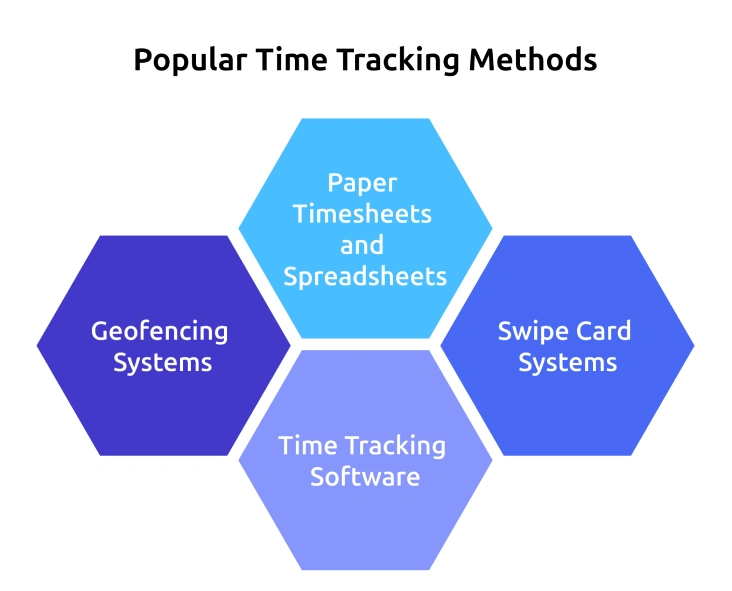
1. Paper Timesheets and Spreadsheets
This is the most traditional way to track time. Employees manually enter their work hours, breaks, and tasks into paper sheets or spreadsheets.
Best for: Small teams with simple workflows.
Limitations: Depends heavily on consistency. Entries get forgotten, hours get rounded, and data quality varies based on how carefully it’s maintained.
2. Swipe Card Systems
Employees clock in and out using ID cards or keycards. These systems are commonly used in offices, factories, and retail environments.
Best for: Workplaces with fixed schedules and physical attendance.
Limitations: Tracks attendance, not actual productivity or task progress. It shows presence, not productivity or output.
3. Time Tracking Software
Modern time tracking software automates hour tracking, links them to tasks or projects, and generates reports through desktop apps, mobile apps, or web platforms.
Best for: Remote, hybrid, and project-based teams.
Limitations: Adoption depends on trust. If it feels like surveillance, usage drops quickly, rollout approach matters as much as the tool itself.
4. Geofencing Systems
Geofencing uses GPS technology to track when employees arrive at or leave a work location.
Best for: Field teams, delivery services, and remote job sites.
Limitations: Can raise privacy concerns if location tracking policies are unclear.
No single method works for every business. The right solution depends on how your team works, the level of visibility you need, and how much automation you want in your workflow.
If you want a deeper understanding of different time tracking methods and how they work, you can refer to our detailed blog on time tracking methods.
What are the Main Types of Time Tracking?
Time tracking types refer to the different ways businesses collect and manage employee time data. Each type is designed for different work environments, team structures, and operational needs.
Some businesses rely on manual tracking methods, while others use automated software. Below are the main types of time tracking businesses use today:
| Type | Best for | What to Watch for |
|---|---|---|
| Manual entry (paper, spreadsheets) | Small teams and simple workflows | Missing entries, calculation errors, and inconsistent tracking |
| Punch card or swipe systems | Factories, retail, and on-site shifts | Tracks attendance, not actual work output |
| Online time tracking software | Remote and hybrid teams | Choose a tool that matches your reporting and workflow needs |
| Automated desktop tracking | Agencies, developers, and knowledge work | Set clear privacy expectations before rollout |
| GPS and geofencing | Field teams, drivers, and on-site services | Battery drain and location accuracy issues |
| AI-driven activity tracking | Teams using multiple tools and AI workflows | Make sure AI-assisted work is tracked fairly and transparently |
Understand Where Your Team’s Time Is Really Going!
Track work automatically, reduce manual logging, and get clear insights into productivity
What Does It Cost When You Don’t Track Time Properly?
Poor time tracking creates problems that often go unnoticed until they start affecting revenue, productivity, and team performance.
Here’s what businesses commonly lose without proper time visibility:
- Under-billed clients and missed billable hours
- Payroll inaccuracies and manual reporting errors
- Delayed projects and unnoticed scope creep
- Uneven workload distribution across teams
- Hidden overtime that leads to employee burnout
- Poor capacity planning and slower hiring decisions
- Reduced profitability due to untracked work
These issues often surface as missed deadlines or shrinking margins, but by then they’ve usually been building quietly for months. That’s what makes them hard to fix, the damage is already embedded long before anyone notices it.
What are the Real Benefits of Time Tracking Beyond Productivity?
When people hear “time tracking,” they think productivity metrics, and that’s part of it, but the real value often sits in the benefits that don’t get talked about as much.
Different teams benefit in different ways:
For Employees
- Better workload visibility and fairer task distribution
- Clear records of overtime and extra work
- Less confusion around priorities and expectations
- More transparency in performance discussions
For Managers
- Better visibility into project progress and team capacity
- Early warning signs when deadlines or workloads start slipping
- More realistic planning and resource allocation
- Less time spent chasing updates manually
For Finance and Operations
- More accurate billing and payroll processing
- Clearer records for audits, invoicing, and compliance
- Better visibility into project costs and resource usage
- Reduced manual reporting work
For Leadership Teams
- Better understanding of team performance and operational efficiency
- Visibility into profitable and unprofitable projects
- Insights into hiring needs and resource gaps
- Better long-term planning based on actual workload data
The biggest benefit is clarity, instead of depending on assumptions, you can make decisions based on real workload and time data.
Manual Vs Automated Time Tracking: Which Fits Your Team?
Manual time tracking gives your team more direct control over how hours are logged, but it depends heavily on consistency and accurate reporting. Automated time tracking reduces manual effort by capturing work activity in the background, making tracking more accurate and reliable.
| Dimension | Manual tracking | Automated tracking |
|---|---|---|
| Accuracy | Depends on employee memory and consistency | More accurate since tracking happens automatically |
| Employee effort | Higher, employees log hours manually | Lower, tracking runs in the background |
| Best for | Small teams and simple workflows | Teams that prefer detailed insights & accurate results |
| Common challenge | Missed or delayed entries | Privacy concerns if policies are unclear |
| Reporting depth | Basic reporting with limited insights | Detailed reporting with project and activity data |
| Setup time | Quick to start | Requires onboarding and setup |
As you can see, manual time tracking takes more effort and still may not provide completely accurate results. Automated time tracking simplifies the process by tracking work automatically, generating detailed reports, supporting client projects, and helping teams work efficiently across multiple locations and workflows.
Key Features to Look for in Time Tracking Software
The basic expectation for any time tracking tool in 2026 is automatic tracking, anything that still relies entirely on manual entry is already behind. Beyond that, what really matters is how much context and clarity the system can provide.
- Automatic time tracking
- Project and task tracking
- Reporting and analytics
- Payroll and invoicing integrations
- GPS or geofencing support
- Productivity insights
- Role-based access controls
The right tool will reduce manual work while giving your team clear and accurate visibility into how time is spent.
If you want a detailed breakdown of these features, you can explore our complete guide to time tracking software features.
How Do You Roll Out Time Tracking Without Losing the Team?
This is where most implementations go wrong, not the tool choice, but the rollout. If your employees hear “we’re implementing time tracking” and immediately think surveillance, you’ve already lost half the battle.
Here are a few ways to make the rollout smoother:
- Explain The Purpose Clearly: Focus on better planning, fair workloads, and improved visibility, not surveillance.
- Set Privacy Expectations Early: Be transparent about what is tracked, who can access the data, and how it will be used.
- Start With Smaller Teams First: Test workflows, gather feedback, and fix issues before a company-wide rollout.
- Have Managers Lead by Example: Adoption improves when leadership actively uses the system too.
- Share Insights with the Team: Show how time data helps improve planning, workloads, and project management.
When your employees understand the value behind time tracking, adoption becomes much easier.
Why Time Champ is the Best Time Tracking Software
Time Champ is a time tracking and employee monitoring tool that combines productivity analytics and workforce insights. It goes beyond hours to show how work flows across teams and projects.
With growing demand for remote, hybrid, and distributed work visibility, Time Champ is designed to give businesses real-time clarity on productivity, workload distribution, and project performance, without adding extra manual effort for employees.
Here’s why it stands out as a time tracking solution:
Automated Time Tracking: Captures work hours in real time, reducing the need for manual timesheets and minimizing errors
Workforce Intelligence Layer: Connects time data with productivity insights to help you understand not just when work happens, but how it happens
Project & Task Visibility: Tracks time across projects and tasks to improve planning, budgeting, and accountability
Productivity & Activity Insights: Shows how time is spent across apps, websites, and workflows to identify efficiency patterns
Idle & Break Tracking: Automatically tracks and separates idle time and break time to ensure accurate working-hour data.
Unified Reporting System: Turns raw time data into structured reports for payroll, billing, and performance analysis
Timesheet Automation & Approval Flow: Reduces manual effort with automated timesheets and simple manager approvals for accuracy
Role-Based Access Control: Makes sure that only selected roles can see the data relevant to their responsibilities
Audit-Ready Time Logs: Maintains detailed historical records that support compliance, payroll verification, and internal audits
Customizable Dashboards: Allows teams to view the most relevant productivity, project, or workforce metrics in one place
Seamless Integrations: Connects with commonly used project management, payroll, and business tools to keep workflows unified
Make Every Hour of Your Team’s Work Count with Time Champ!
Track time, improve productivity, and make better decisions with real-time workforce insights.
Final Thoughts
Time tracking is about understanding where time goes and using it more effectively, not watching people. If it is implemented correctly, it improves planning, balances workloads, and gives leadership clear visibility into capacity. The success depends on choosing the right tool, setting clear expectations, and sharing insights with the team early. That’s what makes it sustainable beyond the first few weeks.

Jahnavi Pulluri

Table of Content
 What is Time Tracking?
- Why Time Tracking Matters in 2026
- Popular Time Tracking Methods and How to Use Them
- What are the Main Types of Time Tracking?
- What Does It Cost When You Don’t Track Time Properly?
- What are the Real Benefits of Time Tracking Beyond Productivity?
- Manual Vs Automated Time Tracking: Which Fits Your Team?
- Key Features to Look for in Time Tracking Software
- How Do You Roll Out Time Tracking Without Losing the Team?
- Why Time Champ is the Best Time Tracking Software
- Final Thoughts

Related Blogs
Understand whether employee monitoring a Boon or Bane for Modern Workplaces. Discover how it impacts productivity, privacy, and the overall work environment.
Jahnavi Pulluri | Aug 06, 2024
Learn the pros and cons of employee monitoring and discover when monitoring improves productivity and when it creates workplace risks.
Guna Lakshmi | May 06, 2026
Choose the right employee monitoring tool for your team with this 2026 guide. Explore types, key features, a 5-step framework, and top software options.
Jahnavi Pulluri | Apr 13, 2026
Get answers to the most asked questions about employee monitoring laws, including legal considerations and privacy rights for compliant workplace monitoring.
Thasleem Shaik | Aug 17, 2024
Explore 5 core principles of employee monitoring, emerging AI ethics in 2026, and a practical playbook to balance employee productivity, privacy, and trust.
Anjali | May 07, 2026
Learn how employee monitoring improves workplace safety by spotting risky work patterns early and building accountability through visibility.
Thasleem Shaik | May 08, 2026


 4.7/5 avg.
Ready to Manage Your Workforce Smarter?
Join our family of 1500+ companies using smart insights to redefine workforces!

Free Trial
No Credit Card Required