A Complete Guide to Employee Time Tracking Solutions
Compare employee time tracking solutions, key features, benefits, and selection tips to choose the right system for accurate time tracking with confidence.

Keeping track of work hours sounds simple until you try to choose the right tool. With so many employee time tracking solutions available, it is easy to end up with software that does not match your workflow, creates extra work, or leaves you paying for features you never use.
When your time tracking system does not fit your team, you lose visibility into work, struggle with payroll and project tracking, and spend more time fixing records than moving work forward.
The right employee time tracking solution helps you record work hours accurately, simplify daily operations, and gain clear insights into how your team works. This guide explains the different types of employee time tracking solutions, the features that matter most, how to compare your options, and the key factors to consider before you choose the best solution for your business.
What Are Employee Time Tracking Solutions?
Employee time tracking solutions are digital tools that record, organize, and report your team's work hours across projects, tasks, shifts, and daily activities. They replace paper timesheets, spreadsheets, and manual time entries with automated time tracking, giving you a clear view of where work hours go and helping you manage payroll, project progress, attendance, and productivity from one place.
What Are the Main Types of Employee Time Tracking Solutions?
Not every employee time tracking solution works the same way. Some focus on tracking work hours automatically, while others help you manage attendance, projects, or field operations. Understanding these categories makes it easier to compare options and choose a solution that supports the way your team works.
1. By Deployment Model
- Cloud-Based Employee Time Tracking Solutions: These solutions run online and let your team access them through a web browser or mobile app without installing software on local servers. They offer quick setup, automatic updates, real-time data syncing, and easy scalability.
- On-Premise Time Tracking Solutions: You install these solutions on your own servers, which gives you full control over data storage and system management. You need dedicated IT resources and regular maintenance to run them effectively, but they allow you to maintain stronger control over security and compliance.
- Hybrid Employee Time Tracking Software Solutions: These solutions combine on-premises systems with cloud features. They keep sensitive data on internal servers while using cloud tools for reporting, mobile access, and analytics, offering a balance of control and flexibility.
2. By Use Case
- Automated Employee Time Tracking Software: Automatically records work hours in the background without needing manual timers or daily entries. It tracks activity across apps, websites, and projects, helping reduce manual effort while keeping timesheets accurate.
- Manual Timesheet Solutions: Let employees log their work hours manually at the end of the day or week. It’s simple to use but depends on consistent and accurate entries.
- Time and Attendance Solutions: Focuses on tracking clock-ins, clock-outs, attendance, shifts, overtime, and leave. Often supports biometric devices, kiosks, or badge-based check-ins.
- Mobile Employee Time Tracking Solutions: Allow teams to track work hours using smartphones or tablets. Features like GPS tracking, geofencing, and offline mode make it ideal for teams working outside the office.
- Enterprise Employee Time Tracking Solutions: Built for large teams, offering advanced security, role-based access, custom workflows, and integrations. It supports centralized workforce management and detailed reporting.
3. By Pricing Model
- Free Employee Time Tracking Solution: Offers basic time tracking features at no cost, but usually comes with limits on users, reports, or integrations.
- Freemium and Paid Solutions: Provide basic features for free, with advanced tools like automation and reporting available in paid plans.
- Enterprise Pricing: Custom pricing for large businesses, including advanced features, support, and tailored solutions.
Take a quick look at the Time Champ pricing page if you want to explore the available plans and features.
Need complete visibility into your team's work?
Choose Time Champ for smarter time tracking.
Which Features Actually Matter in an Employee Time Tracking Solution?
Every employee time tracking solution promises to help you track work hours, but not every feature adds real value. The right employee time tracking software should simplify your daily work, reduce manual effort, and give you reliable data that supports better decisions. Here are the features you should prioritize before choosing a time tracking software solution.
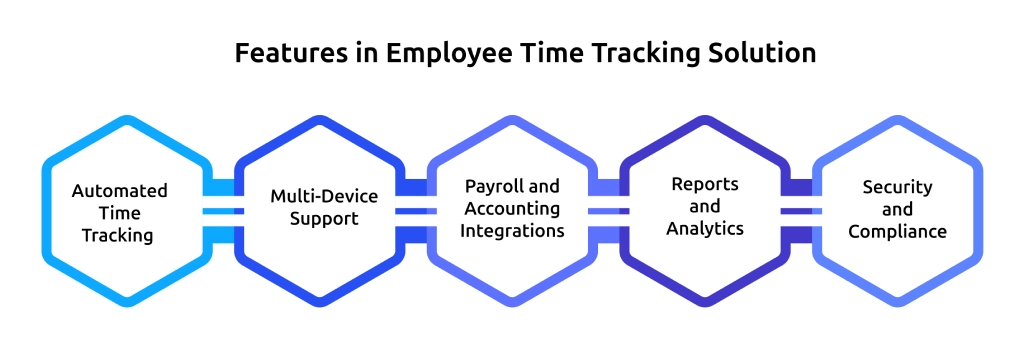
1. Automated Time Tracking
Manual time entries often lead to missed hours and inaccurate timesheets. Automated time tracking records work activity in the background across apps, websites, and devices, giving you accurate work hour data without asking your team to start or stop timers throughout the day.
2. Multi-Device Support
Your team may work from desktops, laptops, tablets, or mobile phones depending on the day. A good employee time tracking software solution should keep data synchronized across every device so everyone can track time without interruption, regardless of where they work.
3. Payroll and Accounting Integrations
Your time tracking software should connect directly with payroll and accounting platforms. Automatic data syncing removes manual data entry, speeds up payroll processing, and helps you avoid costly calculation errors.
4. Reports and Analytics
Clear reports help you turn time data into useful insights. Look for a time tracker software that provides customizable reports, team dashboards, productivity trends, attendance summaries, and export options so you can review performance without sorting through spreadsheets.
5. Security and Compliance
Your work hour data contains sensitive business information, so choosing software with strong security is essential. Choose employee time tracking software solutions that provide role-based access, data encryption, audit logs, and compliance with privacy regulations such as GDPR and CCPA.
Pro Tip
If you want to learn more about time tracking software features, check our guide to understand how they can simplify work hour management and improve overall productivity.
How Do You Choose the Right Employee Time Tracking Solution?
Choosing the right employee time tracking solution is not about selecting the software with the longest feature list. It is about finding a solution that fits the way your team works today and continues to support your business as it grows. Following a clear evaluation process helps you compare employee time tracking software solutions with confidence and avoid costly mistakes later.
Step 1. Define Your Primary Goal
Start by identifying the main problem you want to solve. You may want to simplify payroll, improve project tracking, monitor work hours, manage attendance, or gain better visibility into daily work. Once you know your priorities, you can narrow your options and focus on a time tracking solution that addresses your specific needs.
Step 2. Match the Solution to Your Work Environment
Think about how your team works every day. Remote teams often need cloud access and automated tracking, while field teams benefit from GPS tracking and mobile access. Office-based teams may prioritize attendance tracking, and hybrid teams need a solution that works consistently across every location.
Step 3. Set a Budget That Supports Future Growth
A free plan may work for a small team today, but your requirements can change as your business expands. Compare pricing, included features, upgrade options, and long-term value instead of looking only at the monthly subscription cost. Choosing the right employee time tracking software solution now can help you avoid switching tools later.
Step 4. Check Your Existing Software Stack
Your employee time tracking software should work well with the tools you already use. Check whether it integrates with your payroll, HR, accounting, project management, and communication platforms. Smooth integrations reduce manual work and help you keep accurate records across every system.
Step 5. Test the Software Before Making a Decision
Always use the free trial or demo before committing to any employee time tracking solution. Invite a small group from your team to test the software during everyday work. Evaluate how easy it is to use, how accurate the reports are, and whether it fits naturally into your existing workflow before making your final decision.

Did You Know
According to Market Research Future, the time tracking software market reached approximately USD 3.38 billion in 2024. Analysts project it will grow from USD 3.938 billion in 2025 to USD 18.17 billion by 2035, registering a compound annual growth rate (CAGR) of 16.52% during the forecast period from 2025 to 2035.
What Mistakes Should You Avoid When Choosing a Time Tracking Solution?
Selecting the right time tracking software is a significant investment in your team's productivity. However, many businesses fall into common traps that lead to low adoption rates or wasted budgets. Avoiding these mistakes ensures you choose a tool that actually helps your team rather than slowing them down.
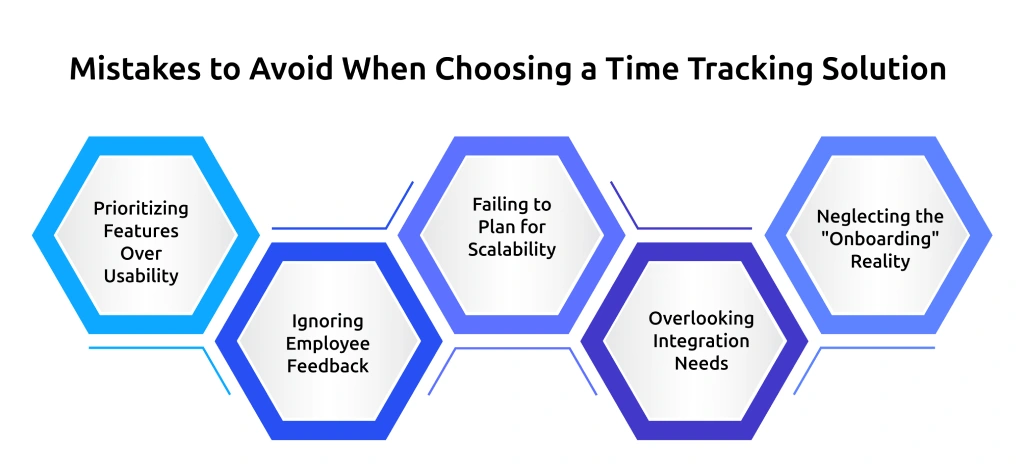
1. Prioritizing Features Over Usability
More features do not always mean better software. If the tool is confusing or difficult to use, your team may avoid using it. A tool with ten essential features that everyone uses is far more valuable than one with fifty complex features that no one touches. Always prioritize an intuitive interface over a massive feature set.
2. Ignoring Employee Feedback
Your team uses the software every day, so their feedback matters. If you ignore their opinions, adoption becomes more difficult. Include a few team members in the trial to make sure the solution meets their needs.
3. Failing to Plan for Scalability
A solution that works perfectly for a team of five might crash or become prohibitively expensive once you reach fifty. Don’t just look at your current headcount, evaluate how the software handles growth. Consider how easy it is to add seats, manage new departments, and integrate more complex reporting as your business scales.
4. Overlooking Integration Needs
If the tracking software doesn’t "talk" to your payroll, accounting, or project management platforms, you’ll end up spending more time manually moving data between systems. Before finalizing your choice, ensure it bridges the gaps in your current tech stack.
5. Neglecting the "Onboarding" Reality
Great software can fail if the setup is too complex. If your team spends weeks learning the software, productivity suffers from the start. Look for solutions that offer clear documentation, simple implementation, and responsive support. A simple onboarding process makes adoption faster and easier.
How Does Time Champ Deliver Employee Time Tracking Solutions?
If you want more than basic time tracking, Time Champ is a better choice than traditional time tracking tools. It combines time tracking, employee monitoring, attendance management, project tracking, timesheets, and workforce insights in one platform. This helps you accurately track work hours, reduce manual effort, and manage your team's daily work from a single place. Instead of switching between multiple tools, you get a complete employee time tracking solution that supports everything from daily operations to business reporting.
Here are some of the capabilities that make it a reliable choice.
- Automated Time Tracking: Automatically record work hours across apps, websites, and projects, removing the need for manual timesheets. Capture active time, idle time, breaks, and offline work for accurate tracking.
- Smart Timesheets: Generate accurate digital timesheets without requiring manual updates. Organize work hours by employee, project, or client, making payroll processing and billing simpler and more reliable.
- Project and Task Time Tracking: Tracks the time spent on individual projects and tasks, helping you clearly understand where effort is going. Separates billable and non-billable hours and lets you compare planned work with actual time spent.
- Attendance Management: It automatically records clock-in and clock-out times while monitoring attendance, shifts, overtime, and breaks from one dashboard. This helps reduce payroll errors and ensures accurate attendance records.
- Productivity Insights: Analyze work activity by categorizing it into productive, neutral, and unproductive time. Highlight patterns that help identify inefficiencies and provide reports that support better decision-making.
- Multi-Platform Access: Support Windows, macOS, Linux, Android, iOS, and web browsers while keeping all data synchronized. Make it easy to manage teams working in the office, remotely, or in hybrid setups.
- Integrations: It integrates smoothly with payroll, HR, project management, and other business tools. This reduces duplicate data entry and ensures your workflows remain efficient and uninterrupted.
- Security and Privacy Controls: Protect your business data with strong security measures such as role-based access and encryption. Support compliance with privacy standards and maintain full control over who can access sensitive information.
Choosing the right employee time tracking software should make your work simpler, not more complicated. With automated tracking, powerful reporting, and flexible integrations, Time Champ helps you manage time with confidence while giving your team the visibility and insights they need to perform at their best.
Still relying on spreadsheets for time tracking?
Switch to Time Champ for accurate automated time tracking.
Conclusion
Understanding how employee time tracking solutions work and how they support daily operations can help you manage time, improve productivity, and maintain better control over your workforce. When used effectively, they bring clarity, reduce manual effort, and support smarter decisions.
If you are looking for a reliable platform that offers automated tracking, monitoring, and useful insights in one place, Time Champ helps you manage work more smoothly and efficiently.

Thasleem Shaik

Table of Content
 What Are Employee Time Tracking Solutions?
- What Are the Main Types of Employee Time Tracking Solutions?
- Which Features Actually Matter in an Employee Time Tracking Solution?
- How Do You Choose the Right Employee Time Tracking Solution?
- What Mistakes Should You Avoid When Choosing a Time Tracking Solution?
- How Does Time Champ Deliver Employee Time Tracking Solutions?
- Conclusion

Related Blogs

Still relying on manual time tracking? Discover 10 proven time tracking use cases that boost productivity, reduce inefficiencies, and drive real ROI.
Guna Lakshmi | Jun 20, 2026
Compare the best time tracking tools for virtual assistants to track hours, manage clients, boost productivity, simplify billing, and stay organized.
Thasleem Shaik | Jun 04, 2026
Improve project profitability with Time Tracking ROI by reducing wasted hours, controlling labor costs, increasing productivity, and boosting returns.
Anjali | Jun 03, 2026
A day without time tracking can create chaos for managers. Learn how to improve visibility, reporting accuracy, and productivity with time tracking.
Jahnavi Pulluri | May 28, 2026
Explore 17 frequently asked questions about time tracking tools, including productivity, remote work, payroll, monitoring, features, and business benefits.
Anjali | May 19, 2026
Looking for the best freelance time tracking software? Explore the top free and paid tools to track work hours, manage projects, and improve productivity.
Guna Lakshmi | May 18, 2026


 4.7/5 avg.
Ready to Manage Your Workforce Smarter?
Join our family of 1500+ companies using smart insights to redefine workforces!

Free Trial
No Credit Card Required