What Is a Timesheet? Uses, Types, and Why They Matter
Get a clear overview of what a timesheet is, its types, uses, benefits, and how digital timesheets help to improve time tracking, payroll, and productivity.

Managing employee work hours, payroll, and project time can quickly become overwhelming when records are scattered or inaccurate. If you’re looking for a better way to track work hours, improve accountability, and reduce payroll errors, understanding what a timesheet is can help you build a more accurate and efficient time-tracking process.
Here, you’ll understand what is a timesheet, why it matters, its types, uses, and benefits, along with how it helps simplify time tracking and payroll.
What Is a Timesheet?
A timesheet is a structured record used to track the time employees spend on work during a specific period. It captures details such as working hours, breaks, tasks or projects, and total hours worked, helping you manage payroll, monitor productivity, allocate resources, and maintain accurate records for daily operations.
Why Does It Matter?
Timesheets matter because they provide a clear and accurate record of how employees spend their working hours. They help you process payroll correctly, monitor project progress, calculate billable hours, manage overtime, and improve workforce productivity. For employees, timesheets ensure work hours are recorded fairly, reducing payroll disputes and promoting greater transparency and accountability.

Did You Know?
The U.S. Department of Labor reported an improper payment rate of 14.41% for FY 2024 in unemployment insurance programs, highlighting the importance of maintaining accurate employee work-hour and payroll records to reduce payment errors and strengthen compliance.
What Are the Different Types of Timesheets?
Not every business tracks employee time the same way. The right type depends on the payroll cycle, project requirements, and reporting needs. Choosing the appropriate timesheet helps you improve accuracy, simplifies payroll processing, and gives better visibility into employee time, attendance, and productivity.
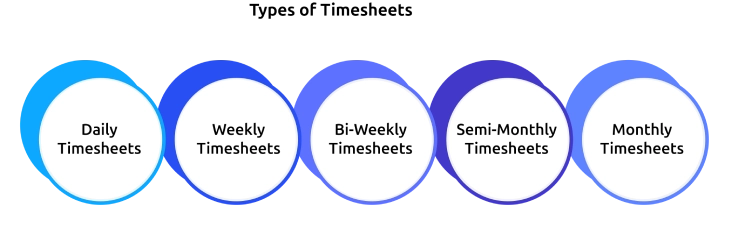
Daily Timesheets
A daily timesheet records an employee's work hours for each day, including clock-in and clock-out times, breaks, overtime, and tasks completed. It is ideal for businesses that require close monitoring of employee attendance or operate with changing schedules. Daily timesheets help you quickly identify attendance issues, improve payroll accuracy, and maintain up-to-date records of work performed.
Weekly Timesheets
A weekly timesheet captures an employee's work hours over seven days and is usually submitted at the end of each week. It is widely used with weekly payroll cycles and project-based teams. This format helps you review employee attendance, calculate overtime, efficiently approve work hours, and track project progress without requiring daily submissions.
Bi-Weekly Timesheets
A bi-weekly timesheet records employee work hours across a two-week pay period and is commonly used with bi-weekly payroll. It reduces administrative work while providing enough detail for accurate payroll processing and overtime calculations. It also helps you track project hours, control labor costs, and understand how your team is performing over a longer period.
Semi-Monthly Timesheets
A semi-monthly timesheet tracks employee hours for two fixed payroll periods each month, typically from the 1st to the 15th and from the 16th to the end of the month. It works well with semi-monthly payroll schedules, helping you maintain accurate salary calculations, leave records, overtime tracking, and compliance with company payroll policies.
Monthly Timesheets
A monthly timesheet records an employee's total work hours throughout an entire month. It is commonly used for salaried employees, consultants, and freelancers, focused on monthly reporting without daily attendance. Monthly timesheets provide a complete overview of work hours, project allocation, and productivity, making workforce planning, payroll reconciliation, and performance analysis much easier.
What are Timesheets Used For?
Timesheets do much more than record employee work hours. They give you accurate information to manage payroll, track projects, control labor costs, and improve workforce productivity. Whether you manage a small team or a large workforce, timesheets help you make informed decisions while keeping daily operations organized and transparent.
- Track Employee Work Hours: Timesheets record employees' regular hours, breaks, overtime, and attendance, giving you an accurate record of time worked. This helps eliminate manual errors and ensures all employees’ working hours are properly documented.
- Process Accurate Payroll: Payroll calculations depend on accurate work-hour records. Timesheets help you calculate regular pay, overtime, paid leave, and deductions correctly, reducing payroll errors and ensuring employees are paid accurately and on time.
- Monitor Projects and Tasks: Recording time spent on specific projects or tasks allows you to track progress, compare planned versus actual effort, and identify potential delays before they affect deadlines or budgets.
- Calculate Billable Hours: Service-based businesses, agencies, consultants, and freelancers use timesheets to record billable hours for each client. This creates accurate invoices, prevents missed billable time, and improves revenue by ensuring every hour worked is accounted for.
- Improve Workforce Productivity: Timesheet data reveals how employees spend their workday, making it easier to identify productivity trends, workload imbalances, and opportunities to improve resource allocation without relying on assumptions.
- Support Compliance and Reporting: Maintaining detailed timesheet records helps you comply with labor regulations, maintain audit-ready documentation, and generate reports for payroll, project costing, budgeting, and workforce planning whenever needed.
Still spending hours managing timesheets manually?
Automate time tracking and generate accurate timesheets effortlessly with Time Champ.
What Are the Benefits of Using Timesheets?
Using timesheets goes beyond tracking employee work hours. They help you streamline business operations, make informed workforce decisions, and improve overall efficiency. Whether you’re managing payroll, projects, or team performance, timesheets provide reliable data that supports better planning, accountability, and business growth.

Ensure Accurate and Stress-Free Payroll
With reliable timesheets, you can confidently calculate employee wages, overtime, and leave without errors. This not only ensures employees are paid correctly and on time but also builds trust and reduces payroll-related disputes.
Gain Clear Visibility into Workforce Activity
Timesheets provide valuable insights into how your team spends their time. This clarity helps you balance workloads, identify inefficiencies, and ensure every team member is contributing effectively.
Enhance Project Planning and Delivery
Tracking time spent on tasks and projects allows you to make smarter decisions about resource allocation and timelines. This leads to better project planning, improved deadline management, and more successful project outcomes.
Encourage Accountability and Ownership
When employees log their work regularly, it promotes responsibility and transparency. This encourages consistent performance, improves focus, and supports fair and data-driven performance evaluations.
Optimize Labor Costs Efficiently
Timesheet data helps you identify areas where time and resources may be overused or underutilized. With these insights, you can control labor expenses, reduce unnecessary overtime, and improve overall operational efficiency.
Stay Compliant with Ease
Maintaining accurate time records ensures your business meets labor laws and regulations without hassle. It also prepares you for audits and provides reliable documentation whenever needed.
Manual vs Digital Timesheets: Which Is Better?
Both manual and digital timesheets help record employee work hours, but they differ significantly in accuracy, efficiency, and scalability. While manual timesheets may work for small teams with simple tracking needs, digital timesheets automate the entire process, reduce administrative effort, and provide real-time insights that help businesses make faster and more informed decisions.
| Aspect | Manual Timesheets | Digital Timesheets |
|---|---|---|
| Data Entry | Employees manually record work hours on paper or spreadsheets. | Work hours are captured automatically or entered digitally with minimal effort. |
| Accuracy | More prone to calculation mistakes, missing entries, and human error. | Reduces errors through automation, validations, and automatic calculations. |
| Payroll Processing | Requires manual calculations, increasing payroll processing time. | Automatically calculates work hours, overtime, and leave, making payroll faster and more accurate. |
| Time Tracking | Limited visibility into real-time employee work hours. | Provides real-time tracking of work hours, attendance, and productivity. |
| Reporting & Insights | Reports need to be created manually, making analysis time-consuming. | Generates instant reports and dashboards for payroll, projects, and workforce performance. |
| Project Management | Difficult to track time across multiple projects or tasks. | Easily track project and task hours, helping manage budgets and resource allocation. |
| Scalability | Suitable for very small teams with simple tracking needs. | Easily scales for growing businesses, remote teams, and multi-location organizations. |
| Record Management | Paper records and spreadsheets can be misplaced or difficult to maintain. | Stores records securely in the cloud, making them easy to access, search, and audit. |
| Overall Efficiency | Involves repetitive manual work and higher administrative effort. | Saves time through automation, improves accuracy, and streamlines workforce management. |
How Time Champ Simplifies Timesheet Management
Managing employee timesheets manually often leads to missed entries, payroll delays, and unnecessary administrative work. As your team grows, keeping work hours accurate and organized becomes even more challenging. Time Champ is smart employee monitoring software with accurate timesheet management capabilities that give you complete visibility into employee work hours, attendance, productivity, and project time.
Key features of Time Champ that help you manage timesheets efficiently.
- Automatic Timesheet Generation: Automatically creates accurate daily, weekly, and monthly timesheets by capturing employees’ work hours, eliminating manual data entry and reducing errors.
- Real-Time Time Tracking: Tracks employee work hours, active time, idle time, breaks, and overtime as they happen, ensuring accurate records for payroll and performance management.
- Project and Task Time Tracking: Monitors the time spent on individual projects and tasks to improve project planning, measure team performance, and allocate resources more effectively.
- Attendance and Leave Management: Syncs attendance, leave requests, holidays, and work hours in one place, making payroll processing faster and more accurate.
- Timesheet Approval Workflow: Simplifies timesheet reviews with an easy approval workflow that helps you verify employee work hours, prevent incorrect submissions, and ensure payroll is processed with confidence.
- Productivity Monitoring: Provides insights into application usage, website activity, productive time, and idle time, enabling you to identify productivity trends and improve team performance.
- Custom Reports and Analytics: Generates detailed reports on work hours, attendance, overtime, project time, and productivity to help you make informed workforce and business decisions.
- Payroll-Ready Data: Generates accurate, payroll-ready timesheet records that help you speed up payroll processing, reduce manual calculations, and ensure employees are paid correctly every pay cycle.
Ready to simplify employee timesheet management?
Use Time Champ to track work hours, streamline payroll, and improve workforce productivity.
Conclusion
A well-managed timesheet does more than record employee work hours. It helps you improve payroll accuracy, track project progress, manage labor costs, and gain better visibility into workforce productivity. Knowing what a timesheet is and choosing the right approach can make day-to-day operations more efficient while reducing manual work and errors. As your business grows, switching from manual records to a digital timesheet solution helps streamline time tracking, simplify workforce management, and support better business decisions. With the right tools in place, you can save time, improve accountability, and keep your teams productive and organized.

Anjali

Table of Content
 What Is a Timesheet?
- What Are the Different Types of Timesheets?
- What are Timesheets Used For?
- What Are the Benefits of Using Timesheets?
- Manual vs Digital Timesheets: Which Is Better?
- How Time Champ Simplifies Timesheet Management
- Conclusion
Instant Signup
Thank you for your request!
We have received your signup request and our team will get back to you soon. In the meantime, you can book a demo to see Time Champ in action.
Book a DemoFree trial. No credit card required. Prefer a walkthrough? Book a demo.
Related Blogs

Time tracking software vs manual timesheets: compare accuracy, cost, effort, and ROI to pick the right solution for improving your team's productivity.
Jahnavi Pulluri | May 15, 2026
Improve project profitability with Time Tracking ROI by reducing wasted hours, controlling labor costs, increasing productivity, and boosting returns.
Anjali | Jun 03, 2026
Discover how to use timesheet reports to track progress, manage time effectively, and ensure project success with better planning and efficiency.
Sai Keerthi Uppala | Sep 17, 2024
Choose employee time tracking software with the right tracking features, reporting, integrations, security, scalability, and workforce visibility for your team.
Thasleem Shaik | May 26, 2026
Take your team management to the next level by learning how to track employee attendance using smart tools and tactics to boost efficiency and remove errors
Chetana Choudary | Mar 15, 2025
Employee attendance tracker helps businesses maintain accurate work hour records, ensure labor law compliance, manage overtime, and prevent legal issues.
Thasleem Shaik | Mar 15, 2025


 4.7/5 avg.
Ready to Manage Your Workforce Smarter?
Join our family of 1500+ companies using smart insights to redefine workforces!

Free Trial
No Credit Card Required