How to Choose the Right Employee Time Tracking Software
Choose employee time tracking software with the right tracking features, reporting, integrations, security, scalability, and workforce visibility for your team.
Choosing employee time tracking software can feel confusing when every platform claims to be the best time tracking software. If you pick a tool with weak reporting, limited integrations, or poor privacy controls, you can lose visibility into work hours, create payroll issues, and make daily workflows harder to manage.
The right choice helps you simplify tracking, protect sensitive work data, and support your team with a reliable time tracker tool that fits your needs. In this article, you will learn what to look for in time tracking software for employees, including essential features, usability, integrations, and the key criteria for selecting secure employee monitoring tools.
What is Employee Time Tracking Software?
Employee time tracking software is a digital solution that records, manages, and analyzes work hours across tasks, projects, applications, and daily activities. It gives you accurate visibility into how your team uses time without depending on manual entries or spreadsheets. Many businesses use time tracking software for employees to organize workflows, track work hours, and maintain accurate operational records.
Why Employee Time Tracking Matters?
Businesses lose nearly 7% of total payroll every year because of inaccurate time tracking. Small gaps in recorded hours quickly compound into payroll mistakes, missed project deadlines, and client invoices that do not match the actual work delivered. Here is what the right time tracking tool for employees actually fixes.
- Payroll Accuracy: Time tracking replaces manual guesses. This reduces payroll mistakes and removes the confusion of correcting inaccurate timesheets later.
- Project Cost Visibility: You get a clearer view of how much time each project actually consumes compared to the planned budget and timelines.
- Productivity Gaps: A good time tracker tool shows how teams spend work hours across tasks, projects, and activities, which makes it easier to identify workload gaps and improve resource allocation.
- Billing Confidence: For client-facing teams, accurate hour logs create clear invoices with fewer disputes and less back and forth.
- Team Fairness: When work hours stay visible, workload imbalances become easier to identify and fix before they affect retention.
For a full breakdown of what employee time tracking tools deliver across each of these areas, see the guide on the benefits of using a work time tracker.
Stop relying on spreadsheets and manual timesheets to understand where work hours go.
Try Time Champ and simplify employee time tracking.
How to Choose the Employee Time Tracking Software?
Choosing the right employee time tracking software becomes difficult when many tools offer similar features but work very differently in daily operations. Some tools focus only on timers, while others overload you with features you may never use. The right choice depends on how your team works, what you need to track, and how much visibility you actually need across daily operations. Here are the key things you should evaluate before choosing time tracking software for employees.
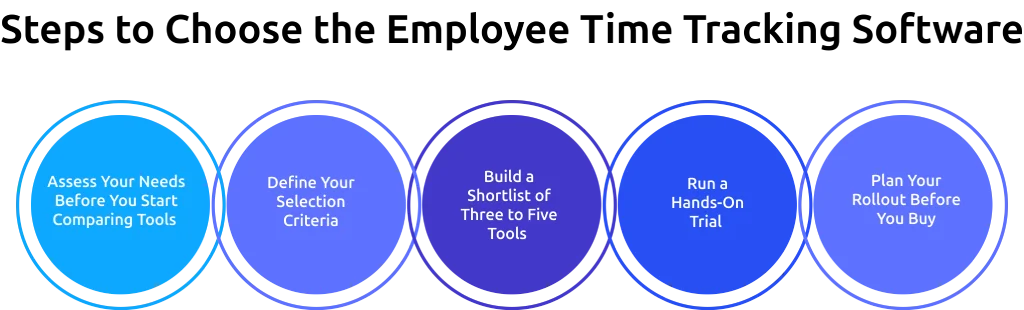
Step 1: Assess Your Needs Before You Start Comparing Tools
Before you compare different employee time tracking software options, get clear on what you actually need. Most software decisions go wrong when you start comparing tools before understanding the real problem.
- What Problem Are You Trying to Solve? " Define the exact problem in one simple sentence before moving forward. "We want better time tracking" is not a problem."We lose billable hours because consultants forget to log time after client calls,” which gives you a clear direction.
- What Is Your Work Model? Remote, hybrid, in-office, and field teams all need different tracking features. Choose a time tracker tool that matches how your team works daily, especially if you need mobile access, remote tracking, or cross-platform support.
- Which Tools Should It Connect With? List the payroll, HR, communication, and project management tools you already use. A time tracking software without proper integrations creates extra manual work and slows down operations.
- Who Will Use This Software? A small agency, a customer support team, and a distributed engineering team all work differently. Consider your team size, daily workflows, and technical comfort level before choosing a platform. A tool that works well for developers may feel difficult for field teams or non-technical employees.
Step 2: Define Your Tool Selection Criteria
Once your requirements are clear, decide which features matter most for your workflow. Not every business needs the same level of tracking, reporting, or monitoring, so focus on the features you will actually use.
- Automatic vs Manual Tracking: Manual time entries often miss work hours and create inaccurate records. If you depend on time logs for payroll, billing, or project tracking, prioritize time tracking software with automatic tracking features.
- Ease of Use and Adoption: The best time tracker software is the one your team uses consistently. A simple and easy-to-use tool usually performs better than a complex platform with too many features.
- Platform and Device Coverage: Make sure the time tracking tool supports all the devices and operating systems your team uses. Remote and distributed teams often need Windows, Mac, Linux, and mobile support.
- Reporting and Analytics Depth: Some teams only need timesheets and work hours tracking, while others need productivity reports, project insights, and workload tracking. Choose reporting features based on the level of visibility you actually need.
- Integrations: Prioritize integrations with the payroll, HR, communication, and project management tools you already use. Good integrations reduce manual work and keep workflows organized. You can also explore the available integrations on the Time Champ Integrations page.
- Security and Compliance: For regulated industries, security should be a requirement, not an optional feature. Check whether the software includes encryption, role-based access controls, GDPR or CCPA compliance, and certifications like SOC 2 or ISO 27001. If a tool does not meet your compliance requirements, remove it from your shortlist.
Step 3: Build a Shortlist of Three to Five Tools
Once your requirements and selection criteria are clear, narrow your list down to three to five employee time tracking software options. Reviewing too many tools usually makes the decision process slower and more confusing.
- Where Can You Compare Different Tools? Use platforms like G2 and Capterra to compare tools based on your team size, industry, and business needs. Focus on recent reviews because they reflect the current product experience. You can also explore this best employee time tracking software comparison to simplify your research process.
- Score Each Tool Against Your Criteria: Create a simple comparison sheet with your key requirements and shortlisted tools. Score each platform based on tracking features, usability, reporting, integrations, security, and pricing. This gives you a clearer way to compare tools and avoids decisions based only on demos or marketing pages.
- Watch for Early Red Flags: Pay attention to pricing limitations, missing free trials, poor customer support reviews, sync issues, or important features locked behind expensive plans. These problems often create operational challenges later, especially for growing teams.
Step 4: Run a Hands-On Trial
Never buy time tracking software without testing it first. The demo shows the tool at its best. The trial shows how it works for your team.
- Test with Real Users, Not Just Admins: Pick a pilot group from your team to test and use the software during daily work. Their experience gives you a clearer idea of how well the tool will work during a full rollout. If the pilot group struggles with the tool, the larger team will likely face the same issues.
- Test Across Your Actual Devices: A tool may work smoothly on Windows but create issues on Mac or mobile devices. Run the trial across every device and operating system your team uses. A real trial setup often reveals issues that demos do not highlight clearly.
- Test Your Most Important Workflows: Use the trial to complete tasks like payroll processing, project reporting, or client invoicing. If the time tracker tool handles your complex workflows smoothly, daily operations become easier to manage. If the software creates issues during critical workflows, you can identify them before making a purchase decision.
Step 5: Plan Your Rollout Before You Buy
Choosing the right tool is only part of the process. Poor implementation can create confusion, reduce adoption, and limit the value you get from the software.
- Include Your Team in the Evaluation: Involve the team members who will use the software during daily work. Discuss concerns and feedback before purchasing so you can avoid adoption issues later.
- Explain the Benefits Clearly: Show how the tool reduces manual timesheet work, improves hour accuracy, and removes the pressure of filling timesheets at the end of the week. Clear communication about what the software tracks and how it supports daily work helps build stronger trust across the team.
- Roll Out in Phases: Start with one department or a smaller group first. Collect feedback, adjust the setup if needed, and then expand gradually. A phased rollout makes adoption smoother and helps teams adjust more comfortably.
- Focus on the First Few Weeks: Early onboarding plays a major role in long-term adoption. Good support and training during the first few weeks help teams use the software more consistently. You can also review these time tracking best practices to understand what effective usage looks like after implementation.
Why Businesses Choose Time Champ for Employee Time Tracking?
Time Champ is employee monitoring and time tracking software with workforce intelligence features. It covers automated time and attendance tracking, productivity tracking, app and website usage detection, and data loss prevention, all from one platform. Here is how Time Champ fits your requirements.
- Automatic Time Tracking: Time Champ captures work hours based on real activity, without manual timers or the need to fill timesheets later.
- Smart Attendance Management: Track who is present, absent, late, or on leave with real-time attendance visibility across teams. Get a clearer view of daily attendance patterns without manually following up on updates.
- Productivity Tracking: Understand how teams spend work hours through app and website activity tracking. Categorize activities into productive, neutral, and unproductive work patterns to get clearer productivity insights across daily operations.
- Idle Time Tracking: Monitor idle and offline time more accurately to identify work gaps and improve daily visibility into team activity.
- Field and Location-Based Tracking: Track attendance and work hours accurately with GPS-enabled tracking and geofencing support for field operations.
- Automated Project-Based Timesheets: Generate timesheets automatically from tracked hours and manage project-based entries, approvals, and timesheet corrections more easily.
- Proactive Workforce Alerts: Receive alerts for late logins, productivity drops, unusual activity, or extended idle time before issues affect operations.
- Data Loss Prevention: Monitor website access violations, USB access violations, and file activity logs to reduce security risks and maintain better control over sensitive business data.
- Integrations: Connect with ADP, Gusto, QuickBooks, Asana, Slack, Microsoft Teams, and 30+ other workplace tools without disrupting workflows.
- Detailed Reporting: Get productivity dashboards, attendance reports, project-level cost tracking, and workforce insights that support better operational decisions.
Still relying on spreadsheets and manual timesheets?
Switch to smarter employee time tracking with Time Champ.
Conclusion
Selecting the right employee time tracking software begins with analyzing how your employees operate, what challenges you want to solve, and which features actually support your daily operations. A proper time tracker must make work hours tracking effortless, give more insights about projects, automate processes, and seamlessly integrate into your existing workflow. By concentrating on usability, reporting capabilities, integration, security, and scalability, it becomes much easier to choose software that supports both your current needs and future growth.

Thasleem Shaik

Table of Content
 What is Employee Time Tracking Software?
- Why Employee Time Tracking Matters?
- How to Choose the Employee Time Tracking Software?
- Why Businesses Choose Time Champ for Employee Time Tracking?
- Conclusion

Related Blogs

Explore 17 frequently asked questions about time tracking tools, including productivity, remote work, payroll, monitoring, features, and business benefits.
Anjali | May 19, 2026
Learn the difference between productivity tracking and time tracking, how they work, and which approach helps improve team performance and visibility.
Guna Lakshmi | May 09, 2026
Explore the latest time tracking statistics for 2026, including productivity trends, AI insights, remote work data, and workforce analytics.
Thasleem Shaik | May 22, 2026
Learn the key pros and cons of time tracking to enhance employee productivity and manage challenges effectively.
Thasleem Shaik | Aug 17, 2024
Discover effective time tracking methods to boost efficiency, manage resources, and ensure timely project delivery. Find the best method for your organization.
Tarun Kumar Reddy | Aug 16, 2024
Create a clear time tracking policy to boost productivity and ensure accurate work-hour reporting. Download a free customizable template.
Thasleem Shaik | Oct 04, 2024


 4.7/5 avg.
Ready to Manage Your Workforce Smarter?
Join our family of 1500+ companies using smart insights to redefine workforces!

Free Trial
No Credit Card Required