Key Benefits of Using a Work Time Tracker for Teams
Track employee working hours accurately, improve productivity, reduce time waste, and gain better visibility into team performance with a work time tracker.

If you rely on manual timesheets, spreadsheets, or employee updates to know how work hours are being spent, it can be difficult to get a clear picture of your team’s productivity. Missing time entries, inaccurate records, and limited visibility often make it harder to manage workloads, control labor costs, and make informed decisions. A work time tracker helps solve these challenges by giving you accurate data on how time is spent across your team.
Whether you manage a small team or a growing workforce, knowing where time goes can help you improve efficiency and reduce unnecessary delays. Ahead, you'll see how a work time tracker benefits employees, managers, and organizations, along with the key features to look for when choosing the right solution.
What Is a Work Time Tracker?
A work time tracker is a tool that records how employees spend their working hours throughout the day. It helps track time spent on tasks, projects, meetings, and other work activities, giving you a clearer view of team productivity and workload distribution. With automated time tracking, you can get accurate data showing how time is being used across your team.
With real-time tracking and detailed reports, a work time tracker makes it easier to monitor progress, manage resources, improve accountability, and ensure work hours are recorded correctly. This helps the team stay organized while giving you the visibility needed to make better operational decisions.
Benefits of a Work Time Tracker for Employees and Managers
When you have a clear view of where work hours are being spent, it becomes easier to improve productivity, manage workloads, and identify opportunities for better efficiency. A work time tracker benefits different stakeholders in different ways, depending on their responsibilities and goals. Here you’ll understand the key benefits a work time tracker offers employees, managers, and enterprises.
Benefits for Employees
1. Better Visibility into Daily Work
Employees handle multiple tasks, projects, meetings, and responsibilities throughout the day. Without a clear record of how time is spent, it can be difficult to understand where the time goes. A work time tracker provides a complete view of daily activities, helping employees identify time-consuming tasks and manage their schedules more effectively.
This visibility makes it easier to prioritize important work, reduce distractions, and maintain a more productive workflow.
2. Accurate Work Hour Records
Manual timesheets can lead to missed entries, forgotten tasks, or inaccurate reporting. Automated time tracking captures work hours as they happen, reducing the risk of errors and ensuring records remain accurate.
Accurate work hour data helps employees ensure their work hours are recorded correctly and supports accurate payroll calculations, project reporting, and performance reviews by properly documenting their actual contributions.
3. Improves Workload Management
When employees can see how their time is distributed across tasks and projects, it becomes easier to identify overloaded schedules or inefficient work patterns. This visibility helps them address workload concerns sooner and make adjustments before issues affect productivity.
Better workload management reduces stress, prevents burnout, and supports a healthier work environment. As a result, employees can maintain consistent performance and focus on delivering quality work over time.
Benefits for Managers
1. Better Team Productivity Insights
Managing a team becomes easier when you have accurate information about how work is being completed. A work time tracker gives you visibility into task progress, productive hours, and overall team performance.
You can identify bottlenecks, uncover inefficiencies, and take action based on real data without relying on assumptions.

Did You Know?
According to Gallup's Q12 Meta-Analysis, business units in the top quartile of employee engagement achieve 18% higher sales productivity and 14% higher production productivity than those in the bottom quartile.
2. Smarter Resource Allocation
Assigning the right people to the right tasks is critical for project success. Time tracking data helps you understand employee capacity, workload distribution, and project demands.
With these insights, you can allocate resources more effectively, avoid overloading team members, and ensure projects stay on schedule.
3. Easier Project and Deadline Management
Projects often fall behind when there is limited visibility into how time is being spent. A work time tracker allows you to monitor project progress in real time and identify delays before they become larger problems.
This proactive approach helps your teams stay aligned with deadlines while improving project planning and execution.
Benefits for Small Businesses & Enterprises
1. Improves Operational Efficiency
For growing organizations, understanding how time is used across departments is essential for improving efficiency. Time tracking helps uncover repetitive tasks, workflow bottlenecks, and areas where resources are underutilized.
These insights support process improvements that help teams work more efficiently without increasing operational costs.
2. More Accurate Payroll and Cost Control
Payroll errors can create frustration for employees and increase administrative work for businesses. A work time tracker provides reliable records of employee hours, making payroll calculations more accurate and reducing manual effort.
Organizations also gain better control over labor costs by understanding where time and resources are being invested.
3. Better Decision-Making Through Workforce Data
Business growth depends on making informed decisions. Time tracking reports provide valuable data about productivity trends, resource utilization, project performance, and workforce capacity.
With access to this information, organizations can make smarter staffing decisions, improve planning, and build strategies based on measurable insights.
Struggling to understand where employee work hours actually go?
Time Champ automatically tracks work time and gives you complete visibility into team productivity.
How to Choose the Right Work Time Tracker
Not every work time tracker offers the same level of visibility, automation, or reporting. Choosing the right solution can make a significant difference in how effectively you manage employee time, monitor productivity, and support business operations.
Choose a work time tracker that aligns with your team size, workflows, and business goals by considering the key factors below:
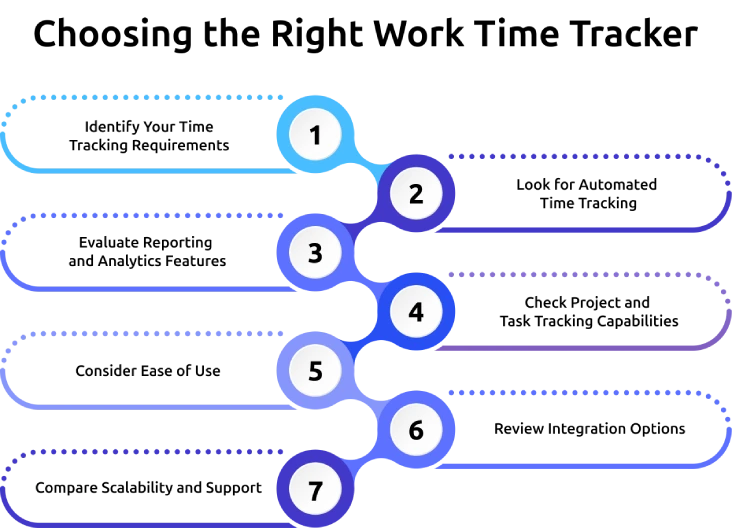
1. Identify Your Time Tracking Requirements
Start by defining what you want to achieve with time tracking. Some organizations need accurate work hour records for payroll, while others focus on productivity monitoring, project tracking, or workforce management.
Defining your priorities makes it easier to focus on solutions that match your requirements and avoid investing in unnecessary features.
2. Look for Automated Time Tracking
Choose a tool that automatically records work hours and activities without relying entirely on manual entries. Automated tracking reduces human errors, saves time, and provides more accurate data.
This helps you capture work hours consistently while reducing the time and effort needed to manage records and approvals.
3. Evaluate Reporting and Analytics Features
Choose a work time tracker that provides detailed reporting and analytics without simply recording employee hours. Review the available reports to ensure they offer insights into productivity trends, workload distribution, attendance patterns, and project performance.
Prioritize solutions that turn workforce data into actionable insights, helping you make informed decisions about productivity, staffing, and resource allocation.
4. Check Project and Task Tracking Capabilities
Select a tracker that allows you to monitor time spent on individual tasks, projects, and clients. This feature is especially important if your team handles multiple projects simultaneously.
Make sure the tool provides clear visibility into project activities so you can improve planning, allocate resources effectively, and identify areas where time is being spent inefficiently.
5. Consider Ease of Use
Look for a solution that is simple and intuitive for you and your employees. A complicated platform can discourage adoption and lead to inconsistent time tracking practices.
Choose a tool that requires minimal training and helps you to record and review employee work hours without unnecessary complexity.
6. Review Integration Options
Check whether the work time tracker integrates with the systems your organization already uses, such as payroll software, project management tools, communication platforms, and HR systems.
Selecting a solution with strong integration capabilities can help you streamline workflows, reduce manual data entry, and improve operational efficiency.
7. Compare Scalability and Support
Choose a work time tracker that can support your organization as it grows. Evaluate whether the platform can accommodate additional employees, departments, and evolving business requirements without disrupting operations.
Also assess the quality of customer support, including onboarding assistance, training resources, and technical support, to ensure you can get help whenever needed.
How Time Champ Helps You Track Work Time More Effectively
Tracking work hours through manual timesheets or spreadsheets often leads to inaccurate records and limited visibility into how employee time is actually spent. Without clear insights, it becomes harder to manage productivity, workloads, projects, and labor costs effectively. Time Champ is an employee time tracking and monitoring software that helps solve these challenges by providing automated work time tracking and workforce insights that give you a clear picture of how work happens across your organization.
Beyond simply recording employee work hours, Time Champ gives deeper insights into how time is spent across tasks, projects, and daily activities. Some of its key features include:
- Automatic Time Tracking: Gives you accurate records of time spent on applications, websites, tasks, and projects without relying on manual entries.
- Detailed Reports & Analytics: Provide comprehensive insights that help you identify workload imbalances, monitor team capacity, and address productivity challenges early.
- Project & Task Tracking: Supports better project management by showing how much time is spent on specific tasks and projects, helping you track billable hours, project costs, and profitability.
- Role-Based Access Control: Helps you manage workforce data securely by assigning appropriate access levels to different users.
- Privacy-Focused Monitoring: Supports responsible productivity monitoring while helping you maintain employee privacy and trust.
These capabilities help you make better workforce decisions while keeping employees productive, organized, and accountable.
Still relying on manual timesheets?
Time Champ automates time tracking, reporting, and workforce insights in one place.
Conclusion
Managing employee time effectively requires more than simply recording work hours. You need accurate visibility into how time is spent, where productivity gaps exist, and how workloads are distributed across your team. A work time tracker helps you achieve these goals by improving accountability, supporting better decision-making, and providing the insights needed to optimize daily operations. When you choose the right solution and use the data effectively, you can improve productivity, streamline workforce management, and support long-term business growth. Evaluate your current time tracking process and identify opportunities to make it more accurate, efficient, and actionable.

Anjali

Table of Content
 What Is a Work Time Tracker?
- Benefits of a Work Time Tracker for Employees and Managers
- How to Choose the Right Work Time Tracker
- How Time Champ Helps You Track Work Time More Effectively
- Conclusion

Related Blogs
Discover top-rated employee time tracking software options! Explore the 10 best tools to streamline productivity and manage work hours effectively.
Sai Keerthi Uppala | Dec 05, 2023
Learn how real-time productivity tracking helps teams monitor performance, improve efficiency, and make smart decisions for better workplace productivity.
Jahnavi Pulluri | May 12, 2026
Understand what idle time is, its main causes, how to calculate it using a simple formula, and practical ways to reduce it without micromanaging your team.
Anjali | May 26, 2026
Learn what time estimation is, its importance, and how accurate time planning can improve productivity, task management, and decision-making in daily life.
Jahnavi Pulluri | May 29, 2026
Explore the top benefits of productivity tracking software for better visibility, balanced workloads, smarter planning, and improved business decisions.
Guna Lakshmi | Apr 30, 2026
Discover how employee productivity tracking builds accountability, drives ownership, and turns daily activity into measurable team performance.
Guna Lakshmi | May 01, 2026


 4.7/5 avg.
Ready to Manage Your Workforce Smarter?
Join our family of 1500+ companies using smart insights to redefine workforces!

Free Trial
No Credit Card Required