Real-Time Productivity Tracking: How It Works and Why It Matters
Learn how real-time productivity tracking helps teams monitor performance, improve efficiency, and make smart decisions for better workplace productivity.

If your productivity data is already a day old, your team issues are too. And by the time you review reports, workload imbalances may have already impacted performance, customer experience, and employee productivity.
This hidden delay is known as the “lag tax.” Real-time productivity tracking helps you identify problems early, balance workloads faster, and take action before small issues turn into bigger challenges.
In this blog, I’ll explain how real-time productivity tracking works, why it matters, and how you can use live insights to improve team performance.
What is Real-Time Productivity Tracking?
Real-time productivity trackingis the monitoring and analysis of workforce activity through live data updates. Instead of depending on reports generated hours or days later, it provides managers with clear, immediate visibility into team performance, workload distribution, and operational activity.
This allows managers to identify issues early, respond faster to workload changes, and make more informed operational decisions.
How Does Real-Time Productivity Tracking Work?
Real-time productivity tracking works through four core components that continuously capture, process, and display your team’s activity with minimal delay. Understanding this flow helps you review whether a tool is truly working in real-time or just updating reports more frequently.
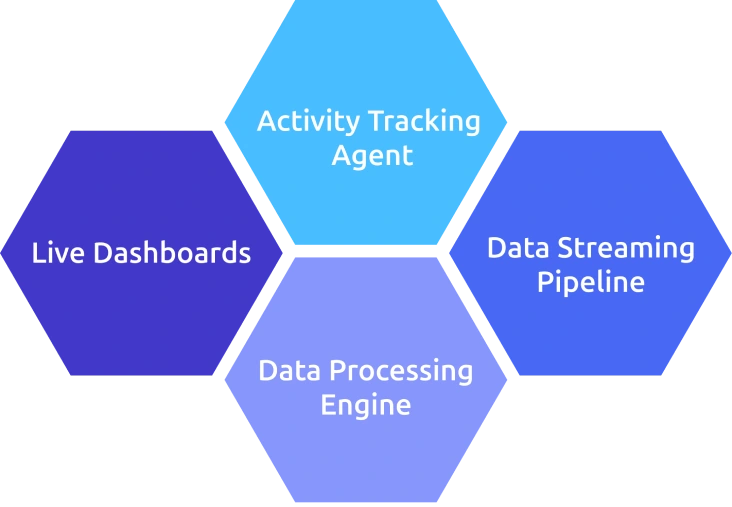
1. Activity Tracking Agent
A simple software agent installed on employee devices collects activity data continuously. This may include app usage, website activity, active and idle time, project allocation, and task-related data. The agent acts as the primary data source for the activities.
2. Data Streaming Pipeline
Instead of storing employee activity data for static end-of-day reports, the system continuously sends information to the cloud through a real-time streaming pipeline. Most modern workforce monitoring and productivity tools transmit updates every few seconds, allowing you to maintain real-time visibility into workloads, performance trends, productivity patterns, and operational bottlenecks as they happen.
3. Data Processing Engine
These productivity tracking systems automatically process and categorize incoming data by classifying activities based on productivity rules, mapping them to specific projects or teams, and aggregating the information into meaningful operational metrics.
4. Live Dashboards
Live dashboards continuously refresh and display the processed data in real time. You can monitor workload distribution, productivity trends, team activity, and operational performance in real-time.
When reviewing tools, focus on where delays occur. Some platforms claim “real-time” but refresh dashboards every 10–15 minutes. True real-time systems update within seconds, giving you immediate and accurate visibility.
Why Real-Time Productivity Tracking Data Outperforms Delayed Reports
According to Gitnux, employees working under productivity monitoring systems show an average 20–30% increase in task completion productivity.
However, the effectiveness of these systems depends heavily on how quickly teams can access and respond to the data they collect.
That’s where timing becomes critical. The real difference lies in whether you can act on productivity insights while issues are still manageable instead of discovering them after performance has already declined. Here are four “lag tax moments” that make this problem clear.
LAG TAX MOMENT 1
Tuesday, 11:14 AM - Customer support
A support agent is stuck on a complex ticket but hasn’t escalated it.
- Real-Time View: You see unusually long handling time and rising search activity on the ticket. You step in immediately.
- Delayed Report: You only see the delay the next day, after hours of lost time and a frustrated customer.
LAG TAX MOMENT 2
Thursday, 2:18 AM - Engineering operations
Unusual system access happens outside normal working hours.
- Real-Time View: You get an instant anomaly alert and can detect within minutes.
- Delayed Report: The activity shows up in a morning summary after hours of exposure.
LAG TAX MOMENT 3
Friday, 4:42 PM - BPO operations
Shift fatigue starts affecting quality.
- Real-Time View: You notice rising response times and reduced focus during the shift.
- Delayed Report: Quality drops appear only in next week’s report, after CSAT is already impacted.
LAG TAX MOMENT 4
Monday, 9:47 AM - Sales operations
Reps are distracted with manual data work instead of selling.
- Real-Time View: You see CRM usage drop and spreadsheet activity spike mid-morning.
- Delayed Report: You only discover it days later in weekly summaries.
The Pattern
Real-time tracking lets you intervene while it still matters. Delayed reports only explain what has already gone wrong.
Key Metrics in Real-Time Productivity Tracking
Not every metric needs real-time updates. The ones that matter most are those that help you act immediately. Here are the key five metrics in real-time productivity tracking:
- Active vs Idle Status: Shows who is working, on break, or inactive at any moment.
- Focus Blocks in Progress: Identifies uninterrupted deep work sessions that should be protected.
- App and Website Usage by Role: Reveals where attention is going and whether it aligns with job responsibilities.
- Workload Distribution: Tracks how work is spread across the team to spot imbalances early.
- Anomaly Detection: Flags unusual behavior or activity patterns that may need immediate attention.
These metrics matter as they help you respond in real time, not after the fact.
Improve Team Productivity with Real-Time Work Visibility
Track workloads, monitor activity, and identify productivity gaps with Time Champ
When Is Real-Time Productivity Tracking Overkill?
Real-time productivity tracking isn’t always necessary. In some cases, periodic reports are more than enough to avoid unnecessary complexity or cost.
- Output-Based Knowledge Work: In roles like software development, content creation, or R&D, work follows longer cycles, so real-time updates add little value.
- Small Teams: With fewer than ~20 people, direct communication and regular check-ins already provide full visibility.
- Autonomous Teams: High-trust teams with clear goals and strong ownership don’t need continuous monitoring because periodic summaries are sufficient.
In these situations, weekly or daily reports typically provide all the insight you need without the overhead of real-time tracking.
How Real-Time Productivity Tracking Affects Employees
Employees don’t experience real-time tracking the same way they experience periodic reports. A weekly report feels like history, but a live dashboard feels present, even if no one is actively watching. That shift changes perception, not just data access.
Three factors determine whether real-time productivity tracking builds trust or creates pressure:
- When employees can see the same dashboard, it becomes a self-management tool, not oversight.
- Real-time data should not automatically trigger intervention or judgment, it should define when and how action is appropriate.
- Anomalies should lead to guidance and support, not immediate consequences.
Handle data transparently and responsibly so employees see real-time tracking as a tool for shared visibility, better coordination, and stronger team support rather than surveillance.
Why Choose Time Champ for Real-Time Productivity Tracking
Time Champ is an employee monitoring software with a workforce intelligence layer that provides a live dashboard updating every minute. It continuously captures workforce activity, processes it in the cloud, and shows you real-time insights so you can monitor what is happening across your team as it happens. It also supports compliance with GDPR, ISO 27001:2022, HIPAA, and SOC 2 Type I standards.
Key Capabilities
1. Automatic Time Tracking
Automatic time tracking records employee work hours in the background without any manual input or timers. It continuously captures start, stop, and active work periods throughout the day, which ensures data is accurate and consistent. It also removes the errors and effort that come with manual timesheets.
2. Productivity Tracking
Real-time productivity tracking monitors employee activity as work happens to understand effort, focus, and work patterns. It allows you to categorize applications and websites as productive, non-productive, or neutral based on departments. It uses color-coded insights to highlight working, productive, and away time, revealing peaks, dips, and gaps for better planning. It also helps you compare productivity across teams and shows a clear timeline of app and website usage throughout the day.
3. Active Hours Tracking
Active hours tracking measures the actual time employees spend engaged in work-related activity. It separates productive working time from idle or inactive periods. This gives you a more realistic view of how working hours are being utilized, which helps in evaluating productivity beyond just login time.
4. App and Website Usage
It tracks the apps and websites employees use during work hours, monitors the time spent on each tool, and provides detailed data on usage patterns. This helps you gain clear visibility into employee focus areas, work alignment, productivity behavior, and overall software usage trends.
5. Idle Time Detection
Idle time detection identifies periods when employees are inactive on their systems. It highlights gaps in the workflow where no activity is taking place. You can use this insight to understand delays or workload issues, which helps improve efficiency and reduce unproductive downtime.
6. Workload Distribution
Time Champ provides how tasks and working hours are spread across individuals and teams. It provides insights into team performance, including employees working extra hours and those with higher workloads. It also highlights the percentage of the team working additional hours, which helps you rebalance workloads early, improve efficiency, and reduce the risk of burnout.
7. Real-Time Dashboards
Real-time dashboards provide continuously refreshed workforce data as activity happens. You can see live changes in productivity, workload, and employee activity patterns.
Get Real-Time Insights Into Your Team’s Productivity with Time Champ
Conclusion
Real-time productivity tracking helps you make smarter decisions by giving you continuous visibility into how work happens across your team. Instead of reacting to problems after productivity drops, you can identify workload imbalances, bottlenecks, and inefficiencies early and take action immediately. When teams use real-time insights effectively, they improve focus, balance workloads more efficiently, and create a more productive and accountable work environment.

Jahnavi Pulluri

Table of Content
 What is Real-Time Productivity Tracking?
- How Does Real-Time Productivity Tracking Work?
- Why Real-Time Productivity Tracking Data Outperforms Delayed Reports
- Key Metrics in Real-Time Productivity Tracking
- When Is Real-Time Productivity Tracking Overkill?
- How Real-Time Productivity Tracking Affects Employees
- Why Choose Time Champ for Real-Time Productivity Tracking
- Conclusion

Related Blogs
Implement a productivity tracking tool with clear steps, setup tips, and best practices to track employee productivity and improve team performance.
Thasleem Shaik | Apr 30, 2026
Address employee concerns about productivity tracking with clear communication, rollout steps, and practical scripts that build trust and transparency.
Thasleem Shaik | May 01, 2026
Productivity tracking is legal in the US, UK, and EU when you follow the rules. Get the per-region checklist, GDPR framework, and risk lines.
Guna Lakshmi | May 01, 2026
Discover the real pros and cons of employee productivity tracking, how it impacts your team, and the right way to use it to support trust and performance.
Anjali | May 02, 2026
Productivity Tracking Software helps remote teams stay on top, track progress, streamline workflows & boost efficiency effortlessly. Learn more!
Shabana Shaik | Mar 15, 2025
Learn how to choose the right remote employee monitoring software with the right features, scalability, and usability to manage remote teams effectively.
Guna Lakshmi | Apr 14, 2026


 4.7/5 avg.
Ready to Manage Your Workforce Smarter?
Join our family of 1500+ companies using smart insights to redefine workforces!

Free Trial
No Credit Card Required