Is Productivity Tracking Legal? A Compliance Guide for the US, UK, and EU
Productivity tracking is legal in the US, UK, and EU when you follow the rules. Get the per-region checklist, GDPR framework, and risk lines.

Employers in the US, UK, and EU can legally run productivity tracking, but only when they follow the right rules. Legal in one region can be non-compliant in another, and EU enforcement is tightening fastest in 2026.
As you adopt productivity tracking for remote and hybrid teams, you need a compliance framework that covers privacy, transparency, and employee rights. What seems like a simple setup can quickly become a compliance risk if you don’t follow the right laws.
In this guide, you will learn the key rules for productivity tracking in each region, how they differ, and the steps you need to stay compliant. It also covers upcoming EU changes that are making monitoring rules stricter.
What “Productivity Tracking” Actually Means in Legal Terms
Productivity tracking means collecting and analyzing data about how employees spend their work time, such as time logs, app usage, activity levels, or task progress. In legal terms, it falls under employee monitoring, but how it is treated depends on what data you collect and how intrusive the method is.
Simple tracking methods like time tracking or general activity reports are seen as less risky. More invasive methods, like keystroke logging, screenshots, or continuous screen recording, are higher risks. The more intrusive your tracking is, the stricter your compliance requirements become.
1. Productivity Data is Personal Data
Productivity tracking data, like app usage, activity logs, and timestamps, is considered personal data under GDPR and UK GDPR, which means it must be handled with proper data protection measures. This means full data protection rules apply. In the US, federal laws are less strict, but state laws are becoming more focused on employee privacy.
2. You Must Prove Your Tracking is Necessary
Regulators now look beyond legal permission. They ask whether your tracking is truly needed. In the UK and EU, there is a strong shift toward checking if your tracking is more invasive than required. Collecting excessive data without a clear reason can create compliance risks.
3. Legal Boundaries Based on Device, Time, and Location
What you track and how you track it depend on the situation. You must handle monitoring on company devices differently than on personal devices. Tracking during work hours is also very different from tracking outside work hours. If you ignore these boundaries, you can quickly face legal issues.
Want to track productivity without crossing legal limits?
See how Time Champ helps you monitor work in a transparent and compliant way.
Is Productivity Tracking Legal in the United States?
Productivity tracking is generally legal in the United States. However, federal law only sets the minimum rules. Many states have added their own requirements. Some states also require you to inform employees before any monitoring begins. If your company operates in multiple states, it is safest to follow the strictest state rules across your entire organization.
What Federal Law Allows
Two main federal laws affect productivity tracking.
- The Electronic Communications Privacy Act (ECPA) allows you to monitor communications on company systems if there is a valid business reason. It also allows monitoring when employees have given consent.
- The Computer Fraud and Abuse Act (CFAA) focuses on unauthorized access. It usually does not apply to normal employee monitoring. However, it can become an issue if your tracking tool accesses accounts or systems without proper permission.
In simple terms, you can monitor company-owned devices during work hours if you have a clear business reason.
States That Require Notice or Consent
Some states have stricter rules than federal law.
- New York requires employers to give written notice before starting any electronic monitoring. Employees must acknowledge this notice.
- Connecticut requires written notice to be displayed clearly so employees can see it.
- Delaware requires written notice signed by employees who are being monitored.
Other states also have related laws. For example, California requires you to disclose what employee data you collect. Illinois restricts the use of biometric data. States like Texas and Florida have laws about recording communications that may affect certain tracking methods.
A simple rule is this. If you follow written notice requirements like those in New York, Connecticut, and Delaware, you will meet most legal expectations across the US.
Common Legal Risks to Avoid
Even when tracking is allowed, certain actions can create legal problems.
- Monitoring personal devices without a clear company policy
- Tracking employees outside work hours
- Capturing sensitive employee activities such as union-related actions
- Collecting health-related data without proper safeguards
Simple Compliance Checklist
Before you implement productivity tracking, make sure you:
- Create a clear policy in your employee handbook
- Provide notice when employees join and when policies change
- Collect consent where required
- Limit tracking to work hours and approved devices
- Define how long you will store the data
Source: Skadden Publications, JUSTIA, Holland & Knight
Is Productivity Tracking Legal in the United Kingdom?
Productivity tracking is legal in the UK under the Data Protection Act 2018 and UK GDPR. However, the rules are stricter than in the US. You must have a clear legal reason, assess the risks, and protect employee privacy at every step.
Choose the Right Legal Reason
Under UK GDPR, you need a valid reason to collect and use employee data. There are several options, but only two usually apply to productivity tracking.
- Legitimate interest: You track productivity to run your business effectively
- Legal obligation: You must monitor employees due to regulatory requirements
Employee consent is not a strong option. Regulators reject consent as a lawful basis here; employees can't freely refuse when their job depends on agreeing.
Know When a DPIA Is Required
You must complete a DPIA when your tracking creates a higher risk for employees.
You need a DPIA if your tracking includes:
- Screenshots
- Keystroke logging
- Continuous activity monitoring
- Profiling individual employees
Avoid Excessive Monitoring
UK regulators focus on whether your tracking goes too far. Some practices are usually seen as excessive:
- Constant webcam monitoring of employees at home
- Keystroke logging without a clear and specific reason
- Tracking personal devices without a proper BYOD policy
- Accessing personal messages or emails
Follow a Simple Compliance Checklist
- Before you start productivity tracking, make sure you:
- Define and document your legal basis
- Complete a DPIA for high-risk tracking
- Update and share your privacy notice
- Collect only the data you actually need
- Set a clear data retention period
- Allow employees to access their own data when requested
This keeps you compliant and builds trust with your team.
Source: Information Commissioner’s Office (UK), Data Protection Act 2018 (Legislation Gov.UK)
Is Productivity Tracking Legal in the European Union?
Productivity tracking is legal in the European Union under GDPR. But the rules are stricter than in the US, and each country adds its own requirements. In 2026, enforcement is becoming strict, especially around how much data you collect and how intrusive your tracking is.
Start With a Valid Legal Basis
Under GDPR, you must have a clear legal reason to process employee data. In most cases, only two apply to productivity tracking.
- Legitimate interest: You track productivity to manage your business, but you must balance this with employee privacy
- Legal obligation: You are required by law to monitor certain activities, usually in regulated industries
Other options, like consent or contract, rarely apply. Employees may not feel free to refuse consent, so regulators do not treat it as reliable.
Country Rules You Cannot Ignore
Even though GDPR applies across the EU, each country has its own rules that you must follow. This is where many companies make mistakes.
- In Germany, you must get approval from the works council before starting any monitoring
- In France, you must inform staff representatives and make sure your tracking is proportionate
- In Italy, you need a union agreement or approval from the authorities for certain types of monitoring
- In Spain, you must clearly notify employees in a way they can easily understand
- In the Netherlands, you are expected to carry out detailed risk assessments and document how you reduce risks
If you operate in multiple EU countries, it is safest to follow the strictest rule and then adjust for each country where needed.
Practical Compliance Checklist
Before you roll out productivity tracking across the EU, make sure you:
- Document your legal basis clearly
- Complete a DPIA and review it regularly
- Consult works councils or employee representatives where required
- Provide a clear privacy notice in the employee’s language
- Collect only the data you actually need
- Set a clear and enforceable data retention period
- Use proper safeguards if data is transferred outside the EU
- Involve a Data Protection Officer or document
Following these steps helps you stay compliant while reducing legal risk across different EU countries.
Source: EUR-Lex (European Union law)
US, UK, and EU at a Glance: Side-by-Side Comparison
Many companies think the US, UK, and EU follow similar rules for productivity tracking, but they do not. While all three allow tracking on company devices during work hours for valid business reasons, the requirements differ when it comes to notice, consent, risk assessments, and employee involvement.
Use this table as a quick and simple way to understand the key differences.
| Compliance element | United States | United Kingdom | European Union |
|---|---|---|---|
| Is productivity tracking legal? | Yes | Yes | Yes |
| Lawful basis required? | Federal: business-use justification. State-by-state additions. | Documented lawful basis (usually legitimate interests) | Documented lawful basis under GDPR |
| Is consent required? | Required in NY, CT, DE. Optional elsewhere. | Rarely valid (power imbalance) | Rarely valid (power imbalance) |
| Written notice required? | Required in NY, CT, DE. Best practice elsewhere. | Yes (privacy notice) | Yes (privacy notice + national variants) |
| DPIA required? | No federal requirement | Yes, for invasive monitoring | Yes, for invasive monitoring |
| Works council approval? | No | No (no equivalent body) | Yes, in Germany, often required in France and Italy |
| Personal devices tracked? | Risky without an explicit BYOD framework | Generally, not permitted | Generally, not permitted |
| Off-hours tracking? | Risky | Generally not permitted | Generally not permitted |
| Penalty risk | State AG fines, class actions, and NLRB exposure | ICO fines up to £17.5M or 4% of global turnover | DPA fines up to €20M or 4% of global turnover |
A GDPR-Ready Legitimate Interest Assessment Template for Productivity Tracking
A Legitimate Interest Assessment (LIA) is a document that shows your productivity tracking has a valid legal reason under GDPR and UK GDPR. It helps you prove that your tracking is fair, necessary, and respectful of employee privacy.
Build your LIA across three parts: Purpose, Necessity, and Balance. You should complete it before you start tracking and review it regularly. It does not need to be long. It just needs to be clear, honest, and easy to review.
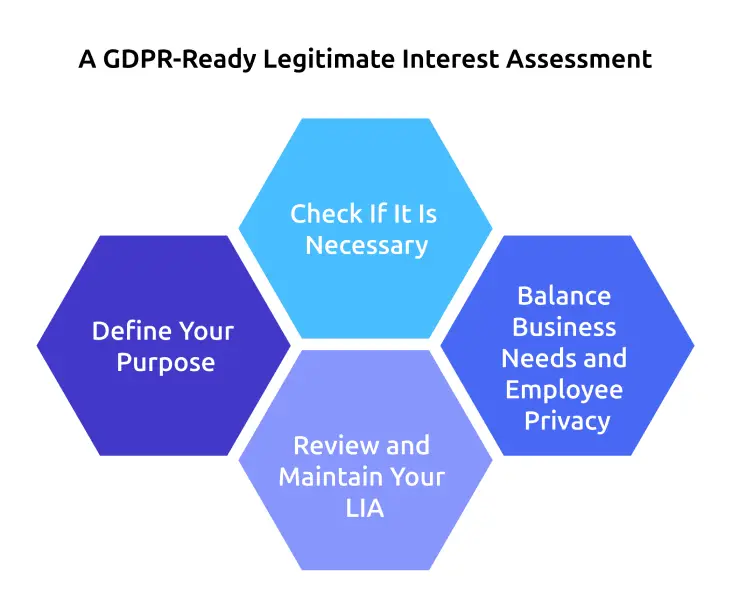
Part 1: Define Your Purpose
Start by clearly explaining why you are tracking employees and what you want to achieve. Your purpose should be specific and tied to a real business need. Avoid vague goals like “improve productivity.” Instead, describe a clear and measurable outcome.
For example:
“Our goal is to make sure the hours billed to clients match the actual
work done. This helps us bill accurately and identify delays early.”
Part 2: Check If It Is Necessary
Next, confirm whether tracking is truly needed. Focus on these points:
- The tracking should be essential, rather than optional
- There should be no less intrusive way to achieve the same result
The key idea is to collect only what you need. For example, if the total project hours are enough, you should not collect screenshots. If app categories give enough insight, you do not need detailed website tracking.
Part 3: Balance Business Needs and Employee Privacy
This is the most important step. You need to make sure your business goals do not unfairly affect employee privacy.
Consider the following:
- How this tracking affects employees’ privacy, comfort, and work experience
- The actions you take to reduce risks, such as limiting data collection and improving transparency
- Whether this level of tracking would seem reasonable and fair to an employee if it is explained clearly
To lower risk, take simple steps like being transparent, limiting how much data you collect, setting clear data retention periods, controlling who can access the data, and allowing employees to see their own information. If the tracking feels too invasive or difficult to justify, it is a strong sign that it may not be compliant.
Part 4: Review and Maintain Your LIA
Store your LIA along with other compliance documents like your DPIA. Review it at least once a year. You should also update it whenever:
- Add new tracking features
- Expand tracking to more employees
- Change the purpose of tracking
If your tracking goals change, your LIA must be updated too. Keeping it current helps you stay compliant and reduces legal risk.
Common Compliance Mistakes (And How to Avoid Them)
A setup that was compliant at the start can slowly become non-compliant if you do not update policies, review assessments, or check new features before adding them.
Here are the most common mistakes and how you can avoid them:
Collecting Too Much Data
Many tools are set to collect maximum data by default. This can create unnecessary risk.
What to do: Only collect the data you truly need for your purpose and adjust the tool settings accordingly.
Not Updating the Privacy Notice
When you add new features, you change how data is collected. If your privacy notice is
not updated, it becomes inaccurate.
What to do: Review and update your privacy notice regularly, such as
every few months.
Using the Same Tool for Different Purposes Over Time
A tool used for one purpose may slowly be used for other purposes. For example,
tracking time for billing may later be used for performance evaluation.
What to do: Treat every new use as a
new purpose and update your compliance documents, like the LIA.
Skipping Employee or Representative Consultation
In some regions, especially in the EU, you must involve employee representatives before
starting monitoring. Skipping this step can make your setup non-compliant.
What to do: Always check if a
consultation is required and complete it before rollout.
If you avoid these mistakes, you can keep your productivity tracking compliant and build trust with your employees.
How to Choose the Right Productivity Tracking Software
The software you choose has a direct impact on how easily you can manage and maintain compliance. While compliance mainly depends on your policies, assessments, and data practices, the tool you use can either support those efforts or create unnecessary complications when you review your processes or respond to audits.
Here are the key features you should consider when selecting a productivity tracking tool:
Key Features to Look For
Flexible Data Retention: Gives you control over how long data is stored, allowing you to set clear time limits that match your business needs and compliance requirements.
Role-Based Access: Limits who can view specific data, ensuring only the right people have access and helping protect employee privacy.
Employee Visibility: Gives employees access to their own data, which improves transparency, builds trust, and reduces concerns about monitoring.
Audit Logs: Tracks who accessed data and when, making it easier to monitor usage and respond to compliance checks.
Strong Security Standards: Verifies that data is handled securely through recognized certifications like ISO 27001 or SOC 2.
Customizable Tracking Settings: Allows you to adjust tracking features based on your needs, so you can turn off options like screenshots or keystroke tracking and collect only the data required.
How Time Champ Supports Compliance
Time Champ is an employee monitoring software designed to support these compliance needs. It offers flexible data retention, role-based access, employee-visible dashboards, and secure data handling. It also includes options like screenshot blur and customizable tracking settings, which help you reduce how much data you collect when required.
For teams working across different regions, these flexible settings make it easier to follow stricter rules in places like the EU and UK while still meeting business needs in other regions.
Ready to make productivity tracking simple and compliant?
Start using Time Champ to gain clear insights while staying compliant and legal.
Conclusion
Productivity tracking is legal in the United States, the United Kingdom, and the European Union, but the rules differ in each region. A single policy may not work everywhere. The key is to track only what you need, use it for a clear purpose, and respect employee privacy.
To stay compliant, follow the strictest rules that apply to your business, document your reasons for tracking, complete required assessments, update your privacy notice, and involve employee representatives where needed. Choose software that lets you adjust how much data you collect based on regional laws.
Important Notes: This guide is for general understanding only and is not legal advice. Before using any productivity tracking tool, you should consult a qualified legal expert in your region. Laws can change, and the right approach depends on your specific business.

Table of Content
-
 What “Productivity Tracking” Actually Means in Legal Terms
-
Is Productivity Tracking Legal in the United States?
-
Is Productivity Tracking Legal in the United Kingdom?
-
Is Productivity Tracking Legal in the European Union?
-
Country Rules You Cannot Ignore
-
US, UK, and EU at a Glance: Side-by-Side Comparison
-
A GDPR-Ready Legitimate Interest Assessment Template for Productivity Tracking
-
Common Compliance Mistakes (And How to Avoid Them)
-
How to Choose the Right Productivity Tracking Software
-
Conclusion
Related Blogs
Explore the top benefits of productivity tracking software for better visibility, balanced workloads, smarter planning, and improved business decisions.
Guna Lakshmi | Apr 30, 2026
Implement a productivity tracking tool with clear steps, setup tips, and best practices to track employee productivity and improve team performance.
Thasleem Shaik | Apr 30, 2026
Employee screen monitoring captures work activity in real time. Learn all monitoring types, how they boost productivity, and how to implement them ethically.
Jahnavi Pulluri | Apr 17, 2026
Struggling with remote work productivity challenges? Learn what’s slowing your team down and how to improve focus, communication, and performance.
Guna Lakshmi | Apr 15, 2026
Learn what workforce productivity is, key factors, metrics, and ways to measure and optimize it. Discover AI’s role in improving workforce efficiency.
Chetana Choudary | October 1, 2025
Learn how employee productivity monitoring software can boost your company with key features, usage tips, and advantages of using tools like Time Champ.
Tarun Kumar | June 24, 2024


 4.7/5 avg.
Ready to Manage Your Workforce Smarter?
Join our family of 1500+ companies using smart insights to redefine workforces!

Free Trial
No Credit Card Required