How to Implement a Productivity Tracking Tool at Work
Implement a productivity tracking tool with clear steps, setup tips, and best practices to track employee productivity and improve team performance.
You try to implement a productivity tracking tool, but the setup creates confusion instead of clarity. The team does not follow it, the data does not match actual work, and the tool fails to support decisions. This usually happens when you introduce a productivity tracker for employees without defining what to track and how to use that data in daily workflows. Many teams struggle with low adoption and inconsistent usage when the purpose is unclear, and expectations are not clearly communicated.
A structured approach fixes this. When you implement an employee productivity tracking tool with clear goals, defined metrics, and the right setup, you collect reliable data that reflects actual work patterns. You move from disconnected tracking methods to a structured system that gives visibility into tasks, time spent, and overall performance. This guide explains how to implement an employee productivity tracker step by step, from selecting the right productivity tracking tool to setting it up in a way that fits your workflow.
What Is a Productivity Tracking Tool?
A productivity tracking tool is a system that helps you track employee productivity by recording how work happens across tasks, time, and tools. It collects data such as time spent on tasks, application usage, and work patterns, so you can clearly see how teams produce output instead of relying on assumptions.
In simple terms, a productivity tracker for employees gives you a clear view of where time goes and how work moves. A good employee productivity tracking software does more than track hours. It shows task progress, highlights delays, and helps you track productivity at both individual and team levels. This makes it easier to connect effort with results and improve how your team completes work.
Why Should You Implement Productivity Tracking Software?
A lack of clear visibility makes it difficult to understand how work moves across tasks and time. When you use a productivity tracking tool, you replace assumptions with real data and gain better control over output, timelines, and performance. Here are the key reasons to implement employee productivity tracking software:
1. Better Visibility Into Work Patterns
Without data, you only see the output, not the process behind it. A productivity tracking tool shows you when your team is most active, which tasks take longer than planned, which apps consume the most time, and where focus drops during the day. This shifts your conversations from "why is this delayed?" to "which step is slowing us down?" That is a much more useful question to ask.
2. Fairer Workload Planning
Poor workload planning often creates an imbalance across the team. One role handles multiple projects while another finishes early and stays underutilized. You usually notice this only after deadlines slip or pressure builds up. Employee productivity tracking software helps you improve workload planning by comparing work patterns across the team. You can identify overloaded roles, available capacity, and redistribute tasks early before the issue grows.
3. More Accurate Project and Resource Planning
Most teams misjudge task timelines because they rely on memory and assumptions instead of actual data. When you use software to track employee productivity, you build a record of time spent across tasks, projects, and roles. This record helps you plan work with realistic timelines, assign the right resources at the right time, and avoid committing to timelines that do not match actual capacity.
4. Clearer Visibility for Remote and Hybrid Teams
For remote and hybrid setups, it becomes harder to understand progress clearly since you do not have direct visibility into daily work. Remote employee productivity tracking fills that gap without requiring constant check-ins. You get activity timelines, app usage patterns, task progress, and idle time data that shows how work moves, without adding extra effort to figure it out.
How to Implement a Productivity Tracking Tool Step by Step?
Once you define what to track and how to introduce it, the next step is execution. A structured rollout helps you avoid confusion, improve adoption, and make your productivity tracking tool part of daily work instead of an extra layer. The steps below focus on how to implement it in a practical and usable way.
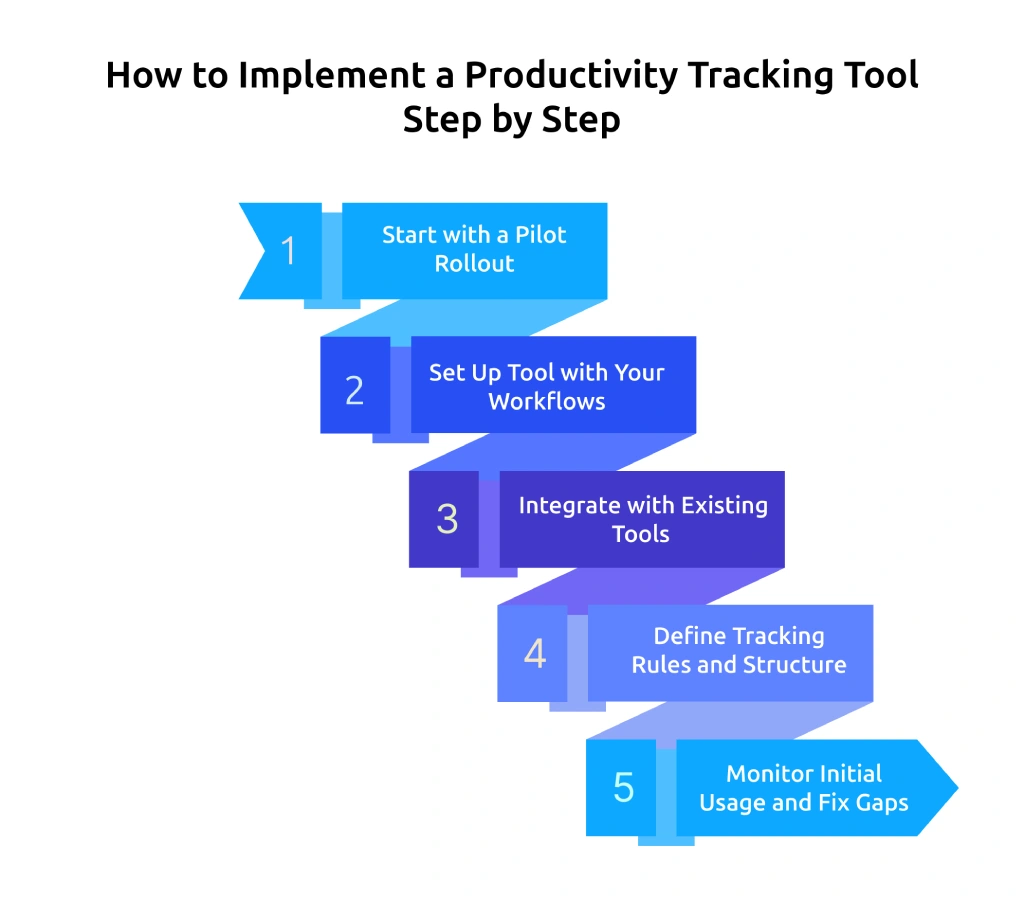
1. Start with a Pilot Rollout
Do not implement productivity tracking software across the entire team at once. Start with a small group or one team and observe how the tool works in real conditions. This helps you identify gaps, fix issues early, and refine the setup before a wider rollout.
2. Set Up the Tool with Your Workflows
Configure the productivity tracker for employees based on how your team already works. Map projects, tasks, and roles inside the system so tracking aligns with real workflows. A setup that matches daily work improves accuracy and reduces friction.
3. Integrate with Existing Tools
Connect your productivity tracking tool with tools your team already uses, such as project management or communication platforms. Integration reduces manual effort and keeps all work data connected in one place.
4. Define Tracking Rules and Structure
Set clear rules inside the system, so your team knows how to use the productivity tracking tool correctly. Define work hours, tracking categories, and how your team should log tasks in the system. A structured setup helps you track productivity consistently and keeps reports useful across teams. Also, define how you handle exceptions, such as breaks, offline work, or meetings, so the data reflects actual work patterns without confusion.
5. Monitor Initial Usage and Fix Gaps
After rollout, review how the tool is being used. Check if the data looks accurate and whether teams follow the process correctly. Early monitoring helps you adjust settings, fix inconsistencies, and improve usage.
What Should You Decide Before Rolling Out a Productivity Tracking Tool?
Before you roll out a productivity tracking tool, you need clarity on what type of data and insights you need from it. If you skip this step, you end up collecting data that does not help you make decisions. A clear setup helps you avoid confusion, improve adoption, and get useful insights from day one. Below are the key things you should define before implementation:
1. Define What Productivity Means For Your Team
Start by identifying what “productive work” looks like in your setup. For some teams, it may focus on task completion, while others may look at time spent or output quality. For example, a support team may track response time, while a development team may focus on task progress. This clarity helps you track employee productivity in a way that actually reflects performance.
2. Set Clear Goals for Tracking
Decide what you want to achieve with employee productivity tracking software. You might aim to improve timelines, reduce delays, or get better visibility into work. When goals stay clear, you avoid collecting unnecessary data and focus only on what supports decisions. This also makes it easier to measure whether the tool adds value.
3. Choose the Right Data to Track
Focus on productivity metrics that connect directly to work, such as time on tasks, app usage, and task progress. These metrics show how work happens and contributes to results. When you choose the right ones, your productivity tracking stays clear, relevant, and easy to act on.
4. Select a Tool That Fits Your Workflow
Choose a productivity tracking software that matches how your team already works. If your team uses project tools or communication platforms daily, pick a tool that integrates with them. This reduces friction and helps teams adapt faster instead of changing their entire workflow.
5. Decide How Tracking Will Work Day-to-Day
Plan how the productivity tracker for employees will fit into daily routines. Define when tracking starts, how your team records tasks, and how updates happen. For example, automatic tracking may work better for some teams, while manual updates may suit others. A clear process avoids confusion later.
5. Set Privacy Boundaries Before You Launch
Your team needs to know what you track, why you track it, who can access the data, and how you will use it. This step builds clarity and helps your team understand the purpose from the start.
Stop guessing how your team spends the workday.
Try Time Champ and get clear productivity data from day one.
How Can You Introduce Productivity Tracking Without Losing Trust?
Many teams already feel uncomfortable with workplace monitoring. In fact, 59% of employees worry about being monitored through tools like screen tracking or webcams. This shows how easily tracking can create resistance if you introduce it without clarity. The way you present and position the tool directly shapes how your team reacts to it.
1. Explain the Business Reason Clearly
Start by clearly communicating why you are introducing productivity tracking software. If the purpose is not explained upfront, your team may misunderstand its intent. Clearly explain what problem you want to solve, such as improving planning, balancing workloads, or reducing unnecessary follow-ups.
A message like this works well:
"We are rolling out a work productivity tracker to get better visibility into project time, workload distribution, and daily activity patterns. The goal is to improve planning and reduce unnecessary check-ins. This is not about watching every minute."
One clear message before launch reduces more resistance than any policy document written after.
2. Tell Your Team Exactly What You Will and Will Not Track
Do not leave any room for guesswork. Share a clear and simple breakdown before the employee productivity tracker goes live so your team understands the boundaries from the start.
What the Tool Tracks:
- Work hours and attendance to understand availability
- Active and idle time to see work patterns
- Apps and websites used during work hours to track work-related usage
- Task and project time to measure progress
- Productivity tracking categories such as productive, neutral, and non-productive
- Activity timelines and reports to review daily workflow
What You Should Not Track Without a Clear Reason:
- Private messages or personal emails
- Personal device activity outside work hours
- Non-work browsing after work hours
- Webcam feeds
- Passwords or personal login details
This list removes ambiguity. When your team knows the boundary, the employee productivity tracking software feels like a work tool, not surveillance.
3. Give Your Team Access to Their Own Data
When your team can view their own reports inside the productivity tracker, the approach changes. They stop feeling monitored and start using the tool to understand their own work patterns.
Self-Access Helps Your Team:
- Understand how they spend time across tasks and tools
- Identify and correct inaccurate time entries or app labels
- Participate in performance discussions using the same data you review
- Improve focus and output without waiting for feedback
This step makes tracking employee productivity feel more transparent and collaborative instead of one-sided.
4. Create a Clear Channel for Concerns and Feedback
Even with a transparent rollout, your team will have questions after the productivity tracker goes live. Some may notice incorrect app labels on their reports. Others may feel a specific metric does not reflect their actual work. Without a clear place to raise these concerns, doubt builds quietly.
Set Up a Simple Process Before Launch:
- Name one point of contact (a team lead or HR representative) for data-related questions
- Tell your team how to flag a report they believe is inaccurate
- Set a response window so concerns do not go unanswered
- Review flagged issues and correct them where valid
This does not need to be complicated. A shared form or a direct email address works fine.
How Does Time Champ Help You Track and Implement Productivity Tracking?
Time Champ is an employee monitoring software that helps you implement productivity tracking with a clear and structured approach. It tracks work hours, app and website usage, task activity, and idle time in real time, so you can understand how work happens across your team without relying on manual updates. The platform presents this data through dashboards and reports, which makes it easier to identify patterns, spot delays, and improve day-to-day workflow visibility.
It also simplifies the implementation process by aligning with your existing workflow. You can set up your workspace, add your team, define tracking categories, and start monitoring without complex steps. With real-time insights and clear reports, you can use Time Champ to improve planning, balance workloads, and make decisions based on actual work patterns instead of assumptions.
Conclusion
Implementing a productivity tracking tool works when you approach it with clarity, structure, and intent. You need to define what to track, set clear expectations, introduce it transparently, and follow a step-by-step rollout that fits your workflow. When you focus on the right setup and use the data to improve planning, workload balance, and decision-making, productivity tracking becomes a practical system that supports daily work instead of adding complexity.
Scattered updates and manual follow-ups slow your team down.
Switch to Time Champ and replace assumptions with accurate, actionable productivity data.

Thasleem Shaik


Table of Content
-
 What Is a Productivity Tracking Tool?
-
Why Should You Implement Productivity Tracking Software?
-
How to Implement a Productivity Tracking Tool Step by Step?
-
What Should You Decide Before Rolling Out a Productivity Tracking Tool?
-
How Can You Introduce Productivity Tracking Without Losing Trust?
-
How Does Time Champ Help You Track and Implement Productivity Tracking?
-
Conclusion
Related Blogs

Track the right remote worker productivity metrics to understand performance, improve output, and avoid micromanagement with clear insights.
Thasleem Shaik | Apr 24, 2026
Apply the OKR framework to boost employee productivity with clear goals, aligned teams, and measurable progress you can track weekly.
Guna Lakshmi | Apr 22, 2026
Learn what productivity intelligence is, why it
Shabana Shaik | February 11, 2026
Learn what workforce productivity is, key factors, metrics, and ways to measure and optimize it. Discover AI’s role in improving workforce efficiency.
Chetana Choudary | October 1, 2025
Learn how employee productivity monitoring software can boost your company with key features, usage tips, and advantages of using tools like Time Champ.
Tarun Kumar | June 24, 2024
Learn how to calculate and boost your Employee Productivity Ratio. Improve workplace efficiency and drive success with these practical tips.
Shabana Shaik | June 28, 2024


 4.7/5 avg.
Ready to Manage Your Workforce Smarter?
Join our family of 1500+ companies using smart insights to redefine workforces!

Free Trial
No Credit Card Required