How to Track Your Time Spent on Tasks: A Complete Guide
Learn how to track your time spent on tasks more accurately to improve billing and productivity with practical tracking methods and tools.

Many people track how many hours they work, but still struggle to understand where their time actually goes. Without task-level tracking, it becomes difficult to understand which tasks consume most of your time and where your productivity is actually going. Task tracking helps you track your time more accurately by measuring the time spent on individual tasks instead of simply tracking total hours worked.
To help you get started, this guide breaks down how to track your time spent on tasks, organize your work into trackable activities, and build a simple task tracking workflow that improves visibility and control over your daily work.
Why Task-Level Time Tracking Matters
Many people don’t realize how much time certain tasks actually consume until they start tracking them properly. Here are some important benefits of task-level time tracking and how it helps improve the way you work.
Improve Accuracy in Task-Based Billing
Accurate billing becomes easier when every task is tracked properly and recorded on time.
If you work with clients, task-level tracking helps you record billable hours more accurately and avoid missing important work activities. It also creates better transparency because clients can clearly see how time was spent across different tasks and projects. Using a dedicated time tracking tool can make this process much easier and more consistent.
Create More Reliable Task Time Estimates
Tracking task duration helps you build more realistic timelines and workload estimates.
When you regularly monitor how long recurring tasks take, you gain a clearer understanding of the time required for similar work in future projects. Over time, this improves deadline planning, workload distribution, and overall project accuracy while reducing unexpected delays.
Identify Tasks That Consume Excessive Time
Task-level tracking helps you discover where most of your work hours are actually going.
Meetings, revisions, emails, reporting, and administrative work can quietly consume a large part of the day without being noticed. Once you gain visibility into these patterns, it becomes easier to improve workflows, reduce repetitive work, and focus more on high-priority tasks.
Minimize Productivity Loss from Task Switching
Constantly switching between tasks can make it harder to stay focused and productive.
Tracking your work at the task level helps you understand how often interruptions and context switching affect your day. This visibility makes it easier to organize similar tasks together, create focused work sessions, and reduce unnecessary distractions that break concentration.

Did You Know?
Research by the American Psychological Association (APA) revealed that frequent task switching can consume up to 40% of your productive time, making it harder to stay focused and complete important work efficiently.
Build Smarter and More Realistic Project Plans
Task-level data helps you create more accurate schedules and project plans.
When you understand how long specific tasks actually take, you can allocate resources better, set realistic deadlines, and identify bottlenecks earlier. Instead of relying on guesswork, you can plan future projects using real performance data from previous tasks.
Struggling to understand where your work hours actually go?
Track every task accurately and manage productivity better with Time Champ.
A Step-by-Step Task Time Tracking Workflow
A structured workflow makes task tracking easier, more organized, and far more accurate. Instead of guessing how your time was spent at the end of the day, a proper workflow helps you capture task data consistently and turn it into useful insights. Here’s a simple step-by-step process you can follow.
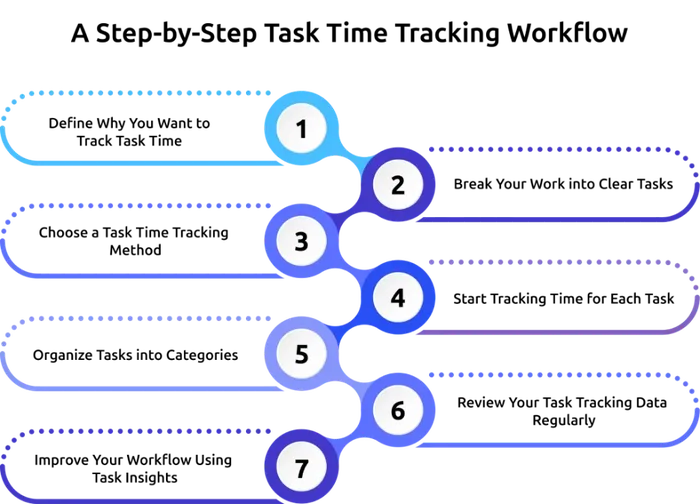
Step 1: Define Why You Want to Track Task Time
Before you start tracking, identify your main goal. Different goals require different levels of tracking detail.
For example:
- Freelancers may track tasks for accurate client billing
- Teams may track tasks to improve project planning
- You may use task data to monitor workloads
- Individuals may want better productivity visibility
When you clearly understand your objective, it becomes easier to decide what tasks to track and how detailed your tracking should be.
Step 2: Break Your Work into Clear Tasks
Task tracking works best when tasks are specific and measurable. Avoid using broad task names like “Project Work” because they don’t provide meaningful insights later.
Instead, create tasks with clear outcomes, such as:
- Design homepage wireframe
- Write a monthly performance report
- Review client feedback
- Conduct a team meeting
If a task is too large, divide it into smaller sub-tasks. This improves tracking accuracy and helps you identify which parts of a project consume most of the time.
Step 3: Choose a Task Time Tracking Method
The next step is selecting how you want to track your task time. Some people use manual methods like spreadsheets or timers, while others prefer automated time tracking software.
Common time tracking methods include:
- Manual timesheets
- Spreadsheet-based tracking
- Stopwatch or timer apps
- Automated task tracking software
Automated tools are often more effective because they reduce manual work and capture task activity more accurately in real time.
Also Read: Time Tracking Methods: Why They’re Crucial for Your Company
Step 4: Start Tracking Time for Each Task
Once your tasks are ready, begin tracking time as soon as you start working on a task. Stop the timer immediately after completing it or when switching to another activity.
Make sure each entry includes:
- Task name
- Project or client name
- Category
- Duration
- Notes if necessary
The biggest mistake people make is trying to remember their task time later in the day. Real-time tracking is always more accurate than memory-based tracking.
Step 5: Organize Tasks into Categories
Categorizing tasks helps you analyze how your time is distributed across different types of work. You can organize tasks into categories such as:
- Meetings
- Client work
- Administrative tasks
- Research
- Deep work
- Communication
Over time, category-level insights can reveal hidden productivity problems or excessive time spent on low-value activities.
Step 6: Review Your Task Tracking Data Regularly
Tracking data becomes valuable only when you review it consistently. Take some time every week to review your task reports and understand how your time was spent.
During your review, look for:
- Tasks that took longer than expected
- Frequent interruptions or task switching
- Repetitive low-value work
- Inaccurate project estimates
- Productivity gaps
These insights help you understand where improvements are needed.
Step 7: Improve Your Workflow Using Task Insights
The final step is to use your task data to make better decisions about your work. Task tracking becomes valuable when it helps you optimize workflows and manage time more efficiently.
Based on your insights, you may decide to:
- Reduce unnecessary meetings
- Batch similar tasks together
- Delegate repetitive work
- Adjust project timelines
- Improve task prioritization
- Create better schedules for focused work
Over time, consistent task tracking helps you build a more productive and organized workflow.
Finding it difficult to manage multiple tasks efficiently?
Simplify task tracking and improve workflow visibility with Time Champ.
Common Task Time Tracking Mistakes to Avoid
Even with the right tracking system, small mistakes can reduce the accuracy and usefulness of your task data. Avoiding these common issues can help you maintain cleaner reports, improve productivity, and make task tracking more effective over time.
Using Broad Task Names
Using broad task names like “Project Work” or “Office Tasks” makes it difficult to understand where your time is actually going.
Instead, create specific tasks with clear outcomes, such as “Prepare Client Presentation” or “Review Marketing Report.” Detailed task names provide more meaningful insights and improve reporting accuracy.
Forgetting to Track Interruptions
Interruptions like unexpected meetings, calls, messages, or quick requests often consume more time than people realize. If these interruptions are never tracked, your reports may show inaccurate productivity patterns.
Recording interruptions as separate tasks helps you understand what is affecting your focus and workflow.
Relying on Memory Instead of Real-Time Tracking
Many people wait until the end of the day to remember what they worked on. Unfortunately, memory-based tracking usually leads to missed tasks and inaccurate time entries.
Tracking tasks in real time is far more reliable because it captures work activity as it happens. Using automated task timers can make this process much easier.
Creating Too Many Small Tasks
Breaking work into tasks is important, but creating extremely small tasks can make tracking feel overwhelming and difficult to maintain consistently.
Instead of tracking every minor activity separately, group related small activities into broader categories when appropriate.
Not Reviewing Task Reports Regularly
Task tracking becomes valuable only when you review the data consistently. Simply collecting time entries without analyzing them limits the benefits of tracking.
Regular reviews help you identify time-consuming tasks, productivity gaps, inaccurate estimates, and workflow issues that may need improvement.
Track Task Time Effortlessly with Time Champ’s Task Timer
Managing task-level time tracking becomes much easier when you have a system that automatically records, organizes, and analyzes how your work hours are spent. Time Champ helps businesses and individuals manage task tracking, productivity monitoring, attendance tracking, reporting, and workforce visibility from a single platform.
For task-level time tracking specifically, Time Champ’s Task Timer helps you monitor how much time each task takes without adding unnecessary manual effort.
Key features of Time Champ that support efficient task tracking include:
- Real-Time Task Timers: Track every task with precision so you can understand exactly where your work hours are going.
- Productivity Tracking: Gain better visibility into work patterns and identify areas affecting team productivity.
- Automatic and Manual Tracking: Track task hours and employee attendance more accurately with flexible tracking options that fit different work styles and workflows.
- Detailed Timesheets and Productivity Insights: Access detailed reports to monitor performance and task progress.
- Idle Time Detection: Automatically detect inactive periods to maintain more accurate task tracking and improve productivity visibility.
- Workload Management: Understand workload distribution across your employees to avoid overburdening teams.
Tired of manually tracking tasks and work hours?
Automate task tracking and gain detailed productivity insights with Time Champ.
Conclusion
Tracking time spent on tasks helps you understand where your work hours are actually going and where improvements are needed. When you consistently monitor tasks, it becomes easier to plan projects better, reduce unnecessary work, improve productivity, and manage workloads more effectively.
Using a tool like Time Champ can simplify the entire process with features like real-time task timers, productivity tracking, workload management, and detailed task reports. With the right tracking system in place, staying organized and maintaining better control over your work becomes much easier.

Guna Lakshmi

Table of Content
 Why Task-Level Time Tracking Matters
- A Step-by-Step Task Time Tracking Workflow
- Common Task Time Tracking Mistakes to Avoid
- Track Task Time Effortlessly with Time Champ’s Task Timer
- Conclusion

Related Blogs

Struggling with addressing employee attendance issues? Learn the causes and solutions to improve attendance, increase productivity and create engaged workforce.
Guna Lakshmi | July 02, 2025
Top task management software tools that help organize work, streamline collaboration, improve productivity, enhance clarity, and simplify team workflows.
Thasleem Shaik | June 31, 2025
Learn how a task timer boosts productivity, simplifies billing, and helps you manage time effectively. Learn its benefits and tips to tackle challenges!
Jahnavi Pulluri | Oct 08, 2024
Curious about task management? Discover what it is, why it matters, along with its key benefits and proven best practices to stay organized and get more done.
Chetana Choudary | July 24, 2025
Use our effective task management strategies to stay organized, reduce stress, and boost team’s productivity by prioritizing tasks and managing time effectively.
Guna Lakshmi | July 01, 2025
Unleash methods and tips for employee task tracking to enhance productivity, with top tools for streamlining task management and improving team efficiency.
Chethana Choudary | July 24, 2025


 4.7/5 avg.
Ready to Manage Your Workforce Smarter?
Join our family of 1500+ companies using smart insights to redefine workforces!

Free Trial
No Credit Card Required