Suspicious Activity in the Workplace: Ways to Identify & Prevent
Learn how to identify suspicious activity in the workplace, take the right steps to address it, and protect your business from insider threats.

Nothing ruins your workday faster than finding out someone accessed confidential files, shared company data, or made suspicious transactions without anyone noticing. Fortunately, these incidents usually leave warning signs before they escalate. If you know what to look for, you can spot suspicious activity early and take action before it leads to fraud, data theft, or other security issues.
To help you protect your business from insider threats, this guide covers the warning signs of suspicious activity and the best ways to identify, report, and address them.
What Is Suspicious Activity in the Workplace?
Suspicious activity in the workplace includes any unusual action that could threaten your organization's security, operations, or reputation. It can include unauthorized access to confidential information, unusual system activity, data theft, fraud, policy violations, or any behavior that puts your people, assets, or business at risk.
These actions often start with small changes in behavior or work patterns that seem unusual. Paying attention to these warning signs helps you identify problems early and take action before they become more serious.

Did You Know?
According to Verizon's 2024 Data Breach Investigations Report, 68% of data breaches involved a human element, including errors, privilege misuse, or social engineering, highlighting the importance of identifying suspicious workplace activity early.
9 Signs of Suspicious Activity in the Workplace
Many workplace security incidents begin with small, unusual behaviors. Here are the common signs that may indicate suspicious activity.
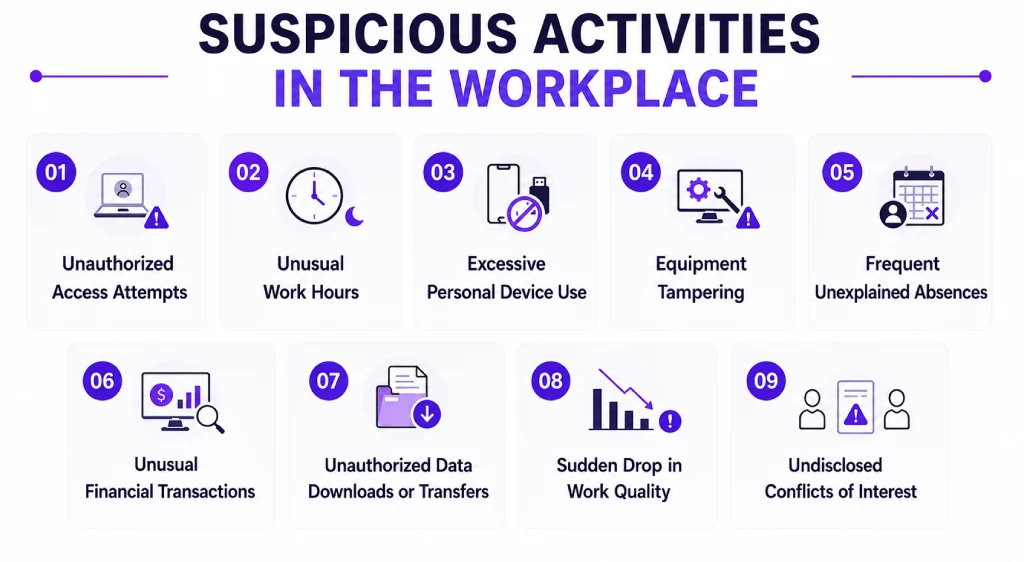
Unauthorized Access Attempts
Unauthorized access attempts occur when someone tries to access files, systems, applications, or areas they aren't permitted to use. These attempts may be intentional, such as trying to steal sensitive information, or they may result from someone misusing another person's login credentials. Even if no data is stolen, repeated unauthorized access attempts can be an early warning sign of insider threats or security breaches.
How to Identify Unauthorized Access Attempts
You can identify unauthorized access attempts by looking for unusual login or access patterns, such as:
- Multiple failed login attempts to company accounts or systems.
- Employees are trying to access confidential files or folders outside their job responsibilities.
- Login attempts from unfamiliar devices, locations, or IP addresses.
- Access to company systems outside normal working hours without a valid reason.
- Employees using another person's login credentials or sharing passwords.
- Repeated attempts to bypass security controls or permission settings.
Reviewing access logs, user permissions, and login history can help you determine whether the activity is accidental or requires immediate attention.
Did You Know?
Verizon's 2025 Data Breach Investigations Report found that 29% of breaches in the EMEA region originated from within organizations, with 19% caused by employee mistakes and 8% involving misuse of data or systems.
Unusual Work Hours
Working outside regular business hours isn't always suspicious. You may have employees working late to meet deadlines, support clients in different time zones, or follow flexible schedules. However, if you notice someone regularly accessing company systems or sensitive information at unusual hours without a clear reason, it could be a warning sign. When this behavior occurs alongside other unusual activities, it's worth taking a closer look.
How to Identify Unusual Work Hours
You can identify unusual work hours by watching for patterns such as:
- Regular logins late at night, early in the morning, or on weekends without work-related requirements.
- Employees accessing sensitive files or systems outside their normal schedules.
- Long periods of activity after everyone else has logged off.
- Frequent after-hours access to confidential data without manager approval.
- Sudden changes in an employee's work schedule without explanation.
- Repeated after-hours activity combined with large file downloads or transfers.
Before treating unusual work hours as suspicious, consider legitimate reasons such as overtime, project deadlines, flexible work arrangements, or different time zones. If the activity seems inconsistent with the employee's responsibilities or occurs repeatedly without a valid explanation, review access logs and discuss the situation with the employee or their leads before taking further action.
Looking for a smarter way to identify unusual work activity?
Time Champ gives you real-time visibility into employee work patterns, making it easier to detect suspicious activity.
Excessive Personal Device Use
Personal devices have become a normal part of the workplace, especially with hybrid and remote work. However, frequent use of personal laptops, smartphones, or USB drives to access company resources can create security risks. If you notice employees relying on personal devices to store, transfer, or access sensitive company information, it's worth checking whether they're following your organization's security policies.
How to Identify Excessive Personal Device Use
You can identify excessive personal device use by looking for signs such as:
- Frequent use of personal laptops, tablets, or smartphones to access company systems.
- Connecting personal USB drives or external storage devices to company computers.
- Copying or transferring sensitive files to personal devices or cloud storage accounts.
- Installing unauthorized applications or software on company-owned devices.
- Regular file transfers between company systems and personal devices without approval.
- Accessing confidential information from unsecured or unknown devices.
Using a personal device doesn't always indicate suspicious activity. Many organizations have Bring Your Own Device (BYOD) policies that allow employees to use their own devices for work. However, if you notice repeated policy violations or unusual data access through personal devices, review the activity to determine whether it has a legitimate business purpose.
Equipment Tampering
Equipment tampering involves intentionally altering, damaging, or interfering with company equipment, devices, or security systems. It can affect computers, surveillance cameras, access control systems, networking equipment, or other workplace assets. While some equipment issues happen because of normal wear and tear, repeated or unexplained changes should never be ignored. Identifying tampering early helps you protect company assets, reduce security risks, and avoid costly disruptions.
How to Identify Equipment Tampering
You can identify equipment tampering by looking for signs such as:
- Missing, damaged, or disconnected security cameras or access control devices.
- Computers, servers, or other equipment showing signs of physical damage without a clear explanation.
- Unauthorized hardware, such as USB devices or external storage, connected to company computers.
- Security settings or system configurations changed without approval.
- Equipment repeatedly malfunctions after being used by the same individual.
- Seals, locks, or security labels that appear broken or removed.
- Unexplained changes to network devices, cables, or hardware connections.
Not every equipment issue is the result of tampering. Hardware failures and accidental damage can also occur. If you notice unusual changes or repeated incidents, inspect the equipment, review recent activity, and verify whether the changes were authorized before taking further action.
Frequent Unexplained Absences
Employees may occasionally take unplanned leave because of illness, personal emergencies, or other valid reasons. However, if you notice a pattern of frequent unexplained absences, especially during important projects, audits, or after suspicious incidents, it may be worth paying closer attention. While absences alone don't indicate misconduct, they can become a warning sign when combined with other unusual behaviors.
How to Identify Frequent Unexplained Absences
You can identify frequent unexplained absences by looking for signs such as:
- Repeated absences without prior notice or a valid explanation.
- Frequent sick leave before important meetings, audits, or project deadlines.
- A pattern of arriving late or leaving early without approval.
- Regular absences following security incidents or policy violations.
- Taking leave immediately after accessing sensitive information or completing critical tasks.
- Attendance patterns that suddenly change without an obvious reason.
Not every absence is suspicious. Employees may have genuine personal or medical reasons that require time away from work. Instead of making assumptions, review attendance records, look for repeated patterns, and consider whether the absences are linked to other unusual activities before deciding on the next steps.
Unusual Financial Transactions
Unusual financial transactions can be an early sign of fraud, misuse of company funds, or unauthorized financial activity. Unusual transactions aren't always suspicious. They may result from accounting errors or normal business expenses. Reviewing these activities early helps you prevent financial losses and maintain the integrity of your organization's financial records.
How to Identify Unusual Financial Transactions
You can identify unusual financial transactions by looking for signs such as:
- Expense claims with unusually high amounts or missing supporting documents.
- Repeated payments to unfamiliar vendors or accounts.
- Duplicate invoices or multiple payments for the same expense.
- Large transactions that don't match an employee's role or responsibilities.
- Frequent reimbursements for similar expenses within a short period.
- Changes to banking details or payment information without proper authorization.
- Financial records that contain missing, altered, or inconsistent information.
Not every unusual transaction indicates fraud. It could result from a genuine business need, a billing error, or an administrative mistake. However, document fraud may involve manipulated records that make suspicious transactions appear legitimate. Before taking action, review the supporting documents, verify approvals, and confirm the reason behind the transaction. If the activity remains unexplained or appears inconsistent with company policies, conduct a more detailed review.
Unauthorized Data Downloads or Transfers
Sensitive company data is one of your organization's most valuable assets. When employees download, copy, or transfer that data without proper authorization, it can increase the risk of data leaks, intellectual property theft, or compliance violations. While data transfers are a normal part of many jobs, unusual or excessive downloads should always be reviewed to make sure they serve a legitimate business purpose.
How to Identify Unauthorized Data Downloads or Transfers
You can identify unauthorized data downloads or transfers by looking for signs such as:
- Large volumes of files were downloaded within a short period.
- Sensitive documents copied to personal USB drives or external storage devices.
- Company files sent to personal email accounts or unauthorized cloud storage services.
- Downloads of confidential information unrelated to an employee's role.
- Frequent file transfers outside normal working hours.
- Attempts to disable security controls before downloading or transferring files.
- Repeated access to confidential folders followed by file exports or downloads.
Not every large download is suspicious. Employees may need to transfer files for approved projects, backups, or collaboration. Before taking action, review the type of data involved, confirm whether the transfer was authorized, and check if it aligns with the employee's responsibilities. A clear data loss prevention strategy makes these reviews much easier to carry out consistently.
Worried about unauthorized file transfers?
Detect suspicious uploads and downloads instantly with Time Champ and protect your sensitive business data.
Sudden Drop in Work Quality
Everyone has an occasional off day, but a consistent decline in an employee's work quality can be a sign that something isn't right. Missed deadlines, frequent mistakes, reduced productivity, or a lack of attention to detail may indicate personal challenges, disengagement, or even suspicious activity. When these changes appear suddenly and occur alongside other warning signs, it's worth taking a closer look.
How to Identify a Sudden Drop in Work Quality
You can identify a sudden drop in work quality by looking for signs such as:
- Frequent mistakes in tasks that were previously completed accurately.
- Missed deadlines without a clear explanation.
- A noticeable decline in productivity or work output.
- Poor attention to detail or incomplete assignments.
- Reduced participation in meetings, projects, or team discussions.
- Increased customer complaints or quality issues related to the employee's work.
- A sudden lack of interest in responsibilities that were previously handled well.
A drop in work quality doesn't always indicate suspicious activity. Personal issues, workload, stress, or burnout can also affect performance. Before drawing conclusions, speak with the employee, understand what may be causing the change, and look for other unusual behaviors that could indicate a larger issue.
Undisclosed Conflicts of Interest
A conflict of interest occurs when an employee's personal interests interfere with their professional responsibilities. This can happen when someone makes decisions that benefit themselves, a family member, or another business instead of acting in your organization's best interests. If these relationships or interests aren't disclosed, they can lead to unfair decisions, financial losses, or reputational damage.
How to Identify Undisclosed Conflicts of Interest
You can identify undisclosed conflicts of interest by looking for signs such as:
- Recommending or approving the same vendor without a clear business reason.
- Awarding contracts to companies owned by friends or family members.
- Making purchasing or hiring decisions that appear biased or unfair.
- Working for a competitor or running a side business that creates a conflict with company responsibilities.
- Accepting expensive gifts, favors, or incentives from vendors or clients without disclosure.
- Withholding information about personal relationships that could influence business decisions.
- Frequently making decisions that benefit personal interests over the organization's interests.
Having outside interests doesn't always create a conflict of interest. However, if those interests influence workplace decisions or remain undisclosed, they can affect fairness, trust, and compliance. Encourage employees to disclose potential conflicts early so you can review the situation and manage any risks appropriately.
Behavioral Indicators vs. Technical Indicators
Behavioral and technical indicators highlight different warning signs. Here's how they differ and what each one can reveal.
| Behavioral Indicators | Technical Indicators |
|---|---|
| Sudden changes in attitude or personality | Multiple failed login attempts |
| Frequent conflicts with coworkers or managers | Unauthorized access to confidential files or systems |
| Frequent unexplained absences or repeated lateness | Large or unusual file downloads and data transfers |
| Sudden drop in work quality or productivity | Logins from unfamiliar devices, locations, or IP addresses |
| Reluctance to take time off or let others review their work | Accessing sensitive data outside normal working hours |
| Unusual secrecy about work or daily activities | Connecting unauthorized USB drives or external storage devices |
| Ignoring company policies or standard procedures | Installing unauthorized software or applications |
| Undisclosed conflicts of interest | Attempts to disable security tools or change system settings without approval |
| Unexplained financial stress or sudden lifestyle changes | Unusual network activity or repeated access to restricted systems |
Many of these behavioral patterns overlap with what's typically seen from a malicious insider, so tracking both indicator types together gives you a fuller picture.
The Impact of Suspicious Activity in the Workplace
Suspicious activity can affect many parts of your organization if you don't identify it early. It can impact your security, finances, employees, and daily operations. Here are the most common ways suspicious activity can affect your workplace.
Security and Data Breaches
Unauthorized access, data theft, or policy violations can put your organization's sensitive information at risk. Confidential customer data, financial records, and business information may be exposed, leading to security breaches and compliance issues. The longer these activities go unnoticed, the greater the potential damage.
Financial Losses
Suspicious activity can result in direct and indirect financial losses. Fraudulent transactions, misuse of company resources, data recovery costs, legal expenses, and regulatory penalties can quickly add up. Identifying suspicious activity early helps you reduce these costs before they escalate.
According to the Ponemon Institute's 2025 Cost of Insider Risks report, 55% of insider security incidents are caused by employee negligence. These incidents cost organizations an average of $8.8 million annually to remediate.
Reduced Employee Trust and Morale
When suspicious activity occurs, it can affect the entire workplace. Employees may lose confidence in the organization's ability to maintain a safe and fair work environment. This can reduce collaboration, lower morale, and make employees less likely to report concerns in the future.
Operational Disruptions
Investigating suspicious activity takes valuable time and resources away from your core business operations. While resolving the issues, your team can delay projects, interrupt workflows, and shift their focus away from business priorities while resolving the issue. In serious cases, normal business operations may come to a temporary halt.
Damage to Business Reputation
A security incident or workplace fraud can harm your organization's reputation. Customers, partners, and stakeholders may lose confidence in your ability to protect sensitive information and maintain ethical business practices. Rebuilding trust often takes much longer than preventing incidents.
Legal and Compliance Risks
If suspicious activity leads to data breaches, fraud, or regulatory violations, your organization may face legal action, financial penalties, or compliance investigations. Following clear workplace policies and responding promptly to suspicious behavior helps you reduce these risks and meet your legal obligations.
Don't wait for suspicious activity to disrupt your business.
Use Time Champ to strengthen workplace security and keep your business protected from insider threats.
How to Respond to Suspicious Activity in the Workplace
Once you identify suspicious activity, taking the right action becomes your next priority. A well-planned response helps you manage the situation effectively and reduce the risk of further damage.
Here are six practical steps you can follow to respond to suspicious activity while protecting your workplace and treating everyone fairly.
Step 1: Establish Clear Policies and Reporting Procedures
The best way to handle suspicious activity is to prepare before it happens. Create clear workplace policies that explain what suspicious activity is, how employees should report it, and who is responsible for handling reports. When everyone understands the process, you can respond more quickly and consistently. A documented insider threat program is a good foundation for this.
Step 2: Assess and Categorize the Activity
Not every unusual action is suspicious, so take time to understand the situation before making decisions. Review the available information, identify what happened, and determine whether the activity is a policy violation, a security concern, or simply an honest mistake. This helps you decide the right course of action.
Step 3: Investigate with the Right Teams
If the activity requires further review, involve the appropriate teams such as HR, IT, security, or finance, depending on the nature of the incident. Gather evidence, review system records, and speak with the people involved when necessary. The right insider threat detection tools can make this process faster and more reliable. Throughout the investigation, remain objective and maintain confidentiality.
Step 4: Contain and Mitigate the Risk
If the suspicious activity could harm your organization, act quickly to reduce the impact. Depending on the situation, you may need to restrict system access, secure sensitive data, temporarily suspend user accounts, or prevent further unauthorized activity. Taking immediate action can help stop the issue from escalating while the investigation continues.
Step 5: Review the Incident and Improve Policies
Once you've resolved the issue, review what happened and identify why it occurred. Look for gaps in your security measures, workplace policies, or reporting procedures, then update them where needed. Sharing key lessons with your employees can also help prevent similar incidents in the future.
Step 6: Implement Continuous Monitoring
Preventing suspicious activity requires ongoing attention. Regularly review employee activity, system access, and security logs to identify unusual patterns early. Combining clear policies, employee awareness, and workplace monitoring tools helps you detect potential risks before they become serious problems.
How Time Champ Detects Suspicious Activity
Detecting suspicious activity manually can be challenging, especially when you're managing multiple employees, devices, and projects. With the right employee monitoring and time tracking solution like Time Champ, you can gain better visibility into workplace activities and identify suspicious behavior more effectively.
It helps you detect unusual patterns early, make informed decisions based on real-time insights, and reduce the risk of security incidents before they escalate.
Activity Monitoring
Gain complete visibility into employee activities, including application usage, website visits, and work patterns, to quickly identify unusual behavior.
Suspicious Activity Detection
Automatically identify abnormal employee behavior by comparing current activities with normal work patterns and highlighting unusual events.
Real-Time Alerts
Receive instant notifications whenever suspicious activities or policy violations are detected, allowing you to take immediate action.
Data Loss Prevention
Protect sensitive business information by monitoring file transfers, restricting unauthorized device access, and preventing data leaks.
Reports and Insights
Access detailed reports and activity logs that help you review incidents, analyze trends, and make informed security decisions.
Ready to strengthen your workplace security?
Start your free Time Champ trial today and protect your business with real-time employee activity insights.
Conclusion
Identifying suspicious activity early is the key to protecting your organization from security risks, fraud, and data breaches. Recognizing the warning signs and following a clear response process can help you address potential issues before they become serious problems. To make the process even easier and more accurate, use an employee activity monitoring solution like Time Champ.
Start your free Time Champ trial and detect suspicious activity today before it becomes tomorrow's problem.

Guna Lakshmi

Table of Content
 What Is Suspicious Activity in the Workplace?
- 9 Signs of Suspicious Activity in the Workplace
- The Impact of Suspicious Activity in the Workplace
- How to Respond to Suspicious Activity in the Workplace
- How Time Champ Detects Suspicious Activity
- Conclusion
Instant Signup
Thank you for your request!
We have received your signup request and our team will get back to you soon. In the meantime, you can book a demo to see Time Champ in action.
Book a DemoFree trial. No credit card required. Prefer a walkthrough? Book a demo.
Related Blogs

Protect your business from insider risks with insider threat prevention best practices for monitoring, access control, employee security, and data protection.
Guna Lakshmi | May 08, 2026
Protect your business from BYOD security risks like data breaches and phishing. Learn practical ways to secure employee devices and reduce security threats.
Guna Lakshmi | May 07, 2026
Stealth tracking can improve visibility, but it also raises legal and trust concerns. Learn when it works and when transparent monitoring is the right choice.
Guna Lakshmi | May 06, 2026
Learn the pros and cons of employee monitoring and discover when monitoring improves productivity and when it creates workplace risks.
Guna Lakshmi | May 06, 2026
Explore insider threat mitigation strategies to build a risk reduction program with UEBA, response playbooks, KPIs, and recovery plans for modern teams.
Anjali | May 08, 2026
Your perimeter won't stop insiders. Learn how real-time insider threat monitoring, anomaly detection, SIEM, and response workflows work together to prevent risk.
Jahnavi Pulluri | Apr 14, 2026


 4.7/5 avg.
Ready to Manage Your Workforce Smarter?
Join our family of 1500+ companies using smart insights to redefine workforces!

Free Trial
No Credit Card Required