Insider Threat Prevention: 20 Best Practices to Implement
Protect your business from insider risks with insider threat prevention best practices for monitoring, access control, employee security, and data protection.

Your biggest security risk may not come from outside hackers. It could come from someone inside your organization who already has access to your systems and data.
Employees, contractors, or partners can intentionally or accidentally expose sensitive information, leading to financial losses, compliance issues, and reputational damage. Remote and hybrid workplaces also face growing BYOD security risks that can expose sensitive company data when no one monitors devices properly.
That is why insider threat prevention is essential. You need strong access controls, employee awareness, and proactive monitoring to stop risks before they turn into breaches.
In this guide, you will learn 20 best practices that help you protect sensitive data and build a more secure workplace.
What Is Insider Threat Prevention?
Insider threat prevention is the process of reducing the risk of security threats that come from people inside your organization. These threats may involve employees, contractors, vendors, or business partners who already have access to company systems and data.
Some employees may accidentally expose sensitive information by clicking phishing links, using weak passwords, or sharing files insecurely. Others may misuse access privileges for personal gain or malicious purposes.
Most insider threats fall into three categories
- Malicious insiders who intentionally steal, leak, or misuse company data
- Negligent insiders who expose data through careless actions or poor security habits
- Compromised insiders whose accounts get hijacked by cybercriminals
Insider threat prevention stops these risks through monitoring, access control, training, and policy enforcement. It combines monitoring, access control, employee training, and security policies to help you detect suspicious behavior early and protect critical business data.

Did You Know?
Microsoft research shows that multi-factor authentication can block more than 99.2% of account compromise attacks.
Why Insider Threat Prevention Matters
Insider threats can affect every part of your organization, from operations and finances to customer trust and compliance. Since insiders already have authorized access, their actions are often harder to detect than external attacks.
A single insider incident can expose confidential data, interrupt business operations, and create legal or regulatory problems. In industries that handle sensitive customer information, the impact can become even more severe.
Insider threat prevention matters because it helps you:
- Protect sensitive business and customer data
- Reduce the risk of financial losses
- Improve compliance with security regulations
- Detect unusual employee activity early
- Prevent unauthorized access and data leaks
- Build a stronger security culture across your organization
Modern workplaces also face new risks from AI-powered tools, remote work environments, and cloud-based collaboration platforms. Employees can now access company systems from multiple devices and locations, which increases the attacks. Without proper monitoring and security controls, small security gaps can quickly turn into major incidents.
Worried about hidden insider risks in your workplace?
See how Time Champ helps you monitor activity and detect insider threats early. Sign Up for Free Book Demo
20 Best Practices for Insider Threat Prevention
Insider threats can come from malicious actions, human errors, or compromised accounts. The following best practices help you improve visibility, strengthen security, detect suspicious activity early, and protect sensitive business data more effectively.
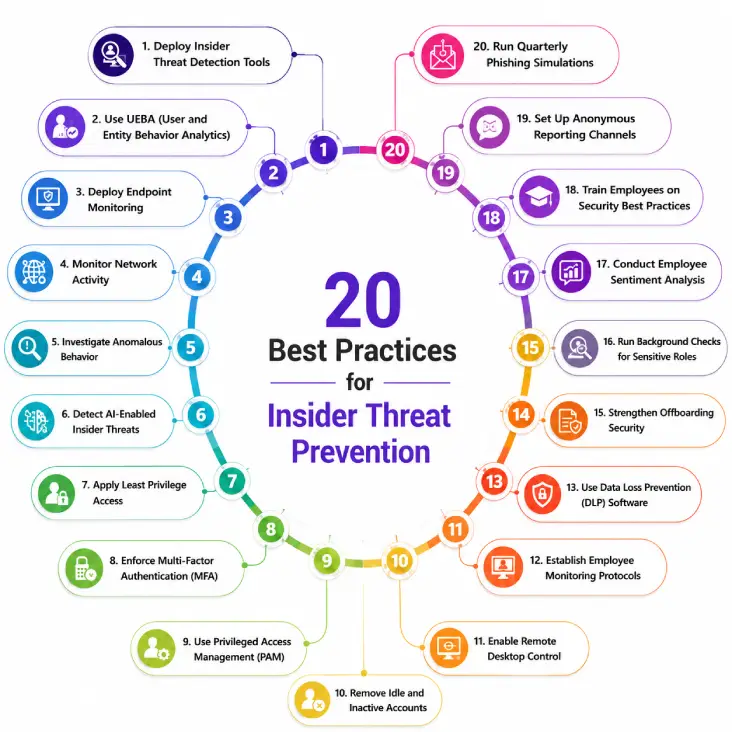
1. Deploy Insider Threat Detection Tools
You cannot prevent insider threats if you cannot see suspicious activity early. Insider threat detection tools help you monitor user behavior, detect unusual actions, and identify security risks before they escalate.
These tools give you visibility into employee activity, file access, application usage, and system behavior. They also help your security team investigate incidents faster and reduce response time.
Choose tools that provide real-time alerts, activity tracking, audit trails, and anomaly detection so you can respond quickly to potential threats.
2. Use UEBA (User and Entity Behavior Analytics)
UEBA helps you detect unusual user behavior by analyzing patterns across devices, applications, and systems. Instead of relying only on static rules, UEBA learns what normal behavior looks like and flags suspicious activity automatically.
For example, if an employee suddenly downloads large amounts of sensitive data at unusual hours, UEBA can trigger alerts immediately.
This approach catches insider threats traditional security tools miss.
3. Deploy Endpoint Monitoring
Endpoint monitoring helps you track activity across laptops, desktops, and other company devices. It gives you visibility into app usage, file transfers, USB activity, and login behavior.
This helps you identify risky actions such as unauthorized downloads, suspicious software installations, or attempts to transfer sensitive files outside the organization.
Strong endpoint monitoring also supports compliance and improves incident investigations. You can also invest in advanced endpoint security solutions to improve device-level protection and threat detection.
4. Monitor Network Activity
Network monitoring helps you detect unusual traffic patterns, unauthorized connections, and suspicious data transfers.
For example, large outbound file transfers, repeated login failures, or access attempts from unfamiliar locations may indicate insider risks. Monitoring network activity allows you to identify threats early and reduce the chances of data exfiltration.
It also helps you maintain better visibility across remote and hybrid work environments. Using proper network traffic monitoring practices can help you identify suspicious activity before sensitive data leaves your systems.
5. Investigate Anomalous Behavior
Unusual behavior often appears before a major insider incident happens. Employees accessing systems outside their normal role, downloading excessive files, or logging in at unusual times may signal a potential threat.
You should investigate these anomalies quickly instead of ignoring them as isolated incidents. Early investigation helps you confirm whether the behavior is harmless or a serious security risk.
The faster you respond, the lower the chance of major damage.
6. Detect AI-Enabled Insider Threats
AI tools have improved productivity, but they also introduce new insider risks. Employees may unknowingly share confidential information with AI platforms or use AI-generated phishing attacks and deepfake content maliciously.
You should monitor AI tool usage, set clear policies for approved AI platforms, and restrict the sharing of sensitive company data with external AI systems. The growing use of AI tools in workplaces has also increased concerns around data leakage and AI-assisted phishing attacks.
AI-related insider threats will continue growing, so proactive monitoring and policy enforcement are essential. The increasing use of AI tools in workplaces also creates new concerns around data leakage and unauthorized information sharing.
7. Apply Least Privilege Access
Employees should only have access to the systems and data they need for their roles. This principle is called least privilege access.
Limiting unnecessary access reduces the chances of data misuse, accidental exposure, and unauthorized activity.
You should regularly review user permissions and remove outdated or excessive access rights to minimize security risks.
8. Enforce Multi-Factor Authentication (MFA)
Passwords alone are no longer enough to protect sensitive systems. Multi-factor authentication adds an extra layer of security by requiring users to verify their identity using additional methods.
Even if attackers steal login credentials, MFA helps prevent unauthorized access to company accounts and applications.
Enable MFA across email systems, cloud apps, VPNs, and all critical business platforms.
9. Use Privileged Access Management (PAM)
Privileged accounts have access to highly sensitive systems and data. If these accounts are misused, the damage can be severe.
Privileged Access Management helps you control, monitor, and secure high-level access across your organization. It allows you to limit admin privileges, track privileged sessions, and reduce unauthorized access risks.
PAM also improves accountability by maintaining detailed access logs and audit trails.
10. Remove Idle and Inactive Accounts
Unused accounts create unnecessary security risks. Former employees, inactive contractors, or forgotten accounts can become easy targets for attackers.
Regularly review all user accounts and immediately disable accounts that are no longer needed.
This simple step reduces unauthorized access opportunities and strengthens overall security hygiene. It also helps you maintain better control over who can access sensitive systems and business data. Setting automated account review schedules can further reduce the chances of overlooked inactive accounts.
11. Enable Remote Desktop Control
Remote desktop monitoring tools help your IT and security teams manage devices securely, especially in remote and hybrid work environments.
With proper controls in place, you can monitor remote sessions, restrict unauthorized access, and quickly respond to suspicious activity.
Secure remote desktop access also helps prevent attackers from exploiting unmanaged remote connections. You should limit remote access permissions only to authorized employees and use secure authentication methods to reduce security risks further.
12. Establish Employee Monitoring Protocols
Employee monitoring helps you understand how company systems and data are being used. However, monitoring should always remain transparent, ethical, and policy-driven.
Clear monitoring protocols help employees understand what activities are monitored, why monitoring exists, and how the data is used.
Transparent monitoring builds trust while improving visibility into potential insider risks. Well-defined employee monitoring laws also help your organization stay compliant with privacy and workplace regulations.
Need better visibility into suspicious employee activity?
Detect insider risks earlier with smarter employee monitoring and activity insights from Time Champ.
13. Use Data Loss Prevention (DLP) Software
Data loss prevention software helps you prevent sensitive data from leaving your organization without authorization. It can detect and block risky actions such as unauthorized file sharing, external uploads, and suspicious downloads.
DLP tools also help you classify sensitive information and apply protection policies automatically.
This reduces the chances of accidental leaks and intentional data theft. Strong DLP policies also help you monitor how employees interact with confidential files across cloud apps, emails, and external storage devices.
14. Create a Data Handling Policy
A strong data handling policy explains how employees should access, store, share, and protect company data. Without clear guidelines, employees may unknowingly expose sensitive information through insecure practices.
Your policy should define:
- Which data is sensitive
- Who can access it
- Approved sharing methods
- Storage requirements
- Security responsibilities
15. Strengthen Offboarding Security
Offboarding employees without proper security controls creates major insider risks. Former employees may still retain access to systems, applications, or sensitive files if you don't revoke accounts immediately.
You should revoke access immediately when employees leave the organization. This includes email accounts, cloud apps, VPNs, shared drives, and internal systems.
A secure offboarding process reduces the risk of unauthorized access after departure. You should also review the employee’s recent activity and recover company-owned devices before the offboarding process is completed. A secure offboarding process is also an important part of managing the overall employee lifecycle effectively.
16. Run Background Checks for Sensitive Roles
Employees working with sensitive systems, financial data, or confidential information should go through proper background verification.
Background checks help you identify potential risks before granting high-level access.
For critical roles, consider periodic reviews to ensure ongoing trust and compliance. This process becomes especially important for employees handling customer data, financial records, or privileged system access.
17. Conduct Employee Sentiment Analysis
Disengaged or frustrated employees may become higher insider risk candidates over time. Employee sentiment analysis helps you identify workplace concerns early and improve employee experience before problems escalate.
You can gather feedback through surveys, one-on-one discussions, and engagement monitoring.
A supportive work environment reduces the likelihood of malicious insider behavior. Employees who feel heard and supported are also more likely to follow security policies and report suspicious activity responsibly.
18. Train Employees on Security Best Practices
Many insider threats happen because employees are unaware of security risks. Regular training helps your workforce recognize threats and follow safer security practices. Your training should cover:
- Phishing attacks
- Password security
- Safe file sharing
- AI tool risks
- Data protection policies
- Remote work security
Security awareness creates a stronger first line of defense. Ongoing training sessions also help employees stay updated on emerging cyber threats and changing security policies. Training employees to recognize common phishing attempt indicators can significantly reduce the risk of compromised accounts.
19. Set Up Anonymous Reporting Channels
Employees often notice suspicious behavior before security teams do. Anonymous reporting channels encourage employees to report concerns without fear of retaliation.
These channels help you detect insider threats earlier and build a culture of accountability and trust.
Make reporting simple, secure, and accessible for all employees. Encouraging open communication also increases employee confidence in your organization’s security and compliance efforts.
20. Run Quarterly Phishing Simulations
Phishing attacks remain one of the biggest causes of compromised insider accounts. Running phishing simulations helps employees recognize suspicious emails and improve their response to cyber threats.
Regular testing also helps you measure the effectiveness of your security awareness training and identify areas that need improvement.
Employees who practice identifying phishing attempts are less likely to fall for real attacks. Over time, phishing simulations also help you build stronger security habits and improve overall employee awareness.
The Insider Threat Prevention Framework
Insider threat prevention works best when you follow a structured security framework instead of relying on isolated security measures. A clear framework helps you identify risks early, improve visibility, and respond to suspicious activity before it turns into a serious incident.
You can build a stronger insider threat prevention strategy by focusing on four key stages:
- Define
Start by identifying what insider threats look like in your organization. Define which systems, applications, and data are most sensitive and create clear security policies around them. You also need to establish employee access rules, acceptable use policies, and reporting procedures so everyone understands their security responsibilities. - Detect
Use monitoring tools and security systems to detect suspicious behavior in real time. This includes endpoint monitoring, UEBA, network monitoring, and data loss prevention tools. Early detection helps you identify unusual activity such as unauthorized file access, abnormal login behavior, or suspicious downloads before major damage occurs. - Assess
Not every alert represents a serious insider threat. Your security team should review suspicious activity carefully to determine whether the behavior is accidental, negligent, or malicious. A proper assessment process helps you reduce false alarms and focus on real risks that require immediate attention. - Manage
Once you identify an insider threat, you need a clear response plan. This includes restricting access, containing the incident, investigating the activity, and improving security controls to prevent similar incidents in the future. Regular reviews and policy updates also help you strengthen your insider threat prevention strategy over time.
How Time Champ Helps with Insider Threat Prevention
Preventing insider threats becomes much easier when you have clear visibility into employee activity, system usage, and unusual behavior patterns. Time Champ helps you reduce insider risks with better visibility into employee activity, productivity patterns, and suspicious behavior.
With Time Champ, you can:
- Monitor application and website usage in real time
- Track unusual activity patterns across devices
- Detect unauthorized access attempts early
- Improve endpoint visibility for remote and hybrid teams
- Maintain audit trails for compliance and investigations
- Monitor productivity while improving accountability
Time Champ also helps you create transparent monitoring practices by giving employees and managers visibility into work activity and system usage. This balance between visibility and accountability helps you improve security without disrupting employee trust.
Want to prevent insider threats before they disrupt your business?
See how Time Champ helps you detect suspicious activity and protect sensitive business data.
Conclusion
Insider threats can come from intentional attacks, human errors, or compromised employee accounts. Since insiders already have access to your systems and data, even small security gaps can create serious risks for your organization. Start by improving visibility into employee activity, strengthening access management, and building a security-aware workplace culture. A proactive insider threat prevention strategy helps you protect sensitive business data, improve compliance, and create a safer work environment for your organization.

Guna Lakshmi

Table of Content
 What Is Insider Threat Prevention?
- Most insider threats fall into three categories:
- Why Insider Threat Prevention Matters
- 20 Best Practices for Insider Threat Prevention
- The Insider Threat Prevention Framework
- How Time Champ Helps with Insider Threat Prevention
- Conclusion

Related Blogs
Learn what an Insider Threat Program is and how it helps protect data from internal risks. Get key strategies to safeguard your organization effectively.
Sai Keerthi Uppala | Mar 12, 2025
Discover effective insider threat mitigation strategies to protect your organization from internal risks and minimize vulnerabilities.
Thasleem Shaik | Jan 22, 2025
Your perimeter won't stop insiders. Learn how real-time insider threat monitoring, anomaly detection, SIEM, and response workflows work together to prevent risk.
Jahnavi Pulluri | Apr 14, 2026
Learn what unintentional insider threats are and how to prevent them. Discover simple steps to protect your company from accidental security risks.
Jahnavi Pulluri | Jan 21, 2025
Identify key insider threat indicators to safeguard your business. Spot potential risks early to prevent security breaches and protect sensitive data.
Sai Keerthi Uppala | Jan 21, 2025
Find the best Insider Threat Detection Tools for 2026. Compare features, pricing, pros & cons to reduce internal risk and secure workforce activity data.
Tarun Kumar | Apr 02, 2026


 4.7/5 avg.
Ready to Manage Your Workforce Smarter?
Join our family of 1500+ companies using smart insights to redefine workforces!

Free Trial
No Credit Card Required