Key BYOD Security Risks and How to Prevent Them
Protect your business from BYOD security risks like data breaches and phishing. Learn practical ways to secure employee devices and reduce security threats.

Your employees use phones, tablets, laptops, and personal computers every day to stay connected and get work done faster. While this flexibility improves productivity, it also exposes your business to serious BYOD security risks that can quietly grow until a breach happens.
One unsecured device can expose your customer data, passwords, financial records, and internal systems. As remote and hybrid work continue to grow, managing these risks becomes more challenging. The good news is that you can reduce most BYOD security risks with the right strategy and security controls.
In this guide, you will learn the biggest BYOD security risks, why they matter, and the practical steps you can take to prevent them.
What Is BYOD Security?
BYOD security refers to the policies, tools, and security practices you use to protect company data when employees access work systems from personal devices like phones, laptops, tablets, and home computers. It helps you reduce risks such as data breaches, unauthorized access, malware infections, and unsafe file sharing while allowing employees to work flexibly across different locations and devices.
Why BYOD Security Risks Matter for Your Business
BYOD security risks can affect your organization more than you think. They can impact your finances, operations, compliance obligations, and customer trust. When employees use unmanaged devices for work, your business loses visibility into how sensitive data moves, where files are stored, and who can access them.
Financial Damage From BYOD Breaches
Data breaches are expensive. If attackers gain access to your company's confidential data through an employee’s personal device, you may face:
- Legal expense
- Incident recovery costs
- Regulatory fines
- Customer compensation
- Revenue loss from downtime

Did You Know?
According toIBM’s Cost of a Data Breach Report, the global average cost of a data breach reached $4.4 million, showing how expensive security incidents can become for businesses.
Compliance and Legal Risks
If your employees access sensitive information from personal devices without proper security controls, your business may violate compliance requirements related to:
- GDPR
- HIPPA
- PCI DSS
- SOX
- CCPA
Productivity and Reputation Impact
A data breachcan slow down your work and affect your team’s productivity. Your employees may lose access to important tools, projects can get delayed, and your team may spend more time fixing issues instead of focusing on work.
At the same time, your customers may start questioning whether their information is safe with your business.
Worried about hidden BYOD security risks across your team?
Time Champ helps you detect unusual activity early and improve visibility across employee devices.
BYOD Risk Severity Matrix
Not every BYOD threat creates the same level of risk. Some threats happen frequently but cause moderate damage, while others occur less often but create a severe business impact.
| Risk | Likelihood | Business Impact | Prevention Effort |
|---|---|---|---|
| Data breaches from lost devices | High | Severe | Medium |
| Malware and ransomware | High | Severe | Hard |
| Phishing and smishing | Very High | Severe | Medium |
| Insecure public Wi-Fi | Very High | Moderate | Easy |
| Insider threats | Medium | Severe | Hard |
| Shadow IT | Very High | Moderate | Hard |
| AI tool data leakage | High | Severe | Hard |
| Supply chain attacks | Low | Severe | Very Hard |
This matrix helps you identify which risks need immediate attention and where your security investments can create the biggest impact.
10 Common BYOD Security Risks with Prevention Techniques
When employees use personal devices for work, security risks become harder to manage. Employees may connect through public Wi-Fi, download unsafe apps, or store company files locally without realizing the risks involved. Even one unsecured device can expose sensitive business information and create serious security problems.
Understanding the most common BYOD security risks helps you identify weak points early and take practical steps to prevent data breaches.
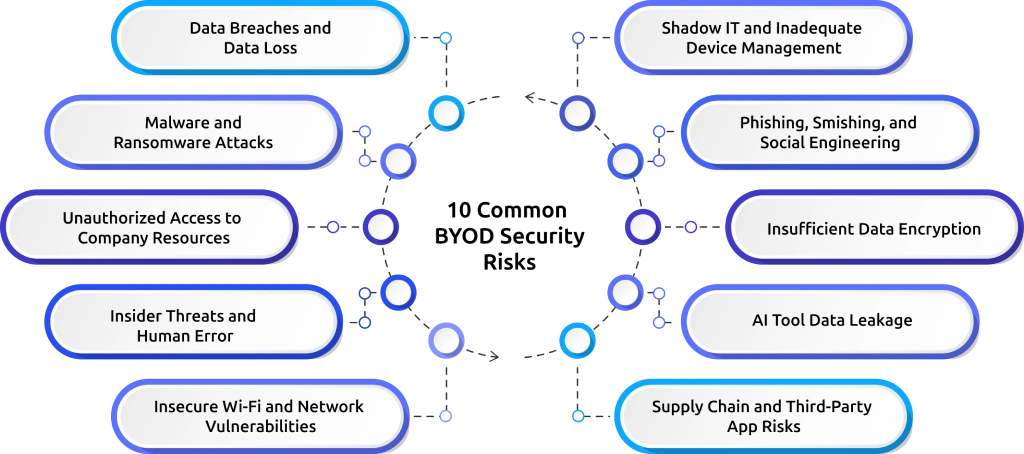
1. Data Breaches and Data Loss
Lost or stolen devices remain one of the biggest BYOD security risks. If employees store sensitive company files on personal devices without encryption, attackers can access that data easily after theft or loss. This risk becomes more serious in remote and hybrid work environments because employees carry work data across multiple devices and locations every day. A lost phone or laptop can expose:
Customer information
Financial records
Login credentials
Internal business files
How to Prevent It :
You can reduce this risk by:
- Enforcing device encryption
- Enabling remote wipe features
- Restricting local file downloads
- Using secure cloud storage
- Limiting access based on employee roles
- Requiring strong passwords and MFA
You should also create a clear lost-device reporting process so your IT team can respond quickly before sensitive data gets exposed.
2. Malware and Ransomware Attacks
Personal devices often contain apps, downloads, and browser extensions that your IT team cannot fully monitor. Employees may accidentally install malicious software through unsafe apps, fake updates, or suspicious links. Once malware enters a device, it can spread into your company's systems, steal sensitive information, or lock files through ransomware attacks.
This risk increases when employees use outdated software or jailbroken devices with weaker security protections.
How to Prevent It
You can reduce this risk by:
- Using mobile device management (MDM) tools
- Blocking jailbroken or rooted devices
- Restricting unapproved apps
- Installing endpoint protection software
- Keeping devices and apps updated regularly
You should also train employees to recognize suspicious downloads and unsafe links.
3. Unauthorized Access to Company Resources
Weak passwords and reused credentials make it easier for attackers to access company systems. Employees often use the same passwords across multiple platforms. If one account gets compromised, attackers may gain access to working applications as well.
Unauthorized access can also happen when former employees still retain access to company tools after leaving.
How to Prevent It
You can reduce this risk by:
- Requiring multi-factor authentication (MFA)
- Using password managers
- Disabling inactive accounts immediately
- Applying role-based access controls
- Monitoring suspicious login activity
Strong authentication controls help prevent unauthorized access even if passwords become exposed.
4. Insider Threats and Human Error
Not every security risk comes from hackers. Employees can accidentally expose sensitive information through simple mistakes.
For example, they may:
- Send files to the wrong person
- Upload work data into personal apps
- Share confidential information externally
- Use unsecured collaboration tools
In some cases, malicious insiders may intentionally misuse company access.
How to Prevent It
You can reduce insider risks by:
- Limiting unnecessary access permissions
- Using data loss prevention (DLP) tools
- Monitoring unusual activity patterns
- Training employees regularly
- Reviewing user access frequently
Early detection helps you stop small mistakes before they become major security incidents.
5. Insecure Wi-Fi and Network Vulnerabilities
Employees often work from cafés, airports, hotels, and other public spaces using unsecured Wi-Fi networks. Attackers can intercept data on unsafe networks through man-in-the-middle attacks, allowing them to steal login credentials or sensitive business information.
Remote and hybrid teams face this risk frequently because employees connect from different locations every day.
How to Prevent It
You can reduce network risks by:
- Requiring VPN usage
- Blocking unsafe network connections
- Encrypting communication channels
- Training employees on secure Wi-Fi practices
A VPN should become mandatory whenever employees access company systems outside trusted networks.
6. Shadow IT and Inadequate Device Management
Shadow IT happens when employees use unapproved apps, cloud services, or devices without IT approval. This creates visibility gaps because your security team cannot protect tools they do not know employees are using.
Unmanaged devices also make it difficult to enforce consistent security policies across your organization.
How to Prevent It
You can reduce this risk by:
- Creating approved app lists
- Requiring device enrollment
- Using cloud access security brokers (CASB)
- Monitoring application usage trends
- Blocking unauthorized software installations
Clear communication helps employees understand why approved tools matter for security.
7. Phishing, Smishing, and Social Engineering
Cybercriminals now target employees through email, SMS, messaging apps, and fake phone calls. Smishing attacks have become especially dangerous because employees frequently use personal phones for work communication. Attackers often create messages that look urgent or trustworthy to trick employees into sharing credentials or downloading malware.
How to Prevent It
You can reduce phishing risks by:
- Running regular security awareness training
- Using email and SMS filtering tools
- Enabling MFA everywhere possible
- Teaching employees how to verify suspicious requests
Frequent training helps employees recognize threats faster and avoid costly mistakes.
Did You Know?
According to Verizon’s Data Breach Investigations Report, phishing continues to remain one of the most common attack methods used in security breaches.
8. Insufficient Data Encryption
Without encryption, attackers can easily access sensitive company files if they gain physical or remote access to a device. Even a lost phone or stolen laptop can expose customer data, internal communications, and financial records when encryption is missing.
How to Prevent It
You can reduce this risk by:
- Requiring full-device encryption
- Encrypting backups automatically
- Using secure containers for work data
- Monitoring encryption compliance regularly
Encryption helps protect data even if devices fall into the wrong hands.
9. AI Tool Data Leakage
Employees now use AI tools like ChatGPT, Claude, and Gemini regularly for work tasks. The problem is that employees may paste sensitive information into these platforms without realizing the risks involved. This may include customer data, source code, financial records, or confidential business information.
Once shared, your business may lose visibility into where that data goes.
How to Prevent It
You can reduce AI-related risks by:
- Creating clear AI usage policies
- Restricting sensitive prompts
- Using enterprise AI platforms
- Training employees on safe AI practices
- Monitoring risky AI tool activity
AI governance should become part of your overall BYOD security strategy.
10. Supply Chain and Third-Party App Risks
Employees often install browser extensions, productivity tools, and third-party apps on personal devices. Some of these apps may contain hidden vulnerabilities or malicious code that attackers can exploit to access company systems.
Even trusted software vendors can become targets of supply chain attacks.
How to Prevent It
You can reduce supply chain risks by:
- Allowlisting trusted applications
- Reviewing app permissions carefully
- Conducting vendor security reviews
- Monitoring third-party software activity
- Restricting risky browser extensions
Small apps can create major security problems when left unmanaged.
Need a smarter way to secure remote and hybrid teams?
Time Champ helps you improve accountability and reduce BYOD security risks with activity insights.
BYOD Security Prevention Playbook
Preventing BYOD security risks requires more than installing a few security tools. You need a clear strategy to protect company data, manage employee devices securely, and detect threats early. You do not need to make your workplace overly restrictive to stay secure. With the right mix of policies, monitoring, employee awareness, and security controls, you can reduce most BYOD risks before they become serious problems.
Here is a simple BYOD security prevention playbook you can follow.
Step 1: Create a BYOD Security Policy
Start by creating a clear BYOD security policy for your employees. Explain which devices employees can use for work, what security rules they must follow, and how they should handle company data. Make your policy simple and easy to understand so employees can follow it correctly without confusion.
Clearly explain what employees should do if they lose a device, use public Wi-Fi, or notice suspicious activity. When everyone follows the same rules, you reduce security gaps and improve accountability across your organization.
Step 2: Deploy MDM or MAM Tools
You should use Mobile Device Management (MDM) or Mobile Application Management (MAM) tools to improve visibility and control over work-related devices and apps.
These tools help you enforce security settings, manage app access, lock compromised devices, and protect company data remotely. If your employees feel uncomfortable giving full access to personal devices, you can use MAM tools to secure only working applications and files instead of the entire device.
Step 3: Enforce MFA and Device Encryption
You should require your employees to use multi-factor authentication (MFA) on all company accounts and business applications. MFA adds an extra layer of protection even if passwords become exposed. At the same time, you should enforce device encryption across all approved devices. Encryption protects sensitive files if your employees lose their phones, tablets, or laptops.
Do not rely only on passwords. You should use both MFA and encryption together to strengthen your BYOD security strategy.
Step 4: Add Detection Through Activity Monitoring
You should not depend only on prevention tools. Add activity monitoring to help you detect unusual behavior early. Monitor suspicious logins, unexpected file transfers, unauthorized app usage, and unusual work patterns. Early detection gives you more time to investigate issues before they become serious security incidents.
Stay transparent with your employees about what you monitor and why you monitor it. Clear communication helps you build trust while improving security visibility.
Step 5: Train Employees on Security Best Practices
Train your employees regularly on basic security habits. Teach them how to recognize phishing messages, avoid unsafe downloads, use secure Wi-Fi networks, and handle company data safely. Keep your training simple, practical, and ongoing instead of treating it like a one-time task. Your employees make better security decisions when they clearly understand real-world risks.
The stronger your employee awareness becomes, the lower your chances of facing preventable security incidents.
Step 6: Review and Update Security Measures Regularly
Review your BYOD security policies and tools regularly because security risks continue changing every year. Check whether your current security controls still protect your business properly. Review your approved apps, device requirements, monitoring settings, access permissions, and AI tool usage policies frequently.
Update outdated security measures quickly and fix security gaps before attackers can exploit them. Regular reviews help you stay prepared as your workplace, technology, and threats continue evolving.
How Time Champ Helps Prevent BYOD Security Risks
Managing BYOD security becomes difficult when your employees use multiple personal devices across different locations. Without proper visibility, you may struggle to detect risky behavior, monitor unusual activity, or identify security gaps early. That is where Time Champ helps you take a more proactive approach.
Time Champ is an employee monitoring software that helps you improve visibility into employee activity while still maintaining transparency and privacy. Instead of relying only on prevention tools, you can use activity insights to detect potential risks before they become serious security incidents.
With Time Champ, you can monitor:
- Unusual login behavior
- Unexpected activity patterns
- Excessive idle or after-hours activity
- Unauthorized app usage
- Suspicious work behavior trends
Time Champ helps you identify possible BYOD-related risks earlier and respond faster. Time Champ also supports a transparent monitoring approach. Your employees can clearly understand what gets tracked, which helps you build trust while improving accountability across remote and hybrid teams. In addition, Time Champ’s DLP (Data Loss Prevention) features help you reduce the risk of sensitive company data getting exposed through unauthorized file sharing, suspicious transfers, or unsafe employee activity. This gives you better control over business data while improving visibility into potential security risks.
When you combine employee awareness, security policies, and activity monitoring together, you create a stronger BYOD security strategy that helps you reduce risks before they affect your business.
Looking for better visibility into BYOD-related security gaps?
See how Time Champ helps you monitor employee activity patterns and detect potential risks faster.
Conclusion
BYOD gives your employees flexibility, but it also creates security risks that can expose sensitive business data if left unmanaged. A single unsecured device, unsafe app, or phishing attack can quickly turn into a serious security issue. You can prevent most BYOD security risks with clear policies, strong access controls, employee awareness, and activity monitoring. When you combine the right security practices with effective tools, you can improve visibility, reduce threats, and build a safer BYOD environment for your team.

Guna Lakshmi

Table of Content
 What Is BYOD Security?
- Why BYOD Security Risks Matter for Your Business
- BYOD Risk Severity Matrix
- 10 Common BYOD Security Risks with Prevention Techniques
- BYOD Security Prevention Playbook
- How Time Champ Helps Prevent BYOD Security Risks
- Conclusion

Related Blogs

Compare the best employee monitoring apps for BYOD devices, with privacy controls, security features, pricing, and use cases for remote and hybrid teams.
Shabana | Apr 28, 2026
Understand how employee monitoring affects workplace morale, trust, and productivity, with practical ways to implement monitoring without reducing engagement.
Anjali | Apr 28, 2026
Explore ethical employee monitoring techniques to track work transparently, protect privacy, and improve productivity while building trust across your team.
Anjali | Apr 27, 2026
From AI-powered behavior analytics to no-code workflow builders, explore the top 10 automation trends that are reshaping employee monitoring in 2026.
Shabana Shaik | Apr 21, 2026
Learn how to address employee monitoring concerns with transparency, clear policies, and trust-building practices that improve engagement and reduce resistance.
Anjali | Apr 17, 2026
Learn how to legally implement employee monitoring software. Covers legal requirements, policy steps, best practices, and what to tell your employees.
Thasleem Shaik | Apr 16, 2026


 4.7/5 avg.
Ready to Manage Your Workforce Smarter?
Join our family of 1500+ companies using smart insights to redefine workforces!

Free Trial
No Credit Card Required