Data Loss Prevention and Employee Monitoring: A Complete Guide
Data loss costs more than you think. Learn what causes it, how employee monitoring reduces data exfiltration risk, and how to protect your business.
Sensitive company data does not disappear overnight. It leaks quietly through everyday actions like file sharing, unsecured devices, or unnoticed insider mistakes. Many teams struggle to see where this risk starts or how it spreads. Without clear visibility, these risks grow unnoticed and lead to compliance issues, financial impact, and loss of trust. Data loss prevention becomes critical at this stage, but it does not always give a clear view of how data is actually used, which makes it harder to catch risks at the right time. Programs investing in prevent data breaches with monitoring see measurable reductions in time-to-detect for risky behavior.
This is where employee monitoring adds clarity and control. By combining data loss prevention and employee monitoring, businesses can track how data moves, identify risky behavior early, and act before damage occurs. Instead of reacting to incidents, teams gain the ability to prevent them with confidence. This guide explains how both approaches work together and how you can use them to protect your data without disrupting productivity.
What Is Data Loss?
Data loss is the accidental or intentional destruction, corruption, or unauthorized removal of information stored on your company's systems. It happens when someone deletes data by mistake, shares it outside the organization, or steals it through a data breach. In many cases, data loss does not come from external attacks alone. It often starts inside the organization through poor handling of data, which makes it a key concern for insider threat prevention.
The part most businesses underestimate is how many situations can lead to data loss. It can happen in many ways. A team member might accidentally delete important files. A system failure can wipe out data before the backups update. A cyberattack can lock access to critical information. An employee might even copy sensitive data before leaving the company. Each of these situations counts as data loss, but each requires a different response. That is why employee monitoring plays a direct role in data loss prevention, as it shows what happens on your systems early and helps teams act before issues grow.
What Causes Data Loss?
Data loss often happens due to multiple issues rather than a single cause. It builds from small gaps in how teams handle, store, and access information. When businesses fail to track these gaps, risks grow quietly until they turn into a data breach or serious data exposure. Understanding the causes helps you strengthen data loss prevention and avoid last-minute fixes. Here is a breakdown of the most common causes and what actually happens in each case.
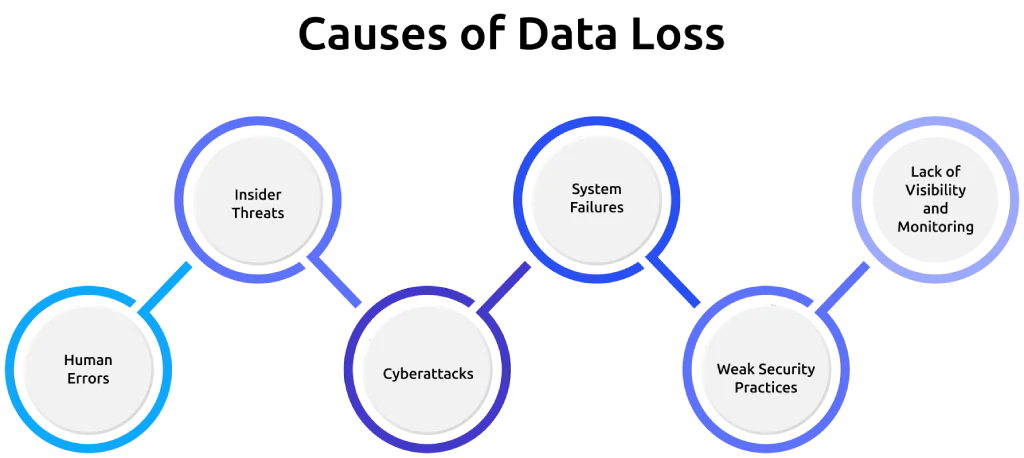
1. Human Errors
Employees often cause data loss without intent. They delete files, send data to the wrong person, or upload sensitive information to unsecured platforms. These small mistakes create real risks. This is why insider threat prevention focuses on everyday actions, not just major incidents.
2. Insider Threats
Not all data loss is accidental. In some cases, employees or contractors intentionally copy, share, or remove sensitive data. This form of data theft becomes harder to detect without proper visibility. Strong insider threat mitigation requires tracking how data moves across users, devices, and systems.
3. Cyberattacks
External attacks remain one of the biggest causes of data loss. Hackers use ransomware, phishing, or malware to access or lock company data. These attacks often lead to a data breach, where attackers expose or hold sensitive information for ransom. Without early detection, the damage spreads quickly across systems.
Real-world incidents show how serious this can get. A ransomware attack on Boeing halted parts of its operations and led attackers to leak large volumes of internal data when the company refused to pay the ransom. This kind of attack proves that even large organizations can lose control of critical data within hours, which forces businesses to stay alert and prepared.
4. System Failures
Technical issues can also lead to data loss. Hardware crashes, software bugs, or failed updates can corrupt or erase data. When backups do not run on time, your business can lose critical information with no way to recover it.
5. Weak Security Practices
Poor security controls increase the chances of data loss. Weak passwords, lack of access control, and unsecured devices allow both internal and external threats to access sensitive data. Without proper policies, even basic actions can turn into major risks.
6. Lack of Visibility and Monitoring
Many businesses fail to see how data moves across their systems. Without visibility, teams cannot detect unusual behavior or prevent risky actions. This is where employee monitoring supports data loss prevention by showing how employees interact with data and helping teams respond before issues escalate.
Take control of how your data moves before small risks turn into serious problems.
Start using Time Champ to track, prevent, and protect your business data with confidence.
What Are the Consequences of Data Loss?
Data loss affects more than just files or systems. It impacts how a business operates, how customers trust it, and how much it spends to recover. Even a single incident can trigger multiple problems at the same time. Understanding these consequences helps teams take data loss prevention seriously and prepare for potential risks.

1. Financial Impact
Data loss creates direct and indirect costs. Businesses spend money on recovery, legal support, and security improvements. In many cases, downtime also reduces revenue. Studies show that the average cost of a data breach can reach millions of dollars, depending on the industry and scale.
2. Operational Downtime
When systems lose or lock data, daily work slows down or stops. Teams lose access to files, miss deadlines, and break workflows. Even short downtime affects customer commitments and project timelines, which puts pressure on teams to restore systems quickly and resume operations.
3. Reputational Damage
Customers expect businesses to protect their data. When a data breach or data exposure happens, trust drops quickly. Negative attention spreads fast, and rebuilding credibility takes time. In many cases, businesses lose long-term customers after a single incident.
4. Legal and Compliance Risks
Companies must follow data protection laws. When they fail to protect sensitive data, they face penalties, audits, and legal action. These issues increase pressure on teams and add unexpected costs. Compliance failures often become as serious as the data loss itself.
5. Loss of Sensitive Information
When data leaves your system, you lose control over it. Attackers can use or sell that information for fraud, identity theft, or further attacks. This creates long-term risks for both the business and its customers.
6. Productivity Loss
Employees depend on data to complete their work. When data goes missing or systems fail, they spend time recovering files or waiting for access. This leads to low productivity and affects overall performance across teams. Instead of focusing on core tasks, employees shift their time toward troubleshooting and coordination, which reduces efficiency and slows down progress.
How Can You Prevent Data Loss?
Preventing data loss does not require a single solution. It depends on how well you control access, track activity, and respond to risks early. When teams build the right practices, they reduce errors, limit exposure, and stay prepared for unexpected incidents. The following approaches show you how to protect your business data in a structured and practical way.
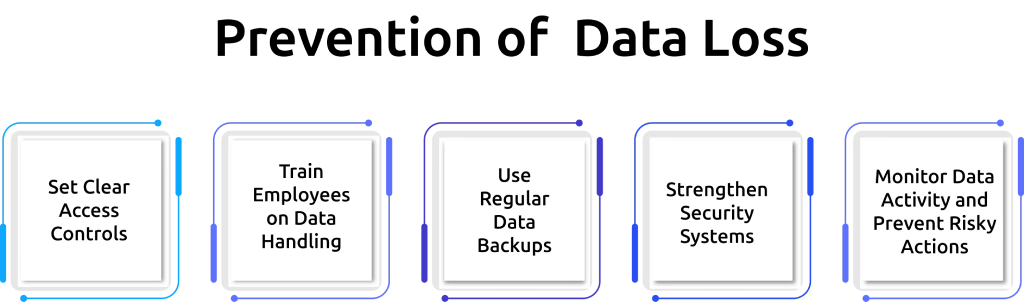
1. Set Clear Access Controls
Limit who can access sensitive data based on roles and responsibilities. When employees only access what they need, you reduce the chances of misuse or accidental exposure. It also limits how far sensitive data can spread if access falls into the wrong hands.
2. Train Employees on Data Handling
Most data loss starts with simple mistakes. Train employees on how to handle, share, and store data securely. Clear guidelines help teams avoid risky actions like sending sensitive files over unsecured channels or storing data on personal devices. This reduces mistakes and supports insider threat prevention by guiding employees to handle data correctly.
3. Use Regular Data Backups
Backups act as a safety net when someone deletes data by mistake, when systems corrupt files, or when attacks lock access. Schedule frequent backups and store them securely. Make sure teams test recovery processes so they can restore data quickly when needed. This reduces downtime and protects critical information.
4. Strengthen Security Systems
Use data loss prevention tools like Time Champ, along with encryption, firewalls, and endpoint protection, to secure your data. These systems help block unauthorized access and reduce the risk of a data breach. Keeping software updated also closes security gaps that attackers often exploit.
5. Monitor Data Activity and Prevent Risky Actions
Track how data moves across devices, platforms, and users. When teams monitor data activity, they can detect unusual behavior early and stop unauthorized sharing or copying of sensitive information. Employee monitoring strengthens this process by showing how employees interact with data during daily work. With this visibility, you can act early, support insider threat mitigation, and reduce the chances of data theft before it becomes a serious issue.
Protect your business data before risks turn into losses.
Use Time Champ to track file activity, control data access, and stop risky actions early.
How Employee Monitoring Reduces Data Exfiltration Risk?
Data exfiltration happens when sensitive information leaves your systems without approval. It can occur through file transfers, external devices, cloud uploads, or even simple actions like copying and pasting data. Most businesses struggle to detect these activities at the right time. This is where employee monitoring helps reduce risk by giving clear visibility into how data moves across users and systems.
1. Tracks Data Movement in Real Time
Employee monitoring shows how employees access, use, and transfer data during daily work. It helps teams identify unusual actions such as large file transfers or repeated access to sensitive files. This visibility supports data loss prevention by catching risks early.
2. Detects Unusual Behavior Patterns
Monitoring tools highlight behavior that does not match normal work patterns. This includes accessing data at odd hours, downloading large volumes of files, or using unauthorized applications. Early detection helps teams respond before the activity turns into data theft.
3. Prevents Unauthorized File Transfers
Employee monitoring helps track when employees try to move data outside the organization. It can flag or block actions like sending files to personal email accounts or uploading data to unapproved platforms. This reduces the chances of a data breach caused by uncontrolled sharing.
4. Creates Accountability Across Teams
When employees know that systems track data activity, they handle information more carefully. This builds accountability and reduces careless actions that often lead to data exposure. It also encourages teams to follow data handling policies more consistently during daily work.
5. Supports Faster Response to Risks
Employee monitoring helps teams act immediately when they detect suspicious behavior. Instead of reacting after data leaves the system, you can stop risky actions in progress. This reduces damage and protects critical information.
How Time Champ Protects Your Business from Data Loss?
Many businesses struggle to understand how sensitive data moves across their teams. Employees share, copy, or store files in ways that often go unnoticed until a problem occurs. Without clear visibility, small mistakes turn into serious issues, and teams realize the impact only after data leaves their control. To prevent this, you need the right tools that give clear insight into daily data activity and help you stay in control.
This is where employee monitoring software like Time Champ helps bring control and clarity. It tracks how employees interact with data and gives you detailed visibility into key risk areas. You can monitor website access violations to see when employees visit restricted or risky platforms. You can track USB access violations to prevent unauthorized data transfers through external devices. With file monitoring logs, you can see who accesses, edits, or moves files at any time. Time Champ also tracks uploads and downloads, so you know when data moves in or out of your systems. With these insights, you can identify risky actions early and take control before they turn into bigger problems.
Conclusion
Data loss occurs when businesses lack clear visibility and control over how data moves across their systems. When you understand the key risks and their impact, you can take the right steps to prevent them. A strong approach to data loss prevention, combined with the right employee monitoring software, helps you stay aware of how data moves, reduce risks early, and maintain control without slowing down your team.
Gain clear visibility into how your data moves every day.
Choose Time Champ to prevent data risks and keep your systems secure.

Thasleem Shaik


Table of Content
-
 What Is Data Loss?
-
What Causes Data Loss?
-
What Are the Consequences of Data Loss?
-
How Can You Prevent Data Loss?
-
How Employee Monitoring Reduces Data Exfiltration Risk?
-
How Time Champ Protects Your Business from Data Loss?
-
Conclusion
Related Blogs
Find the best employee monitoring tools for 2026. Compare features, pricing, pros & cons to manage workforce performance and improve productivity.
Thasleem Shaik | Apr 02, 2026
Understand employee monitoring legal compliance, key laws, and best practices to track work activity while protecting privacy and avoiding legal risks.
Thasleem Shaik | Apr 14, 2026
our perimeter won't stop insiders. Learn how real-time insider threat monitoring, anomaly detection, SIEM, and response workflows work together to prevent risk.
Jahnavi Pulluri | Apr 14, 2026
Discover how remote employee tracking can enhance data leak prevention strategies while maintaining privacy and compliance with global regulations.
Thasleem Shaik | Jan 17, 2025
Discover effective data loss prevention strategies to protect sensitive information, enhance security, and safeguard your business from data breaches.
Shabana Shaik | Jan 22, 2025
Find answers to common questions about Data Loss Prevention, including how it works, its benefits, and how to choose the right solution for your business.
Jahnavi Pulluri | Jan 20, 2025


 4.7/5 avg.
Ready to Manage Your Workforce Smarter?
Join our family of 1500+ companies using smart insights to redefine workforces!

Free Trial
No Credit Card Required