Insider Threat Monitoring & Security Alerts | 2026 Guide
Your perimeter won't stop insiders. Learn how real-time insider threat monitoring, anomaly detection, SIEM, and response workflows work together to prevent risk.
Most security tools focus on keeping attackers out, firewalls, antivirus, and perimeter defenses. But insider threats don’t follow those rules. They happen inside your systems, often using valid access. For the broader picture across this topic, our enterprise employee monitoring guide brings the moving parts together.
That’s why real-time alerts and behavior-based detection are important. They help you find unusual activity as it happens, not weeks later.
According to the Ponemon Institute, the cost of insider risk has risen to $17.4M (from $16.2M in 2023) due to higher containment and response costs, while containment time has improved to 81 days (down from 86).
That delay is where the damage grows!
Insider threat monitoring works by closing this gap, using alerts, anomaly detection, and system integrations to catch risks early and respond faster.
In this blog, we’ll break down how it works and the four key elements every program needs.
What Is an Insider Threat?
An insider threat is a security risk that comes from within an organization, typically caused by employees, contractors, or partners who have authorized access to systems, data, or networks.
Does an insider threat always have malicious intent?
No, most incidents come down to human error, not deliberate wrongdoing. That difference matters when you're deciding how to configure your monitoring, because you need to catch careless behavior just as much as deliberate attacks.
Common examples of insider threats include a sales rep downloading the full customer database before resigning, a system administrator quietly escalating their own access permissions, a finance employee adjusting invoice records to redirect payments, or a contractor leaving sensitive data publicly accessible.
Standard perimeter security misses all of this because the person is already authenticated. They have a valid login, legitimate access, and a normal reason to be on the system. Catching them requires monitoring behavior, not just access.
The Role of Real-Time Monitoring in an Insider Threat Program
The goal of an insider threat program is to find problems before they become incidents. That means building visibility into user behavior so your team can act on early warning signs rather than cleaning up after the fact.
The difference between real-time and periodic monitoring is simple: if an employee starts exfiltrating data at 9 AM and your team reviews logs at 5 PM, eight hours of damage have already happened. Real-time monitoring closes that window, when a flagged action occurs, an alert fires immediately.
Insider threat monitoring software works by sitting on endpoints and network infrastructure to collect data on file access, application usage, login activity, USB connections, data transfers, and communications. That data feeds into an analysis engine combining rule-based detection and behavioral analytics to flag anything that looks off.
Insider threats also carry consequences beyond organizational data loss. In government and defense environments, a compromised employee can expose classified information, risks that go well beyond financial damage.
Not sure if your current monitoring setup is enough?
Evaluate your alert system, anomaly detection, and response workflow!
Alert Systems: How Real-Time Insider Threat Alerts Work
An alert system is what turns data collection into action. Without it, you're just logging events nobody acts on.
Rule-Based vs Behavior-Based Alerts
Rule-based alerts are triggered on specific conditions, such as:
- A user copies more than 500MB to a USB drive
- Someone logs in outside working hours
- A confidential file is sent to an external address.
These are fast and reliable for known scenarios, but can only catch what you've already defined.
Behavior-based alerts are triggered when a user's activity changes significantly from their normal pattern.
A finance employee accessing engineering source code isn't breaking a specific rule, but it's completely outside their baseline. Behavior-based alerting catches slow, subtle misuse that rules alone never would. The best insider threat monitoring tools use both.
Alert Severity Levels
Good systems classify alerts, so teams know what to handle first:
- Critical: active data exfiltration, confirmed account compromise, insider disabling logging or encryption
- High: unusual file access volume, privilege escalation attempt, access to sensitive systems outside job scope
- Medium: repeated failed logins, access outside normal hours, first visit to a sensitive directory
- Low: minor policy violations, single unusual action with limited context
The Alert Fatigue Problem
If your system fires hundreds of alerts daily, analysts eventually start ignoring them, and real threats get missed. The fix isn't fewer alerts, it's less noise:
- Use risk scoring instead of binary triggers. An alert triggers only when multiple suspicious signals push the score past a threshold, not when a single rule fires.
- Group related events into one alert with a summary rather than 50 separate notifications.
- Filter scheduled events like nightly backups so routine large data copies don't fire every time.
- Tune the monthly review, which rules generate the most false positives, and adjust thresholds.
Anomaly Detection: Spotting Behavioral Shifts Early
Anomaly detection catches what rules can't, and it's built on one principle: if you know what normal looks like, anything significantly different stands out.
What is UEBA?
UEBA (User and Entity Behavior Analytics) uses machine learning to build a normal behavior profile for every user and device in your environment, then measures current activity against those profiles continuously. Unlike signature-based tools that look for known attack patterns, UEBA is pattern-based; it doesn't need to know what an attack looks like in advance. It just needs to find that this user is no longer acting like themselves.
Building Behavioral Baselines
When deployed, a UEBA-powered insider threat monitoring spends two to four weeks learning what normal looks like per user: which systems they access, what times they work, how much data they transfer, and which devices they connect from. That baseline becomes the reference point. When activity changes significantly in volume, timing, target, or method, the system flags it.
Key Anomalies to Watch:
- Access Pattern Changes: A user who has never opened finance systems is suddenly browsing payment records.
- Data Movement Spikes: A surge in exports or uploads, especially in the weeks before a resignation.
- Time-of-Day Shifts: An employee who works 9 to 6 suddenly logs in at 2 AM.
- Privilege Changes: Any attempt to escalate permissions or disable security controls.
Modern AI-based systems handle these better than traditional tools by looking at the full picture, not individual events. A single odd login is a weak signal. That same user is also downloading large volumes of files and connecting a USB drive in the same session; that's a pattern worth escalating.
SIEM Integration: Connecting Insider Threat Data to Your Security Stack
SIEM (Security Information and Event Management) is the centralized platform that collects logs from your entire environment, servers, firewalls, endpoints, identity systems, cloud, and correlates events to surface threats.
On its own, an unusual login might not mean much. But your SIEM can correlate it with a network traffic spike from the same machine, a failed VPN attempt from a different IP minutes earlier, and an outbound connection to an unfamiliar domain. Separately, those events are noise. Together, they tell a clear story.
Common SIEM platforms for insider threat programs
- Splunk: Highly flexible with strong search and correlation, good for teams that want to build custom detection rules.
- IBM QRadar: Purpose-built for security operations with built-in UEBA, and better if you want pre-configured insider threat use cases.
- Microsoft Sentinel: Cloud-native, deeply integrated with Microsoft 365, makes sense if your organization already runs on Microsoft infrastructure.
How Integration Typically Works
Most insider threat platforms support three approaches: Syslog forwarding (fast to set up, widely supported), API integration (more structured, event-driven), or native connectors (pre-built for major SIEMs, usually the most reliable path).
The real value comes from alert enrichment. Instead of a bare log entry, your SIEM alert automatically pulls in the user's behavioral profile, current risk score, department, and recent flagged activity. Your analyst starts an investigation already knowing whether this is a first-time anomaly or the fifth suspicious event this week.
The Three-Layer Detection Architecture
Mature insider threat programs run three tools together: SIEM for breadth and correlation across the full environment, DLP (Data Loss Prevention) to block unauthorized transfers in real time, and UEBA to catch behavioral signals that rules-based systems miss. No single tool does all three jobs well.
Incident Response Workflows for Insider Threats
Detection is only half the job. What happens after an alert triggers determines whether an incident gets contained or turns into a serious breach.
Insider threat response is different from standard incident response because the subject may be a current employee. HR, legal, and management need to be involved alongside the security team, and evidence collection needs to meet a higher standard because it may be used in legal proceedings.
The 6-Stage Response Workflow
Detect: An alert fires through your monitoring tool, SIEM correlation, or a human report, and reaches the right person fast.
Triage: The analyst reviews the alert with behavioral context and decides false positive, monitor quietly, or escalate to full investigation.
Investigate: Collect full activity logs, session recordings, data movement history, and SIEM-correlated events. Keep the investigation confidential, the review must take place without the employee’s knowledge.
Contain: Restrict access quietly, block data transfer channels, or, in severe cases, suspend the account. Many platforms support automated containment: if a risk score crosses a threshold, USB ports are disabled or external email is blocked automatically.
Remediate: Close the access control gap or policy gap that allowed the incident to develop. Remove unnecessary privileges, update detection rules.
Post-Incident Review: Every incident teaches something. What fired? What didn't? How long did each stage take? What evidence was missing? Review findings and drive real improvements to your program.
Who Belongs on the Response Team?
Insider threat response is not a solo security problem. The team needs security/SOC for technical investigation, HR for employment context, legal counsel to ensure evidence is collected correctly, IT operations for access changes, and senior management for high-severity cases.
Forensic and Legal Considerations
Collect evidence before taking any action. If you lock an account or confront someone too early, important data might be lost. Keep a clear record of how you collect and handle all evidence. Also, talk to your legal team before starting an investigation to make sure your process is correct if the case goes further.
Also, remember that employee monitoring laws are different in each place. In some regions, companies must notify employees that monitoring takes place. Make sure your monitoring process follows the rules before any issue occurs, not after.
How to Choose the Best Insider Threat Monitoring System
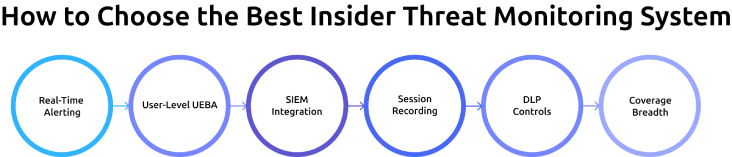
Choosing the right insider threat detection software is essential for you to detect risks early and respond quickly. With many threat monitoring tools available, it’s important to focus on features that directly impact real-time detection, alerts, and investigation.
When evaluating platforms, focus on what actually matters in practice:
- Real-Time Alerting: The system should trigger alerts within seconds or minutes, not hours, so security teams can respond before damage occurs.
- User-Level UEBA: Look for tools that build behavior baselines for individual users, not just group averages, to detect subtle anomalies more accurately.
- SIEM Integration: Ensure the platform supports native connectors or standard protocols so it can integrate easily with your existing security stack.
- Session Recording: The ability to replay user sessions helps you clearly understand what actions were taken during suspicious activity.
- DLP Controls: Check whether the system can block sensitive data transfers in real time or only send alerts after the activity has already happened.
- Coverage Breadth: A strong solution should monitor endpoints, cloud applications, email, USB activity, and web browsing for complete visibility.
Before committing to any platform, run a proof of concept using real-world scenarios. For example, simulate a large file download or unauthorized access attempt and measure how quickly alerts are triggered, how much context is provided, and how easy it is to investigate the incident. This helps you to measure how the tool performs effectively, not just in demos.
Insider threats don’t come with warnings. Your system should help you act in time!
Monitor user activity, detect anomalies instantly, and take control before it’s too late.
How Time Champ Supports Insider Threat Monitoring
Time Champ is a workforce intelligence platform that combines activity monitoring, real-time alerts, and data loss prevention in a single dashboard. It helps organizations monitor employee behavior and identify suspicious actions before they turn into serious security risks.
One of the key capabilities of Time Champ is its real-time alert system. The platform continuously tracks user activity and notifies you when unusual behavior is detected. The behavior alerts can be customized, allowing you to set alerts based on your specific security needs. This includes activities such as unauthorized access attempts, unusual file transfers, or violations of company policies, allowing security teams to respond quickly and reduce potential damage.
Time Champ also offers strong data loss prevention (DLP) features that help protect sensitive information from being misused or transferred without permission. It monitors activities like website access violations, USB device usage, file transfers, and uploads or downloads. These controls provide better visibility into how data is handled and help prevent data leaks before they occur.
In addition, it provides detailed user activity tracking, giving you a clear view of how employees interact with systems, applications, and files. This level of visibility makes it easier to detect unusual patterns and investigate incidents with proper context.
By combining monitoring, alerts, and DLP capabilities, Time Champ supports real-time insider threat detection. It helps you to identify risks such as data exfiltration, misuse of access, and suspicious behavior, making it a practical solution for improving overall security and compliance.
Smarter Insider Threat Monitoring Starts with Time Champ!
Gain real-time visibility, detect risks early, and respond faster, all from a single, powerful platform.
Conclusion
The shift from reactive to proactive insider threat monitoring is essential for modern security. By combining real-time alerts, anomaly detection, SIEM integration, and clear response workflows, organizations can detect risks early and act with confidence. Building the right system and continuously improving it ensures stronger protection against evolving insider threats.

Jahnavi Pulluri


Table of Content
-
 What Is an Insider Threat?
-
The Role of Real-Time Monitoring in an Insider Threat Program
-
Alert Systems: How Real-Time Insider Threat Alerts Work
-
Anomaly Detection: Spotting Behavioral Shifts Early
-
SIEM Integration: Connecting Insider Threat Data to Your Security Stack
-
Incident Response Workflows for Insider Threats
-
How to Choose the Best Insider Threat Monitoring System
-
How Time Champ Supports Insider Threat Monitoring
-
Conclusion
Related Blogs
Learn how to implement insider threat prevention strategies and protect your business from potential internal security breaches.
Thasleem Shaik | Jan 21, 2025
Discover effective insider threat mitigation strategies to protect your organization from internal risks and minimize vulnerabilities.
Thasleem Shaik | Jan 22, 2025
Learn what unintentional insider threats are and how to prevent them. Discover simple steps to protect your company from accidental security risks.
Jahnavi Pulluri | Jan 21, 2025
Learn what a malicious insider is, their threats and motives, and how to prevent them from causing harm to your organization.
Jahnavi Pulluri | Jan 22, 2025
Learn how to spot and handle suspicious activity to keep your organization secure. Discover essential tips and strategies for effective response.
Find the best Insider Threat Detection Tools for 2026. Compare features, pricing, pros & cons to reduce internal risk and secure workforce activity data.
Tarun Kumar Reddy | Apr 02, 2026


 4.7/5 avg.
Ready to Manage Your Workforce Smarter?
Join our family of 1500+ companies using smart insights to redefine workforces!

Free Trial
No Credit Card Required